
Android 曲线动画animation,类似加入购物车动画
按照惯例先放效果图:图中小球做抛物线运动
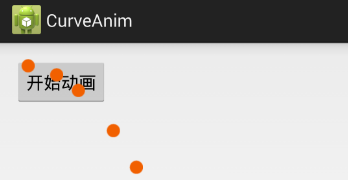
 资源图片
资源图片
1.首先布局文件activity_main.xml,布局很简单,就一个测试按钮
 <RelativeLayout xmlns:android="http://schemas.android.com/apk/res/android"

     xmlns:tools="http://schemas.android.com/tools"

     android:layout_width="match_parent"

     android:layout_height="match_parent"

     android:paddingBottom="@dimen/activity_vertical_margin"

     android:paddingLeft="@dimen/activity_horizontal_margin"

     android:paddingRight="@dimen/activity_horizontal_margin"

     android:paddingTop="@dimen/activity_vertical_margin"

     tools:context=".MainActivity" >

     <Button

         android:id="@+id/btnClick"

         android:layout_width="wrap_content"

         android:layout_height="wrap_content"

         android:onClick="click()"

         android:text="开始动画" />

 </RelativeLayout>
2.然后是java代码MainActivity.java,这个是重点
 package com.example.curveanim;

 import android.app.Activity;

 import android.os.Bundle;

 import android.view.View;

 import android.view.View.OnClickListener;

 import android.view.ViewGroup;

 import android.view.animation.AccelerateInterpolator;

 import android.view.animation.Animation;

 import android.view.animation.Animation.AnimationListener;

 import android.view.animation.AnimationSet;

 import android.view.animation.LinearInterpolator;

 import android.view.animation.TranslateAnimation;

 import android.widget.ImageView;

 import android.widget.LinearLayout;

 public class MainActivity extends Activity {

     private ViewGroup anim_mask_layout;// 动画层

     @Override

     protected void onCreate(Bundle savedInstanceState) {

         super.onCreate(savedInstanceState);

         setContentView(R.layout.activity_main);

         findViewById(R.id.btnClick).setOnClickListener(new OnClickListener() {

             @Override

             public void onClick(View v) {

                 click(v);

             }

         });

     }

     private void click(View v) {

         int[] startLocation = new int[2];// 一个整型数组,用来存储按钮的在屏幕的X、Y坐标

         v.getLocationInWindow(startLocation);// 这是获取购买按钮的在屏幕的X、Y坐标(这也是动画开始的坐标)

         ImageView ball = new ImageView(getApplicationContext());

         ball.setImageResource(R.drawable.sign);// 设置ball的图片

         setAnim(ball, startLocation);// 开始执行动画

     }

     private void setAnim(final View v, int[] startLocation) {

         anim_mask_layout = null;

         anim_mask_layout = createAnimLayout();

         anim_mask_layout.addView(v);// 把动画小球添加到动画层

         final View view = addViewToAnimLayout(anim_mask_layout, v, startLocation);

         // 计算位移

         TranslateAnimation translateAnimationX = new TranslateAnimation(0, 400, 0, 0);

         translateAnimationX.setInterpolator(new LinearInterpolator());

         translateAnimationX.setRepeatCount(Animation.INFINITE);// 动画重复执行的次数

         translateAnimationX.setFillAfter(true);

         TranslateAnimation translateAnimationY = new TranslateAnimation(0, 0, 0, 400);

         translateAnimationY.setInterpolator(new AccelerateInterpolator());

         translateAnimationY.setRepeatCount(Animation.INFINITE);// 动画重复执行的次数

         translateAnimationX.setFillAfter(true);

         AnimationSet set = new AnimationSet(false);

         set.setFillAfter(false);

         set.addAnimation(translateAnimationY);

         set.addAnimation(translateAnimationX);

         set.setDuration(2000);// 动画的执行时间

         view.startAnimation(set);

         // 动画监听事件

         set.setAnimationListener(new AnimationListener() {

             // 动画的开始

             @Override

             public void onAnimationStart(Animation animation) {

                 v.setVisibility(View.VISIBLE);

             }

             @Override

             public void onAnimationRepeat(Animation animation) {

             }

             // 动画的结束

             @Override

             public void onAnimationEnd(Animation animation) {

                 v.setVisibility(View.GONE);

             }

         });

     }

     /**

      * @Description: 创建动画层

      * @param

      * @return void

      * @throws

      */

     private ViewGroup createAnimLayout() {

         ViewGroup rootView = (ViewGroup) this.getWindow().getDecorView();

         LinearLayout animLayout = new LinearLayout(this);

         LinearLayout.LayoutParams lp = new LinearLayout.LayoutParams(LinearLayout.LayoutParams.MATCH_PARENT, LinearLayout.LayoutParams.MATCH_PA            RENT);

         animLayout.setLayoutParams(lp);

         animLayout.setId(Integer.MAX_VALUE);

         animLayout.setBackgroundResource(android.R.color.transparent);

         rootView.addView(animLayout);

         return animLayout;

     }

     private View addViewToAnimLayout(final ViewGroup parent, final View view, int[] location) {

         int x = location[0];

         int y = location[1];

         LinearLayout.LayoutParams lp = new LinearLayout.LayoutParams(LinearLayout.LayoutParams.WRAP_CONTENT, LinearLayout.LayoutParams.WRAP_CON            TENT);

         lp.leftMargin = x;

         lp.topMargin = y;

         view.setLayoutParams(lp);

         return view;

     }

 }
云盘分享下载链接:http://yunpan.cn/cFzVRfCpLwHz8 访问密码 e37f
Android 曲线动画animation,类似加入购物车动画的更多相关文章
- 精灵动画Animation对话框组成Idle动画的各精灵
精灵动画Animation对话框组成Idle动画的各精灵 1.3 精灵动画 场景中已经添加了精灵,现在是时候让让它动起来了.读者也许已经从精灵图集中,各精灵的命名中看出来了,这个精灵一共有两种动画状 ...
- Android动画效果之Frame Animation(逐帧动画)
前言: 上一篇介绍了Android的Tween Animation(补间动画) Android动画效果之Tween Animation(补间动画),今天来总结下Android的另外一种动画Frame ...
- 前端CSS3动画animation用法
前端CSS3动画animation用法 学习如下动画属性 @keyframes animation-name animation-duration animation-delay animation- ...
- Activity取消默认转场动画;去掉默认转场动画;
取消默认转场动画: 一般启动一个新的Activity都默认有切换的动画效果,比如打开界面时从右至左的移动.关闭时从右向左的移动,又或者是上下移动.但是有的时候我们不想要这个动画怎么办? 来上代码: m ...
- 虾扯蛋:Android View动画 Animation不完全解析
本文结合一些周知的概念和源码片段,对View动画的工作原理进行挖掘和分析.以下不是对源码一丝不苟的分析过程,只是以搞清楚Animation的执行过程.如何被周期性调用为目标粗略分析下相关方法的执行细节 ...
- 【转】Android 实现蘑菇街购物车动画效果
原文出处:http://blog.csdn.net/wangjinyu501/article/details/38400479 1.思路 目前想到两种方式实现这种效果,一是使用Tween动画,直截 ...
- Android动画主要包含补间动画(Tween)View Animation、帧动画(Frame)Drawable Animation、以及属性动画Property Animation
程序运行效果图: Android动画主要包含补间动画(Tween)View Animation.帧动画(Frame)Drawable Animation.以及属性动画Property Animatio ...
- Android 实现蘑菇街购物车动画效果
版本号:1.0 日期:2014.8.6 版权:© 2014 kince 转载注明出处 使用过蘑菇街的用户基本上都知道有一个增加购物车的动画效果,此处不详细描写叙述想知道的能够去下载体验一下. 1 ...
- Android动画效果之Property Animation进阶(属性动画)
前言: 前面初步认识了Android的Property Animation(属性动画)Android动画效果之初识Property Animation(属性动画)(三),并且利用属性动画简单了补间动画 ...
随机推荐
- 【转】GOOGLE-PROTOBUF与FLATBUFFERS数据的序列化和反序列化
转载自[黑米GameDev街区] 原文链接: http://www.himigame.com/unity3d-game/1607.html 关于Protobuf 通过本文的转载和分享的相关链接,足够 ...
- B树(B-树)
1.基本概念: M定义为树的高度,也叫阶,就是树的深度: (1).B树又称为多路平衡查找树. (2).根节点至少有两个子节点. (3).除根节点以外的非叶子节点的儿子树为[M/2,M]. (4).每个 ...
- RPC里面的序列化反序列化以及拆包粘包
1.序列化(1)什么是序列化? Java的序列化是把对象转换成有序字节流的过程.以便进行网络传输或者保存到本地.(2)为什么要序列化? 当两个进程进行远程通信时,如果需要发送各种各样的数据,文本.音频 ...
- hibernate多表查询
一对多进行查询(用懒加载的模式) 查找区域所对应的街道: Dao: public Qu selQu(String dno){ Session session=HibernateSessionFacto ...
- Eclipse中构建scala开发环境的步骤
Eclipse是一款非常使用的开发工具,熟悉它的童鞋应该都知道,它不仅是最常用的android开发工具,还是最常用的Java开发工具.既然eclipse如此重要,本文小编就和大家一起来扒一扒在ecli ...
- cdh版本的hadoop安装及配置(伪分布式模式) MapReduce配置 yarn配置
安装hadoop需要jdk依赖,我这里是用jdk8 jdk版本:jdk1.8.0_151 hadoop版本:hadoop-2.5.0-cdh5.3.6 hadoop下载地址:链接:https://pa ...
- [Leetcode] Best time to buy and sell stock 买卖股票的最佳时机
Say you have an array for which the i th element is the price of a given stock on day i. If you were ...
- LA2995 Image is everything
蓝书P12 #include <cstdio> #include <cstring> #include <cmath> #include <algorithm ...
- idea设置文件的编码格式
在打开某些类时会发现注释是乱码的,该如何解决idea的文件乱码呢?这就需要设置这个文件的合适编码格式: idea设置文件编码的两种方式分别如下: 第一种方式点击idea的右下角的图标如下图所示: 第二 ...
- eclipse集成mybatis的generater插件
mybatis也能方向生成代码,能方向生成实体类(po).mapper接口和Mapper接口映射文件,能减少我们代码的工作量.详细步骤如下 1.下载mybatis生成架包工具MyBatis_Gener ...