
【Boost】boost库获取格式化时间
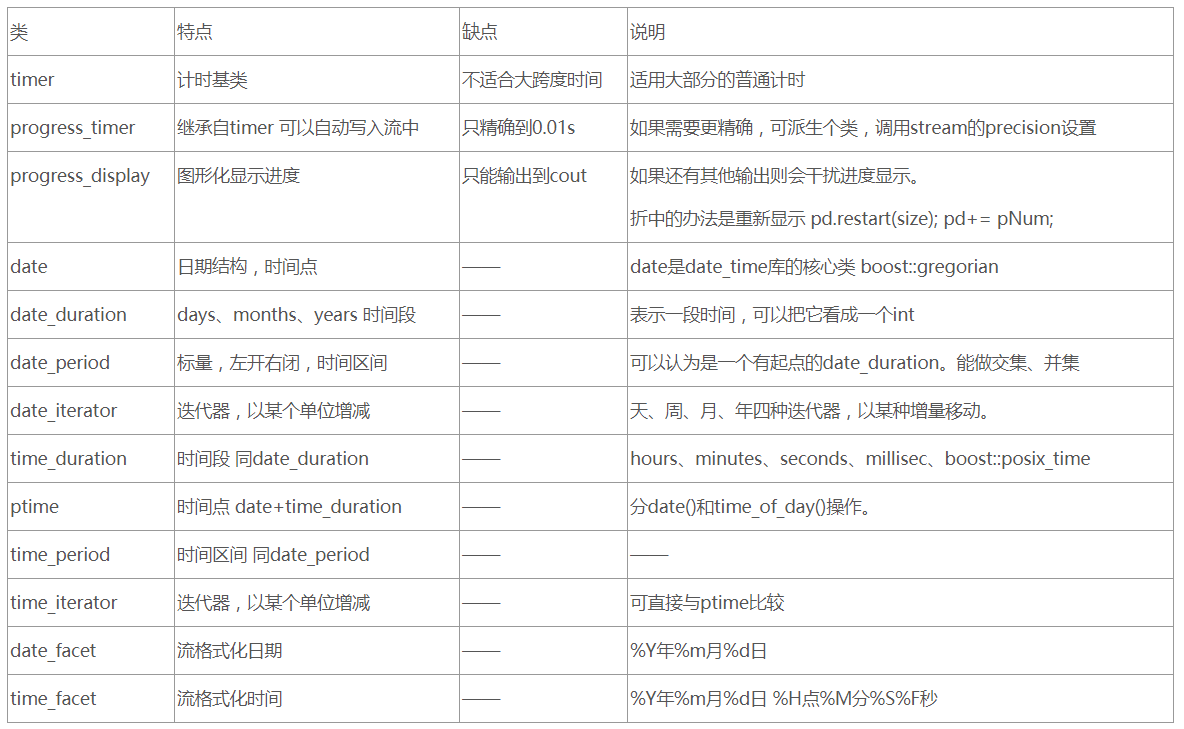
获取时间方式
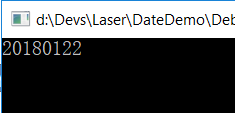
格式一:YYYYMMDD
#include<iostream>

#include<string>

#include<boost/date_time/gregorian/gregorian.hpp>

using namespace std;

int main(int argc, char* argv)

{

    string strTime = boost::gregorian::to_iso_string(boost::gregorian::day_clock::local_day());

    cout<<strTime<<endl;


  //getchar();

    return ;

}
输出格式结果
输出格式二:YYYYMMDD-HH:MM:SS
#include<iostream>

#include<string>

#include<boost/date_time/posix_time/posix_time.hpp>

using namespace std;

int main(int argc, char* argv)

{
   string strPosixTime = boost::posix_time::to_iso_string(boost::posix_time::second_clock::local_time());
//这时候strPosixTime里存放时间的格式是YYYYMMDDTHHMMSS,日期和时间用大写字母T隔开了,这里是以秒为单元,也可以换成
//string strPosixTime = boost::posix_time::to_iso_string(boost::posix_time::microsec_clock::local_time());
    int pos = strPosixTime.find('T');

    strPosixTime.replace(pos,,std::string("-"));

    strPosixTime.replace(pos + ,,std::string(":"));

    strPosixTime.replace(pos + ,,std::string(":"));
    cout<<strPosixTime<<endl;

    return ;

}
输出格式结果

获取时间间隔
#include<iostream>

#include<string>

#include<boost/thread.hpp>

#include<boost/date_time/posix_time/posix_time.hpp>

using namespace std;

boost::posix_time::ptime time_now,time_now1;

boost::posix_time::millisec_posix_time_system_config::time_duration_type time_elapse;

int main(int argc, char* argv)

{

    // 这里为微秒为单位;这里可以将microsec_clock替换成second_clock以秒为单位;

    time_now = boost::posix_time::microsec_clock::universal_time();

    // sleep 100毫秒;

    boost::this_thread::sleep(boost::posix_time::millisec());

    time_now1 = boost::posix_time::microsec_clock::universal_time();

    time_elapse = time_now1 - time_now;

    // 类似GetTickCount,只是这边得到的是2个时间的ticket值的差,以微秒为单位;

    int ticks = time_elapse.ticks();

    // 得到两个时间间隔的秒数;

    int sec = time_elapse.total_milliseconds();

    cout<<time_now<<" "<<time_now1<<endl;

    cout<<time_elapse<<endl;

    cout<<ticks<<endl;

    cout<<sec<<endl;

    getchar();

    return ;

}
结果输出

【Boost】boost库获取格式化时间的更多相关文章
- Python获取当前时间_获取格式化时间_格式化日期
Python获取当前时间_获取格式化时间: Python获取当前时间: 使用 time.time( ) 获取到距离1970年1月1日的秒数(浮点数),然后传递给 localtime 获取当前时间 #使 ...
- python 获取格式化时间
#!/usr/bin/python # -*- coding: UTF- -*- import time localtime = time.asctime( time.localtime(time.t ...
- 【javascript】获取 格式化时间
function getDate() { var myDate = new Date(); var month = myDate.getMonth() + 1; var day = myDate.ge ...
- [Boost]boost的时间和日期处理-(1)日期的操作
<开篇> Boost.DateTime库提供了时间日期相关的计算.格式化.转换.输入输出等等功能,为C++的编程提供了便利.不过它有如下特点: 1. Boost.DateTime 只支持1 ...
- Python获取当前时间及时间转换(datetime)
datetime是Python处理日期和时间的标准库 获取当前时间 import datetime day = datetime.datetime.now() day2 = datetime.date ...
- js 格式化时间、字符串指定长度、随机字符串
格式化字符串长度 方法 function formatWidth(str, width){ str += '' if(str.length<width) '+str, width) else r ...
- 一起学习Boost标准库--Boost.texical_cast&format库
今天接续介绍有关字符串表示相关的两个boost库: lexical_cast 将数值转换成字符串 format 字符串输出格式化 首先,介绍下lexical_cast ,闻其名,知其意.类似C中的at ...
- 如何在WINDOWS下编译BOOST C++库 .
如何在WINDOWS下编译BOOST C++库 cheungmine 2008-6-25 写出来,怕自己以后忘记了,也为初学者参考.使用VC8.0和boost1.35.0. 1)下载boost ...
- Boost线程库学习笔记
一.创建一个线程 创建线程 boost::thread myThread(threadFun); 需要注意的是:参数可以是函数对象或者函数指针.并且这个函数无参数,并返回void类型. 当一个thre ...
随机推荐
- selenium-webdirver api-定位方式
1,8种单数定位方式 # 通过ID定位目标元素 driver.find_element_by_id('i1') # 通过className定位目标元素 driver.find_element_by_c ...
- BuildPipeline.BuildAssetBundle 编译资源包
原文出自:http://blog.csdn.net/nateyang/article/details/7567831 1.导出.unity3d格式资源: http://game.ceeger.com/ ...
- Android 关于后台杀死App之后改变服务器状态的一些尝试
前言: 如题,我的需求是:我需要在App在后台运行(未退出),调出最近运行记录,杀死App服务时,程序能够向服务器发送一条指令,以此达到我想要的目的. Android方面刚刚才开始玩,我一开始想的是可 ...
- 使用zip()并行迭代
- 如何加快Json 序列化?有哪些方法?
1.使用阿里的fastjson 2.可以通过去除不必要属性加快序列化.如person对象,有id,name,address,我json需要用户姓名,此时序列化的时候就只序列化name,id和addre ...
- hl7中V2版本的ACK消息的构造
hl7 v2的ack消息即应答消息构造时有几个注意的地方. 首先,我们看下2个ack的例子: Send: MSH|^~\&|NIST_SENDER^^|NIST^^|NIST_RECEIVER ...
- Spring Boot发布和调用RESTful web service
Spring Boot可以非常简单的发布和调用RESTful web service,下面参考官方指导体验一下 1.首先访问 http://start.spring.io/ 生成Spring Boot ...
- java代码equals方法
package com.bc; public class Test_6 { // 我们知道java中的每个类都继承自Object类,equals是Object方法之一 String name; int ...
- [我的CVE][CVE-2017-15708]Apache Synapse Remote Code Execution Vulnerability
漏洞编号:CNVD-2017-36700 漏洞编号:CVE-2017-15708 漏洞分析:https://www.javasec.cn/index.php/archives/117/ [Apache ...
- angular使用代理解决跨域
angular2.angular4.angular5 及以上版本的跨域问题. 通过angular自身的代理转发功能 配置package.json 两种方式启动代理服务 第一种: 启动项目通过npm s ...