
[原创]Centos7 安装配置ASP.NET Core+Nginx+Supervisor
序言
此教程安装的都是最新版本的。
一键安装
有了这个神器,下面的教程就不用做了!只需运行几行代码,直接打开浏览器就可以访问!
cd /home/

wget https://files.cnblogs.com/files/project/install.sh

chmod  install.sh

./install.sh
准备工作
1. 更新系统
没啥,就他喵想用个最新的。
apt update && apt upgrade
2. 创建目录
创建目录,分别用来放配置文件和网站。
mkdir /web/
一、ASP.NET Core
官方网站:https://docs.microsoft.com/zh-cn/dotnet/core/install/linux-package-manager-debian10
1. 注册Microsoft密钥和订阅源
wget -qO- https://packages.microsoft.com/keys/microsoft.asc | gpg --dearmor > microsoft.asc.gpg

sudo mv microsoft.asc.gpg /etc/apt/trusted.gpg.d/

wget -q https://packages.microsoft.com/config/debian/10/prod.list

sudo mv prod.list /etc/apt/sources.list.d/microsoft-prod.list

sudo chown root:root /etc/apt/trusted.gpg.d/microsoft.asc.gpg

sudo chown root:root /etc/apt/sources.list.d/microsoft-prod.list
2. 安装.NET Core SDK
sudo apt-get update

sudo apt-get install apt-transport-https

sudo apt-get update

sudo apt-get install dotnet-sdk-3.1
3. 利用.NET Core SDK创建一个web实例
创建 Web 应用项目
cd /web/

dotnet new webapp -o app
二、Supervisor
官方网站:http://www.supervisord.org/
1. 安装Supervisor
apt install -y supervisor
2. 编辑supervisord.conf
vim /etc/supervisor/supervisord.conf
3. 新建配置文件
将下面配置文件存到/etc/supervisor/conf.d/app.conf
[program:app]

command=dotnet run      ;要执行的命令

directory=/web/app/     ;命令执行的目录

autostart=true          ;是否自动启动

autorestart=true        ;是否自动重启

stderr_logfile=/var/log/webapp.err.log ;标准错误日志

stdout_logfile=/var/log/webapp.out.log ;标准输出日志
4. 重新启动
supervisorctl shutdown

supervisord -c /etc/supervisor/supervisord.conf
四、Nginx
官方网站:http://nginx.org/
1. 安装nginx
apt install -y nginx
2. 编辑nginx.conf
vim /etc/nginx/nginx.conf
3. 修改如下
worker_processes  ;

events {

    worker_connections  ;

}

http {

    include       mime.types;

    default_type  application/octet-stream;

    sendfile        on;

    keepalive_timeout  ;

    gzip  on;

    server {

        listen       ;

        server_name  localhost;

        location / {

            proxy_pass https://localhost:5001;

            proxy_http_version 1.1;

            proxy_set_header Upgrade $http_upgrade;

            proxy_set_header Connection keep-alive;

            proxy_set_header Host $host;

            proxy_set_header X-Real-IP $remote_addr;

            proxy_set_header X-Forwarded-For $proxy_add_x_forwarded_for;

            proxy_cache_bypass $http_upgrade;

        }

    }

}
4. 重新加载
nginx -s reload
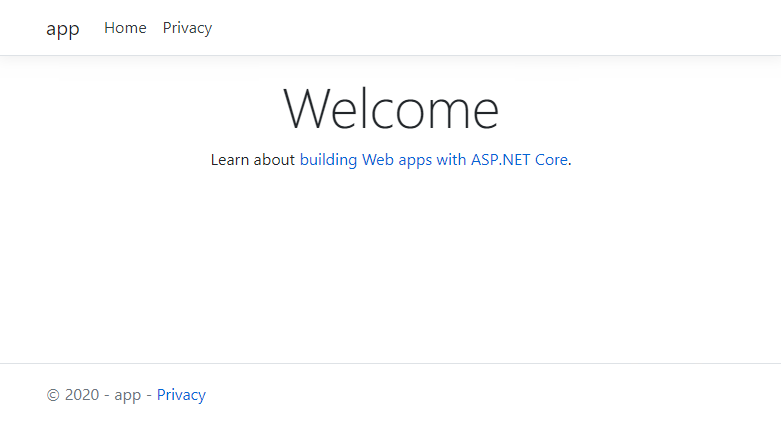
五、效果预览
附、常用命令
nginx
# nginx             //启动nginx

# nginx -s reload   //重启nginx

# nginx -s stop     //关闭nginx
supervisor
supervisord

supervisorctl status    //查看所有任务状态

supervisorctl shutdown  //关闭所有任务

supervisorctl start|stop|restart all          //控制所有进程

supervisorctl start|stop|restart program_name //控制目标进程
[原创]Centos7 安装配置ASP.NET Core+Nginx+Supervisor的更多相关文章
- CentOS7上部署ASP.Net Core 2.2应用
前言 在CentOS7上部署ASP.Net Core应用是我的技术路线验证的一部分,下一个产品计划采用ASP.Net Boilerplate Framework开发.因此需要求提前进行一下技术验证,在 ...
- 部署Asp.net core & Nginx,通过nginx转发
部署Asp.net core & Nginx,通过nginx转发 CentOS 7 x64 1.vs2017 建立Asp.net core项目,并发布到目录 2.通过FTP工具,将程序copy ...
- 本文演示如何配置ASP.NET Core项目以在Visual Studio(VS)2017中使用Telerik UI for ASP.NET Core。
学习时使用的是VS2017+Core2.1了,不再讨论VS2015和core1.1的东西. 配置ASP.NET Core Web应用程序以使用Telerik UI for ASP.NET Core: ...
- ASP.NET Core Identity 配置 - ASP.NET Core 基础教程 - 简单教程,简单编程
原文:ASP.NET Core Identity 配置 - ASP.NET Core 基础教程 - 简单教程,简单编程 ASP.NET Core Identity 配置 上一章节我们简单介绍了下 Id ...
- ASP.NET Core macOS 环境配置 - ASP.NET Core 基础教程 - 简单教程,简单编程
原文:ASP.NET Core macOS 环境配置 - ASP.NET Core 基础教程 - 简单教程,简单编程 ASP.NET Core 是对 ASP.NET 有重大意义的一次重新设计.本章节我 ...
- ASP.NET Core Windows 环境配置 - ASP.NET Core 基础教程 - 简单教程,简单编程
原文:ASP.NET Core Windows 环境配置 - ASP.NET Core 基础教程 - 简单教程,简单编程 ASP.NET Core Windows 环境配置 ASP.NET Core ...
- CentOS7 安装配置笔记
CentOS7 安装配置笔记 1.通过镜像安装 CentOS7 ==============================* 使用 UltraISO 9.7 或者 rufus-3.5p 制作ISO的 ...
- 用"hosting.json"配置ASP.NET Core站点的Hosting环境
通常我们在 Prgram.cs 中使用硬编码的方式配置 ASP.NET Core 站点的 Hosting 环境,最常用的就是 .UseUrls() . public class Program { p ...
- 阿里云服务器Linux CentOS安装配置(八)nginx安装、配置、域名绑定
阿里云服务器Linux CentOS安装配置(八)nginx安装.配置.域名绑定 1.安装nginx yum -y install nginx 2.启动nginx service nginx star ...
随机推荐
- BA 认证
IIBA-CBAP https://www.iiba.org/standards-and-resources/core-standard/ PMI-PBA https://www.pmi.org/ce ...
- P2903 [USACO08MAR]麻烦的干草打包机The Loathesome Hay Baler
传送门 题目问的是从出发点一直跑到终点的一条链上所有齿轮的速度和 其他的不用考虑 直接搜就好了 注意求的是绝对值之和,不是和的绝对值,所以不用考虑方向问题 注意 N<=1050 数组不要只开10 ...
- 待修改 URAL 1542
#include<bits/stdc++.h> using namespace std; const int maxn = 2e5+2e4+11; const int dep = 666; ...
- 工具类_GsonUtils
import java.lang.reflect.Type; import com.google.gson.Gson; /** * Gson工具类 2015-02-01<br/> * 1, ...
- 关于在JS中设置标签属性
Attribute 该属性主要是用来在标签行内样式,添加.删除.获取属性.且适用于自定义属性. setAttribute("属性名",属性值“”):这个是用来设置标签属性的: re ...
- mybatis CDATA引起的查询失败
<![CDATA[ ]]> 在被CDATA包围的所有字符串不会被mybatis解析, 直接写入sql了 CDATA应该只用在特殊字符前后,不能用在<if> <foreac ...
- java多线程-创建线程
大纲: Thread创建线程. Runnable接口. Callable接口. 小结 一.java创建线程--继承Thead类 创建一个类继承Thead类,并重写run方法. class Test { ...
- java多线程(一)
一.进程,线程,并发,并行 1.1 进程和线程的区别 进程是指:一个内存中运行的应用程序,每个进程都有自己独立的一块内存空间,一个进程中可以启动多个线程.比如在Windows系统中,一个运 ...
- UnityError SocketException: 以一种访问权限不允许的方式做了一个访问套接字的尝试。
SocketException: 以一种访问权限不允许的方式做了一个访问套接字的尝试. 以管理员身份运行Unity就可以了,权限不够的问题.
- mongodb3集群搭建
三台服务器:先设置hosts 10.0.0.231 node1 10.0.0.232 node2 10.0.0.233 node3 1:下载 mongodb-linux-x86_64-rhel70-3 ...