
LINQ 学习路程 -- 查询操作 Distinct Except Intersect Union
| Set Operators | Usage |
|---|---|
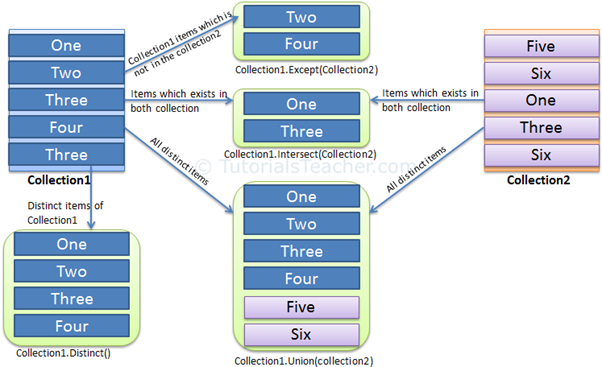
| Distinct | 去掉集合的重复项 |
| Except | 返回两个集合的不同,第一个集合的元素不能出现在第二个集合中 |
| Intersect | 返回两个集合的交集,即元素同时出现在两个集合中 |
| Union | Returns unique elements from two sequences, which means unique elements that appear in either of the two sequences. |
IList<string> strList = new List<string>(){ "One", "Two", "Three", "Two", "Three" };

IList<int> intList = new List<int>(){ , , , , , , ,  };

var distinctList1 = strList.Distinct();

foreach(var str in distinctList1)

    Console.WriteLine(str);

var distinctList2 = intList.Distinct();

foreach(var i in distinctList2)

    Console.WriteLine(i);
如果要去掉复杂类型的重复项,需要实现IEqualityComparer接口
public class Student

{

    public int StudentID { get; set; }

    public string StudentName { get; set; }

    public int Age { get; set; }

}

class StudentComparer : IEqualityComparer<Student>

{

    public bool Equals(Student x, Student y)

    {

        if (x.StudentID == y.StudentID

                && x.StudentName.ToLower() == y.StudentName.ToLower())

            return true;

        return false;

    }

    public int GetHashCode(Student obj)

    {

        return obj.StudentID.GetHashCode();

    }

}
IList<Student> studentList = new List<Student>() {

        new Student() { StudentID = , StudentName = "John", Age =  } ,

        new Student() { StudentID = , StudentName = "Steve",  Age =  } ,

        new Student() { StudentID = , StudentName = "Bill",  Age =  } ,

        new Student() { StudentID = , StudentName = "Bill",  Age =  } ,

        new Student() { StudentID = , StudentName = "Bill",  Age =  } ,

        new Student() { StudentID = , StudentName = "Bill",  Age =  } ,

        new Student() { StudentID = , StudentName = "Ron" , Age =  }

    };

var distinctStudents = studentList.Distinct(new StudentComparer());

foreach(Student std in distinctStudents)
Except
第一个集合的元素不在第二个集合中出现,返回新的集合
IList<string> strList1 = new List<string>(){"One", "Two", "Three", "Four", "Five" };

IList<string> strList2 = new List<string>(){"Four", "Five", "Six", "Seven", "Eight"};

var result = strList1.Except(strList2);

foreach(string str in result)

        Console.WriteLine(str);
public class Student

{

    public int StudentID { get; set; }

    public string StudentName { get; set; }

    public int Age { get; set; }

}

class StudentComparer : IEqualityComparer<Student>

{

    public bool Equals(Student x, Student y)

    {

        if (x.StudentID == y.StudentID && x.StudentName.ToLower() == y.StudentName.ToLower())

            return true;

        return false;

    }

    public int GetHashCode(Student obj)

    {

        return obj.StudentID.GetHashCode();

    }

}
public class Student

{

    public int StudentID { get; set; }

    public string StudentName { get; set; }

    public int Age { get; set; }

}

class StudentComparer : IEqualityComparer<Student>

{

    public bool Equals(Student x, Student y)

    {

        if (x.StudentID == y.StudentID && x.StudentName.ToLower() == y.StudentName.ToLower())

            return true;

        return false;

    }

    public int GetHashCode(Student obj)

    {

        return obj.StudentID.GetHashCode();

    }

}
Intersect
返回两个集合的交集
IList<string> strList1 = new List<string>() { "One", "Two", "Three", "Four", "Five" };

IList<string> strList2 = new List<string>() { "Four", "Five", "Six", "Seven", "Eight"};

var result = strList1.Intersect(strList2);

foreach(string str in result)

        Console.WriteLine(str);
复杂类型的交集需要实现IEqualityComparer<T>接口
public class Student

{

    public int StudentID { get; set; }

    public string StudentName { get; set; }

    public int Age { get; set; }

}

class StudentComparer : IEqualityComparer<Student>

{

    public bool Equals(Student x, Student y)

    {

        if (x.StudentID == y.StudentID &&

                        x.StudentName.ToLower() == y.StudentName.ToLower())

            return true;

        return false;

    }

    public int GetHashCode(Student obj)

    {

        return obj.StudentID.GetHashCode();

    }

}
IList<Student> studentList1 = new List<Student>() {

        new Student() { StudentID = , StudentName = "John", Age =  } ,

        new Student() { StudentID = , StudentName = "Steve",  Age =  } ,

        new Student() { StudentID = , StudentName = "Bill",  Age =  } ,

        new Student() { StudentID = , StudentName = "Ron" , Age =  }

    };

IList<Student> studentList2 = new List<Student>() {

        new Student() { StudentID = , StudentName = "Bill",  Age =  } ,

        new Student() { StudentID = , StudentName = "Ron" , Age =  }

    };

var resultedCol = studentList1.Intersect(studentList2, new StudentComparer());

foreach(Student std in resultedCol)

    Console.WriteLine(std.StudentName);
Union
两个集合的并集
IList<string> strList1 = new List<string>() { "One", "Two", "three", "Four" };

IList<string> strList2 = new List<string>() { "Two", "THREE", "Four", "Five" };

var result = strList1.Union(strList2);

foreach(string str in result)

        Console.WriteLine(str);
复杂类型的并集需要实现IEqualityComparer<T>接口
public class Student

{

    public int StudentID { get; set; }

    public string StudentName { get; set; }

    public int Age { get; set; }

}

class StudentComparer : IEqualityComparer<Student>

{

    public bool Equals(Student x, Student y)

    {

        if (x.StudentID == y.StudentID && x.StudentName.ToLower() == y.StudentName.ToLower())

            return true;

        return false;

    }

    public int GetHashCode(Student obj)

    {

        return obj.StudentID.GetHashCode();

    }

}
IList<Student> studentList1 = new List<Student>() {

        new Student() { StudentID = , StudentName = "John", Age =  } ,

        new Student() { StudentID = , StudentName = "Steve",  Age =  } ,

        new Student() { StudentID = , StudentName = "Bill",  Age =  } ,

        new Student() { StudentID = , StudentName = "Ron" , Age =  }

    };

IList<Student> studentList2 = new List<Student>() {

        new Student() { StudentID = , StudentName = "Bill",  Age =  } ,

        new Student() { StudentID = , StudentName = "Ron" , Age =  }

    };

var resultedCol = studentList1.Union(studentList2, new StudentComparer());

foreach(Student std in resultedCol)

    Console.WriteLine(std.StudentName);
LINQ 学习路程 -- 查询操作 Distinct Except Intersect Union的更多相关文章
- LINQ 学习路程 -- 查询操作 Expression Tree
表达式树就像是树形的数据结构,表达式树中的每一个节点都是表达式, 表达式树可以表示一个数学公式如:x<y.x.<.y都是一个表达式,并构成树形的数据结构 表达式树使lambda表达式的结构 ...
- LINQ 学习路程 -- 查询操作 OrderBy & OrderByDescending
Sorting Operator Description OrderBy 通过给定的字段进行升序 降序 排序 OrderByDescending 通过给定字段进行降序排序,仅在方法查询中使用 Then ...
- LINQ 学习路程 -- 查询操作 Deferred Execution of LINQ Query 延迟执行
延迟执行是指一个表达式的值延迟获取,知道它的值真正用到. 当你用foreach循环时,表达式才真正的执行. 延迟执行有个最重要的好处:它总是给你最新的数据 实现延迟运行 你可以使用yield关键字实现 ...
- LINQ 学习路程 -- 查询操作 Join
Join操作是将两个集合联合 Joining Operators Usage Join 将两个序列连接并返回结果集 GroupJoin 根据key将两个序列连接返回,像是SQL中的Left Join ...
- LINQ 学习路程 -- 查询操作 where
1.where Filtering Operators Description Where Returns values from the collection based on a predicat ...
- LINQ 学习路程 -- 查询操作 GroupBy ToLookUp
Grouping Operators Description GroupBy GroupBy操作返回根据一些键值进行分组,每组代表IGrouping<TKey,TElement>对象 To ...
- LINQ 学习路程 -- 查询操作 let into关键字
IList<Student> studentList = new List<Student>() { , StudentName = } , , StudentName = } ...
- LINQ 学习路程 -- 查询操作 Aggregate
聚合操作执行数学的运算,如平均数.合计.总数.最大值.最小值 Method Description Aggregate 在集合上执行自定义聚集操作 Average 求平均数 Count 求集合的总数 ...
- LINQ 学习路程 -- 查询操作 Select, SelectMany
IList<Student> studentList = new List<Student>() { , StudentName = "John" }, , ...
随机推荐
- Maven的pom文件内容详细理解
<project xmlns="http://maven.apache.org/POM/4.0.0" xmlns:xsi="http://www.w3.org/20 ...
- spring事务管理实现方式
声明式事务 tx及aop配置,利于管理,耦合性低,可读性低 @Transactional注解,不利管理,耦合性高,可读性高 编程式事务 TransactionTemplate类,spring推荐方法 ...
- iOS 日志系统 本地日志打包上传到服务器
日志系统主要包含两个部分 1.本地保存 我们知道NSLog打印的日志一般都是直接输出到控制台,开发人员可以在控制台直接看到实时打印的log,既然可以在控制台输出,那么能否将日志输出到其他地方呢,比如说 ...
- inline用于替代宏函数
在C&C++中 一.inline关键字用来定义一个类的内联函数,引入它的主要原因是用它替代C中表达式形式的宏定义. 表达式形式的宏定义一例: #define ExpressionName(Va ...
- 腾讯课堂十大Excel函数
十大函数:if,sumifs,countifs,vlookup,match,index,indirect,subtotal,left(mid,right),offset substotal:用于灵活计 ...
- 配置LANMP环境(8)-- 安装Samba与配置
Samba套件,将linux下的文件夹共享给windows(本地开发会很方便) 一.安装Samba yum install –y samba 二.配置Samba 1.备份配置文件 cp /etc/sa ...
- Hibernate: 数据持久层框架
Hibernate 是一种Java语言下的对象关系映射解决方案. 它是使用GNU宽通用公共许可证发行的自由.开源的软件.它为面向对象的领域模型到传统的关系型数据库的映射,提供了一个使用方便的框架.Hi ...
- 浅谈Java数据结构和算法
今天的突然看集合底层的时候发现了好多算法和数据结构.再次就比较一下和汇总一下. 数据结构分类:线性结构和非线性结构 问题一: 什么是线性和非线性: 我个人的理解是:数据结构中线性结构指的是数据元素之间 ...
- Live555 中的客户端openRTSP 保存H264文件
http://amitapba.blog.163.com/blog/static/20361020720140189239762/ http://amitapba.blog.163.com/blog/ ...
- <C#入门经典>学习笔记1之初识C#
序言 选择< C#入门经典第五版>作为自学书籍,以此记录学习过程中的笔记与心得. C#简单介绍 1. C#是一种块结构的语言 2. C#区分大写和小写 C#变量 C#的变量定义与C语言相似 ...