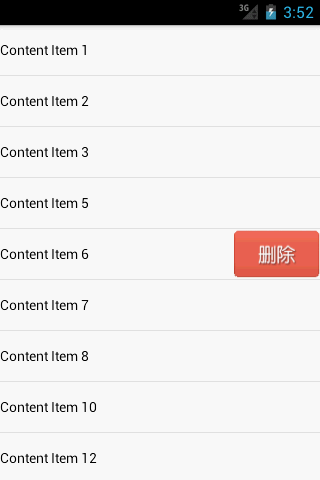
在一些用户体验较好的应用上,可以经常遇见 在ListView中 向左或向右滑动便可删除那一项列表.
具体实现 则是继承ListView实现特定功能即可.
(1). 新建 delete_button.xml文件
<?xml version="1.0" encoding="utf-8"?>
<Button xmlns:android="http://schemas.android.com/apk/res/android"
android:layout_width="match_parent"
android:id="@+id/btn_delete"
android:layout_height="match_parent"
android:background="#FF0000"
android:textColor="#F8F8FF"
android:text="删除"
android:orientation="vertical" >
</Button>
很简单的布局,一个按钮,但这就是滑动时会出现的一个布局.
(2). 创建MyListView继承自 ListView.
public class MyListView extends ListView implements OnTouchListener,OnGestureListener {
private GestureDetector gestureDetector; //监听手势的实例
public interface OnDeleteListener{ //将要删除的某项位置 回调给 MainActivity进行处理
void onDelete(int index );
}
private OnDeleteListener mListener; //删除监听
private View deleteButton; //删除按钮的视图
private ViewGroup itemLayout; //需要操作项 的 ViewGroup对象
private int selectedItem; //选中位置
private boolean isDeleteShown; //是否有 删除按钮显示
public MyListView(Context context, AttributeSet attrs) {
super(context, attrs);
gestureDetector=new GestureDetector(getContext(),this);
setOnTouchListener(this);
}
public void setOnDeleteListener(OnDeleteListener l){
this.mListener=l;
}
@Override
public boolean onTouch(View v, MotionEvent event) {
if(isDeleteShown){
itemLayout.removeView(deleteButton);
deleteButton=null;
isDeleteShown=false;
return true;
}
else{
//如果在空白地方继续滑动 , 禁止非法位置出现 删除按钮
if(AdapterView.INVALID_POSITION == pointToPosition((int)event.getX(), (int) event.getY()))
{
return false;
}
selectedItem=pointToPosition((int)event.getX(), (int)event.getY());
return gestureDetector.onTouchEvent(event);
}
}
@Override
public boolean onDown(MotionEvent e) { //点击按下事件
if(!isDeleteShown){
selectedItem=pointToPosition((int)e.getX(), (int)e.getY());
}
return false;
}
@Override
public boolean onFling(MotionEvent e1, MotionEvent e2, float x, //手指滑动事件
float y) {
if(!isDeleteShown&&Math.abs(x)>Math.abs(y)){
deleteButton=LayoutInflater.from(getContext()).inflate(R.layout.delete_button,null);
deleteButton.setOnClickListener(new OnClickListener() {
@Override
public void onClick(View v) {
itemLayout.removeView(deleteButton);
deleteButton=null;
isDeleteShown=false;
mListener.onDelete(selectedItem);
}
});
itemLayout=(ViewGroup) getChildAt(selectedItem - getFirstVisiblePosition());
RelativeLayout.LayoutParams params = new RelativeLayout.LayoutParams(
LayoutParams.WRAP_CONTENT, LayoutParams.WRAP_CONTENT);
params.addRule(RelativeLayout.ALIGN_PARENT_RIGHT);
params.addRule(RelativeLayout.CENTER_VERTICAL);
itemLayout.addView(deleteButton, params);
isDeleteShown=true;
}
return false;
}
@Override
public void onLongPress(MotionEvent e) {
}
@Override
public boolean onScroll(MotionEvent arg0, MotionEvent arg1, float arg2,
float arg3) {
return false;
}
@Override
public void onShowPress(MotionEvent arg0) {
}
@Override
public boolean onSingleTapUp(MotionEvent arg0) {
return false;
}
}
这段代码, 在构造方法中创建了 GestureDetector的实例用于监听手势,注册了touch事件,然后在onTouch进行判断,
如果删除按钮已经显示了,将将它移除掉,否则就是用GestureDetector处理当前手势.
当手指按下onGestureListener的onDown方法时,这里通过pointToPosition()方法判断当前选中的是哪一行.
当手指快速滑动时,会调用onFling()方法,在这里会去加载delete_button.xml这个布局,然后将删除按钮添加到当前选中的那一行item上。
这里删除按钮添加了一个点击事件,当点击了删除按钮时就会回调onDeleteListener的onDelete()方法,在回调方法中应该去处理具体的删除操作。
(3)新建item项
<?xml version="1.0" encoding="utf-8"?>
<RelativeLayout xmlns:android="http://schemas.android.com/apk/res/android"
android:layout_width="match_parent"
android:layout_height="match_parent"
android:descendantFocusability="blocksDescendants"
android:orientation="vertical" >
<TextView
android:id="@+id/tv"
android:layout_width="wrap_content"
android:layout_height="50dp"
android:layout_centerVertical="true"
android:gravity="left|center_vertical"
android:textColor="#000" />
</RelativeLayout>
(4) 适配器
public class MyAdapter extends ArrayAdapter<String> {
public MyAdapter(Context context, int tvSourceId,List<String> objects) {
super(context, tvSourceId,objects);
}
@Override
public View getView(int position, View convertView, ViewGroup parent) {
View view;
if(convertView==null){
view=LayoutInflater.from(getContext()).inflate(R.layout.item,null);
}
else{
view=convertView;
}
TextView tv=(TextView) view.findViewById(R.id.tv);
tv.setText(getItem(position));
return view;
}
}
(5) main.xml
<RelativeLayout xmlns:android="http://schemas.android.com/apk/res/android"
xmlns:tools="http://schemas.android.com/tools"
android:layout_width="match_parent"
android:layout_height="match_parent"
tools:context=".MainActivity" >
<com.example.listviewdeletedemo.MyListView
android:id="@+id/mListView"
android:layout_width="match_parent"
android:layout_height="match_parent">
</com.example.listviewdeletedemo.MyListView>
</RelativeLayout>
(6)最后初始化数据,处理onDelete方法中的删除.
public class MainActivity extends Activity {
private MyListView mListView;
private MyAdapter mAdapter;
private List<String> contentList=new ArrayList<String>(); //数据集
@Override
protected void onCreate(Bundle savedInstanceState) {
super.onCreate(savedInstanceState);
requestWindowFeature(Window.FEATURE_NO_TITLE);
setContentView(R.layout.activity_main);
initList();
mListView=(MyListView) findViewById(R.id.mListView);
mListView.setOnDeleteListener(new OnDeleteListener() {
@Override
public void onDelete(int index) {
contentList.remove(index);
mAdapter.notifyDataSetChanged();
}
});
mAdapter=new MyAdapter(this, 0, contentList);
mListView.setAdapter(mAdapter);
}
private void initList() {
contentList.add("Content Item 1");
contentList.add("Content Item 2");
contentList.add("Content Item 3");
contentList.add("Content Item 4");
contentList.add("Content Item 5");
contentList.add("Content Item 6");
contentList.add("Content Item 7");
contentList.add("Content Item 8");
contentList.add("Content Item 9");
contentList.add("Content Item 10");
contentList.add("Content Item 11");
contentList.add("Content Item 12");
contentList.add("Content Item 13");
contentList.add("Content Item 14");
contentList.add("Content Item 15");
contentList.add("Content Item 16");
contentList.add("Content Item 17");
contentList.add("Content Item 18");
contentList.add("Content Item 19");
contentList.add("Content Item 20");
}
}
这样,一个毫无BUG的滑动删除就完成了.
- 自定义listView添加滑动删除功能
今天研究了一下android里面的手势,结合昨天学习的自定义View,做了一个自定义的listview,继承自listView,添加了条目的滑动手势操作,滑动后出现一个删除按钮,点击删除按钮,触发一个 ...
- 【转】Android 实现ListView的滑动删除效果
http://www.cnblogs.com/weixiao870428/p/3524055.html http://download.csdn.net/download/love_javc_you/ ...
- Android 使用NineOldAndroids实现绚丽的ListView左右滑动删除Item效果
本文出自xiaanming的博客(http://blog.csdn.net/xiaanming/article/details/18311877) 今天还是给大家带来自定义控件的编写,自定义一个Lis ...
- 【转】Android 使用Scroller实现绚丽的ListView左右滑动删除Item效果
原文网址:http://blog.csdn.net/xiaanming/article/details/17539199 转帖请注明本文出自xiaanming的博客(http://blog.csdn. ...
- [转]Android 使用Scroller实现绚丽的ListView左右滑动删除Item效果
转帖请注明本文出自xiaanming的博客(http://blog.csdn.net/xiaanming/article/details/17539199),请尊重他人的辛勤劳动成果,谢谢! 我在上一 ...
- Android 使用Scroller实现绚丽的ListView左右滑动删除Item效果
转帖请注明本文出自xiaanming的博客(http://blog.csdn.net/xiaanming/article/details/17539199),请尊重他人的辛勤劳动成果,谢谢! 我在上一 ...
- Android 禁止ViewPager左右滑动的功能实现
来来来,各位看官~ Look here!!! Android 禁止ViewPager左右滑动的功能实现!! I think it`s so easy,无需重写ViewPager!!! JUST ...
- Android滑动删除功能
今天学习了新的功能那就是滑动删除数据.先看一下效果 我想这个效果大家都很熟悉吧.是不是在qq上看见过这个效果.俗话说好记性不如赖笔头,为了我的以后,为了跟我一样自学的小伙伴们,我把我的代码粘贴在下面. ...
- Android学习之ItemTouchHelper实现RecylerView的拖拽以及滑动删除功能
今天在群里见大神们提到控件的拖动以及滑动删除的效果实现,就在网上找了资料ItemTouchHelper学习,并实现其功能.不胜窃喜之至,忍不住跟大家分享一下,如今就对学习过程做下简介.帮助大家实现这样 ...
随机推荐
- CUDA memory
原文链接 CUDA存储器类型: 每个线程拥有自己的register and loacal memory; 每个线程块拥有一块shared memory; 所有线程都可以访问global memory; ...
- ES6初识-Decorator
开始先按照个插件 npm install babel-plugin-transform-decorators-lagacy --save-dev 1.扩充和修改类的行为 2.修改的行为@readonl ...
- [优化]Steamroller-freecodecamp算法题目
晚上在medium看到一篇关于找工作的文章,里面提到一个面试题目--flattening an array(扁平化数组).这我好像在哪看过!应该是freecodecamp里的算法某一题.翻了下博客记录 ...
- 搞定 mybatis generator 三步走
基于idea 编辑器下maven项目使用mybatis generator快速生成持久层 添加插件:插件网址:http://www.mybatis.org/generator/running/runn ...
- mybatis的坑——不报错,就是不能committing,数据存不进数据库
测试的时候会报空指针异常,在项目跑的时候会停止执行程序,不会出现异常. 经过一星期的排查与测试,最终找到错误,把mapper文件的映射属性名写错了. property属性名要与接收类的属性名保持一致. ...
- ethereum(以太坊)(十二)--应用(二)__投票(基础总和)
编写应用合约之前,先弄清它的逻辑,有助于我们更好的部署合约 pragma solidity ^0.4.21; pragma experimental ABIEncoderV2; contract vo ...
- laravel-多条件查询并指定key输出
$room = DB::table('room') ->where(function($query) use($contList){ foreach ($contList as $k=>$ ...
- hosts 文件的位置及作用
一.位置 1.Window系统位置 C:\Windows\System32\drivers\etc 2.Linux系统位置 /etc/hosts 二.作用 综述:Hosts文件中指定了域名和IP地址的 ...
- yii2 url 美化参数
所谓的url参数美化就是将冗长的字符串 进行正则替换 yii2 框架的url参数美化完成需要完成两个阶段 第一个阶段分apache和nginx 两种的配置 apache :1.1 必须开启rewrit ...
- 守护进程,进程安全,IPC进程间通讯,生产者消费者模型
1.守护进程(了解)2.进程安全(*****) 互斥锁 抢票案例3.IPC进程间通讯 manager queue(*****)4.生产者消费者模型 守护进程 指的也是一个进程,可以守护着另一个进程 一 ...
