
Linux下安装Wine运行windows程序
资料
安装 https://www.winehq.org/download/
教程 https://www.winehq.org/documentation
1.安装Wine
本文以Ubuntu为例,其它请到官网参考详细文档
https://www.winehq.org/download/
https://wiki.winehq.org/Ubuntu
2.1 Installing WineHQ packages
If you have previously installed a Wine package from another repository, please remove it and any packages that depend on it (e.g., wine-mono, wine-gecko, winetricks) before attempting to install the WineHQ packages, as they may cause dependency conflicts.
If your system is 64 bit, enable 32 bit architecture (if you haven't already):
$sudo dpkg --add-architecture i386
Add the repository:
$sudo add-apt-repository ppa:wine/wine-builds
Update packages:
$sudo apt-get update
Then install one of the following packages:(注意:Staging版一般不稳定)
| Stable branch |
sudo apt-get install --install-recommends winehq-stable |
|---|---|
| Development branch |
sudo apt-get install --install-recommends winehq-devel |
| Staging branch |
sudo apt-get install --install-recommends winehq-staging |
If apt-get complains about missing dependencies, install them, then repeat the last two steps (update and install).
If you have previously used the distro packages, you will notice some differences in the WineHQ ones:
- Files are installed to /opt/wine-devel.
- Menu items are not created for Wine's builtin programs (winecfg, etc.), and if you are upgrading from a distro package that had added them, they will be removed. You can recreate them yourself using your menu editor.
- Binfmt_misc registration is not added. Consult your distro's documentation for update-binfmts if you wish to do this manually.
- WineHQ does not at present package wine-gecko or wine-mono. When creating a new wine prefix, you will be asked if you want to download those components. For best compatibility, it is recommended to click Yes here. If the download doesn't work for you, please follow the instructions on the Gecko and Mono wiki pages to install them manually.
2.2 安装目录
成功后会在 /opt 目录下生成wine-staging目录

~/.wine/drive_c 是windows目录
2.用wine运行exe文件
- 终端下 wine xxx.exe
$wine Si3576Setup.exe
- 图形界面
右键点xxx.exe 选Open With -> Wine Windows Program Loader
3.卸载安装的程序
3.1 用应用提供的卸载程序
在相应的目录下找到卸载程序,如uninstall.exe 。然后右键 选Open With -> Wine Windows Program Loader
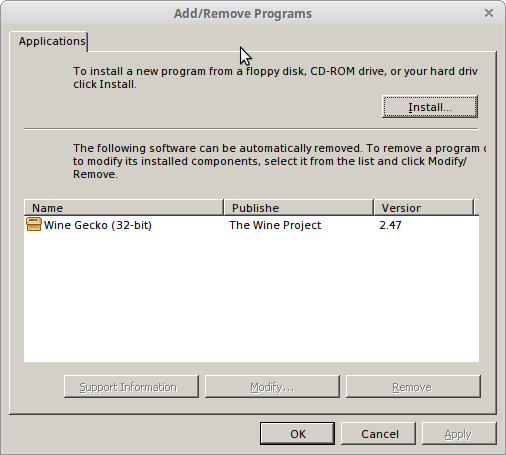
3.2 wine uninstaller 命令
输入命令:
$wine uninstaller
找到相应程序卸载,也可以用它安装应用。
Linux下安装Wine运行windows程序的更多相关文章
- Linux下安装Wine 运行、卸载 windows程序
资料 首页 https://www.winehq.org/ 安装 https://www.winehq.org/download/ 教程 https://www.winehq.org/document ...
- Linux Linux下安装wine
Linux下安装wine Linux下安装wine可以从源码编译安装,但一般都觉得麻烦,所以尽量利用yum进行安装,解决很多包的依赖关系. 首先安装一个epel rpm -ivh http://dl. ...
- mac通过wine运行windows程序(将文件关联到windows程序notepad++)
windows程序功能强大且已经习惯使用了,用mac总感觉不给力,例如记事本工具Notepad++就非常优秀.下面介绍如何在mac系统下通过wine来安装使用notepadd++程序. 1.安装win ...
- Debian安装wine运行Windows软件
1.sudo dpkg --add-architecture i386,使系统支持32位应用 2.wget -nc https://dl.winehq.org/wine-builds/Release. ...
- linux下安装压缩解压程序7z命令及7z命令的使用
1.1 在线安装如果你的宿主机Linux可以连接外网,推荐用这种方式,方便简单,执行命令:sudo apt-get install p7zip即可在线安装7z命令. 1.2 安装包安装7z(准确点说是 ...
- linux下安装与运行docker
写者环境: 1.lsb_release -a hello@hello:~$ lsb_release -aNo LSB modules are available.Distributor ID: Ubu ...
- linux下如何编译运行c程序
GCC是Linux操作系统下一个非常重要的源代码编译工具,有着许多重要的选项,支持许多不同语言的编译,如C.C++.Ada.Fortran.Objective.Perl.Python.Ruby以及Ja ...
- 在linux下通过sh运行java程序
1.导出jar包放在目录下,如/home 2.通过vi创建sh文件如:test.sh,内容如:java -jar test1.jar com.wzh.test.test & 3.运行命令:sh ...
- linux下安装jre运行环境
上官网下载安装文件:点击打开链接 文件名:jre-8u65-linux-x64.gz安装步骤1.解压tar -xzvf jre-8u65-linux-x64.gz2.将解压后的文件放到/usr/lib ...
随机推荐
- js异步收集
http://www.cnblogs.com/rubylouvre/archive/2011/03/18/1984336.html http://www.cnblogs.com/hustskyking ...
- vs2013编译qt程序后中文出现乱码
我的vs是2013版的,qt是5.4.2,在使用vc将程序编译好后并运行时在界面上输出的中文出现了乱码,在网上找了很长时间终于找到了解决方法: QString str = QStringLiteral ...
- DTCMS一些问题
站点管理,主站和手机站同时绑定不同域名 手机站会报错,解决方法为 主站不绑定 手机站绑定 关键问题为:不能和主站域名相同 PC模版文件下的JS文件夹下的commen.js和手机模版下的JS文件夹下的b ...
- CentOs7&zookeeper
下载安装包 wget http://www.apache.dataguru.cn/zookeeper/stable/zookeeper-3.4.6.tar.gz 解压 tar xzvf zookeep ...
- [Linux]学习笔记(2)
本节主要学习: whoami who am i who w users tty 6个命令的用法. (1)whoami whoami用于查询当前是以哪个用户登录Linux系统: [root@linuxf ...
- Flex读文本文件
布局: <s:Group id="> <s:Rect width="100%" height="100%"> <s:fi ...
- hdu 4622 Reincarnation 字符串hash 模板题
题目链接:http://acm.hdu.edu.cn/showproblem.php?pid=4622 题意:给定一个长度不超过2000的字符串,之后有不超过1e5次的区间查询,输出每次查询区间中不同 ...
- Java中的异常处理(一)
package second; public class C { public static void main(String[] args){ String name = null;//定义一个nu ...
- 子查询优化成join关联查询时要注意一对多关系
mysql> select * from t where t.id in (select t1.tid from t1); +------+ | id | +------+ | +------+ ...
- Xcode免证书打包ipa
1,创建证书 打开“钥匙串访问”创建证书 填写好内容后点击继续,之后的步骤什么都不用改,一路点击“确定”和“继续”,最后完成这个向导就可以了. 我们创建的证书是不被信任的,右键点击证书选择“显示简介” ...