
Android 中的图像特效(Matrix)
以前在线性代数中学习了矩阵,对矩阵的基本运算有一些了解,现在在Android中有一个Matrix类,它的中文意思就是矩阵。Matrix主要是用于图像的缩放、平移、旋转、扭曲等操作。图像处理,主要用到的是乘法。
下面是一个乘法的公式:

在Android里面,Matrix由9个float值构成,是一个3*3的矩阵。如下图

其含义如下:
sinX和cosX,表示旋转角度的cos值和sin值(旋转角度是按顺时针方向计算的)。translateX和translateY表示x和y的平移量。scale是缩放的比例,1是不变,2是表示缩放1/2。
还有另一种样式的图:
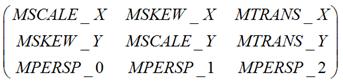
矩阵中的MSCALE用于处理缩放变换,MSKEW用于处理错切变换,MTRANS用于处理平移变换,MPERSP用于处理透视变换。
Class Overview
The Matrix class holds a 3x3 matrix for transforming coordinates.
Matrix的构造函数有两种:
public Matrix ()
Create an identity matrix
public Matrix (Matrix src)
Create a matrix that is a (deep) copy of src
Parameters
src The matrix to copy into this matrix
了解了这些基本概念,就可以简单的使用matrix了。
先是一个未做任何操作的图象显示:
图像取名为:img_saber
完整图像为:尺寸是960*540(还是比较大的,重点是还是我的女王啊!哈哈。)

先新建一个MyView类:
public class MyView extends View {

    private Bitmap bitmap;

    private Matrix matrix = new Matrix();

    public MyView(Context context, AttributeSet attrs) {

        super(context, attrs);

        // 取得Bitmap对象

        this.bitmap = BitmapFactory.decodeResource(super.getResources(),

                R.drawable.img_saber);

    }

    @Override

    protected void onDraw(Canvas canvas) {

        // TODO Auto-generated method stub

        super.onDraw(canvas);

        canvas.drawBitmap(this.bitmap, this.matrix, null);

    }

}
在activity_main.xml中实现:
(com.topcsa.zhj_matrix.MyView是包名加类名)
<?xml version="1.0" encoding="utf-8"?>

<LinearLayout xmlns:android="http://schemas.android.com/apk/res/android"

    android:layout_width="match_parent"

    android:layout_height="match_parent"

    android:orientation="vertical" >

    <com.topcsa.zhj_matrix.MyView

        android:id="@+id/myview"

        android:layout_width="wrap_content"

        android:layout_height="wrap_content" />

</LinearLayout>
在MainActivity中实现:
public class MainActivity extends Activity {

    @Override

    protected void onCreate(Bundle savedInstanceState) {

        super.onCreate(savedInstanceState);

        setContentView(R.layout.activity_main);

    }

}
运行程序,结果如图:
(很明显图像没有显示完整)
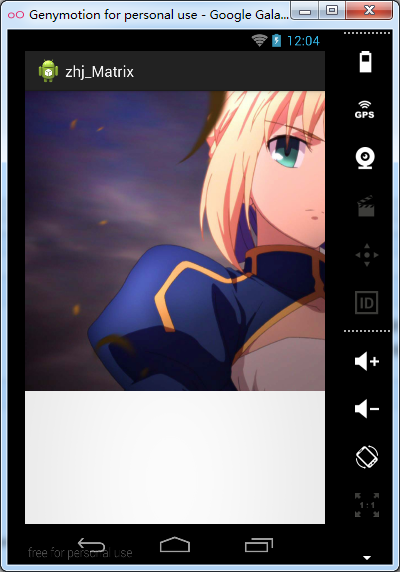
有了原始图像的对比,就好办了。
之前就说了,Matrix的对图像的处理可分为四类基本变换:
Translate 平移变换
Rotate 旋转变换
Scale 缩放变换
Skew 错切变换
下面一个一个的实现:
由于图像较大,下面实例的操作除缩放外,都会进行一个缩放操作以便观看效果。
1、Scale
对于Scale,Matrix类有6个方法:
public void setScale (float sx, float sy, float px, float py)
Set the matrix to scale by sx and sy, with a pivot point at (px, py). The pivot point is the coordinate that should remain unchanged by the specified transformation.
public void setScale (float sx, float sy)
Set the matrix to scale by sx and sy.
public boolean preScale (float sx, float sy)
Preconcats the matrix with the specified scale. M' = M * S(sx, sy)
public boolean preSkew (float kx, float ky, float px, float py)
Preconcats the matrix with the specified scale. M' = M * S(sx, sy, px, py)
public boolean postScale (float sx, float sy)
Postconcats the matrix with the specified scale. M' = S(sx, sy) * M
public boolean postScale (float sx, float sy, float px, float py)
Postconcats the matrix with the specified scale. M' = S(sx, sy, px, py) * M
public MyView(Context context, AttributeSet attrs) {

        super(context, attrs);

        // 取得Bitmap对象

        this.bitmap = BitmapFactory.decodeResource(super.getResources(),

                R.drawable.img_saber);

        matrix.setScale(0.5f, 0.5f);//以(0.0)为基准,图像缩小一半

    }
运行结果如下:(与之前的图像相比明显缩小)

matrix.setScale(0.5f, 0.5f, 50, 500);//(50,500)代替(0.0)进行缩放
运行如下:

如果将代码换成:
matrix.preScale(0.5f, 0.5f);
运行结果如下:

这里运行的结果与代码:matrix.setScale(0.5f, 0.5f);运行的结果是一样的。其实我想说的是如果单独运行matrix.postScale(0.5f, 0.5f);结果仍然是一样。那么大家肯定会想这三种方法结果是一样的,那有什么区别呢?先别急,这个问题我们文章最后来解决。
这里已经完成了原点缩放和指定点缩放。
(其余三种操作的方法没有一种操作,包含的方法比缩放的方法多,并且方法含义基本与缩放类似,下面的三种操作就不一一的展示其方法了。)
2、Rotate
修改MyView中的构造函数如下:
public MyView(Context context, AttributeSet attrs) {

        super(context, attrs);

        // 取得Bitmap对象

        this.bitmap = BitmapFactory.decodeResource(super.getResources(),

                R.drawable.img_saber);

        matrix.setRotate(30);//使图片以原点(0.0)为基准点旋转到一定角度,负数为向左旋转,正数为向右旋转

        matrix.preScale(0.5f, 0.5f);

    }
运行结果如下:

换成代码:
matrix.setRotate(30,100,0);//指定一个点(100,0),围绕该点旋转
运行效果如下:

3、Skew
修改代码如下:
public MyView(Context context, AttributeSet attrs) {

        super(context, attrs);

        // 取得Bitmap对象

        this.bitmap = BitmapFactory.decodeResource(super.getResources(),

                R.drawable.img_saber);

        matrix.setSkew(0.15f, 0.15f);//使图像扭曲

        matrix.preScale(0.5f, 0.5f);

    }
运行程序:

换成代码:
matrix.setSkew(0.05f, -0.15f,700,500);//以指定点为为参考点,使图像扭曲
运行如下:

4.Translate
老样子,改代码如下:
public MyView(Context context, AttributeSet attrs) {

        super(context, attrs);

        // 取得Bitmap对象

        this.bitmap = BitmapFactory.decodeResource(super.getResources(),

                R.drawable.img_saber);

        matrix.setTranslate(50, 100);//平移至点(100,100)

        matrix.preScale(0.5f, 0.5f);

    }
运行结果如下:

OK,这下四种图像特效就简单的演示完毕。
下面回到之前提到的问题:(其他几种特效类似)
setScale,preScale和postScale的区别
呃……这个问题嘛,其实我没深入研究过,不过在网上找到了一篇讲解文章,分享给大家:
http://www.eoeandroid.com/blog-659748-5465.html
PS:之前用到或没用到的方法
matrix.setScale(0.5f, 0.5f);//以(0.0)为基准,图像缩小一半
matrix.setScale(0.5f, 0.5f, 50, 500);//(50,500)代替(0.0)进行缩放
matrix.preScale(0.5f, 0.5f);
matrix.setRotate(30);//使图片以原点(0.0)为基准点旋转到一定角度,负数为向左旋转,正数为向右旋转
matrix.setRotate(30,100,0);//指定一个点(100,0),围绕该点旋转
//点(x,y)经过skew(kx,ky,px,py)变换之后,坐标为(kx*(y-py)+px,ky*(x-px)+py),如果,px和py没有,则默认为都为0。
matrix.setSkew(0.15f, 0.15f);
matrix.setSkew(0.15f, 0.15f,-100,-150);//以指定点为为参考点,使图像扭曲
matrix.setSinCos((float) Math.sin(Math.PI / 3),
(float) Math.sin(Math.PI / 3));// 以原始点为坐标旋转的sin和cos值
matrix.setSinCos((float) Math.sin(Math.PI / 3),
(float) Math.sin(Math.PI / 3), 100, 100);// 以(100,100)点为坐标旋转的sin和cos值
matrix.setTranslate(50, 100);//平移至点(100,100)
Android 中的图像特效(Matrix)的更多相关文章
- Android中解决图像解码导致的OOM问题
Android中解决图像解码导致的OOM问题 原文链接:http://blog.csdn.net/zjl5211314/article/details/7042017
- Android中利用Camera与Matrix实现3D效果详解
本文行文目录: 一.Camera与Matrix初步认识 二.Camera与Matrix旋转效果拆分介绍 三.Camera与Matrix实现立体3D切换效果 [csdn地址:http://blog.cs ...
- 王立平-Android中对图像进行Base64编码
// ------------------base64-------------------// public String bitmaptoString(Bitmap bitmap) { // 将B ...
- Android中图像变换Matrix的原理、代码验证和应用(一)
第一部分 Matrix的数学原理 在Android中,如果你用Matrix进行过图像处理,那么一定知道Matrix这个类.Android中的Matrix是一个3 x 3的矩阵,其内容如下: Matri ...
- Android零点一度的区别——Matrix
2013-07-07 导语:Matrix是android中对图像绘制的处理(旋转.放缩.平移等等),貌似书本翻页就是用这种方式处理的 正文: 1.基于坐标(px,py)旋转degrees度, post ...
- Android资源之图像资源(图层图像资源)
曾经看别人的程序的drawable目录里有xml资源,说实话第一次见到这种xml图像资源时,我真心不知道是干什么的.抽出时间学习了一下图像资源.才了解了这类图像资源的妙用. 以下我来分享一下这部分知识 ...
- Android中图像变换Matrix的原理、代码验证和应用(三)
第三部分 应用 在这一部分,我们会将前面两部分所了解到的内容和Android手势结合起来,利用各种不同的手势对图像进行平移.缩放和旋转,前面两项都是在实践中经常需要用到的功能,后一项据说苹果也是最近才 ...
- Android中强大的Matrix操作
简介: Matrix翻译字面意思时矩阵,在Android的API中提供了两种Matrix,分别是android.graphics.Matrix 和 android.opengl.Matrix . 后者 ...
- Android中的Matrix(矩阵)
写在前面 看这篇笔记之前先看一下参考文章,这篇笔记没有系统的讲述矩阵和代码的东西,参考文章写的也有错误的地方,要辨证的看. 如何计算矩阵乘法 android matrix 最全方法详解与进阶(完整篇) ...
随机推荐
- [置顶] Jquery中DOM操作(详细)
Jquery中的DOM操作 为了能全面的讲解DOM操作,首先需要构建一个网页. HTML代码: <%@ page language="java" import="j ...
- VS2012与NUnit
微软提供的NUnit插件是针对vs2010的,而vs2012会自动识别,测试环境为64位win7,具体操作步骤如下 1.下载安装NUnit(NUnit-2.6.3.msi) 2.新建测试项目UnitT ...
- 再次理解JavaScript原型链和匿名函数
<!--------------------------------------------- 1.演示匿名加载 2.js单进程执行流 3.原型链理解 a.__proto__:属性每个对象都有 ...
- centos 6.5下安装docker
关于docker的更多信息,请移步度娘.以下两个链接也对docker有了具体的介绍: http://www.docker.org.cn/book/docker/what-is-docker-16.ht ...
- [置顶] stax解析xml文档的6种方式
原文链接:http://blog.csdn.net/u011593278/article/details/9745271 stax解析xml文档的方式: 基于光标的查询: 基于迭代模型的查找: 基于过 ...
- SSL协议与数字证书原理
国内私募机构九鼎控股打造APP,来就送 20元现金领取地址:http://jdb.jiudingcapital.com/phone.html 内部邀请码:C8E245J (不写邀请码,没有现金送) 国 ...
- 【转】python的内存管理机制
http://developer.51cto.com/art/201007/213585.htm 内存管理,对于Python这样的动态语言,是至关重要的一部分,它在很大程度上甚至决定了Python的执 ...
- delphi TTreeView组件遍历磁盘目录
TTreeView组件遍历磁盘目录 实例说明 TTreeView组件是一个以分枝结构或者说树状结构显示数据的组件,以该组件显示数据具有较好的等级关系和逻辑层次,并且易于操作.在组件中显示的数据结构与系 ...
- DOS命令生成文件列表
DOS命令窗口,生成文件列表命令格式:dir xmlFiles /b >list.txt dir 文件列表相关命令 xmlFiles 待生成文件所在文件夹,在dos命令窗口根目录下,省略前缀.别 ...
- iOS开发——UI篇OC篇&layoutSubviews和drawRect
layoutSubviews和drawRect 首先两个方法都是异步执行.layoutSubviews方便数据计算,drawRect方便视图重绘. layoutSubviews在以下情况下 ...