
SpringBoot整合Swagger2案例,以及报错:java.lang.NumberFormatException: For input string: ""原因和解决办法
原文链接:https://blog.csdn.net/weixin_43724369/article/details/89341949
SpringBoot整合Swagger2案例
先说SpringBoot如何整合Swagger2,然后再说报错问题。
用IDEA新建SpringBoot项目,只需勾选Web即可。

在项目的pom文件中添加Swagger2相关依赖
 <!--引入两个Swagger2相关的依赖-->

        <dependency>

             <groupId>io.springfox</groupId>

             <artifactId>springfox-swagger2</artifactId>

             <version>2.9.2</version>

         </dependency>

         <dependency>

             <groupId>io.springfox</groupId>

             <artifactId>springfox-swagger-ui</artifactId>

             <version>2.9.2</version>

         </dependency>
待依赖导入完成后,在项目启动类中添加启动Swagger2的注解

添加自定义的Swagger2的配置类Swagger2Config
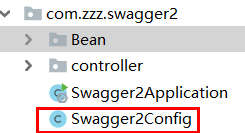
 package com.zzz.swagger2;

 import org.springframework.context.annotation.Bean;

 import org.springframework.context.annotation.Configuration;

 import springfox.documentation.builders.ApiInfoBuilder;

 import springfox.documentation.builders.PathSelectors;

 import springfox.documentation.builders.RequestHandlerSelectors;

 import springfox.documentation.service.Contact;

 import springfox.documentation.spi.DocumentationType;

 import springfox.documentation.spring.web.plugins.Docket;

 @Configuration

 public class Swagger2Config {

     @Bean

     public Docket createRestApi() {

         return new Docket(DocumentationType.SWAGGER_2)

                 .pathMapping("/")

                 .select()

                 .apis(RequestHandlerSelectors.basePackage("com.zzz.swagger2.controller"))//指定方法接口都来自controller这个包

                 .paths(PathSelectors.any())//选any表示给这个controller包下所有的接口都生成文档

                 .build().apiInfo(new ApiInfoBuilder()

                         .title("SpringBoot整合Swagger")//生成的接口文档的标题名称

                         .description("SpringBoot整合Swagger,详细信息......")//文档摘要

                         .version("1.0.0")//API版本,可以自定义

                         //文档制作人、个人主页地址、邮箱

                         .contact(new Contact("Kyo", "https://blog.csdn.net/weixin_43724369", "aaa@gmail.com"))

                         .description("Kyo的个人博客")//(可以不配置)

                         .license("The Apache License")//授权信息(可以不配置)

                         .licenseUrl("http://www.baidu.com")//授权地址(可以不配置)

                         .build());

     }

 }
下图是项目启动后,对应上面的配置信息。不过现在项目还没配置完,先往下面看。

接下来添加对应的实体类对象,和控制层方法,模拟增删改查
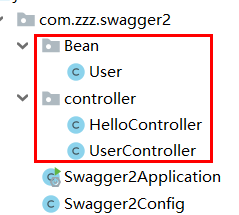
①User对象
 package com.zzz.swagger2.Bean;

 import io.swagger.annotations.ApiModel;

 import io.swagger.annotations.ApiModelProperty;

 @ApiModel

 public class User {

     @ApiModelProperty("用户的id")

     private Long id;

     @ApiModelProperty("用户名")

     private String username;

     @ApiModelProperty("用户的地址")

     private String address;

     public String getUsername() {

         return username;

     }

     public void setUsername(String username) {

         this.username = username;

     }

     public Long getId() {

         return id;

     }

     public void setId(Long id) {

         this.id = id;

     }

     public String getAddress() {

         return address;

     }

     public void setAddress(String address) {

         this.address = address;

     }

 }
添加完User类后,可以启动项目了。
在浏览器中打开:http://locahost:8080/swagger-ui.html#/ 即可
上面的三行注解:
@ApiModelProperty("用户的id")
@ApiModelProperty("用户名")
@ApiModelProperty("用户的地址")
对应接口文档
②UserController,采用Restful风格,模拟对User信息的增删改查操作。
 package com.zzz.swagger2.controller;

 import com.zzz.swagger2.Bean.User;

 import io.swagger.annotations.Api;

 import io.swagger.annotations.ApiImplicitParam;

 import io.swagger.annotations.ApiImplicitParams;

 import io.swagger.annotations.ApiOperation;

 import org.springframework.web.bind.annotation.*;

 @RestController

 @Api(tags = "用户管理接口")

 public class UserController {

     @ApiOperation("通过用户id查询一个用户")

     @ApiImplicitParam(name = "id",value = "用户id",defaultValue = "33")

     @GetMapping("/user")

     public User getUserById(Long id){

         User user=new User();

         user.setId(id);

         return user;

     }

     @DeleteMapping("/user/{id}")

     @ApiOperation("通过用户id删除一个用户")

     @ApiImplicitParam(name = "id",value = "用户id",defaultValue = "99")

     public Long deleteUserById(@PathVariable Long id){

         return id;

     }

     @PutMapping("/user")

     @ApiImplicitParams({@ApiImplicitParam(name = "id",value = "用户id",defaultValue = "80"),

             @ApiImplicitParam(name = "username",value = "用户名",defaultValue = "李四")})

     @ApiOperation("通过用户id更新用户名")

     public Long updateUsernameById(Long id, String username){

         return id;

     }

     @PostMapping("/user")

     @ApiOperation("添加用户")

     public User addUser(User user){

         return user;

     }

 }
③再来一个HelloController,里面只有一个简单的返回字符串的方法
 package com.zzz.swagger2.controller;

 import org.springframework.web.bind.annotation.GetMapping;

 import org.springframework.web.bind.annotation.RestController;

 @RestController

 public class HelloController {

     @GetMapping("/hello")

     public String hello(){

         return "hello swagger!";

     }

 }
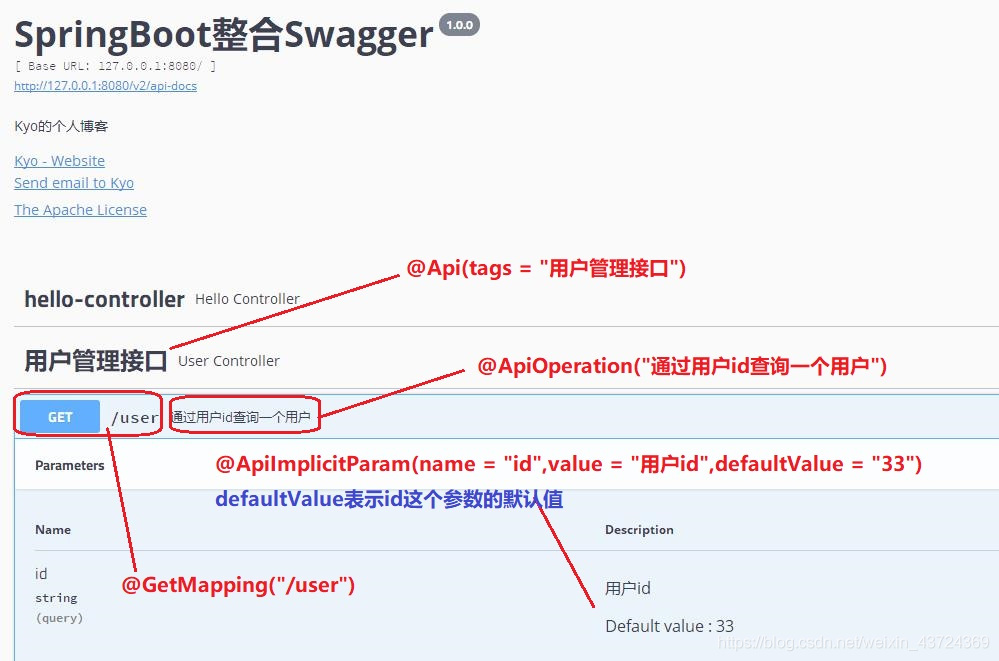
6、这时可以启动项目了,顺便说说controller层里的注解是什么意思
二、报错:java.lang.NumberFormatException: For input string: ""原因和解决办法
项目启动之后,打开http:/localhost:8080/swagger-ui.html#/ 后
你会发现控制台报错:

看意思是数值类型转换异常,原因是输入了一个空字符串 ,而且是把String转换成Long类型数值的过程中发生异常。
随便一分析,就知道我们刚刚定义的User类中,有一个Long类型的属性id

而在UserController中,我们给每个方法的参数id,都设置了默认值,即defaultValue。
却唯独没有给最后一个方法的参数id,设置默认值。罪魁祸首见下图:
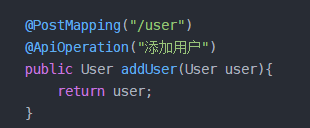
而根据报错信息来看,系统会自动把我们输入的String类型的id,转换成Long类型的id,再保存成JSON数据。
这个转换过程调用的就是Long.parseLong(),注意要求的是非空字符串!

由于我们没有给这个addUser()这个方法设置默认值,所以系统已启动,就自动尝试把空字符串转换成Long类型数值,所以就报错了。
所以,解决办法就很简单——给参数id设置任意一个默认值。如下:
 @PostMapping("/user")

     @ApiImplicitParams({@ApiImplicitParam(name = "id",value = "用户id",defaultValue = "00"),

     @ApiImplicitParam(name = "username",value = "用户名",defaultValue = "请输入用户名")})

     @ApiOperation("添加用户")

     public User addUser(User user){

         return user;

     }
设置完,再启动项目就不会报错了。
SpringBoot整合Swagger2案例,以及报错:java.lang.NumberFormatException: For input string: ""原因和解决办法的更多相关文章
- hadoop ha环境下的datanode启动报错java.lang.NumberFormatException: For input string: "10m"
hadoop ha环境启动start-dfs.sh的时候datanode启动不了,并且报错. [hadoop@datanode2 ~]$ cat /home/hadoop/hadoop-2.7.3/l ...
- Window启动Zookeeper报错java.lang.NumberFormatException: For input string:
用zkServer start命令报如题的错误,改为直接用zkServer启动则ok 还有在window下,myid文件不能是myid.txt,不能带文件格式 dataDir=D:/zookeeper ...
- java.lang.NumberFormatException: For input string: "F"
在通过myBatis执行sql时,报错: java.lang.NumberFormatException: For input string: "F" xml中sql内容为: &l ...
- 执行Hive时出现org.apache.hadoop.util.RunJar.main(RunJar.java:136) Caused by: java.lang.NumberFormatException: For input string: "1s"错误的解决办法(图文详解)
不多说,直接上干货 问题详情 [kfk@bigdata-pro01 apache-hive--bin]$ bin/hive Logging initialized -bin/conf/hive-log ...
- mybatis 报错:Caused by: java.lang.NumberFormatException: For input string
mybatis的if标签之前总是使用是否为空,今天要用到字符串比较的时候遇到了困难,倒腾半天,才在一个论坛上找到解决方法.笔记一下,如下: 转自:https://code.google.com/p/m ...
- MyBatis报错:Caused by: java.lang.NumberFormatException: For input string: "XX"
<select id="sltTreatment" resultType="com.vitaminmd.sunny.core.bo.Treatment"& ...
- maven项目中使用redis集群报错: java.lang.NumberFormatException: For input string: "7006@17006"
Caused by: org.springframework.beans.BeanInstantiationException: Failed to instantiate [redis.client ...
- Swagger2异常 java.lang.NumberFormatException: For input string: ""
问题在访问swagger首页时报错: java.lang.NumberFormatException: For input string: "" at java.lang.Numb ...
- java.lang.NumberFormatException: For input string:"filesId"
做项目时候,页面获取出现了这个问题.找了好久一直以为是我字段或者是数据库字段问题导致引起的. 最后才发现是 struts2中jsp我写错了一个参数,一直导致报错.后来改了就好了. 当大家遇到这个问题的 ...
随机推荐
- 构建Oracle的Docker镜像
说明:本次构建环境,Centos7.7,Oracle12.2.0.1,Docker19 注意:已安装好docker的,请检查docker版本,1.13以下版本要升级: # df -h 命令检查根目录的 ...
- Hibernate基础数据类型
Java数据类型 Hibernate数据类型 byte,java.lang.Byte byte short,java.lang.Short short int,java.lang.Integer in ...
- PictureService
package me.zhengjie.tools.service; import me.zhengjie.tools.domain.Picture; import org.springframewo ...
- VMware 安装 Centos7 后,没有ipv4的地址,或者地址显示127.0.0.1
问题描述:VMware 安装 Centos7 后,没有ipv4的地址,或者地址显示127.0.0.1 安装环境:VMware版本:VMware-workstation-full-14.0.0.2405 ...
- Variable|quantitative variables|continuous variable|discrete variable|qualitative variables| observation|data set
2.1Variables and Data Variable:某物或某人的某一特征和其他个体不同. quantitative variables:定量变量either discrete (可以被数)o ...
- 有几张高度不一样的小图片,如何用html+css实现在同一行垂直居中对齐?
方法一 :使用弹性布局 方法二 :CSS3 transform 属性 父级元素定位 子集元素加属性: position: absolute; top: 50%; transform: translat ...
- kettle的基本使用
一.下载下载kettlehttp://sourceforge.net/projects/pentaho/files/Data%20Integration/7.0/pdi-ce-7.0.0.0-25.z ...
- 高可用性的mongo集群搭建
mongoDB安装 参照:https://docs.mongodb.com/manual/tutorial/install-mongodb-on-red-hat/ 配置yum管理包 在路径/etc/y ...
- Qt platform plugin 'windows' 问题的解决方法
关于Qt 发布程序时遇到qt platform plugin ‘windows’问题的解决方法如下 遇到这个问题,一般应该已经把一部分dll拷贝到了发布的可执行文件同级目录, 我是直接添加C:\Qt ...
- FP-Grow树
序言 FP-growth(Frequent Pattern Tree, 频繁模式树),是韩家炜老师提出的挖掘频繁项集的方法,是将数据集存储在一个特定的称作FP树的结构之后发现频繁项集或频繁项对,即常在 ...