
C++ spdlog日志管理
【1】spdlog简介
spdlog是一个开源的、快速的、仅有头文件的基于C++11实现的一款C++专用日志管理库。
【2】源码下载
下载地址:https://github.com/gabime/spdlog
【3】工程配置
(1)解压缩源码包
解压后,找到include文件夹。类比本地:
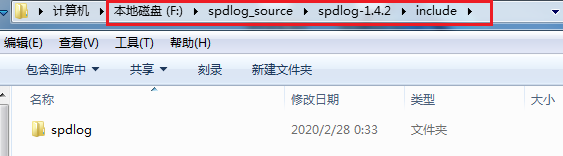
注意:include文件夹里是所需的头文件及源码。
(2)工程配置
2.1 新建一个C++控制台应用程序空项目spdlog
2.2 在项目属性页:VC++目录->包含目录 中添加上述include路径,如下图:
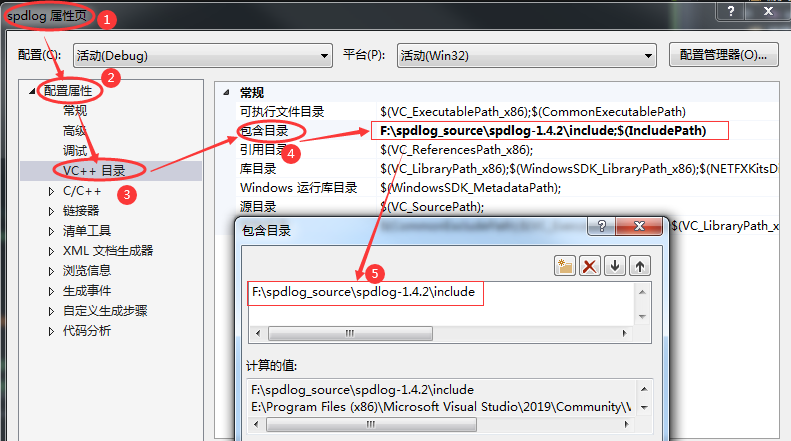
2.3 在项目中添加头文件即可,如下:
 #include "spdlog/spdlog.h"

 using namespace spdlog;
OK 请尽情享用。是的,没错,就是这么简单,你不用怀疑你自己。。。。
【4】应用示例
为了更权威、更有说服力,遂决定把源码包中的example示例贴出来(加了若干自己理解的信息)
应用示例如下:
 //

 // Copyright(c) 2015 Gabi Melman.

 // Distributed under the MIT License (http://opensource.org/licenses/MIT)

 // spdlog usage example

 #include <cstdio>

 // 标准输出类型

 void stdout_logger_example();

 // 基本类型:日志文件会一直被写入,不断变大。

 void basic_example();

 // 滚动类型:日志文件会先写入一个文件,当超出规定大小时,会备份(或删除)当前日志内容,重建文件开始写入。

 /* 说明:从函数声明可以看出,参数max_file_size规定了文件数量的最大值,当文件数量超过此值就会把最早的先清空。

 参数max_file_size规定了滚动文件的个数。当logger_name存满时,将其名称更改为logger_name.1,再新建一个logger_name文件来存储新的日志。

 再次存满时,把logger_name.1改名为logger_name.2,logger_name改名为logger_name.1,再新建一个logger_name来存放新的日志。

 以此类推,max_files 数量为几,就可以有几个logger_name文件用来滚动。

 */

 void rotating_example();

 // 每日类型:每天新建一个日志,新建日志文件时间可以自定义。

 void daily_example();

 // 异步模式类型

 void async_example();

 // 二进制类型

 void binary_example();

 // 追踪类型

 void trace_example();

 // 多汇入类型

 /* 带多接收器的记录器 - 每个接收器都有不同的格式和日志级别

 譬如,创建具有 2 个不同日志级别和格式的目标的记录器。

 控制台将仅显示警告或错误,而文件将记录所有。

 */

 void multi_sink_example();

 // 自定义类型

 void user_defined_example();

 // 错误处理类型

 /*

 自定义错误处理程序。将在日志失败时触发。

 可以全局设置或针对性设置

 */

 void err_handler_example();

 // 系统类型 (linux/osx/freebsd)

 void syslog_example();

 // 重点备注:

 // 日志实时写入接口:logger->flush();

 /*

 上述各种日志文件,仅在程序退出时才保存日志。

 如果要想在程序运行时也能够实时保存日志,可以在程序中添加如上语句。

 具体参见譬如166行的应用示例

 */

 #include "spdlog/spdlog.h"

 int main(int, char* [])

 {

     spdlog::info("Welcome to spdlog version {}.{}.{}  !", SPDLOG_VER_MAJOR, SPDLOG_VER_MINOR, SPDLOG_VER_PATCH);

     spdlog::warn("Easy padding in numbers like {:08d}", );

     spdlog::critical("Support for int: {0:d};  hex: {0:x};  oct: {0:o}; bin: {0:b}", );

     spdlog::info("Support for floats {:03.2f}", 1.23456);

     spdlog::info("Positional args are {1} {0}..", "too", "supported");

     spdlog::info("{:>8} aligned, {:<8} aligned", "right", "left");

     // Runtime log levels

     // 支持设置日志级别:低于设置级别的日志将不会被输出。各level排序详见源码,数值越大级别越高:

     /*

     enum level_enum

     {

         trace = SPDLOG_LEVEL_TRACE,

         debug = SPDLOG_LEVEL_DEBUG,

         info = SPDLOG_LEVEL_INFO,

         warn = SPDLOG_LEVEL_WARN,

         err = SPDLOG_LEVEL_ERROR,

         critical = SPDLOG_LEVEL_CRITICAL,

         off = SPDLOG_LEVEL_OFF,

     };

     */

     spdlog::set_level(spdlog::level::info); // Set global log level to info

     spdlog::debug("This message should not be displayed!");

     spdlog::set_level(spdlog::level::trace); // Set specific logger's log level

     spdlog::debug("This message should be displayed..");

     // Customize msg format for all loggers

     // 支持自定义日志格式

     spdlog::set_pattern("[%H:%M:%S %z] [%^%L%$] [thread %t] %v");

     spdlog::info("This an info message with custom format");

     spdlog::set_pattern("%+"); // back to default format

     spdlog::set_level(spdlog::level::info);

     // 支持回溯分析

     // Backtrace support

     // Loggers can store in a ring buffer all messages (including debug/trace) for later inspection.

     // When needed, call dump_backtrace() to see what happened:

     spdlog::enable_backtrace(); // create ring buffer with capacity of 10  messages

     for (int i = ; i < ; i++)

     {

         spdlog::debug("Backtrace message {}", i); // not logged.

     }

     // e.g. if some error happened:

     spdlog::dump_backtrace(); // log them now!

     try

     {

         stdout_logger_example();

         basic_example();

         rotating_example();

         daily_example();

         async_example();

         binary_example();

         multi_sink_example();

         user_defined_example();

         err_handler_example();

         trace_example();

         // Flush all *registered* loggers using a worker thread every 3 seconds.

         // note: registered loggers *must* be thread safe for this to work correctly!

         spdlog::flush_every(std::chrono::seconds());

         // Apply some function on all registered loggers

         spdlog::apply_all([&](std::shared_ptr<spdlog::logger> l) { l->info("End of example."); });

         // Release all spdlog resources, and drop all loggers in the registry.

         // This is optional (only mandatory if using windows + async log).

         spdlog::shutdown();

     }

     // Exceptions will only be thrown upon failed logger or sink construction (not during logging).

     catch (const spdlog::spdlog_ex & ex)

     {

         std::printf("Log initialization failed: %s\n", ex.what());

         return ;

     }

 }

 #include "spdlog/sinks/stdout_color_sinks.h"

 // or #include "spdlog/sinks/stdout_sinks.h" if no colors needed.

 void stdout_logger_example()

 {

     // Create color multi threaded logger.

     auto console = spdlog::stdout_color_mt("console");

     // or for stderr:

     // auto console = spdlog::stderr_color_mt("error-logger");

 }

 #include "spdlog/sinks/basic_file_sink.h"

 void basic_example()

 {

     // Create basic file logger (not rotated).

     auto my_logger = spdlog::basic_logger_mt("file_logger", "logs/basic-log.txt");

 }

 #include "spdlog/sinks/rotating_file_sink.h"

 void rotating_example()

 {

     // Create a file rotating logger with 5mb size max and 3 rotated files.

     auto rotating_logger = spdlog::rotating_logger_mt("some_logger_name", "logs/rotating.txt",  * , );

     int a = , b = ;

     rotating_logger->error("error!");

     rotating_logger->info("a = {}, b = {}, a/b = {}, a%b = {}", a, b, a / b, a % b);

     rotating_logger->flush();

 }

 #include "spdlog/sinks/daily_file_sink.h"

 void daily_example()

 {

     // Create a daily logger - a new file is created every day on 2:30am.

     auto daily_logger = spdlog::daily_logger_mt("daily_logger", "logs/daily.txt", , );

 }

 #include "spdlog/async.h"

 void async_example()

 {

     // Default thread pool settings can be modified *before* creating the async logger:

     // spdlog::init_thread_pool(32768, 1); // queue with max 32k items 1 backing thread.

     auto async_file = spdlog::basic_logger_mt<spdlog::async_factory>("async_file_logger", "logs/async_log.txt");

     // alternatively:

     // auto async_file = spdlog::create_async<spdlog::sinks::basic_file_sink_mt>("async_file_logger", "logs/async_log.txt");

     for (int i = ; i < ; ++i)

     {

         async_file->info("Async message #{}", i);

     }

 }

 // Log binary data as hex.

 // Many types of std::container<char> types can be used.

 // Iterator ranges are supported too.

 // Format flags:

 // {:X} - print in uppercase.

 // {:s} - don't separate each byte with space.

 // {:p} - don't print the position on each line start.

 // {:n} - don't split the output to lines.

 #include "spdlog/fmt/bin_to_hex.h"

 void binary_example()

 {

     std::vector<char> buf;

     for (int i = ; i < ; i++)

     {

         buf.push_back(static_cast<char>(i & 0xff));

     }

     spdlog::info("Binary example: {}", spdlog::to_hex(buf));

     spdlog::info("Another binary example:{:n}", spdlog::to_hex(std::begin(buf), std::begin(buf) + ));

     // more examples:

     // logger->info("uppercase: {:X}", spdlog::to_hex(buf));

     // logger->info("uppercase, no delimiters: {:Xs}", spdlog::to_hex(buf));

     // logger->info("uppercase, no delimiters, no position info: {:Xsp}", spdlog::to_hex(buf));

 }

 // Compile time log levels.

 // define SPDLOG_ACTIVE_LEVEL to required level (e.g. SPDLOG_LEVEL_TRACE)

 void trace_example()

 {

     // trace from default logger

     SPDLOG_TRACE("Some trace message.. {} ,{}", , 3.23);

     // debug from default logger

     SPDLOG_DEBUG("Some debug message.. {} ,{}", , 3.23);

     // trace from logger object

     auto logger = spdlog::get("file_logger");

     SPDLOG_LOGGER_TRACE(logger, "another trace message");

 }

 // A logger with multiple sinks (stdout and file) - each with a different format and log level.

 void multi_sink_example()

 {

     auto console_sink = std::make_shared<spdlog::sinks::stdout_color_sink_mt>();

     console_sink->set_level(spdlog::level::warn);

     console_sink->set_pattern("[multi_sink_example] [%^%l%$] %v");

     auto file_sink = std::make_shared<spdlog::sinks::basic_file_sink_mt>("logs/multisink.txt", true);

     file_sink->set_level(spdlog::level::trace);

     spdlog::logger logger("multi_sink", { console_sink, file_sink });

     logger.set_level(spdlog::level::debug);

     logger.warn("this should appear in both console and file");

     logger.info("this message should not appear in the console, only in the file");

 }

 // User defined types logging by implementing operator<<

 #include "spdlog/fmt/ostr.h" // must be included

 struct my_type

 {

     int i;

     template<typename OStream>

     friend OStream& operator<<(OStream& os, const my_type& c)

     {

         return os << "[my_type i=" << c.i << "]";

     }

 };

 void user_defined_example()

 {

     spdlog::info("user defined type: {}", my_type{  });

 }

 // Custom error handler. Will be triggered on log failure.

 void err_handler_example()

 {

     // can be set globally or per logger(logger->set_error_handler(..))

     spdlog::set_error_handler([](const std::string& msg) { printf("*** Custom log error handler: %s ***\n", msg.c_str()); });

 }

 // syslog example (linux/osx/freebsd)

 #ifndef _WIN32

 #include "spdlog/sinks/syslog_sink.h"

 void syslog_example()

 {

     std::string ident = "spdlog-example";

     auto syslog_logger = spdlog::syslog_logger_mt("syslog", ident, LOG_PID);

     syslog_logger->warn("This is warning that will end up in syslog.");

 }

 #endif

 // Android example.

 #if defined(__ANDROID__)

 #include "spdlog/sinks/android_sink.h"

 void android_example()

 {

     std::string tag = "spdlog-android";

     auto android_logger = spdlog::android_logger_mt("android", tag);

     android_logger->critical("Use \"adb shell logcat\" to view this message.");

 }

 #endif
good good study, day day up.
顺序 选择 循环 总结
C++ spdlog日志管理的更多相关文章
- 第13章 Linux日志管理
1. 日志管理 (1)简介 在CentOS 6.x中日志服务己经由rsyslogd取代了原先的syslogd服务.rsyslogd日志服务更加先进,功能更多.但是不论该服务的使用,还是日志文件的格式其 ...
- ABP(现代ASP.NET样板开发框架)系列之8、ABP日志管理
点这里进入ABP系列文章总目录 基于DDD的现代ASP.NET开发框架--ABP系列之8.ABP日志管理 ABP是“ASP.NET Boilerplate Project (ASP.NET样板项目)” ...
- 【Java EE 学习 76 下】【数据采集系统第八天】【通过AOP实现日志管理】【日志管理功能分析和初步实现】
一.日志管理相关分析 1.日志管理是一种典型的系统级别的应用,非常适合使用spring AOP实现. 2.使用日志管理的目的:对系统修改的动作进行记录,比如对权限.角色.用户的写操作.修改操作.删除操 ...
- ElasticSearch+NLog+Elmah实现Asp.Net分布式日志管理
本文将介绍使用NLOG.Elmah结合ElasticSearch实现分布式日志管理. 一.ElasticSearch简介 ElasticSearch是一个基于Lucene的搜索服务器.它提供了一个分布 ...
- Apache 日志管理,获取客户端端口号
日志管理分类 日志文件是用户管理和监控 Apache 安全的非常好的第一手资料,它清晰地记录了客户端访问 Apache 服务器资源的每一条记录,以及在访问中出现的错误信息,可以这样说,Apache 可 ...
- linux 学习 14 日志管理
第十四讲 日志管理 14.1 日志管理-简介 .日志服务 在CentOS .x中日志服务已经由rsyslogd取代了原先的syslogd服务.rsyslogd日志服务更加先进,功能更多.但是不论该服 ...
- SQL Server中的事务日志管理(7/9):处理日志过度增长
当一切正常时,没有必要特别留意什么是事务日志,它是如何工作的.你只要确保每个数据库都有正确的备份.当出现问题时,事务日志的理解对于采取修正操作是重要的,尤其在需要紧急恢复数据库到指定点时.这系列文章会 ...
- SQL Server中的事务日志管理(9/9):监控事务日志
当一切正常时,没有必要特别留意什么是事务日志,它是如何工作的.你只要确保每个数据库都有正确的备份.当出现问题时,事务日志的理解对于采取修正操作是重要的,尤其在需要紧急恢复数据库到指定点时.这系列文章会 ...
- 基于吉日嘎底层架构的Web端权限管理操作演示-日志管理
权限管理要实现的效果是对“ 谁”可以访问“什么内容”,可以进行“哪些操作” 一系列权限的精细化控制.衡量一个软件好坏的重要标准是:它的权限体系是否足够细致.是否可以立体勾勒出信息对象的访问控制.前面4 ...
随机推荐
- android studio 入门坑
安装 android studio,碰到下面这个图片,直接跳过. 安装时候,选择自定义设置,里面可以配置 sdk 的存放位置. 新建工程后,gradle sync 比较慢,可以 修改工程中的 buil ...
- JavaScript动态实现div窗口弹出&消失功能
先积累一个JavaScript动态实现div窗口弹出&消失功能 首先是index.jsp代码 <html> <head> <link rel="styl ...
- Web基础之Spring IoC
Spring之IoC 概念 IoC:Inversion of Control,中文通常翻译为"控制反转",它还有一个别名叫做依赖注入(Dependency Injection) ...
- Setup Factory删除TODO文件
s1= Shell.GetFolder(SHF_STARTMENUPROGRAMS);s2 = String.Concat(s1, "\\*\\TODO");//将*替换成项目名F ...
- c#实现"扫描检测硬件改动"
public static class Win32Api { public const int CM_LOCATE_DEVNODE_NORMAL = 0x00000000; public const ...
- 项目中常用的JS操作技巧
1.<a>标签-超链接中confirm方法使用介绍 <a href="a.html" onclick="if(confirm('确定删除?')==fal ...
- 3-Java逻辑控制语句
目录 Java选择结构 Java循环结构 return.break.continue Math.random()的使用和条件运算符 1.Java选择结构 1.1.if(布尔表达式)单选结构 - 当布尔 ...
- [转载]SQL Server 数据库定时自动备份
推荐使用SQLserver自带的SSMS工具创建维护计划来实现数据库定时自动备份 “维护计划”是在SSMS的对象资源管理中“管理”节点下面.使用维护计划可以通过可视化的操作,只点点鼠标就可以创建数据库 ...
- HTMLCSS学习
子选择器:第一代 .food>li{border:1px solid red;} 后代选择器:所有后代 .first span{color:red;} 通用选择器: ...
- goroutine简介
一.goroutine简介 Golang中最迷人的一个优点就是从语言层面就支持并发 在Golang中的goroutine(协程)类似于其他语言的线程 并发和并行 并行(parallelism)指不同的 ...