
cobbler的网页操作
需求:安装一台服务器
1.指定两块网卡一块外网一块内网2.内网ip10.0.0.62外网为172.16.1.623.主机名为m02
开始吧!

1.添加镜像文件
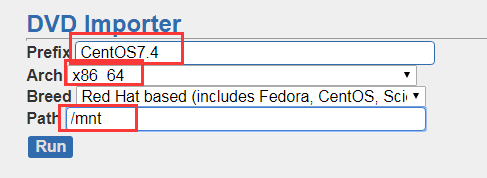
2.创建ks文件
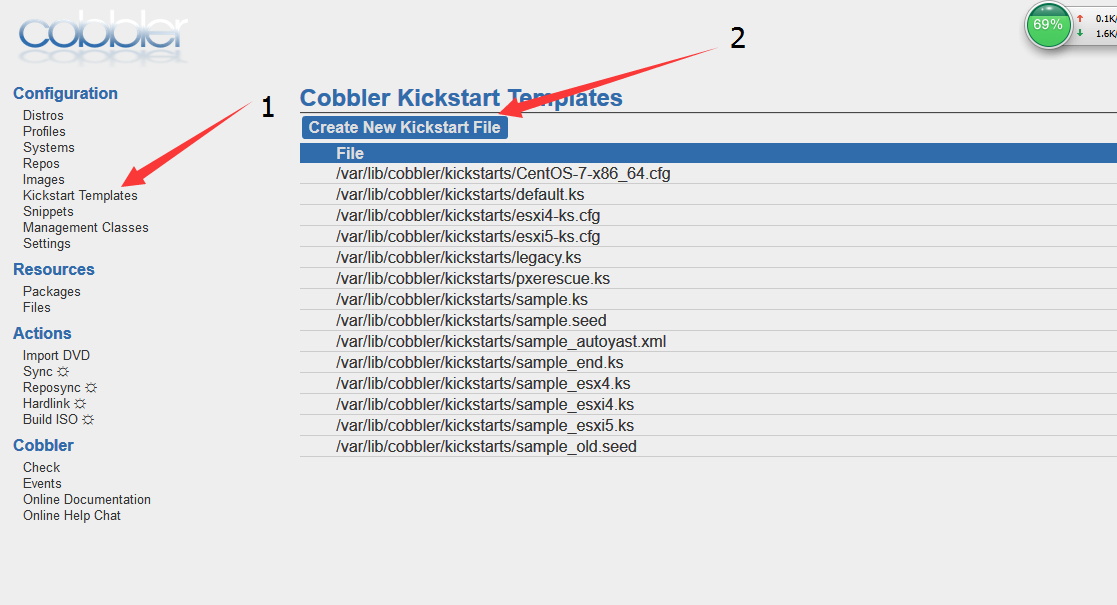
编写ks文件
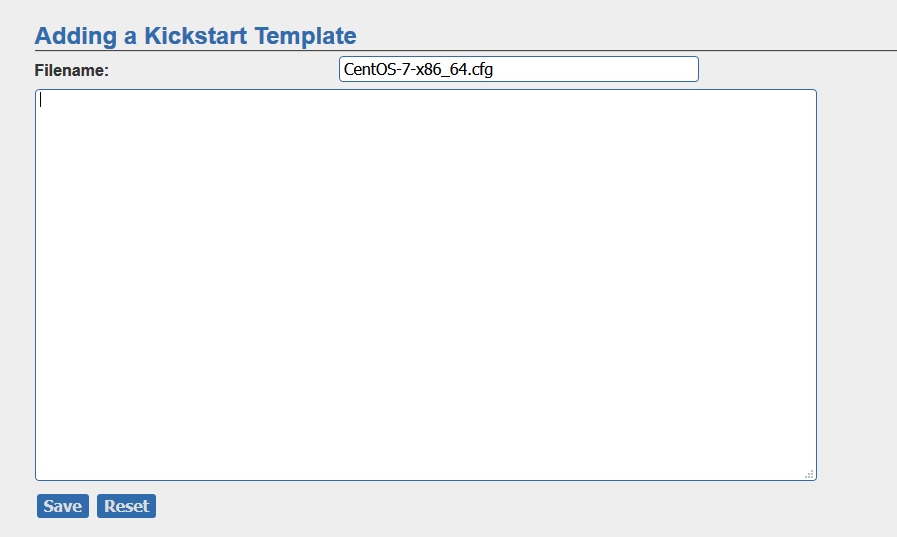
附:ks配置文件参考(centos7系列)
install

url --url=$tree

text

lang en_US.UTF-8

keyboard us

zerombr

bootloader --location=mbr --driveorder=sda --append="crashkernel=auto rhgb quiet"

#Network information

$SNIPPET('network_config')

#network --bootproto=dhcp --device=eth0 --onboot=yes --noipv6 --hostname=CentOS7

timezone --utc Asia/Shanghai

authconfig --enableshadow --passalgo=sha512

rootpw  --iscrypted $default_password_crypted

clearpart --all --initlabel

part /boot --fstype xfs --size 1024

part swap --size 1024

part / --fstype xfs --size 1 --grow

firstboot --disable

selinux --disabled

firewall --disabled

logging --level=info

reboot

%pre

$SNIPPET('log_ks_pre')

$SNIPPET('kickstart_start')

$SNIPPET('pre_install_network_config')

# Enable installation monitoring

$SNIPPET('pre_anamon')

%end

%packages

@^minimal

@compat-libraries

@core

@debugging

@development

bash-completion

chrony

dos2unix

kexec-tools

lrzsz

nmap

sysstat

telnet

tree

vim

wget

%end

%post

systemctl disable postfix.service

%end
centos6系列ks文件
install

url --url=$tree

text

lang en_US.UTF-8

keyboard us

zerombr

bootloader --location=mbr --driveorder=sda --append="crashkernel=auto rhgb quiet"

$SNIPPET('network_config')

timezone --utc Asia/Shanghai

authconfig --enableshadow --passalgo=sha512

rootpw  --iscrypted $default_password_crypted

clearpart --all --initlabel

part /boot --fstype=ext4 --asprimary --size=200

part swap --size=1024

part / --fstype=ext4 --grow --asprimary --size=200

firstboot --disable

selinux --disabled

firewall --disabled

logging --level=info

reboot

%pre

$SNIPPET('log_ks_pre')

$SNIPPET('kickstart_start')

$SNIPPET('pre_install_network_config')

# Enable installation monitoring

$SNIPPET('pre_anamon')

%end

%packages

@base

@compat-libraries

@debugging

@development

tree

nmap

sysstat

lrzsz

dos2unix

telnet

%end

%post --nochroot

$SNIPPET('log_ks_post_nochroot')

%end

%post

$SNIPPET('log_ks_post')

# Start yum configuration

$yum_config_stanza

# End yum configuration

$SNIPPET('post_install_kernel_options')

$SNIPPET('post_install_network_config')

$SNIPPET('func_register_if_enabled')

$SNIPPET('download_config_files')

$SNIPPET('koan_environment')

$SNIPPET('redhat_register')

$SNIPPET('cobbler_register')

# Enable post-install boot notification

$SNIPPET('post_anamon')

# Start final steps

$SNIPPET('kickstart_done')

# End final steps

%end
3.
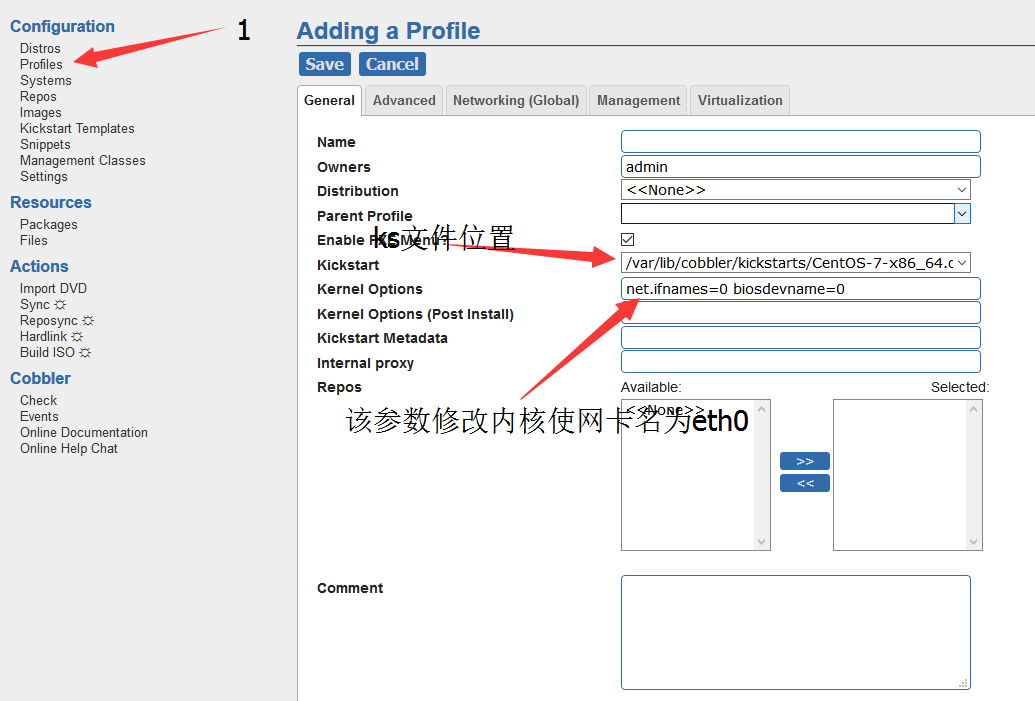
3.添加自定义模块
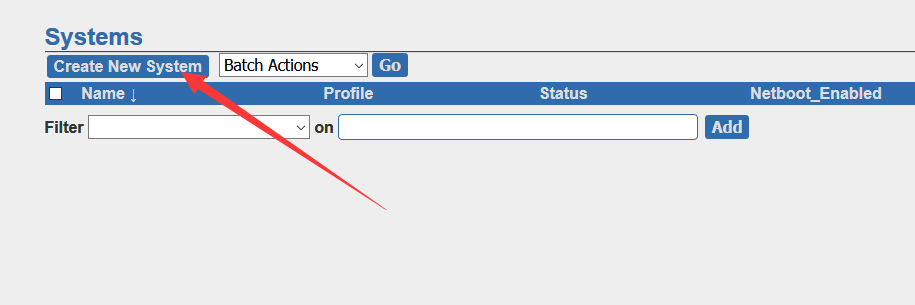
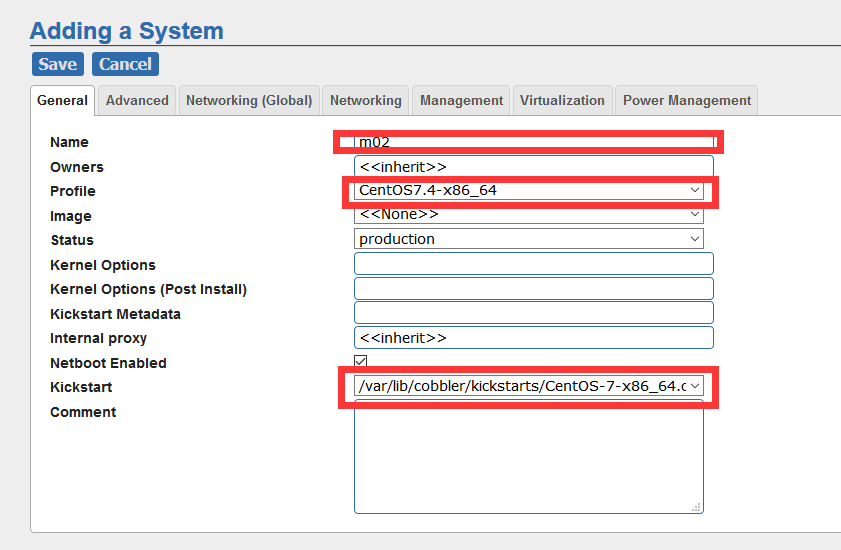
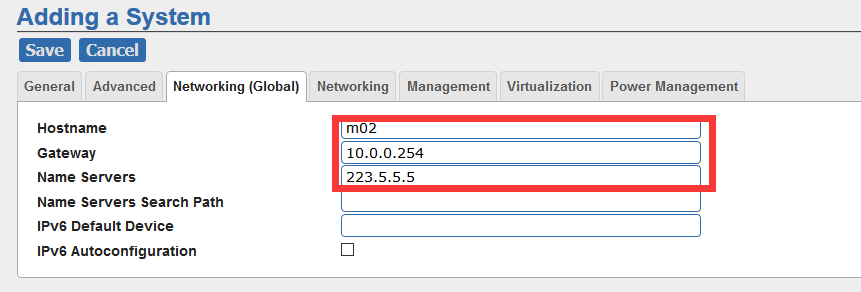
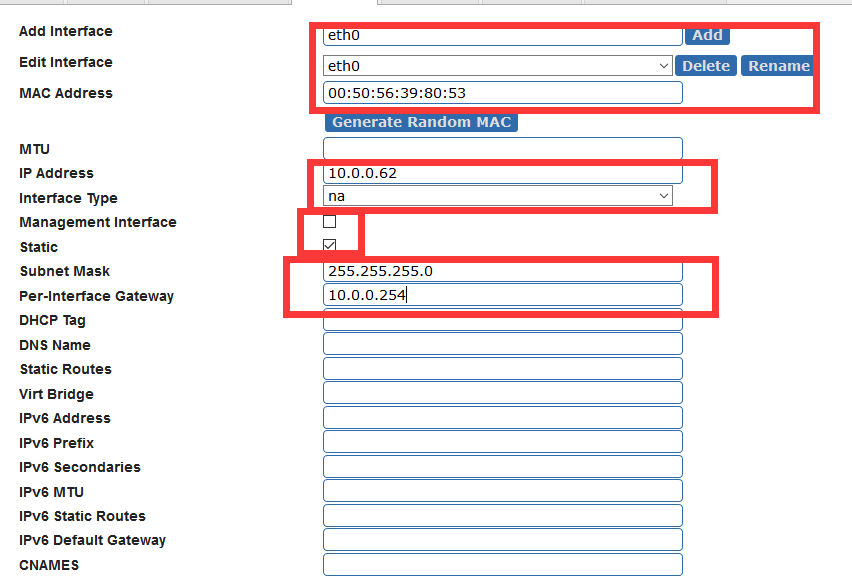
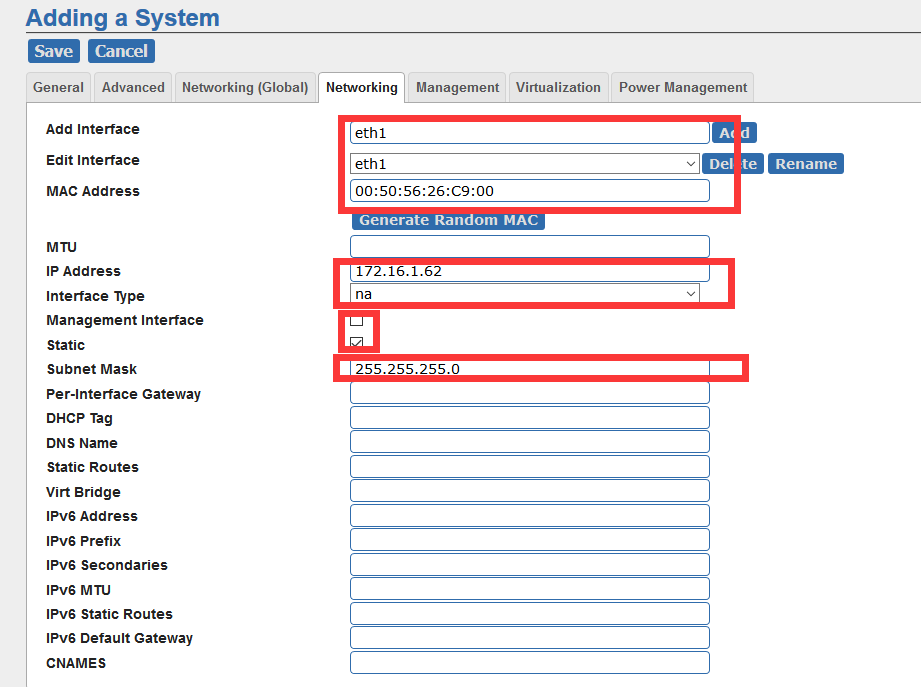
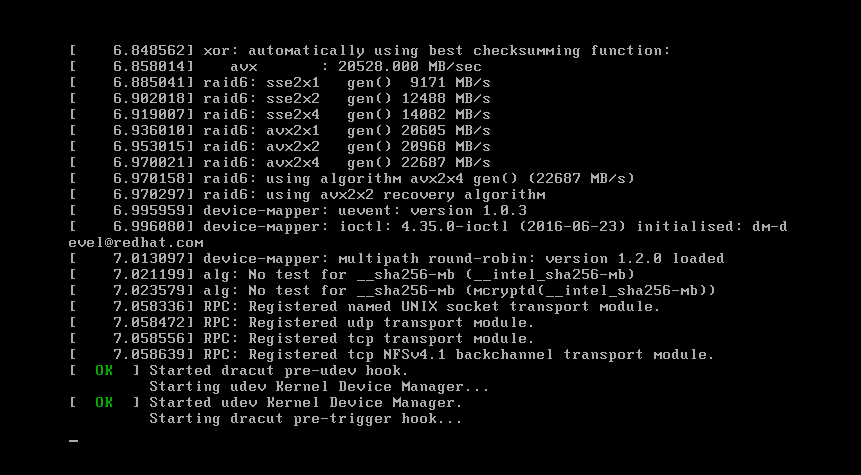
最后,打开服务器的电源
转载于:https://www.cnblogs.com/ExzaiTin/p/7840093.html
cobbler的网页操作的更多相关文章
- 【软件编程】乐易贵宾VIP教程 - JS改写+网页操作系列教程
JS改写系列教程: 1.MD5加密改写教程(爱拍网登录)2.解密如何快速找到真确的js加密算法3.多重MD5加密改写教程(5173登录)4.DZ论坛登录加密改写5.唯品会手机登录加密改写6.新浪微博密 ...
- WebBrowser网页操作之提取获取元素和标签(完整篇)
最近使用WebBrower做了几个Hook小程序,收集积累如下: using System; using System.Collections.Generic; using System.Linq; ...
- 解决boa网页操作出现502 Bad Gateway The CGI was not CGI/1.1 compliant的一种可能
最近在把一套网页操作的接口从原来Android5.0上移植到Android7.0上. 客户端连接验证的时候主页显示异常 502 Bad Gateway The CGI was not CGI/1.1 ...
- C# 引用SHDocVw 实现模拟网页操作
因为最近项目需要,所以接触到了网页爬取. 1. HttpWebRequest 初期接触的都是一些比较简单的网页,通过Fiddler抓包分析后,就能模拟进行http请求,进行想要的操作. 2. WebB ...
- cobbler批量安装操作
打开mirrors.aliyun.com/epel http://mirrors.aliyun.com/epel/epel-release-latest-6.noarch.rpm rpm -ivh h ...
- pandas网页操作基础
ipython notebook 命令行输入ipython notebook 此时,浏览器会自动运行并打开ipython网页 基本操作 如上图所示,新建一个项目 导入相关模块,建立一个数据集 制造数据 ...
- Burp Suite批量网页操作
1.打开md5解密网站,并输入“21232F297A57A5A743894A0E4A801FC3”,不要点击[Decrypt It!] 1.启动Burp Suite,并设置浏览器代理 3.点击[Dec ...
- 在WEB网页上模拟人的操作(批量操作)
思路:selenium IDE网页测试工具+firefox浏览器=>录制网页操作脚本->导出为Perl/python/Ruby/C/R等语言 参考: (1)selenium IDE网页测试 ...
- Selenium-IDE,在网页上模拟人的操作
想偷懒,不想做很机械重复的网页操作,就百度了一下看看有什么方法,能把自己从重复性的网页操作中解放出来,于是,百度到了selenium ide,折腾许久,用最新版火狐添加了自带selenium ide组 ...
随机推荐
- springboot actuator 配置安全
springboot actuator监控是什么?类似php的phpinfor()函数,不过actuator更强大,可以查看的数据.状态更多.Actuator是Spring Boot提供的对应用系统的 ...
- python-nmap 使用基础
前言 python-nmap是一个Python库,可帮助您使用nmap端口扫描程序.它可以轻松操纵nmap扫描结果,将是一个完美的选择想要自动执行扫描任务的系统管理员的工具和报告. 它还支持nmap脚 ...
- 微信小程序常用的方法(留着用)
function zero_fill_hex(num, digits) { let s = num.toString(16); while (s.length < digits) s = &qu ...
- 搭建DVWA Web渗透测试靶场
文章更新于:2020-04-13 按照惯例,需要的文件附上链接放在文首. 文件名:DVWA-1.9-2020.zip 文件大小:1.3 M 文件说明:这个是新版 v1.9 (其实是 v1.10开发版) ...
- Linux 文件管理篇(四 文件查找)
显示脚本文件或者命令的路径 which 显示档案的路径(数据库中查找,较快) ...
- Pytest系列(18)- 超美测试报告插件之allure-pytest的基础使用
如果你还想从头学起Pytest,可以看看这个系列的文章哦! https://www.cnblogs.com/poloyy/category/1690628.html 官方介绍 Allure Frame ...
- 关于SQLAlchemy ORM框架
SQLAlchemy 1.介绍 SQLAlchemy是一个基于Python实现的ORM框架.该框架建立在 DB API之上,使用关系对象映射进行数据库操作,简言之便是:将类和对象转换成SQL,然后使用 ...
- 在linux中使用mailx发送邮件
[root@ml ~]# yum -y install mailx #安装 [root@ml ~]# vim /etc/mail.rc 在最后一行添加(我这里使用的是qq邮箱): @qq.com ...
- AJ学IOS(55)多线程网络之图片下载框架之SDWebImage
AJ分享,必须精品 效果: 代码: - (NSArray *)apps { if (!_apps) { NSArray *dictArray = [NSArray arrayWithContentsO ...
- Python 小技之实现的鲜花盛宴,你准备好了吗?
前言 本文的文字及图片来源于网络,仅供学习.交流使用,不具有任何商业用途,版权归原作者所有,如有问题请及时联系我们以作处理. 作者:派森酱 PS:如有需要Python学习资料的小伙伴可以加点击下方链接 ...