
Android底部TabHost API
今天在项目中遇到了底部TabHost,顺便就写了一个底部TabHost的api继承即可使用非常简单,以下为源代码:
首先是自定义的TabHostActivity,如果要使用该TabHost继承该类即可
 package com.api;

 import android.app.TabActivity;

 import android.content.Intent;

 import android.os.Bundle;

 import android.view.LayoutInflater;

 import android.view.View;

 import android.widget.LinearLayout;

 import android.widget.TabHost;

 import android.widget.TabHost.OnTabChangeListener;

 import android.widget.TabHost.TabSpec;

 import android.widget.TabWidget;

 import android.widget.TextView;

 public abstract class TabHostActivity extends TabActivity {

     private TabHost mTabHost;

     private TabWidget mTabWidget;

     private LayoutInflater mLayoutflater;

     @Override

     protected void onCreate(Bundle savedInstanceState) {

         super.onCreate(savedInstanceState);

         // set theme because we do not want the shadow

         setTheme(R.style.Theme_Tabhost);

         setContentView(R.layout.api_tab_host);

         mLayoutflater = getLayoutInflater();

         mTabHost = getTabHost();

         mTabWidget = getTabWidget();

         //mTabWidget.setStripEnabled(false);    // need android2.2

         prepare();

         initTop();

         initTabSpec();

     }

     private void initTop() {

         View child = getTop();

         LinearLayout layout = (LinearLayout) findViewById(R.id.tab_top);

         layout.addView(child);

     }

     private void initTabSpec() {

         int count = getTabItemCount();

         for (int i = 0; i < count; i++) {

             // set text view

             View tabItem = mLayoutflater.inflate(R.layout.api_tab_item, null);

             TextView tvTabItem = (TextView) tabItem.findViewById(R.id.tab_item_tv);

             setTabItemTextView(tvTabItem, i);

             // set id

             String tabItemId = getTabItemId(i);

             // set tab spec

             TabSpec tabSpec = mTabHost.newTabSpec(tabItemId);

             tabSpec.setIndicator(tabItem);

             tabSpec.setContent(getTabItemIntent(i));

             mTabHost.addTab(tabSpec);

         }

     }

     /** 在初始化界面之前调用 */

     protected void prepare() {

         // do nothing or you override it

     }

     /** 自定义头部布局 */

     protected View getTop() {

         // do nothing or you override it

         return null;

     }

     protected int getTabCount() {

         return mTabHost.getTabWidget().getTabCount();

     }

     /** 设置TabItem的图标和标题等*/

     abstract protected void setTabItemTextView(TextView textView, int position);

     abstract protected String getTabItemId(int position);

     abstract protected Intent getTabItemIntent(int position);

     abstract protected int getTabItemCount();

     protected void setCurrentTab(int index) {

         mTabHost.setCurrentTab(index);

     }

     protected void focusCurrentTab(int index) {

         mTabWidget.focusCurrentTab(index);

     }

 }
需要再创建一个javabean TabItem
 package com.api.example.app;

 import android.content.Intent;

 public class TabItem {

     private String title;        // tab item title

     private int icon;            // tab item icon

     private int bg;            // tab item background

     private Intent intent;    // tab item intent

     public TabItem(String title, int icon, int bg, Intent intent) {

         super();

         this.title = title;

         this.icon = icon;

         this.bg = bg;

         this.intent = intent;

     }

     public String getTitle() {

         return title;

     }

     public void setTitle(String title) {

         this.title = title;

     }

     public int getIcon() {

         return icon;

     }

     public void setIcon(int icon) {

         this.icon = icon;

     }

     public int getBg() {

         return bg;

     }

     public void setBg(int bg) {

         this.bg = bg;

     }

     public Intent getIntent() {

         return intent;

     }

     public void setIntent(Intent intent) {

         this.intent = intent;

     }

 }
然后创建一个Activity继承上面的TabHostActivity即可使用该自定义的TabHost了
 package com.api.example.app;

 import java.util.ArrayList;

 import java.util.List;

 import android.content.Intent;

 import android.os.Bundle;

 import android.view.LayoutInflater;

 import android.view.View;

 import android.widget.TabWidget;

 import android.widget.TextView;

 import com.api.R;

 import com.api.TabHostActivity;

 /**

  * <p>整个流程就像使用ListView自定BaseAdapter一样</p>

  *

  * <p>如果要自定义TabHostActivity的Theme,并且不想要头部阴影

  * 一定要添加这个android:windowContentOverlay = null</p>

  *

  * <p>如果想在别的项目里面使用TabHostActivity

  * 可以项目的属性里面找到Android,然后在Library部分添加这个项目(Api)

  * <a href="http://www.cnblogs.com/qianxudetianxia/archive/2011/05/01/2030232.html">如何添加</a></p>

  * */

 public class ExampleActivity extends TabHostActivity {

     List<TabItem> mItems;

     private LayoutInflater mLayoutInflater;

     /**在初始化TabWidget前调用

      * 和TabWidget有关的必须在这里初始化*/

     @Override

     protected void prepare() {

         TabItem home = new TabItem(

                 "首页",                                    // title

                 R.drawable.icon_home,                    // icon

                 R.drawable.example_tab_item_bg,            // background

                 new Intent(this, Tab1Activity.class));    // intent

         TabItem info = new TabItem(

                 "资料",

                 R.drawable.icon_selfinfo,

                 R.drawable.example_tab_item_bg,

                 new Intent(this, Tab2Activity.class));

         TabItem msg = new TabItem(

                 "信息",

                 R.drawable.icon_meassage,

                 R.drawable.example_tab_item_bg,

                 new Intent(this, Tab3Activity.class));

         TabItem square = new TabItem(

                 "广场",

                 R.drawable.icon_square,

                 R.drawable.example_tab_item_bg,

                 new Intent(this, Tab4Activity.class));

         TabItem more = new TabItem(

                 "更多",

                 R.drawable.icon_more,

                 R.drawable.example_tab_item_bg,

                 new Intent(this, Tab5Activity.class));

         mItems = new ArrayList<TabItem>();

         mItems.add(home);

         mItems.add(info);

         mItems.add(msg);

         mItems.add(square);

         mItems.add(more);

         // 设置分割线

         TabWidget tabWidget = getTabWidget();

         tabWidget.setDividerDrawable(R.drawable.tab_divider);

         mLayoutInflater = getLayoutInflater();

     }

     @Override

     protected void onCreate(Bundle savedInstanceState) {

         super.onCreate(savedInstanceState);

         setCurrentTab(0);

     }

     /**tab的title,icon,边距设定等等*/

     @Override

     protected void setTabItemTextView(TextView textView, int position) {

         textView.setPadding(3, 3, 3, 3);

         textView.setText(mItems.get(position).getTitle());

         textView.setBackgroundResource(mItems.get(position).getBg());

         textView.setCompoundDrawablesWithIntrinsicBounds(0, mItems.get(position).getIcon(), 0, 0);

     }

     /**tab唯一的id*/

     @Override

     protected String getTabItemId(int position) {

         return mItems.get(position).getTitle();    // 我们使用title来作为id,你也可以自定

     }

     /**点击tab时触发的事件*/

     @Override

     protected Intent getTabItemIntent(int position) {

         return mItems.get(position).getIntent();

     }

     @Override

     protected int getTabItemCount() {

         return mItems.size();

     }

     /**自定义头部文件*/

     @Override

     protected View getTop() {

         return mLayoutInflater.inflate(R.layout.example_top, null);

     }

 }
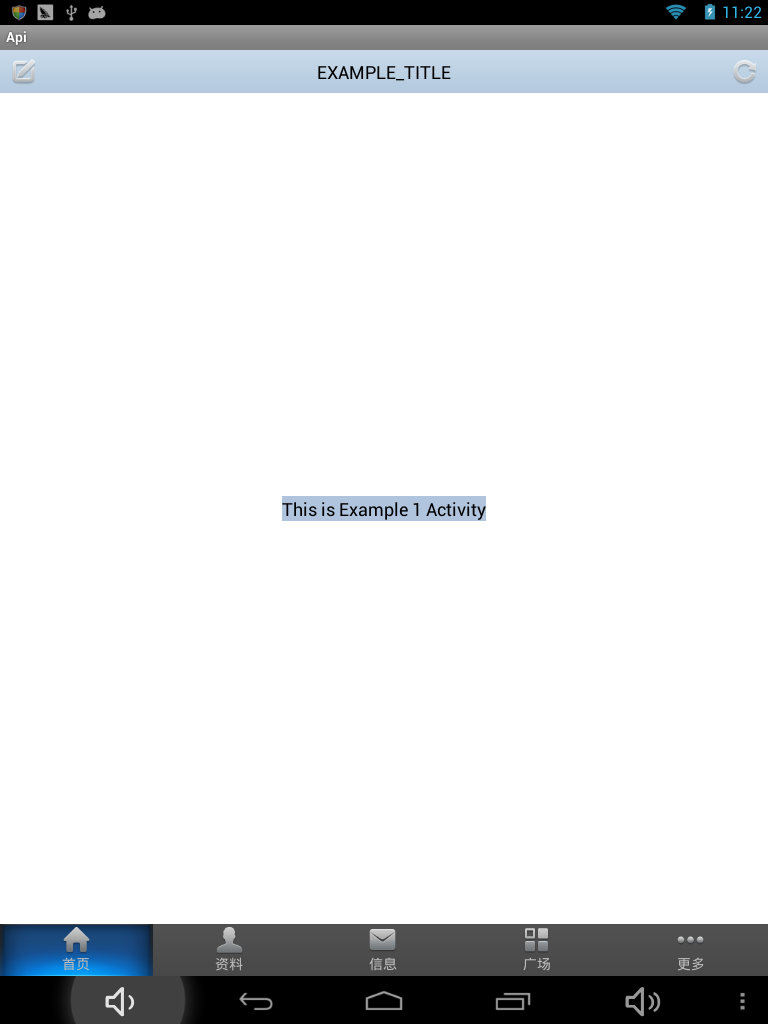
效果如下:
Android底部TabHost API的更多相关文章
- android之实现底部TabHost
先说布局文件,如下:利用android:layout_alignParentBottom="true" 实现底部显示 <?xml version="1.0" ...
- VS 2015 开发Android底部导航条----[实例代码,多图]
1.废话背景介绍 在Build 2016开发者大会上,微软宣布,Xamarin将被整合进所有版本的Visual Studio之中. 这也就是说,Xamarin将免费提供给所有购买了Visual ...
- android使用tabhost实现导航
参考 http://blog.csdn.net/xixinyan/article/details/6771341 http://blog.sina.com.cn/s/blog_6b04c8eb0101 ...
- Android底部导航栏
Android底部导航栏 今天简单写了一个底部导航栏,封装了一个库,用法比较简单 效果图 Github地址:https://github.com/kongqw/KqwBottomNavigation ...
- Android 底部TabActivity(1)——FragmentActivity
先看看效果图: 第一篇Tab系列的文章首先实现这样的风格的底部Tab:背景条颜色不变,我们是用了深灰的颜色,图标会发生对应的变化.当选中某个标签后该标签的背板会由正常的颜色变为不正常,哈哈,是变为加深 ...
- Android ViewPager+TabHost实现首页导航
今天发的是TabHost结合ViewPager实现首页底部导航的效果,虽然说网上有很多这样的Demo,不过呢,我还是要把自己练习写的发出来,没错!就是这么任性: 先上效果图,如下: 代码里面有注释,就 ...
- android中TabHost和RadioGroup
android底部菜单应用 博客分类: android--UI示例 TabHostMenuRadioGroupButton 在android中实现菜单功能有多种方法. Options Menu:用户 ...
- 从零開始学android<TabHost标签组件.二十九.>
TabHost主要特点是能够在一个窗体中显示多组标签栏的内容,在Android系统之中每一个标签栏就称为一个Tab.而包括这多个标签栏的容器就将其称为TabHost.TabHost类的继承结构例如以下 ...
- Android SDK之API Level
Android SDK之API Level Android SDK API_LEVEL Platform Version API Level VERSION_CODE Android 4.2, 4.2 ...
随机推荐
- Android自定义之TextView跑马灯的监听
TextView都有跑马灯的效果,如果说让你去监听跑马灯效果的执行,我觉得这个需求有点二了,但是也要实现. 思路: 1.自定义View 继承TextView 这种方法过于麻烦,只是监听一个跑马灯 ...
- Python - 利用pip管理包
下载与安装setuptools和pip https://pypi.python.org/packages/source/s/setuptoolshttps://pypi.python.org/pypi ...
- 设计师必备!免费下载 PSD 素材的32个网站
今天我想和大家分享一组可以免费下载 PSD 图形素材的最好的网站. PSD 文件是非常有用的资源,因为你可以看到所有的层,使用了什么技术来创建出这些作品和效果. 某些列出的网站可能已是众所周知的,但你 ...
- 如何拿到国内IT巨头的Offer
感觉写的很真实,分享一下.原文链接:http://jingyan.baidu.com/article/72ee561aa16d23e16138df3d.html 不久前,byvoid面阿里星计划的面试 ...
- MySQL安全问题(防范必知)
对于任何一种数据库来说,安全问题都是非常重要的.如果数据库出现安全漏洞,轻则数据被窃取,重则数据被破坏,这些后果对于一些重要的数据库都是非常严重的.下面来从操作系统和数据库两个层对MySQL的安全问题 ...
- web面试题大全
$HTML, HTTP,web综合问题 常见排序算法的时间复杂度,空间复杂度 前端需要注意哪些SEO web开发中会话跟踪的方法有哪些 <img>的title和alt有什么区别 docty ...
- C#设计模式——策略模式(Strategy Pattern)
一.概述我们来实现一个企业的工资系统,该企业中不同级别的员工工资算法都不相同,针对该问题,最容易想到的莫过于在代码中堆积一大堆if…else…语句或者是switch…case…语句.如果该企业中不同级 ...
- (转载)IO-同步、异步、阻塞、非阻塞
一.概述 同步(synchronous) IO和异步(asynchronous) IO,阻塞(blocking) IO和非阻塞(non-blocking)IO分别是什么,到底有什么区别?这个问题其实不 ...
- 转 PHP在JVM上的实现JPHP
前两天还在想,像Quercus只封装了PHP在Java上的Web接口,有没有实现了完整的JVM语言特性的东东,这不,来了. JPHP是一个面向Java虚拟机的PHP实现,支持PHP(5.3+)的很多特 ...
- [moka同学笔记]yii2.0查询数据库
一. [:id占位符]使用 $results = Test::findBySql($sql,array(':id'=>'1 or 1=1))->all() 二. [id=1] 选 ...