
DataBase: MySQL在.NET中的应用
首先需要下载MySQL:
1. 官方下载
dev.mysql.com/downloads/mysql/
2. 解压到你所想要安装的位置,在文件夹里创建my.ini文件
 [mysql]

 # 设置mysql客户端默认字符集

 default-character-set=gbk

 [mysqld]

 #设置3306端口

 port = 3306

 # 设置mysql的安装目录

 basedir=D:\mysql\mysql-5.6.17-winx64

 # 设置mysql数据库的数据的存放目录

 datadir=D:\mysql\mysql-5.6.17-winx64\data

 # 允许最大连接数

 max_connections=200

 # 服务端使用的字符集默认为8比特编码的latin1字符集

 character-set-server=gbk

 # 创建新表时将使用的默认存储引擎

 default-storage-engine=INNODB
这里要把路径改掉
3. 用管理员身份运行cmd.exe, 到bin文件里运行:mysqld install,在任务管理器的服务中开启mysql服务
4. 在cmd.exe中设置root密码:mysqladmin -u root -p password
5. 登录mysql:mysql -u root -p
6. 设置路径:将mysql所安装文件夹的bin路径加入
7. 可以用到的一些指令:show databases; show tables; describe [table]; source
8. 建议用下Navicat for mysql这个软件
在使用C#连mysql前需要下载.NET与mysql的连接器
http://dev.mysql.com/downloads/connector/net
一。数据读取
与MySQL进行数据读取的步骤是:
1. 连接数据源
2. 打开连接
3. 创建一个SQL查询命令
4. 用DataReader或者DataSet读取数据
5. 关闭连接
下面是以DataReader为例的数据读取
 using System;

 using System.Collections.Generic;

 using System.Linq;

 using System.Text;

 using MySql.Data;

 using MySql.Data.Entity;

 using MySql.Data.MySqlClient;

 using System.IO;

 namespace test4

 {

     class Program

     {

         static void Main(string[] args)

         {

             MySqlConnection con = new MySqlConnection("server=localhost; database=persons; uid=root; pwd=0000; connect timeout=30; pooling=true");

             con.Open();

             MySqlCommand cmd = new MySqlCommand("SELECT * FROM students", con);

             MySqlDataReader reader = cmd.ExecuteReader();

             while (reader.Read())

             {

                 Console.WriteLine("\t{0}\t{1}", reader["Name"], reader["Grade"]);

             }

             reader.Close();

             con.Close();

         }

     }

 }
下面是用DataSet来读取数据
 using System;

 using System.Collections.Generic;

 using System.Linq;

 using System.Text;

 using MySql.Data;

 using MySql.Data.Entity;

 using MySql.Data.MySqlClient;

 using System.IO;

 using System.Data;

 namespace test4

 {

     class Program

     {

         static void Main(string[] args)

         {

             MySqlConnection con = new MySqlConnection("server=localhost; database=persons; uid=root; pwd=0000; connect timeout=30; pooling=true");

             con.Open();

             MySqlDataAdapter adapter = new MySqlDataAdapter("SELECT * FROM students", con);

             DataSet ds = new DataSet();

             adapter.Fill(ds, "students");

             foreach (DataRow row in ds.Tables["students"].Rows)

             {

                 Console.WriteLine(row["Name"] + "\t" + row["Grade"]);

             }

             con.Close();

         }

     }

 }
一般我们偏向用DataSet来进行操作,因为数据更新用DataSet会更加方便
二。数据更新
不需要用SQL的update语句,直接用SqlCommandBuilder就可以更新数据库了
 using System;

 using System.Collections.Generic;

 using System.Linq;

 using System.Text;

 using MySql.Data;

 using MySql.Data.Entity;

 using MySql.Data.MySqlClient;

 using System.IO;

 using System.Data;

 namespace test4

 {

     class Program

     {

         static void Main(string[] args)

         {

             MySqlConnection con = new MySqlConnection("server=localhost; database=persons; uid=root; pwd=0000; connect timeout=30; pooling=true");

             con.Open();

             MySqlDataAdapter adapter = new MySqlDataAdapter("SELECT * FROM students", con);

             MySqlCommandBuilder builder = new MySqlCommandBuilder(adapter);

             DataSet ds = new DataSet();

             adapter.Fill(ds, "students");

             Console.WriteLine("Grade before change: {0}", ds.Tables["students"].Rows[]["Grade"]);

             ds.Tables["students"].Rows[]["Grade"] = "";

             adapter.Update(ds, "students");

             Console.WriteLine("Grade after change: {0}", ds.Tables["students"].Rows[]["Grade"]);

             con.Close();

         }

     }

 }
注意adapter.Update方法的datatable名字必须与前面的fill方法一致
增加一行,判断是不是已经存在了,if语句中为了保证Add()成功,必须在添加操作成功后马上调用Find()方法
 using System;

 using System.Collections.Generic;

 using System.Linq;

 using System.Text;

 using MySql.Data;

 using MySql.Data.Entity;

 using MySql.Data.MySqlClient;

 using System.IO;

 using System.Data;

 namespace test4

 {

     class Program

     {

         static void Main(string[] args)

         {

             MySqlConnection con = new MySqlConnection("server=localhost; database=persons; uid=root; pwd=0000; connect timeout=30; pooling=true");

             con.Open();

             MySqlDataAdapter adapter = new MySqlDataAdapter("SELECT * FROM students", con);

             MySqlCommandBuilder builder = new MySqlCommandBuilder(adapter);

             DataSet ds = new DataSet();

             adapter.Fill(ds, "students");

             Console.WriteLine("# rows before change: {0}", ds.Tables["students"].Rows.Count);

             DataColumn[] keys = new DataColumn[];

             keys[] = ds.Tables["students"].Columns["Name"];

             ds.Tables["students"].PrimaryKey = keys;

             DataRow findRow = ds.Tables["students"].Rows.Find("wangnaiyu");

             if (findRow == null)

             {

                 Console.WriteLine("wangnaiyu not found, will add to students table");

                 DataRow newRow = ds.Tables["students"].NewRow();

                 newRow["Name"] = "wangnaiyu";

                 newRow["Age"] = "";

                 newRow["Grade"] = "";

                 ds.Tables["students"].Rows.Add(newRow);

                 if ((findRow = ds.Tables["students"].Rows.Find("wangnaiyu")) != null)

                 {

                     Console.WriteLine("wangnaiyu successfully added to students table");

                 }

             }

             else

             {

                 Console.WriteLine("wangnaiyu already present in database");

             }

             adapter.Update(ds, "students");

             Console.WriteLine("# rows after change: {0}", ds.Tables["students"].Rows.Count);

             con.Close();

         }

     }

 }
删除行
 using System;

 using System.Collections.Generic;

 using System.Linq;

 using System.Text;

 using MySql.Data;

 using MySql.Data.Entity;

 using MySql.Data.MySqlClient;

 using System.IO;

 using System.Data;

 namespace test4

 {

     class Program

     {

         static void Main(string[] args)

         {

             MySqlConnection con = new MySqlConnection("server=localhost; database=persons; uid=root; pwd=0000; connect timeout=30; pooling=true");

             con.Open();

             MySqlDataAdapter adapter = new MySqlDataAdapter("SELECT * FROM students", con);

             MySqlCommandBuilder builder = new MySqlCommandBuilder(adapter);

             DataSet ds = new DataSet();

             adapter.Fill(ds, "students");

             Console.WriteLine("# rows before change: {0}", ds.Tables["students"].Rows.Count);

             DataColumn[] keys = new DataColumn[];

             keys[] = ds.Tables["students"].Columns["Name"];

             ds.Tables["students"].PrimaryKey = keys;

             DataRow findRow = ds.Tables["students"].Rows.Find("wangnaiyu");

             if (findRow != null)

             {

                 Console.WriteLine("wangnaiyu already in students table");

                 Console.WriteLine("Removing wangnaiyu ...");

                 findRow.Delete();

                 adapter.Update(ds, "students");

             }

             Console.WriteLine("# rows after change: {0}", ds.Tables["students"].Rows.Count);

             con.Close();

         }

     }

 }
访问多个表
这里用DataRelations类,DataSet建立关系是用DataSet.Relations.Add(DataRelation);的。而DataRelation的构造函数为DataRelation(string relationName, DataColumn parentColumn, DataColumn, childColumn);注意这里的父子关系不要弄错,父表中的一行对应子表中的多行,用DataRow.GetChildRows(DataRelation)可以得到的子表中对应的行DataRow[]。具体看下面的代码
 using System;

 using System.Collections.Generic;

 using System.Linq;

 using System.Text;

 using MySql.Data;

 using MySql.Data.Entity;

 using MySql.Data.MySqlClient;

 using System.IO;

 using System.Data;

 namespace test4

 {

     class Program

     {

         static void Main(string[] args)

         {

             MySqlConnection con = new MySqlConnection("server=localhost; database=persons; uid=root; pwd=0000; connect timeout=30; pooling=true");

             con.Open();

             MySqlDataAdapter stuAdapter = new MySqlDataAdapter("SELECT * FROM students", con);

             MySqlCommandBuilder stuBuilder = new MySqlCommandBuilder(stuAdapter);

             MySqlDataAdapter orderAdapter = new MySqlDataAdapter("SELECT * FROM Orders", con);

             MySqlCommandBuilder orderBuilder = new MySqlCommandBuilder(orderAdapter);

             DataSet ds = new DataSet();

             stuAdapter.Fill(ds, "students");

             orderAdapter.Fill(ds, "Orders");

             DataRelation stuOrderRel = ds.Relations.Add("StuOrders", ds.Tables["students"].Columns["Name"], ds.Tables["Orders"].Columns["Name"]);

             foreach (DataRow stuRow in ds.Tables["students"].Rows)

             {

                 Console.WriteLine("Student Name: " + stuRow["Name"] + " Age: " + stuRow["Age"] + " Grade: " + stuRow["Grade"]);

                 foreach (DataRow orderRow in stuRow.GetChildRows(stuOrderRel))

                 {

                     Console.WriteLine(" Order: " + orderRow["Order"]);

                 }

             }

             con.Close();

         }

     }

 }
如果要从子表中取得父表中的数据,可以通过GetParentRow()。
三。直接执行SQL命令
一般DataSet中存储的数据很大,如果操作不是很多,则用SQL命令来操作效率会快很多
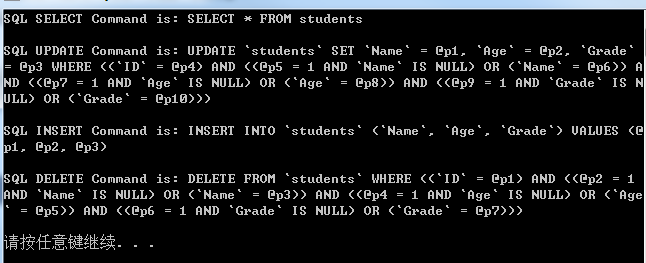
可以通过下面的程序看看SQL语句
 using System;

 using System.Collections.Generic;

 using System.Linq;

 using System.Text;

 using MySql.Data;

 using MySql.Data.Entity;

 using MySql.Data.MySqlClient;

 using System.IO;

 using System.Data;

 namespace test4

 {

     class Program

     {

         static void Main(string[] args)

         {

             MySqlConnection con = new MySqlConnection("server=localhost; database=persons; uid=root; pwd=0000; connect timeout=30; pooling=true");

             con.Open();

             MySqlDataAdapter adapter = new MySqlDataAdapter("SELECT * FROM students", con);

             MySqlCommandBuilder builder = new MySqlCommandBuilder(adapter);

             Console.WriteLine("SQL SELECT Command is: {0}\n", adapter.SelectCommand.CommandText);

             Console.WriteLine("SQL UPDATE Command is: {0}\n", builder.GetUpdateCommand().CommandText);

             Console.WriteLine("SQL INSERT Command is: {0}\n", builder.GetInsertCommand().CommandText);

             Console.WriteLine("SQL DELETE Command is: {0}\n", builder.GetDeleteCommand().CommandText);

             con.Close();

         }

     }

 }
ExecuteScalar返回的是结果
ExecuteNonQuery返回的是修改操作影响的行数
 using System;

 using System.Collections.Generic;

 using System.Linq;

 using System.Text;

 using MySql.Data;

 using MySql.Data.Entity;

 using MySql.Data.MySqlClient;

 using System.IO;

 using System.Data;

 namespace test4

 {

     class Program

     {

         static void Main(string[] args)

         {

             MySqlConnection con = new MySqlConnection("server=localhost; database=persons; uid=root; pwd=0000; connect timeout=30; pooling=true");

             con.Open();

             MySqlCommand cmd = new MySqlCommand("SELECT COUNT(*) FROM students", con);

             Object res = cmd.ExecuteScalar();

             Console.WriteLine("Count of students = {0}", res);

             cmd.CommandText = "UPDATE students SET Age = 29 WHERE Grade = 88";

             int rowsAffected = cmd.ExecuteNonQuery();

             Console.WriteLine("Rows Update = {0}", rowsAffected);

             con.Close();

         }

     }

 }
数据库的操作一般都需要加上异常机制,另外MySqlConnection也是一个需要关闭的类,用using可能会来得更方便些,在MySqlCommand语句里可以用@variable的方式增加变量,在后面用Command.Parameters来选择特定值。
 using System;

 using System.Collections.Generic;

 using System.Linq;

 using System.Text;

 using MySql.Data;

 using MySql.Data.Entity;

 using MySql.Data.MySqlClient;

 using System.IO;

 namespace MysqlTest

 {

     class Program

     {

         static void Main(string[] args)

         {

             using (MySqlConnection con = new MySqlConnection("server=localhost; database=persons; uid=root; pwd=0000; connect timeout=30; pooling=true"))

             {

                 MySqlCommand cmd = new MySqlCommand("SELECT * FROM students where Name = @Name", con);

                 try

                 {

                     con.Open();

                     cmd.Parameters.Add("@Name", MySqlDbType.VarChar);

                     cmd.Parameters["@Name"].Value = "yingzhongwen";

                     MySqlDataReader reader = cmd.ExecuteReader();

                     while (reader.Read())

                     {

                         Console.WriteLine("\t{0}\t{1}", reader["Name"], reader["Grade"]);

                     }

                     reader.Close();

                 }

                 catch (Exception ex)

                 {

                     Console.WriteLine(ex.Message);

                 }

             }

         }

     }

 }
Parameter的操作还可以这样:
MySqlParameter parameters = new MySqlParameter("@Name", MySqlDbType.VarChar);
parameters.Value = "yingzhongwen";
cmd.Parameters.Add(parameters);
DataBase: MySQL在.NET中的应用的更多相关文章
- MAC下 mysql不能插入中文和中文乱码的问题总结
MAC下 mysql不能插入中文和中文乱码的问题总结 前言 本文中所提到的问题解决方案,都是基于mac环境下的,但其他环境,比如windows应该也适用. 问题描述 本文解决下边两个问题: 往mysq ...
- mysql 5.7中的用户权限分配相关解读!
这篇文章主要介绍了MySQL中基本的用户和权限管理方法,包括各个权限所能操作的事务以及操作权限的一些常用命令语句,是MySQL入门学习中的基础知识,需要的朋友可以参考下 一.简介 各大帖子及文章都会讲 ...
- 在MySQL向表中插入中文时,出现:incorrect string value 错误
在MySQL向表中插入中文时,出现:incorrect string value 错误,是由于字符集不支持中文.解决办法是将字符集改为GBK,或UTF-8. 一.修改数据库的默认字符集 ...
- mysql安装过程中出现错误ERROR 1820 (HY000): You must SET PASSWORD before executing this statement解决
mysql安装过程中出现错误ERROR 1820 (HY000): You must SET PASSWORD before executing this statement解决 最近新装好的my ...
- Mysql - 解决Access denied for user ''@'localhost' to database 'mysql'问题
http://361324767.blog.163.com/blog/static/11490252520124454042468/ 首先我想说一句话: 我极度鄙视国内搞IT的人,简直无语,同样是解决 ...
- Database(Mysql)发版控制二
author:skate time:2014/08/18 Database(Mysql)发版控制 The Liquibase Tool related Database 一.Installation ...
- MySQL:ERROR 1044 (42000): Access denied for user ''@'localhost' to database 'mysql'
ERROR 1044 (42000): Access denied for user ''@'localhost' to database 'mysql'. 原因是:mysql数据库的user表里,存 ...
- MySQL:windows中困扰着我们的中文乱码问题
前言:什么是mysql中的中文乱码问题? 话不多说,直接上图 这个东西困扰了我好久,导致我现在对windows映像非常不好,所以就想改成Linux,行了,牢骚就发到这里,直接说问题,明眼人一眼就看出来 ...
- 涂抹mysql笔记-数据库中的权限体系
涂抹mysql笔记-数据库中的权限体系<>能不能连接,主机名是否匹配.登陆使用的用户名和密码是否正确.mysql验证用户需要检查3项值:用户名.密码和主机来源(user.password. ...
随机推荐
- 【转】android中最好的瀑布流控件PinterestLikeAdapterView
[源地址]http://www.jcodecraeer.com/a/anzhuokaifa/androidkaifa/2014/0919/1696.html 之前我们介绍过一个开源的瀑布流控件Stag ...
- trunc sysdate
select * from per_all_people_f papf where trunc(sysdate) between trunc(papf.effective_start_date) a ...
- 基于ace后台管理系统模板--CMS(Thinkphp框架)的筹划
临近春节,准备自己做一个关于宠物的cms网站,特写下此博客提醒自己,尽量争取在过年前做好.废号少说,先梳理下接下来准备使用的工具.. 由于最近在学习thinkphp,所以打算用这个框架来作为主体,可能 ...
- final关键字+const关键字
final关键字 1.如果我们希望某个类不被其它的类来继承(可能因为安全考虑),可以使用final. 例题 <? final class A{} class B extends A{};//会报 ...
- WGZX:javaScript 学习心得--2
转贴javascript心得(二) 标签: javascriptajaxweb开发htmlfirefox框架 2008-09-11 10:56 636人阅读 评论(0) 收藏 举报 分类: UI(2 ...
- Android源码剖析之Framework层基础版(窗口、linux、token、Binder)
本文来自http://blog.csdn.net/liuxian13183/ ,引用必须注明出处! 关于Framework,就是应用层底下的控制层,离应用层最近,总想找个机会,写写WindowMang ...
- AutoHotKey使用:空格键坏了怎么办?
;RCtrl:: RAlt:: Send, {space} Return http://ahkscript.org/ https://autohotkey.com/download/
- 转:自定义ASP.NET MVC Html辅助方法
在ASP.NET MVC中,Html辅助方法给我们程序员带来很多方便,其重要性也就不言自明.有时候,我们不想重复地写一些HTML代码,或者MS没有提供我们想要的那个HTML标签的Html辅助方法,那么 ...
- sell-- 英文网站产品显示404?
1. 简介: 通过在主页(header.jsp)查询B22212,在localhost本地, cn和us查询的结果search.jsp中显示都是没有找到! 但是在外网(www),cn能够查询到,并展示 ...
- .NET基础加强,找工作之前可以看看这些............
.NET基础知识加强: 1 变量命名规则:骆驼命名法:第一个字母小写之后的首字母大写,[对于方法名和类名首字母大写]→培养良好的命名规范. 2 构造函数:没有返回值,方法名和类名相同,每个类中都有 ...