
跨域名 Cookie 传递测试
问题
我打开了 www.aaa.com 里面的一个页面(www.aaa.com/hello.php),其中这个 hello.php 里面包含一个 <img> 标签,里面的 src 来自于 www.bbb.com/get.php。
请问如果我已经在 aaa.com 里面登录了,那么访问 hello.php 时会不会把 cookie 发送给 www.bbb.com/get.php ?
实战
没有什么比实战测试更有说服力了!
新建 2 个独立的站点 A,B , 分别对应域名 aaa.com , bbb.com,其中在 A 里面制作一个登录功能,并且还有一直图片引用 bbb.com,登录后 aaa.com 会写入 cookie 到客户端,观察登录前后 bbb.com 是否能获取到 aaa.com 里面的 cookie。
1. A 站点的前台代码:
<%@ Page Language="C#" AutoEventWireup="true" CodeBehind="default.aspx.cs" Inherits="CrossSiteCookieDemo_SiteA.WebUI.index" %> <!DOCTYPE html> <html xmlns="http://www.w3.org/1999/xhtml">
<head runat="server">
<meta http-equiv="Content-Type" content="text/html; charset=utf-8"/>
<title></title>
</head>
<body>
<form id="form1" runat="server">
<div>
<h1>跨域名 Cookie 传递测试</h1>
</div>
<br /><br />
<asp:Panel ID="pnLogin" runat="server" Visible="true">
用户名:<asp:TextBox ID="txtUserName" runat="server"></asp:TextBox>
密码:<asp:TextBox ID="txtPassword" runat="server"></asp:TextBox>
<asp:Button ID="btnLogin" runat="server" Text="登录" OnClick="btnLogin_Click"/>
</asp:Panel> <asp:Panel ID="pnWelcomeInfo" runat="server" Visible="false">
欢迎您,<asp:Literal ID="ltShowUserName" runat="server" EnableViewState="false"/>
<asp:Button ID="btnLogout" runat="server" Text="注销" OnClick="btnLogout_Click" />
</asp:Panel> <br /><br />
图片(这个图片是另一个域名下的图片):
<img alt="这个图片是另一个域名下的图片" title="这个图片是另一个域名下的图片" src="http://www.bbb.com/index.ashx" />
<br /><br />
<div>
<asp:Label ID="lblMessage" runat="server" EnableViewState="false"></asp:Label>
</div>
<br /><br />
</form>
</body>
</html>
2. A 站点的后台代码:
using System;

using System.Collections.Generic;

using System.Linq;

using System.Web;

using System.Web.UI;

using System.Web.UI.WebControls;

namespace CrossSiteCookieDemo_SiteA.WebUI

{

    public partial class index : System.Web.UI.Page

    {

        protected void Page_Load(object sender, EventArgs e)

        {

            if(!IsPostBack)

            {

                InitData();

            }

        }

        protected void InitData()

        {

            HttpCookie accountCookie = Request.Cookies["root_account_info"];

            if (accountCookie != null)

            {

                this.pnWelcomeInfo.Visible = true;

                this.pnLogin.Visible = false;

                this.ltShowUserName.Text = HttpUtility.UrlDecode(accountCookie["username"]);

            }

        }

        protected void btnLogin_Click(object sender, EventArgs e)

        {

            string userName = this.txtUserName.Text.Trim();

            string password = this.txtPassword.Text.Trim();

            if (string.IsNullOrEmpty(userName))

            {

                this.lblMessage.Text = "用户名不能为空!";

                this.lblMessage.ForeColor = System.Drawing.Color.Red;

                return;

            }

            if (string.IsNullOrEmpty(password))

            {

                this.lblMessage.Text = "密码不能为空!";

                this.lblMessage.ForeColor = System.Drawing.Color.Red;

                return;

            }

            HttpCookie accountCookie = new HttpCookie("root_account_info");

            accountCookie.Expires = DateTime.Now.AddDays(1d);

            accountCookie["username"] = HttpUtility.UrlEncode(userName); // 仅仅为了测试,省略了加密

            accountCookie["password"] = HttpUtility.UrlEncode(password); // 仅仅为了测试,省略了加密

            Response.AppendCookie(accountCookie);

            HttpCookie loginStatCookie = Request.Cookies["root_login_stat_info"];

            if (loginStatCookie == null)

            {

                loginStatCookie = new HttpCookie("root_login_stat_info");

                loginStatCookie.Expires = DateTime.Now.AddYears();

                loginStatCookie["firstLoginTime"] = HttpUtility.UrlEncode(DateTime.Now.ToString("yyyyMMddHHmmss")); // 仅仅为了测试,省略了加密

                loginStatCookie["LoginCount"] = "";

            }

            else

            {

                string loginCountStr = loginStatCookie["LoginCount"];

                int loginCount;

                int.TryParse(loginCountStr, out loginCount);

                loginCount++;

                loginStatCookie["LoginCount"] = loginCount.ToString();

            }

            loginStatCookie["lastLoginTime"] = HttpUtility.UrlEncode(DateTime.Now.ToString("yyyyMMddHHmmss")); // 仅仅为了测试,省略了加密

            Response.AppendCookie(loginStatCookie);

            this.pnWelcomeInfo.Visible = true;

            this.pnLogin.Visible = false;

            this.ltShowUserName.Text = userName;

        }

        protected void btnLogout_Click(object sender, EventArgs e)

        {

            HttpCookie accountCookie = Request.Cookies["root_account_info"];

            if (accountCookie != null)

            {

                accountCookie.Expires = DateTime.Now.AddYears(-);

                Response.AppendCookie(accountCookie);

            }

            this.pnWelcomeInfo.Visible = false;

            this.pnLogin.Visible = true;

            this.ltShowUserName.Text = string.Empty;

        }

    }

}
3. B 站点的处理程序代码:
using System;

using System.Collections.Generic;

using System.Linq;

using System.Web;

using System.Text;

namespace CrossSiteCookieDemo_SiteB.WebUI

{

    /// <summary>

    /// index 的摘要说明

    /// </summary>

    public class index : IHttpHandler

    {

        public void ProcessRequest(HttpContext context)

        {

            string cookieContent = new string('=', ) + "时间:" + DateTime.Now.ToString("yyyy-MM-dd HH:mm:ss") + new string('=', ) + "\r\n\r\n";

            StringBuilder sbAppend = new StringBuilder();

            foreach (HttpCookie cookieItem in context.Request.Cookies)

            {

                sbAppend.Append("cookieName: " + cookieItem.Name + "\r\n");

                sbAppend.Append("cookieValue: \r\n");

                if(cookieItem.Values != null && cookieItem.Values.AllKeys != null && cookieItem.Values.AllKeys.Length > )

                {

                    foreach (string childCookieKey in cookieItem.Values.AllKeys)

                    {

                        sbAppend.AppendFormat(new string(' ', ) + "{0}: {1} \r\n", childCookieKey, cookieItem.Values[childCookieKey]);

                    }

                }

            }

            cookieContent += sbAppend.ToString();

            System.IO.File.AppendAllText(System.Web.Hosting.HostingEnvironment.MapPath("~/log/cookie.log"), cookieContent, System.Text.Encoding.UTF8);

            context.Response.ContentType = "image/jpeg";

            context.Response.TransmitFile(System.Web.Hosting.HostingEnvironment.MapPath("~/images/01.jpg"));

        }

        public bool IsReusable

        {

            get

            {

                return false;

            }

        }

    }

}
4. 运行截图:
01

02

03

04

05
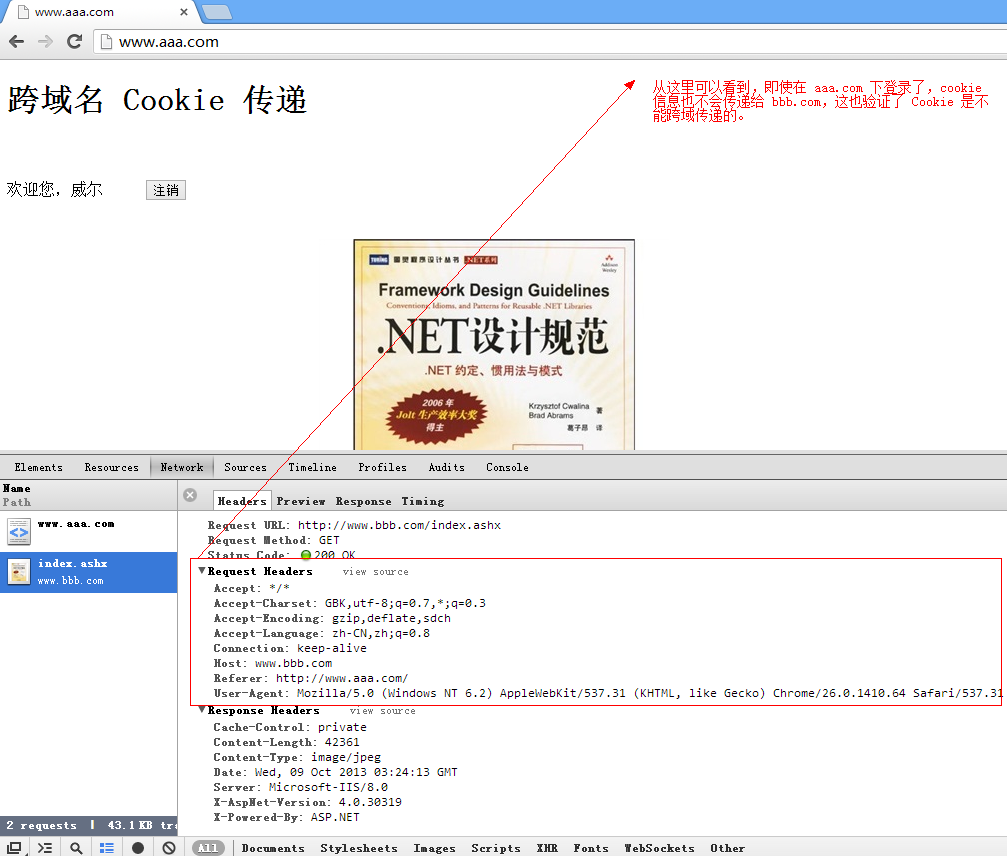
结论:跨域 Cookie 是无法传递的,浏览器会阻止!
谢谢浏览!
跨域名 Cookie 传递测试的更多相关文章
- CORS跨域cookie传递
服务端 Access-Control-Allow-Credentials:true Access-Control-Allow-Methods:* Access-Control-Allow-Origin ...
- CORS跨域、Cookie传递SessionID实现单点登录后的权限认证的移动端兼容性测试报告
简述 本文仅记录如标题所述场景的测试所得,由于场景有些特殊,且并不需兼容所有浏览器,所以本文的内容对读者也许并无作用,仅为记录. 场景.与实现 需在移动端单点登录 需在移动端跨域访问我们的服务 基于历 ...
- 跨域请求传递Cookie问题
问题描述 前后端完全分离的项目,前端使用Vue + axios,后端使用SpringMVC,容器为Tomcat. 使用CORS协议解决跨域访问数据限制的问题,但是发现客户端的Ajax请求不会自动带上服 ...
- cookie的使用以及cookie的跨域名获取
cookie存放容量4k左右,可设置过期时间. 1.cookie的封装使用 //设置cookies function setCookie(name, value) { var Days = 30; v ...
- 关于vue跨域名对接微信授权认证和APP授权认证
这种情况一般也只会出现在前后端分离,跨域名授权的时候吧.耗费了一个前端+一个后台+一个网关,熬夜通宵了两天才整出来一套方法(你们见过凌晨6点的杭州吗,对,我下班的时候天黑了,到家天亮了....),和开 ...
- iframe跨域数据传递
项目中需要和其他单位合作开发,方案采用iframe嵌入页面,开发过程中设计到了跨域数据的传递,初步方案决定使用html5 API postMessage进行iframe跨域数据传递: 域名A下的页面 ...
- Jmeter(五十二) - 从入门到精通高级篇 - jmeter之跨线程组传递参数(详解教程)
1.简介 之前分享的所有文章都是只有一个线程组,而且参数的传递也只在一个线程组中,那么如果需要在两个线程组中传递参数,我们怎么做呢?宏哥今天就给小伙伴或者童鞋们讲解一下,如何实现在线程组之间传递参数. ...
- JavaScript创建读取cookie代码示例【附:跨域cookie解决办法】
使用JavaScript 原生存取cookie代码示例: var cookie = { set : function(name, value, expires, path, domain, secur ...
- session跨域和ajax跨域名
后台跨域和ajax跨域名: 后台跨域: www.baidu.com 主域名(一级域名一般以www开头) news.baidu.com 二级域名 (a.test.com和b.test.com有相 ...
随机推荐
- Struts2学习笔记-jsp中引用struts2框架
如果在jsp中需要引用struts2 框架,需在前面加上以下内容 <%@taglib prefix="s" uri="/struts-tags" %> ...
- android: open failed: EACCES (Permission denied)
1. 问题描述:在Android中,用程序访问Sdcard时,有时出现“java.io.IOException: open failed: EACCES (Permission denied)&qu ...
- java项目中读取properties文件
这里的配置文件都放在src下面, System.properties的内容 exceptionMapping=exceptionMapping.properties config=config.pro ...
- ECSHOP会员登录后直接进用户中心
ECSHOP系统在会员登录成功后,不是直接进入用户中心,而是跳转回了上一个页面或者是跳转到了首页. 注意:这里说的是,用户没有主动点击前往哪个页面,让系统自动跳转. 那如何让会员登录成功后自动进入“用 ...
- CGI、FastCGI 知识总结
@import url(http://i.cnblogs.com/Load.ashx?type=style&file=SyntaxHighlighter.css);@import url(/c ...
- [JS Compose] 0. Understand 'Box' or 'Container', they are just like Array!
We'll examine how to unnest function calls, capture assignment, and create a linear data flow with a ...
- pod 出错备忘
pod install #输出信息 /System/Library/Frameworks/Ruby.framework/Versions/2.0/usr/lib/ruby/2.0.0/rubygems ...
- iOS WKWebView详解
UIWebView就不用说了,这个过时了,现在iOS8以后建议都使用WKWebView. WKWebView 是现代 WebKit API 在 iOS 8 和 OS X Yosemite 应用中的核心 ...
- Linux和UNIX监控
Linux和UNIX上的数据库监控工具包括监控CPU.内存.磁盘.网络.安全性和用户的监控工具.下面罗列了我们找到的有用工具及其简单描述. ps 显示系统上运行的进程列表 top ...
- Oracle导入dmp备份文件到不同的表空间中
原文链接:http://www.2cto.com/database/201211/171081.html 将DMP导入到不同的表空间中 1,用imp导出数据 cmd进入orcle安装目录bin下 ...