
MyBatis+springMVC+easyUI (dataGirl)实现分页
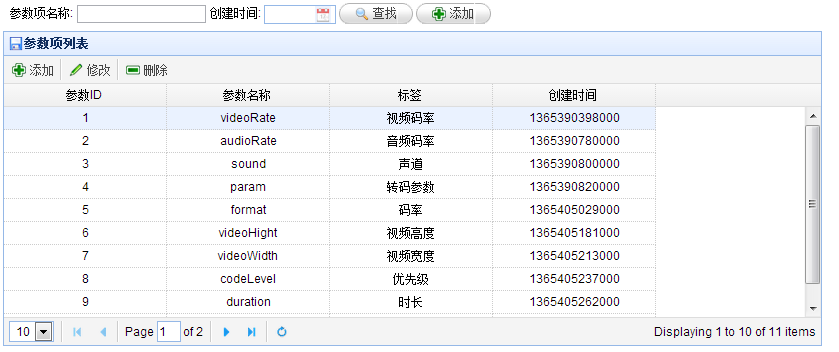
页面展示效果。
页面代码:
- <%@ page contentType="text/html;charset=UTF-8" language="java" %>
- <%@include file="/common/common.jsp" %>
- <html>
- <head>
- <title></title>
- </head>
- <body>
- <h2>样片库管理</h2>
- <div style="padding:8px;height:auto">
- 参数项名称: <input class="easyui-validatebox" type="text" name="name" data-options="required:true">
- 创建时间: <input class="easyui-datebox" name="createTime" style="width:80px">
- <a href="#" class="easyui-linkbutton" iconCls="icon-search">查找</a>
- <a href="#" class="easyui-linkbutton" data-options="iconCls:'icon-add'">添加</a>
- </div>
- <table id="tt" class="easyui-datagrid" style="width:910px;height:350px"
- title="参数项列表" iconCls="icon-save"
- rownumbers="false" pagination="true">
- </table>
- <script type="text/javascript">
- $('#tt').datagrid({
- title: "参数项列表",
- url: '/getAllParam',
- pageSize:5,
- columns: [
- [
- {field: 'paramId', title: '参数ID', width: 180, align: "center"},
- {field: 'paramName', title: '参数名称', width: 180, align: "center"},
- {field: 'paramLabel', title: '标签', width: 180, align: 'center'},
- {field: 'createTime', title: '创建时间', width: 180, align: "center"}
- ]
- ], toolbar: [
- {
- text: '添加',
- iconCls: 'icon-add',
- handler: function () {
- openDialog("add_dialog", "add");
- }
- },
- '-',
- {
- text: '修改',
- iconCls: 'icon-edit',
- handler: function () {
- openDialog("add_dialog", "edit");
- }
- },
- '-',
- {
- text: '删除',
- iconCls: 'icon-remove',
- handler: function () {
- delAppInfo();
- }
- }
- ]
- });
- //设置分页控件
- var p = $('#tt').datagrid('getPager');
- p.pagination({
- pageSize: 5,//每页显示的记录条数,默认为10
- pageList: [5, 10, 15],//可以设置每页记录条数的列表
- beforePageText: '第',//页数文本框前显示的汉字
- afterPageText: '页 共 {pages} 页',
- displayMsg: '当前显示 {from} - {to} 条记录 共 {total} 条记录'
- });
- </script>
- </body>
- </html>
mapper.xml
- <!-- 分页查询-->
- <select id="selectAllPage" resultMap="BaseResultMap" parameterType="java.util.Map" >
- select
- <include refid="Base_Column_List"/>
- from param_item
- <include refid="Example_Where_Clause"/>
- limit #{pageIndex},#{pageSize}
- </select>
controller方法
- @RequestMapping(value = "getAllParam")
- public void getAllParam(HttpServletRequest request, HttpServletResponse response,
- @RequestParam(required = false, defaultValue = "1") Integer page, //第几页
- @RequestParam(required = false, defaultValue = "10") Integer rows, //页数大小
- @RequestParam(required = false, defaultValue = "") String paramName,
- @RequestParam(required = false, defaultValue = "") String createTime
- ) throws IOException {
- JSONObject params = new JSONObject();
- params.put("pageSize", rows);
- params.put("pageIndex", (page-1)*rows);
- if (StringUtil.notEmpty(paramName)) {
- params.put("paramName", paramName);
- }
- if (StringUtil.notEmpty(createTime)) {
- }
- List list = paramItemService.getAllItemPage(params);
- JSONObject result = new JSONObject();
- result.put("rows", list);
- result.put("total", 11);
- ResponseUtil.sendJsonNoCache(response, result.toJSONString());
- }
MyBatis+springMVC+easyUI (dataGirl)实现分页的更多相关文章
- SSM后台管理系统(Spring SpringMVC Mybatis Mysql EasyUI)
非常简单的一个后台管理系统,功能不多,框架也不复杂, 源码下载(附数据库)-ssm后台管理系统框架(Spring mvc + mybatis + mysql + easyui ) 实例图片
- Spring+Mybatis+SpringMVC后台与前台分页展示实例(附工程)(转)
林炳文Evankaka原创作品.转载请注明出处http://blog.csdn.net/evankaka 摘要:本文实现了一个后台由Spring+Mybatis+SpringMVC组成,分页采用Pag ...
- Spring+Mybatis+SpringMVC后台与前台分页展示实例(附工程)
林炳文Evankaka原创作品.转载请注明出处http://blog.csdn.net/evankaka 摘要:本文实现了一个后台由Spring+Mybatis+SpringMVC组成,分页采用Pag ...
- Spring+Mybatis+SpringMVC后台与前台分页展示实例
摘要:本文实现了一个后台由spring+Mybatis+SpringMVC组成,分页采用PageHelper,前台展示使用bootstrap-paginator来显示效果的分页实例.整个项目由mave ...
- 【原】EasyUI ComboGrid 集成分页、按键示例
需求: 1.下拉框下拉时出现表格: 2.表格带分页功能: 3.可以使用向上键.向下键在表格中移动选择行数据: 4.可以使用回车键在表格中选中行数据: 5.在下拉框的文本框中输入内容,能查询表格: 6. ...
- maven SpringMVC easyUI项目创建
在Eclipse中使用Maven创建SpringMVC项目,项目所需软件及工具可以在官网下载.Maven.Nexus及Eclipse集成Maven等到此配置完毕. 1.Maven创建Web项目. 打开 ...
- EasyUI的datagrid分页
EasyUI的datagrid分页 前台代码: <script type="text/javascript"> $(function () { //查询 search( ...
- Spring+Mybatis+SpringMVC+Maven+MySql搭建实例
林炳文Evankaka原创作品.转载请注明出处http://blog.csdn.net/evankaka 摘要:本文主要讲了如何使用Maven来搭建Spring+Mybatis+SpringMVC+M ...
- easy-ui treegrid 实现分页 并且添加自定义checkbox
首先第一点easy-ui treegrid 对分页没有好的实现, 因为在分页的过程中是按照 根节点来分页的 后台只能先按照 根节点做分页查询 再将子节点关联进去, 这样才能将treegrid 按 ...
随机推荐
- [Android UI] Shape详解 (GradientDrawable)
转载自:http://blog.csdn.net/feng88724/article/details/6398193 在Android开发过程中,经常需要改变控件的默认样式, 那么通常会使用多个图片来 ...
- CSS对字体单位的总结
国内的设计师大都喜欢用px,而国外的网站大都喜欢用em和rem,那么三者有什么区别,又各自有什么优劣呢? PX特点 1. IE无法调整那些使用px作为单位的字体大小: 2. 国外的大部分网站能够调整的 ...
- Flesch Reading Ease (poj 3371)
题意: 给出一篇规范的文章,求其 句子数.单词数 和 音节数把这3个值代入题目给出的公式,输出其结果,保留2位小数. 标记单词分隔符: 逗号(,) 和 空格( ) 句子分隔符:句号(.) 问号(?) ...
- codeigniter 对数据库的常用操作
codeigniter (CI)是一个优秀.敏捷的PHP开源框架,尤其封装了对数据库的操作,很方便,以下是php ci常用的数据库操作,作个记录: /* ======================= ...
- cookie 暂时保存内容与恢复
<script type="text/javascript"> $(function(){ $('.ycb_anniu').click(function(){ $.co ...
- jmeter也有loadrunner一样的图像
一.准备工具 1.JMeterPlugins-Standard-1.4.0.zip下载地址: http://yunpan.cn/c6Dk9tDdj8Lvq 访问密码 4538 2.ServerAge ...
- mvc-4控制器和状态(2)
访问视图 常见地视图模式时一个视图对应一个控制器,视图包含一个id,通过id传入控制器:在视图之中的元素则使用class 这里会使用jquery的选择器,为了减少使用,可以设置一个专门用于存放选择器到 ...
- LilyPad Arduino可穿戴技术和电子织物控制器板简介
LilyPad Arduino可穿戴技术和电子织物控制器板简介 第1章 LilyPad Arduino概览 作为本书的第一章,在这里将为读者介绍LilyPad Arduino相关的基础知识.例如,L ...
- 掌上PDA无线下单 移动开单设备 手持POS终端打印扫描开单进销软件
您公司是否存在以下问题吗? ◆ 接单员对价钱是否能记住?接单员是否知道库存? ◆ 接单员是否向客户推介优势产品或新产品? ◆ 接单员是否知道客户为什么有的产品再也没有给我们拿货? ◆ 退货时为什么会退 ...
- POJ1699 Best Sequence(AC自动机+状压DP)
题目,求包含所有的给定的n个DNA片段的序列的最短长度. AC自动机上的DP题. dp[S][u]表示已经包含的DNA片段集合为S,且当前后缀状态是自动机第u个结点的最短长度 dp[0][0]=0 我 ...