
A trip through the Graphics Pipeline 2011_03
At this point, we’ve sent draw calls down from our app all the way through various driver layers and the command processor; now, finally we’re actually going to do some graphics processing on it! In this part, I’ll look at the vertex pipeline. But before we start…
Have some Alphabet Soup!
We’re now in the 3D pipeline proper, which in turn consists of several stages, each of which does one particular job. I’m gonna give names to all the stages I’ll talk about – mostly sticking with the “official” D3D10/11 names for consistency – plus the corresponding acronyms. We’ll see all of these eventually on our grand tour, but it’ll take a while (and several more parts) until we see most of them – seriously, I made a small outline of the ground I want to cover, and this series will keep me busy for at least 2 weeks! Anyway, here goes, together with a one-sentence summary of what each stage does.
- IA — Input Assembler. Reads index and vertex data.
- VS — Vertex shader. Gets input vertex data, writes out processed vertex data for the next stage.
- PA — Primitive Assembly. Reads the vertices that make up a primitive and passes them on.
- HS — Hull shader; accepts patch primitives, writes transformed (or not) patch control points, inputs for the domain shader, plus some extra data that drives tessellation.
- TS — Tessellator stage. Creates vertices and connectivity for tessellated lines or triangles.
- DS — Domain shader; takes shaded control points, extra data from HS and tessellated positions from TS and turns them into vertices again.
- GS — Geometry shader; inputs primitives, optionally with adjacency information, then outputs different primitives. Also the primary hub for…
- SO — Stream-out. Writes GS output (i.e. transformed primitives) to a buffer in memory.
- RS — Rasterizer. Rasterizes primitives.
- PS — Pixel shader. Gets interpolated vertex data, outputs pixel colors. Can also write to UAVs (unordered access views).
- OM — Output merger. Gets shaded pixels from PS, does alpha blending and writes them back to the backbuffer.
- CS — Compute shader. In its own pipeline all by itself. Only input is constant buffers+thread ID; can write to buffers and UAVs.
And now that that’s out of the way, here’s a list of the various data paths I’ll be talking about, in order: (I’ll leave out the IA, PA, RS and OM stages in here, since for our purposes they don’t actually do anything to the data, they just rearrange/reorder it – i.e. they’re essentially glue)
- VS→PS: Ye Olde Programmable Pipeline. In D3D9, this was all you got. Still the most important path for regular rendering by far. I’ll go through this from beginning to end then double back to the fancier paths once I’m done.
- VS→GS→PS: Geometry Shading (new with D3D10).
- VS→HS→TS→DS→PS, VS→HS→TS→DS→GS→PS: Tessellation (new in D3D11).
- VS→SO, VS→GS→SO, VS→HS→TS→DS→GS→SO: Stream-out (with and without tessellation).
- CS: Compute. New in D3D11.
And now that you know what’s coming up, let’s get started on vertex shaders!
Input Assembler stage
The very first thing that happens here is loading indices from the index buffer – if it’s an indexed batch. If not, just pretend it was an identity index buffer (0 1 2 3 4 …) and use that as index instead. If there is an index buffer, its contents are read from memory at this point – not directly though, the IA usually has a data cache to exploit locality of index/vertex buffer access.
Vertex Caching and Shading
Note: The contents of this section are, in part, guesswork. They’re based on public comments made by people “in the know” about current GPUs, but that only gives me the “what”, not the “why”, so there’s some extrapolation here. Also, I’m simply guessing some of the details here. That said, I’m not talking completely out of my ass here – I’m confident that what I’m describing here is both reasonable and works (in the general sense), I just can’t guarantee that it’s actually that way in real HW or that I didn’t miss any tricky details. :)
Anyway. For a long time (up to and including the shader model 3.0 generation of GPUs), vertex and pixel shaders were implemented with different units that had different performance trade-offs, and vertex caches were a fairly simple affair: usually just a FIFO for a small number (think one or two dozen) of vertices, with enough space for a worst-case number of output attributes, using the vertex index as a tag. As said, fairly straightforward stuff.
Okay, so here’s the deal: instead of the vertex shader units of old that shaded more or less one vertex at a time, you now have a huge beast of a unified shader unit that’s designed for maximum throughput, not latency, and hence wants large batches of work (How large? Right now, the magic number seems to be between 16 and 64 vertices shaded in one batch).
This whole FIFO thing really doesn’t adapt well to this environment, so, well, just throw it out. Back to the drawing board. What do we actually want to do? Get a decently-sized batch of vertices to shade, and not shade vertices (much) more often than necessary.
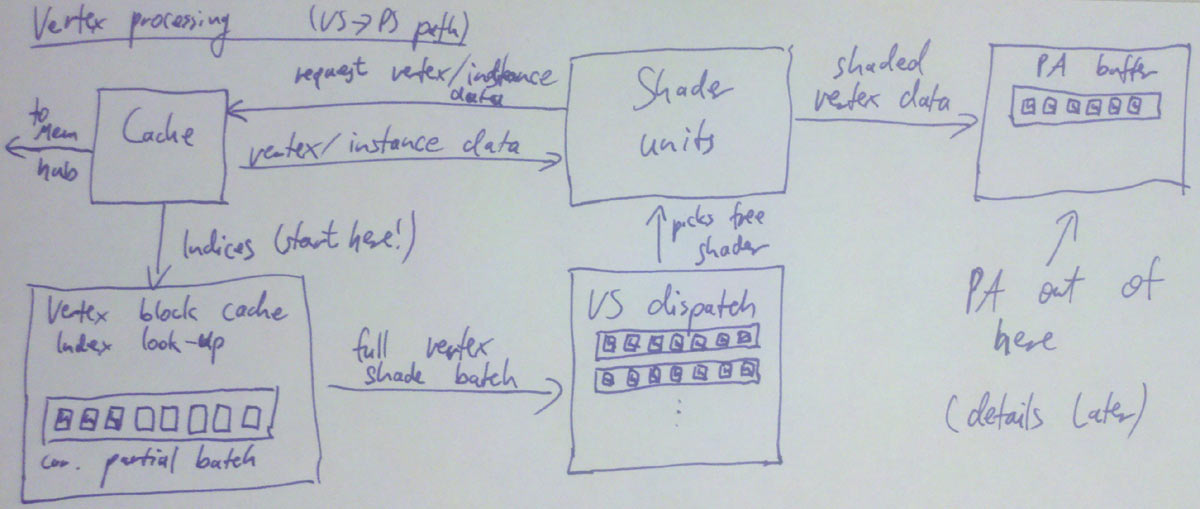
So, well, keep it simple: Reserve enough buffer space for 32 vertices (=1 batch), and similarly cache tag space for 32 entries. Start with an empty “cache”, i.e. all entries invalid. For every primitive in the index buffer, do a lookup on all the indices; if it’s a hit in the cache, fine. If it’s a miss, allocate a slot in the current batch and add the new index to the cache tag array. Once we don’t have enough space left to add a new primitive anymore, dispatch the whole batch for vertex shading, save the cache tag array (i.e. the 32 indices of the vertices we just shaded), and start setting up the next batch, again from an empty cache – ensuring that the batches are completely independent.
Each batch will keep a shader unit busy for some while (probably at least a few hundred cycles!). But that’s no problem, because we got plenty of them – just pick a different unit to execute each batch! Presto parallelism. We’ll eventually get the results back. At which point we can use the saved cache tags and the original index buffer data to assemble primitives to be sent down the pipeline (this is what “primitive assembly” does, which I’ll cover in the later part).
By the way, when I say “get the results back”, what does that mean? Where do they end up? There’s two major choices: 1. specialized buffers or 2. some general cache/scratchpad memory. It used to be 1), with a fixed organization designed around vertex data (with space for 16 float4 vectors of attributes per vertex and so on), but lately GPUs seem to be moving towards 2), i.e. “just memory”. It’s more flexible, and has the distinct advantage that you can use this memory for other shader stages, whereas things like specialized vertex caches are fairly useless for the pixel shading or compute pipeline, to give just one example.
Update: And here’s a picture of the vertex shading dataflow as described so far.
Shader Unit internals
Short versions: It’s pretty much what you’d expect from looking at disassembled HLSL compiler output (fxc /dumpbin is your friend!). Guess what, it’s just processors that are really good at running that kind of code, and the way that kind of thing is done in hardware is building something that eats something fairly close to shader bytecode, in spirit anyway. And unlike the stuff that I’ve been talking about so far, it’s fairly well documented too – if you’re interested, just check out conference presentations from AMD and NVidia or read the documentation for the CUDA/Stream SDKs.
Anyway, here’s the executive summary: fast ALU mostly built around a FMAC (Floating Multiply-ACcumulate) unit, some HW support for (at least) reciprocal, reciprocal square root, log2, exp2, sin, cos, optimized for high throughput and high density not low latency, running a high number of threads to cover said latency, fairly small number of registers per thread (since you’re running so many of them!), very good at executing straight-line code, bad at branches (especially if they’re not coherent).
What’s interesting to note though is the differences between the various shader stages. The short version is that really are rather few of them; for example, all the arithmetic and logic instructions are exactly the same across all stages. Some constructs (like derivative instructions and interpolated attributes in pixel shaders) only exist in some stages; but mostly, the differences are just what kind (and format) of data are passed in and out.
There’s one special bit related to shaders though that’s a big enough subject to deserve a part on its own. That bit is texture sampling (and texture units). Which, it turns out, will be our topic next time! See you then.
Closing remarks
Again, I repeat my disclaimer from the “Vertex Caching and Shading” section: Part of that is conjecture on my part, so take it with a grain of salt. Or maybe a pound. I don’t know.
I’m also not going into any detail on how scratch/cache memory is managed; the buffer sizes depend (primarily) on the size of batches you process and the number of vertex output attributes you expect. Buffer sizing and management is reallyimportant for performance, but I can’t meaningfully explain it here, nor do I want to; while interesting, this stuff is very specific to whatever hardware you’re talking about, and not really very insightful.
A trip through the Graphics Pipeline 2011_03的更多相关文章
- A trip through the Graphics Pipeline 2011_13 Compute Shaders, UAV, atomic, structured buffer
Welcome back to what’s going to be the last “official” part of this series – I’ll do more GPU-relate ...
- A trip through the Graphics Pipeline 2011_12 Tessellation
Welcome back! This time, we’ll look into what is perhaps the “poster boy” feature introduced with th ...
- A trip through the Graphics Pipeline 2011_10_Geometry Shaders
Welcome back. Last time, we dove into bottom end of the pixel pipeline. This time, we’ll switch ...
- A trip through the Graphics Pipeline 2011_08_Pixel processing – “fork phase”
In this part, I’ll be dealing with the first half of pixel processing: dispatch and actual pixel sha ...
- A trip through the Graphics Pipeline 2011_07_Z/Stencil processing, 3 different ways
In this installment, I’ll be talking about the (early) Z pipeline and how it interacts with rasteriz ...
- A trip through the Graphics Pipeline 2011_05
After the last post about texture samplers, we’re now back in the 3D frontend. We’re done with verte ...
- A trip through the Graphics Pipeline 2011_04
Welcome back. Last part was about vertex shaders, with some coverage of GPU shader units in general. ...
- A trip through the Graphics Pipeline 2011_02
Welcome back. Last part was about vertex shaders, with some coverage of GPU shader units in general. ...
- A trip through the Graphics Pipeline 2011_01
It’s been awhile since I posted something here, and I figured I might use this spot to explain some ...
随机推荐
- ShareSDK集成微信、QQ、微博分享
1.前言 为什么要使用第三方的作为集成分享的工具呢?而不去用官方的呢?有什么区别么? 一个字"快",如果你使用官方的得一个个集成他们的SDK,相信这是一个痛苦的过程. 2.准备需要 ...
- C#学习笔记---修饰符,this关键字和static关键字
1. C#中类的修饰符: public 表示不限制对该类的访问 protected 表示只能从所在类和所在类派生的子类进行访问 private 只有其所在类才能访问 internal 只有对 ...
- Robots Exclusion Protocol简介
当Robot访问一个Web站点时,比如http://www.hello.com/,它先去检查是否存在文件http://www.hello.com/robots.txt.如果这个文件存在,它便会按照这样 ...
- Ubuntu配置java环境变量
参考文章: http://www.cnblogs.com/BigIdiot/archive/2012/03/26/2417547.html 方法1:修改/etc/profile 文件所有用户的 she ...
- 一个可能有用的封闭PGSQL操作的PYTHON函数
URL: http://www.linuxyw.com/517.html 一般操作: import psycopg2 连接数据库 conn = psycopg2.connect(database=db ...
- ☆☆配置NDK环境
1 前提是 已经配置好 安卓SDK开发环境. 2 下载 android-ndk64-r10-windows-x86_64,可以从官方网站下载,这里有一个现成的. http://pan.baidu.co ...
- JavaScript案例二:在末尾添加节点
简单实现通过JavaScript来增加HTML节点 <!DOCTYPE html> <html> <head> <title>JavaScript在末尾 ...
- eclipse常用快捷键,这个只要新学会的常用的会陆续更新的。
1.Ctrl+Shift+O 引用包 2.Ctrl+Shift+F 格式化代码 3.Ctrl + / 注释和解除注释代码 4.Ctrl+M 代码最大最小化 5.ctrl+shif ...
- C# Remoting的一个简单例子
.Net对于远程调用提供了两种方法:Remoting和WebService.WebService现在是如火如荼,特别是有一种比较流行的架构:Winform+WebService(Java..Net), ...
- js:数据结构笔记11--排序算法(1)
基本准备: function CArray(numElems) { this.dataStore = []; this.pos = 0; this.numElems = numElems; this. ...