
Solr搜索基础
本例我们使用类库和代码均来自:
http://www.cnblogs.com/TerryLiang/archive/2011/04/17/2018962.html
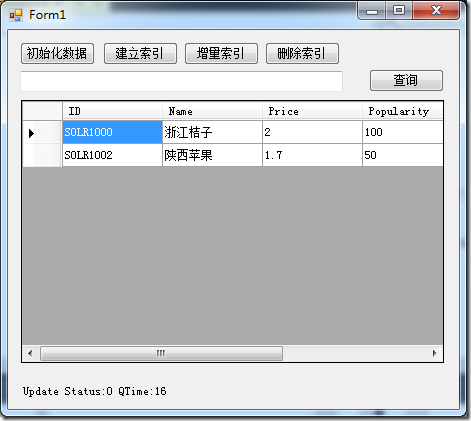
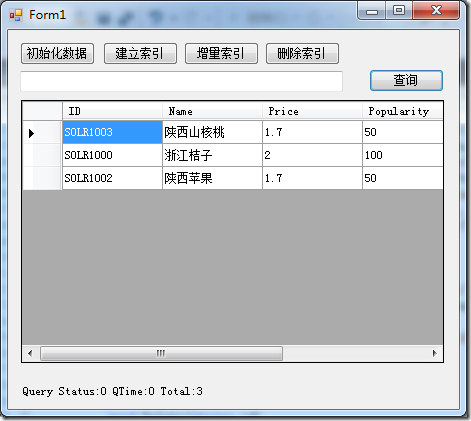
使用C#来模拟搜索、索引建立、删除、更新过程,Demo截图如下:
一、准备工作:
先准备一个实体类Product:
  public  class Product

    {

      public string ID { get; set; }

      public string Name { get; set; }

      public String[] Features { get; set; }

      public float Price { get; set; }

      public int Popularity { get; set; }

      public bool InStock { get; set; }

      public DateTime Incubationdate_dt { get; set; }

    }
再为这个实体类创建一个反序列化类ProductDeserializer:
  class ProductDeserializer : IObjectDeserializer<Product>

  {

      public IEnumerable<Product> Deserialize(SolrDocumentList result)

      {

          foreach (SolrDocument doc in result)

          {

              yield return new Product()

              {

                  ID = doc["id"].ToString(),

                  Name = doc["name"].ToString(),

                  Features = (string[])((ArrayList)doc["features"]).ToArray(typeof(string)),

                  Price = (float)doc["price"],

                  Popularity = (int)doc["popularity"],

                  InStock = (bool)doc["inStock"],

                  Incubationdate_dt = (DateTime)doc["incubationdate_dt"]

              };

          }

      }

  }
为项目引入EasyNet.Solr.dll。
二、创建搜索:
执行Solr客户端初始化操作:
        #region 初始化

       static List<SolrInputDocument> docs = new List<SolrInputDocument>();

        static OptimizeOptions optimizeOptions = new OptimizeOptions();

        static ISolrResponseParser<NamedList, ResponseHeader> binaryResponseHeaderParser = new BinaryResponseHeaderParser();

        static IUpdateParametersConvert<NamedList> updateParametersConvert = new BinaryUpdateParametersConvert();

        static ISolrUpdateConnection<NamedList, NamedList> solrUpdateConnection = new SolrUpdateConnection<NamedList, NamedList>() { ServerUrl = "http://localhost:8080/solr/" };

        static ISolrUpdateOperations<NamedList> updateOperations = new SolrUpdateOperations<NamedList, NamedList>(solrUpdateConnection, updateParametersConvert) { ResponseWriter = "javabin" };

        static ISolrQueryConnection<NamedList> connection = new SolrQueryConnection<NamedList>() { ServerUrl = "http://localhost:8080/solr/" };

        static ISolrQueryOperations<NamedList> operations = new SolrQueryOperations<NamedList>(connection) { ResponseWriter = "javabin" };

        static IObjectDeserializer<Product> exampleDeserializer = new ProductDeserializer();

        static ISolrResponseParser<NamedList, QueryResults<Product>> binaryQueryResultsParser = new BinaryQueryResultsParser<Product>(exampleDeserializer);

        #endregion
我们先模拟一个数据源,这里内置一些数据作为示例:
            List<Product> products = new List<Product>();

            Product juzi = new Product

            {

                ID = "SOLR1000",

                Name = "浙江桔子",

                Features = new String[] {

                    "色香味兼优",

                    "既可鲜食,又可加工成以果汁",

                    "果实营养丰富"},

                Price = 2.0f,

                Popularity = ,

                InStock = true,

                Incubationdate_dt = new DateTime(, , , , , , DateTimeKind.Utc)

            };

            products.Add(juzi);

            var doc = new SolrInputDocument();

            doc.Add("id", new SolrInputField("id", juzi.ID));

            doc.Add("name", new SolrInputField("name", juzi.Name));

            doc.Add("features", new SolrInputField("features", juzi.Features));

            doc.Add("price", new SolrInputField("price", juzi.Price));

            doc.Add("popularity", new SolrInputField("popularity", juzi.Popularity));

            doc.Add("inStock", new SolrInputField("inStock", juzi.InStock));

            doc.Add("incubationdate_dt", new SolrInputField("incubationdate_dt", juzi.Incubationdate_dt));

            docs.Add(doc);

            Product pingguo = new Product

            {

                ID = "SOLR1002",

                Name = "陕西苹果",

                Features = new String[] {

                "味道甜美",

                "光泽鲜艳",

                "营养丰富"

            },

                Price = 1.7f,

                Popularity = ,

                InStock = true,

                Incubationdate_dt = new DateTime(, , , , , , DateTimeKind.Utc)

            };

            products.Add(pingguo);

            var doc2 = new SolrInputDocument();

            doc2.Add("id", new SolrInputField("id", pingguo.ID));

            doc2.Add("name", new SolrInputField("name", pingguo.Name));

            doc2.Add("features", new SolrInputField("features", pingguo.Features));

            doc2.Add("price", new SolrInputField("price", pingguo.Price));

            doc2.Add("popularity", new SolrInputField("popularity", pingguo.Popularity));

            doc2.Add("inStock", new SolrInputField("inStock", pingguo.InStock));

            doc2.Add("incubationdate_dt", new SolrInputField("incubationdate_dt", pingguo.Incubationdate_dt));

            docs.Add(doc2);

            dataGridView1.DataSource = products;
同时将这些数据添加到List<SolrInputDocument>中,SolrInputDocument是TerryLiang编写的文档交换实体,可以在他提供的源代码中看到。
1. 创建索引:
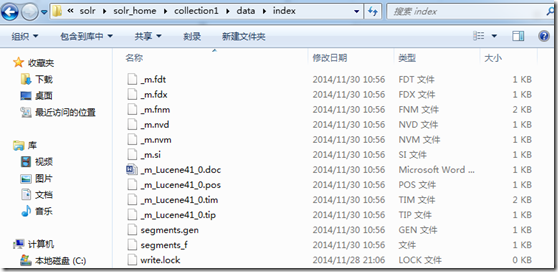
创建索引是指将原始数据传递给Solr,然后在Solr目录下创建指定格式文件,这些文件能够被Solr快速查询,如下图:
创建索引实际上就是用Update将数据POST给collection1,代码如下:
            var result = updateOperations.Update("collection1", "/update", new UpdateOptions() { OptimizeOptions = optimizeOptions, Docs = docs });

            var header = binaryResponseHeaderParser.Parse(result);

            lbl_info.Text= string.Format("Update Status:{0} QTime:{1}", header.Status, header.QTime);
索引成功后我们可以在Solr管理界面查询:
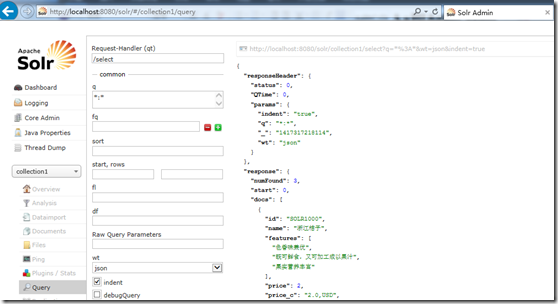
注意:每次使用管理器搜索时,右上角都会显示搜索使用的URL:
http://localhost:8080/solr/collection1/select?q=*%3A*&wt=json&indent=true
这些参数的含义较为简单可以查询一些文档获取信息。
2. 创建查询
查询其实就是提交一个请求给服务器,等待服务器将结果返回的过程,可以使用任何语言只要能发起请求并接受结果即可,这里我们使用客户端。
先创建一个ISolrQuery对象,传入搜索关键字,关键字的构建方法可以从Solr管理界面推理出来:
假如我们要查询name中带“苹果”的信息,我们需要在管理界面输入:
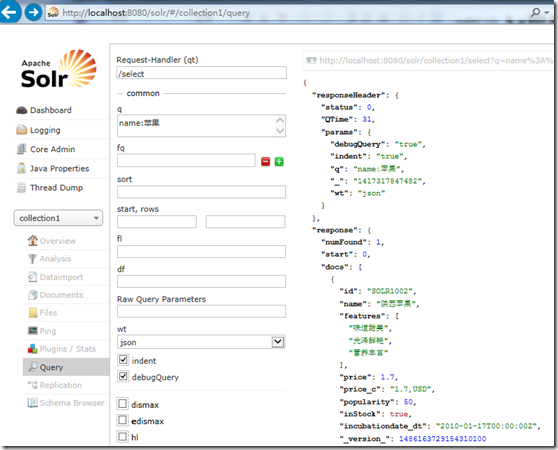
如果想知道Solr是如何构建查询的话可以勾选DebugQuery选项,得到调试信息:
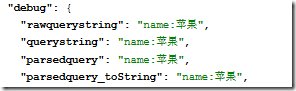
意思是只在Name这个列中检索。
所以我们代码中需要这么写:
ISolrQuery query = new SolrQuery("name:"+keyWord);
安全问题自行考虑。
但是如果要查询全部就简单多了:
ISolrQuery query = SolrQuery.All;
将查询条件发送给服务器之后再把服务器返回的数据还原成对象显示出来即完成了一次查询操作,具体操作代码如下:
            ISolrQuery query = SolrQuery.All;

            if (!string.IsNullOrWhiteSpace(keyWord))

            {

                query = new SolrQuery("name:"+keyWord);

            }

            var result = operations.Query("collection1", "/select", query, null);

            var header = binaryResponseHeaderParser.Parse(result);

            var examples = binaryQueryResultsParser.Parse(result);

            lbl_info.Text= string.Format("Query Status:{0} QTime:{1} Total:{2}", header.Status, header.QTime, examples.NumFound);

            dataGridView1.DataSource = examples.ToList();
3. 增量索引
实际上经常会有数据是新增或者改变的,那么我们就需要及时更新索引便于查询出新数据,就需要增量索引。这和初次索引一样,如果你想更新原有数据,那么将新数据再次提交一次即可,如果想增加提交不同数据即可。数据判断标准为id,这是个配置项,可以在中D:\apache-tomcat-7.0.57\webapps\solr\solr_home\collection1\conf\schema.xml找到:
<field name="id" type="string" indexed="true" stored="true" required="true" multiValued="false" />
可以理解为主键。
代码如下:
             var docs = new List<SolrInputDocument>();

             Product hetao = new Product

             {

                 ID = "SOLR1003",

                 Name = "陕西山核桃",

                 Features = new String[] {

                "营养好吃",

                "微量元素丰富",

                "补脑"

            },

                 Price = 1.7f,

                 Popularity = ,

                 InStock = true,

                 Incubationdate_dt = new DateTime(, , , , , , DateTimeKind.Utc)

             };

             var doc2 = new SolrInputDocument();

             doc2.Add("id", new SolrInputField("id", hetao.ID));

             doc2.Add("name", new SolrInputField("name", hetao.Name));

             doc2.Add("features", new SolrInputField("features", hetao.Features));

             doc2.Add("price", new SolrInputField("price", hetao.Price));

             doc2.Add("popularity", new SolrInputField("popularity", hetao.Popularity));

             doc2.Add("inStock", new SolrInputField("inStock", hetao.InStock));

             doc2.Add("incubationdate_dt", new SolrInputField("incubationdate_dt", hetao.Incubationdate_dt));

             docs.Clear();

             docs.Add(doc2);

             var result = updateOperations.Update("collection1", "/update", new UpdateOptions() { OptimizeOptions = optimizeOptions, Docs = docs });

             var header = binaryResponseHeaderParser.Parse(result);

             lbl_info.Text= string.Format("Update Status:{0} QTime:{1}", header.Status, header.QTime);
4. 删除索引
和数据库删除一样,当然按照主键进行删除。传入删除Option同时带入主键名和主键值发送给服务器即可。
具体操作代码如下:
              var result = updateOperations.Update("collection1", "/update", new UpdateOptions() { OptimizeOptions = optimizeOptions, DelById = new string[] { id } });

              var header = binaryResponseHeaderParser.Parse(result);

              lbl_info.Text=string.Format("Update Status:{0} QTime:{1}", header.Status, header.QTime);
这样就完成了一个最基本的创建索引,更新删除索引和查询的过程,本例查询速度并没有直接操作管理界面那么快,原因在于序列化和反序列化,延续上述提到的:任何语言只要能发起请求和接收响应即可以查询,可以避免这个过程,提高查询效率。
Solr搜索基础的更多相关文章
- 关于Solr搜索标点与符号的中文分词你必须知道的(mmseg源码改造)
关于Solr搜索标点与符号的中文分词你必须知道的(mmseg源码改造) 摘要:在中文搜索中的标点.符号往往也是有语义的,比如我们要搜索“C++”或是“C#”,我们不希望搜索出来的全是“C”吧?那样对程 ...
- 什么是Solr搜索
什么是Solr搜索 一.Solr综述 什么是Solr搜索 我们经常会用到搜索功能,所以也比较熟悉,这里就简单的介绍一下搜索的原理. 当然只是介绍solr的原理,并不是搜索引擎的原理,那会更复杂. ...
- Solr搜索技术
Solr搜索技术 今日大纲 回顾上一天的内容: 倒排索引 lucene和solr的关系 lucene api的使用 CRUD 文档.字段.目录对象(类).索引写入器类.索引写入器配置类.IK分词器 查 ...
- Solr系列五:solr搜索详解(solr搜索流程介绍、查询语法及解析器详解)
一.solr搜索流程介绍 1. 前面我们已经学习过Lucene搜索的流程,让我们再来回顾一下 流程说明: 首先获取用户输入的查询串,使用查询解析器QueryParser解析查询串生成查询对象Query ...
- solr搜索应用
非票商品搜索,为了不模糊查询影响数据库的性能,搭建了solr搜索应用,php从solr读取数据
- Problem L: 搜索基础之马走日
Problem L: 搜索基础之马走日 Time Limit: 1 Sec Memory Limit: 128 MBSubmit: 134 Solved: 91[Submit][Status][W ...
- Problem K: 搜索基础之棋盘问题
Problem K: 搜索基础之棋盘问题 Time Limit: 1 Sec Memory Limit: 128 MBSubmit: 92 Solved: 53[Submit][Status][W ...
- Problem J: 搜索基础之红与黑
Problem J: 搜索基础之红与黑 Time Limit: 1 Sec Memory Limit: 128 MBSubmit: 170 Solved: 100[Submit][Status][ ...
- solr搜索结果转实体类对象的两种方法
问题:就是把从solr搜索出来的结果转成我们想要的实体类对象,很常用的情景. 1.使用@Field注解 @Field这个注解放到实体类的属性[字段]中,例如下面 public class User{ ...
随机推荐
- LightOJ1422 Halloween Costumes(区间DP)
题目大概是依次有n场派对,每场派对都有需要穿某套衣服去参加,可以同时穿多套衣服,就是一套套着一套,如果脱了的话就不能再穿上那套了,问最少需要几套衣服去参加完所有派对. 区间DP: dp[i][j]第i ...
- JS设计模式一:单例模式
单例模式 单例模式也称作为单子模式,更多的也叫做单体模式.为软件设计中较为简单但是最为常用的一种设计模式. 下面是维基百科对单例模式的介绍: 在应用单例模式时,生成单例 ...
- overload和override的区别(转)
overload和override的区别 override(重写) 1.方法名.参数.返回值相同.2.子类方法不能缩小父类方法的访问权限.3.子类方法不能抛出比父类方法更多的异常(但子类方法可以不抛出 ...
- 解决win7系统远程桌面 server 2003 卡的问题
原因在于从vista开始,微软在TCP/IP协议栈里新加了一个叫做“Window Auto-Tuning”的功能.这个功能本身的目的是为了让操作系统根据网络的实时性能(比如响应时间)来动态调整网络上传 ...
- SqlParameter 基本用法
因为通过SQL 语句的方式,有时候存在脚本注入的危险,所以在大多数情况下不建议用拼接SQL语句字符串方式,希望通过SqlParameter实现来实现对数据的操 作,针对SqlParameter的方式我 ...
- excel表中内容如何反排列
如题,我的意思是,比如excel表中有如下内容: 1.红色 2.黄色 3.蓝色 现在我需要一次性全部反向排列,变成 3.蓝色 2.黄色 1.红色 这不是纯数字排序,因为我序号不是自然数的等差数列,其中 ...
- java中实现链表(转)
分析: 上述节点具备如下特征: 1. 每个节点由两部分组成(存储信息的字段,存储指向下一个节点的指针) 2. 节点之间有着严格的先后顺序. 3. 单链表节点是一种非线性的结构,在内存中不连续分配空间. ...
- WinEdt选项卡配置
不小心把选项卡(标签页.多tab)整没了.搜了一下: 在工具栏点击右键可以发现配置.
- [转自开心软件园]解读“剩余 Windows 重置计数”和“信任时间”
昨天在讲解slmgr.vbs命令的时候,有一个问题没有解决,就是输入"slmgr.vbs -dlv"命令,在显示的信息中,注意到最后两行:"剩余 Windows 重置计数 ...
- mongodb复制集配置
#more /opt/mongodb3.0/mongodb_im_conf_47020/mongodb3.0_im_47020.cnf dbpath = /opt/mongodb3.0/mongodb ...