
Android Service获取当前位置(GPS+基站)
需求详情:
1)、Service中每隔1秒执行一次定位操作(GPS+基站)
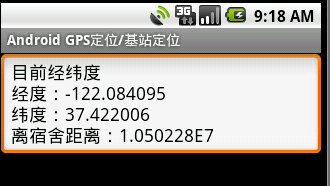
2)、定位的结果实时显示在界面上(要求得到经度、纬度)
技术支持:
1)、获取经纬度
通过GPS+基站获取经纬度,先通过GPS来获取,如果为空改用基站进行获取–>GPS+基站(基站获取支持联通、电信、移动)。
2)、实时获取经纬度
为了达到实时获取经纬度,需在后台启动获取经纬度的Service,然后把经纬度数据通过广播发送出去,在需要的地方进行广播注册(比如在Activity中注册广播,显示在界面中)–>涉及到Service+BroadcastReceiver+Activity+Thread等知识点。
备注:本文注重实践,如有看不懂的,先去巩固下知识点,可以去看看我前面写的几篇文章。
1、CellInfo实体类–>基站信息
package com.ljq.activity;


/**

 * 基站信息

 *

 * @author jiqinlin

 *

 */

public class CellInfo {

 /** 基站id,用来找到基站的位置 */

 private int cellId;

 /** 移动国家码,共3位,中国为460,即imsi前3位 */

 private String mobileCountryCode="460";

 /** 移动网络码,共2位,在中国,移动的代码为00和02,联通的代码为01,电信的代码为03,即imsi第4~5位 */

 private String mobileNetworkCode="0";

 /** 地区区域码 */

 private int locationAreaCode;

 /** 信号类型[选 gsm|cdma|wcdma] */

 private String radioType="";


 public CellInfo() {

 }


 public int getCellId() {

  return cellId;

 }


 public void setCellId(int cellId) {

  this.cellId = cellId;

 }


 public String getMobileCountryCode() {

  return mobileCountryCode;

 }


 public void setMobileCountryCode(String mobileCountryCode) {

  this.mobileCountryCode = mobileCountryCode;

 }


 public String getMobileNetworkCode() {

  return mobileNetworkCode;

 }


 public void setMobileNetworkCode(String mobileNetworkCode) {

  this.mobileNetworkCode = mobileNetworkCode;

 }


 public int getLocationAreaCode() {

  return locationAreaCode;

 }


 public void setLocationAreaCode(int locationAreaCode) {

  this.locationAreaCode = locationAreaCode;

 }


 public String getRadioType() {

  return radioType;

 }


 public void setRadioType(String radioType) {

  this.radioType = radioType;

 }


}
2、Gps类–>Gps封装类,用来获取经纬度
package com.ljq.activity;


import android.content.Context;

import android.location.Criteria;

import android.location.Location;

import android.location.LocationListener;

import android.location.LocationManager;

import android.os.Bundle;


public class Gps{

 private Location location = null;

 private LocationManager locationManager = null;

 private Context context = null;


 /**

  * 初始化

  *

  * @param ctx

  */

 public Gps(Context ctx) {

  context=ctx;

  locationManager=(LocationManager)context.getSystemService(Context.LOCATION_SERVICE);

  location = locationManager.getLastKnownLocation(getProvider());

  locationManager.requestLocationUpdates(LocationManager.GPS_PROVIDER, 2000, 10, locationListener);

 }


 // 获取Location Provider

 private String getProvider() {

  // 构建位置查询条件

  Criteria criteria = new Criteria();

  // 查询精度:高

  criteria.setAccuracy(Criteria.ACCURACY_FINE);

  // 是否查询海拨:否

  criteria.setAltitudeRequired(false);

  // 是否查询方位角 : 否

  criteria.setBearingRequired(false);

  // 是否允许付费:是

  criteria.setCostAllowed(true);

  // 电量要求:低

  criteria.setPowerRequirement(Criteria.POWER_LOW);

  // 返回最合适的符合条件的provider,第2个参数为true说明 , 如果只有一个provider是有效的,则返回当前provider

  return locationManager.getBestProvider(criteria, true);

 }


 private LocationListener locationListener = new LocationListener() {

  // 位置发生改变后调用

  public void onLocationChanged(Location l) {

   if(l!=null){

    location=l;

   }

  }


  // provider 被用户关闭后调用

  public void onProviderDisabled(String provider) {

   location=null;

  }


  // provider 被用户开启后调用

  public void onProviderEnabled(String provider) {

   Location l = locationManager.getLastKnownLocation(provider);

   if(l!=null){

    location=l;

   }


  }


  // provider 状态变化时调用

  public void onStatusChanged(String provider, int status, Bundle extras) {

  }


 };


 public Location getLocation(){

  return location;

 }


 public void closeLocation(){

  if(locationManager!=null){

   if(locationListener!=null){

    locationManager.removeUpdates(locationListener);

    locationListener=null;

   }

   locationManager=null;

  }

 }


}
3、GpsService服务类
package com.ljq.activity;


import java.util.ArrayList;


import android.app.Service;

import android.content.Intent;

import android.location.Location;

import android.os.IBinder;

import android.util.Log;


public class GpsService extends Service {

 ArrayList<CellInfo> cellIds = null;

 private Gps gps=null;

 private boolean threadDisable=false;

 private final static String TAG=GpsService.class.getSimpleName();


 @Override

 public void onCreate() {

  super.onCreate();


  gps=new Gps(GpsService.this);

  cellIds=UtilTool.init(GpsService.this);


  new Thread(new Runnable(){

   @Override

   public void run() {

    while (!threadDisable) {

     try {

      Thread.sleep(1000);

     } catch (InterruptedException e) {

      e.printStackTrace();

     }


     if(gps!=null){ //当结束服务时gps为空

      //获取经纬度

      Location location=gps.getLocation();

      //如果gps无法获取经纬度,改用基站定位获取

      if(location==null){

       Log.v(TAG, "gps location null");

       //2.根据基站信息获取经纬度

       try {

        location = UtilTool.callGear(GpsService.this, cellIds);

       } catch (Exception e) {

        location=null;

        e.printStackTrace();

       }

       if(location==null){

        Log.v(TAG, "cell location null");

       }

      }


      //发送广播

      Intent intent=new Intent();

      intent.putExtra("lat", location==null?"":location.getLatitude()+"");

      intent.putExtra("lon", location==null?"":location.getLongitude()+"");

      intent.setAction("com.ljq.activity.GpsService");

      sendBroadcast(intent);

     }


    }

   }

  }).start();


 }


 @Override

 public void onDestroy() {

  threadDisable=true;

  if(cellIds!=null&&cellIds.size()>0){

   cellIds=null;

  }

  if(gps!=null){

   gps.closeLocation();

   gps=null;

  }

  super.onDestroy();

 }


 @Override

 public IBinder onBind(Intent arg0) {

  return null;

 }


}
4、GpsActivity–>在界面上实时显示经纬度数据
package com.ljq.activity;


import android.app.Activity;

import android.content.BroadcastReceiver;

import android.content.Context;

import android.content.Intent;

import android.content.IntentFilter;

import android.location.Location;

import android.location.LocationManager;

import android.os.Bundle;

import android.util.Log;

import android.widget.EditText;

import android.widget.Toast;


public class GpsActivity extends Activity {

 private Double homeLat=26.0673834d; //宿舍纬度

 private Double homeLon=119.3119936d; //宿舍经度

 private EditText editText = null;

 private MyReceiver receiver=null;

 private final static String TAG=GpsActivity.class.getSimpleName();


 @Override

 public void onCreate(Bundle savedInstanceState) {

  super.onCreate(savedInstanceState);

  setContentView(R.layout.main);


  editText=(EditText)findViewById(R.id.editText);


  //判断GPS是否可用

  Log.i(TAG, UtilTool.isGpsEnabled((LocationManager)getSystemService(Context.LOCATION_SERVICE))+"");

  if(!UtilTool.isGpsEnabled((LocationManager)getSystemService(Context.LOCATION_SERVICE))){

   Toast.makeText(this, "GSP当前已禁用,请在您的系统设置屏幕启动。", Toast.LENGTH_LONG).show();

   Intent callGPSSettingIntent = new Intent(android.provider.Settings.ACTION_LOCATION_SOURCE_SETTINGS);

   startActivity(callGPSSettingIntent);

            return;

  }


  //启动服务

  startService(new Intent(this, GpsService.class));


  //注册广播

  receiver=new MyReceiver();

  IntentFilter filter=new IntentFilter();

  filter.addAction("com.ljq.activity.GpsService");

  registerReceiver(receiver, filter);

 }


 //获取广播数据

 private class MyReceiver extends BroadcastReceiver{

  @Override

  public void onReceive(Context context, Intent intent) {

   Bundle bundle=intent.getExtras();

   String lon=bundle.getString("lon");

   String lat=bundle.getString("lat");

   if(lon!=null&&!"".equals(lon)&&lat!=null&&!"".equals(lat)){

    double distance=getDistance(Double.parseDouble(lat),

      Double.parseDouble(lon), homeLat, homeLon);

    editText.setText("目前经纬度\n经度:"+lon+"\n纬度:"+lat+"\n离宿舍距离:"+java.lang.Math.abs(distance));

   }else{

    editText.setText("目前经纬度\n经度:"+lon+"\n纬度:"+lat);

   }

  }

 }


 @Override

 protected void onDestroy() {

  //注销服务

  unregisterReceiver(receiver);

  //结束服务,如果想让服务一直运行就注销此句

  stopService(new Intent(this, GpsService.class));

  super.onDestroy();

 }


 /**

  * 把经纬度换算成距离

  *

  * @param lat1 开始纬度

  * @param lon1 开始经度

  * @param lat2 结束纬度

  * @param lon2 结束经度

  * @return

  */

 private double getDistance(double lat1, double lon1, double lat2, double lon2) {

  float[] results = new float[1];

  Location.distanceBetween(lat1, lon1, lat2, lon2, results);

  return results[0];

 }

}
5、UtilTool–>工具类
package com.ljq.activity;
import java.io.ByteArrayOutputStream;
import java.io.IOException;
import java.io.InputStream;
import java.io.OutputStream;
import java.io.UnsupportedEncodingException;
import java.net.HttpURLConnection;
import java.net.MalformedURLException;
import java.net.ProtocolException;
import java.net.URL;
import java.util.ArrayList;
import java.util.Calendar;
import java.util.List;
import java.util.Locale;
import org.apache.http.client.ClientProtocolException;
import org.json.JSONException;
import org.json.JSONObject;
import android.content.Context;
import android.location.Location;
import android.location.LocationManager;
import android.telephony.NeighboringCellInfo;
import android.telephony.TelephonyManager;
import android.telephony.cdma.CdmaCellLocation;
import android.telephony.gsm.GsmCellLocation;
import android.util.Log;
import android.widget.Toast;
public class UtilTool {
public static boolean isGpsEnabled(LocationManager locationManager) {
boolean isOpenGPS = locationManager.isProviderEnabled(android.location.LocationManager.GPS_PROVIDER);
boolean isOpenNetwork = locationManager.isProviderEnabled(android.location.LocationManager.NETWORK_PROVIDER);
if (isOpenGPS || isOpenNetwork) {
return true;
}
return false;
}
/**
* 根据基站信息获取经纬度
*
* 原理向http://www.google.com/loc/json发送http的post请求,根据google返回的结果获取经纬度
*
* @param cellIds
* @return
* @throws Exception
*/
public static Location callGear(Context ctx, ArrayList<CellInfo> cellIds) throws Exception {
String result="";
JSONObject data=null;
if (cellIds == null||cellIds.size()==0) {
UtilTool.alert(ctx, "cell request param null");
return null;
};
try {
result = UtilTool.getResponseResult(ctx, "http://www.google.com/loc/json", cellIds);
if(result.length() <= 1)
return null;
data = new JSONObject(result);
data = (JSONObject) data.get("location");
Location loc = new Location(LocationManager.NETWORK_PROVIDER);
loc.setLatitude((Double) data.get("latitude"));
loc.setLongitude((Double) data.get("longitude"));
loc.setAccuracy(Float.parseFloat(data.get("accuracy").toString()));
loc.setTime(UtilTool.getUTCTime());
return loc;
} catch (JSONException e) {
return null;
} catch (UnsupportedEncodingException e) {
e.printStackTrace();
} catch (ClientProtocolException e) {
e.printStackTrace();
} catch (IOException e) {
e.printStackTrace();
}
return null;
}
/**
* 接收Google返回的数据格式
*
* 出参:{"location":{"latitude":26.0673834,"longitude":119.3119936,
* "address":{"country":"ä¸å½","country_code":"CN","region":"ç¦å»ºç","city":"ç¦å·å¸",
* "street":"äºä¸ä¸è·¯","street_number":"128å·"},"accuracy":935.0},
* "access_token":"2:xiU8YrSifFHUAvRJ:aj9k70VJMRWo_9_G"}
* 请求路径:http://maps.google.cn/maps/geo?key=abcdefg&q=26.0673834,119.3119936
*
* @param cellIds
* @return
* @throws UnsupportedEncodingException
* @throws MalformedURLException
* @throws IOException
* @throws ProtocolException
* @throws Exception
*/
public static String getResponseResult(Context ctx,String path, ArrayList<CellInfo> cellInfos)
throws UnsupportedEncodingException, MalformedURLException,
IOException, ProtocolException, Exception {
String result="";
Log.i(ctx.getApplicationContext().getClass().getSimpleName(),
"in param: "+getRequestParams(cellInfos));
InputStream inStream=UtilTool.sendPostRequest(path,
getRequestParams(cellInfos), "UTF-8");
if(inStream!=null){
byte[] datas=UtilTool.readInputStream(inStream);
if(datas!=null&&datas.length>0){
result=new String(datas, "UTF-8");
//Log.i(ctx.getClass().getSimpleName(), "receive result:"+result);//服务器返回的结果信息
Log.i(ctx.getApplicationContext().getClass().getSimpleName(),
"google cell receive data result:"+result);
}else{
Log.i(ctx.getApplicationContext().getClass().getSimpleName(),
"google cell receive data null");
}
}else{
Log.i(ctx.getApplicationContext().getClass().getSimpleName(),
"google cell receive inStream null");
}
return result;
}
/**
* 拼装json请求参数,拼装基站信息
*
* 入参:{'version': '1.1.0','host': 'maps.google.com','home_mobile_country_code': 460,
* 'home_mobile_network_code': 14136,'radio_type': 'cdma','request_address': true,
* 'address_language': 'zh_CN','cell_towers':[{'cell_id': '12835','location_area_code': 6,
* 'mobile_country_code': 460,'mobile_network_code': 14136,'age': 0}]}
* @param cellInfos
* @return
*/
public static String getRequestParams(List<CellInfo> cellInfos){
StringBuffer sb=new StringBuffer("");
sb.append("{");
if(cellInfos!=null&&cellInfos.size()>0){
sb.append("'version': '1.1.0',"); //google api 版本[必]
sb.append("'host': 'maps.google.com',"); //服务器域名[必]
sb.append("'home_mobile_country_code': "+cellInfos.get(0).getMobileCountryCode()+","); //移动用户所属国家代号[选 中国460]
sb.append("'home_mobile_network_code': "+cellInfos.get(0).getMobileNetworkCode()+","); //移动系统号码[默认0]
sb.append("'radio_type': '"+cellInfos.get(0).getRadioType()+"',"); //信号类型[选 gsm|cdma|wcdma]
sb.append("'request_address': true,"); //是否返回数据[必]
sb.append("'address_language': 'zh_CN',"); //反馈数据语言[选 中国 zh_CN]
sb.append("'cell_towers':["); //移动基站参数对象[必]
for(CellInfo cellInfo:cellInfos){
sb.append("{");
sb.append("'cell_id': '"+cellInfo.getCellId()+"',"); //基站ID[必]
sb.append("'location_area_code': "+cellInfo.getLocationAreaCode()+","); //地区区域码[必]
sb.append("'mobile_country_code': "+cellInfo.getMobileCountryCode()+",");
sb.append("'mobile_network_code': "+cellInfo.getMobileNetworkCode()+",");
sb.append("'age': 0"); //使用好久的数据库[选 默认0表示使用最新的数据库]
sb.append("},");
}
sb.deleteCharAt(sb.length()-1);
sb.append("]");
}
sb.append("}");
return sb.toString();
}
/**
* 获取UTC时间
*
* UTC + 时区差 = 本地时间(北京为东八区)
*
* @return
*/
public static long getUTCTime() {
//取得本地时间
Calendar cal = Calendar.getInstance(Locale.CHINA);
//取得时间偏移量
int zoneOffset = cal.get(java.util.Calendar.ZONE_OFFSET);
//取得夏令时差
int dstOffset = cal.get(java.util.Calendar.DST_OFFSET);
//从本地时间里扣除这些差量,即可以取得UTC时间
cal.add(java.util.Calendar.MILLISECOND, -(zoneOffset + dstOffset));
return cal.getTimeInMillis();
}
/**
* 初始化,记得放在onCreate()方法里初始化,获取基站信息
*
* @return
*/
public static ArrayList<CellInfo> init(Context ctx) {
ArrayList<CellInfo> cellInfos = new ArrayList<CellInfo>();
TelephonyManager tm = (TelephonyManager) ctx.getSystemService(Context.TELEPHONY_SERVICE);
//网络制式
int type = tm.getNetworkType();
/**
* 获取SIM卡的IMSI码
* SIM卡唯一标识:IMSI 国际移动用户识别码(IMSI:International Mobile Subscriber Identification Number)是区别移动用户的标志,
* 储存在SIM卡中,可用于区别移动用户的有效信息。IMSI由MCC、MNC、MSIN组成,其中MCC为移动国家号码,由3位数字组成,
* 唯一地识别移动客户所属的国家,我国为460;MNC为网络id,由2位数字组成,
* 用于识别移动客户所归属的移动网络,中国移动为00,中国联通为01,中国电信为03;MSIN为移动客户识别码,采用等长11位数字构成。
* 唯一地识别国内GSM移动通信网中移动客户。所以要区分是移动还是联通,只需取得SIM卡中的MNC字段即可
*/
String imsi = tm.getSubscriberId();
alert(ctx, "imsi: "+imsi);
//为了区分移动、联通还是电信,推荐使用imsi来判断(万不得己的情况下用getNetworkType()判断,比如imsi为空时)
if(imsi!=null&&!"".equals(imsi)){
alert(ctx, "imsi");
if (imsi.startsWith("46000") || imsi.startsWith("46002")) {// 因为移动网络编号46000下的IMSI已经用完,所以虚拟了一个46002编号,134/159号段使用了此编号
// 中国移动
mobile(cellInfos, tm);
} else if (imsi.startsWith("46001")) {
// 中国联通
union(cellInfos, tm);
} else if (imsi.startsWith("46003")) {
// 中国电信
cdma(cellInfos, tm);
}
}else{
alert(ctx, "type");
// 在中国,联通的3G为UMTS或HSDPA,电信的3G为EVDO
// 在中国,移动的2G是EGDE,联通的2G为GPRS,电信的2G为CDMA
// String OperatorName = tm.getNetworkOperatorName();
//中国电信
if (type == TelephonyManager.NETWORK_TYPE_EVDO_A
|| type == TelephonyManager.NETWORK_TYPE_EVDO_0
|| type == TelephonyManager.NETWORK_TYPE_CDMA
|| type ==TelephonyManager.NETWORK_TYPE_1xRTT){
cdma(cellInfos, tm);
}
//移动(EDGE(2.75G)是GPRS(2.5G)的升级版,速度比GPRS要快。目前移动基本在国内升级普及EDGE,联通则在大城市部署EDGE。)
else if(type == TelephonyManager.NETWORK_TYPE_EDGE
|| type == TelephonyManager.NETWORK_TYPE_GPRS ){
mobile(cellInfos, tm);
}
//联通(EDGE(2.75G)是GPRS(2.5G)的升级版,速度比GPRS要快。目前移动基本在国内升级普及EDGE,联通则在大城市部署EDGE。)
else if(type == TelephonyManager.NETWORK_TYPE_GPRS
||type == TelephonyManager.NETWORK_TYPE_EDGE
||type == TelephonyManager.NETWORK_TYPE_UMTS
||type == TelephonyManager.NETWORK_TYPE_HSDPA){
union(cellInfos, tm);
}
}
return cellInfos;
}
/**
* 电信
*
* @param cellInfos
* @param tm
*/
private static void cdma(ArrayList<CellInfo> cellInfos, TelephonyManager tm) {
CdmaCellLocation location = (CdmaCellLocation) tm.getCellLocation();
CellInfo info = new CellInfo();
info.setCellId(location.getBaseStationId());
info.setLocationAreaCode(location.getNetworkId());
info.setMobileNetworkCode(String.valueOf(location.getSystemId()));
info.setMobileCountryCode(tm.getNetworkOperator().substring(0, 3));
info.setRadioType("cdma");
cellInfos.add(info);
//前面获取到的都是单个基站的信息,接下来再获取周围邻近基站信息以辅助通过基站定位的精准性
// 获得邻近基站信息
List<NeighboringCellInfo> list = tm.getNeighboringCellInfo();
int size = list.size();
for (int i = 0; i < size; i++) {
CellInfo cell = new CellInfo();
cell.setCellId(list.get(i).getCid());
cell.setLocationAreaCode(location.getNetworkId());
cell.setMobileNetworkCode(String.valueOf(location.getSystemId()));
cell.setMobileCountryCode(tm.getNetworkOperator().substring(0, 3));
cell.setRadioType("cdma");
cellInfos.add(cell);
}
}
/**
* 移动
*
* @param cellInfos
* @param tm
*/
private static void mobile(ArrayList<CellInfo> cellInfos,
TelephonyManager tm) {
GsmCellLocation location = (GsmCellLocation)tm.getCellLocation();
CellInfo info = new CellInfo();
info.setCellId(location.getCid());
info.setLocationAreaCode(location.getLac());
info.setMobileNetworkCode(tm.getNetworkOperator().substring(3, 5));
info.setMobileCountryCode(tm.getNetworkOperator().substring(0, 3));
info.setRadioType("gsm");
cellInfos.add(info);
//前面获取到的都是单个基站的信息,接下来再获取周围邻近基站信息以辅助通过基站定位的精准性
// 获得邻近基站信息
List<NeighboringCellInfo> list = tm.getNeighboringCellInfo();
int size = list.size();
for (int i = 0; i < size; i++) {
CellInfo cell = new CellInfo();
cell.setCellId(list.get(i).getCid());
cell.setLocationAreaCode(location.getLac());
cell.setMobileNetworkCode(tm.getNetworkOperator().substring(3, 5));
cell.setMobileCountryCode(tm.getNetworkOperator().substring(0, 3));
cell.setRadioType("gsm");
cellInfos.add(cell);
}
}
/**
* 联通
*
* @param cellInfos
* @param tm
*/
private static void union(ArrayList<CellInfo> cellInfos, TelephonyManager tm) {
GsmCellLocation location = (GsmCellLocation)tm.getCellLocation();
CellInfo info = new CellInfo();
//经过测试,获取联通数据以下两行必须去掉,否则会出现错误,错误类型为JSON Parsing Error
//info.setMobileNetworkCode(tm.getNetworkOperator().substring(3, 5));
//info.setMobileCountryCode(tm.getNetworkOperator().substring(0, 3));
info.setCellId(location.getCid());
info.setLocationAreaCode(location.getLac());
info.setMobileNetworkCode("");
info.setMobileCountryCode("");
info.setRadioType("gsm");
cellInfos.add(info);
//前面获取到的都是单个基站的信息,接下来再获取周围邻近基站信息以辅助通过基站定位的精准性
// 获得邻近基站信息
List<NeighboringCellInfo> list = tm.getNeighboringCellInfo();
int size = list.size();
for (int i = 0; i < size; i++) {
CellInfo cell = new CellInfo();
cell.setCellId(list.get(i).getCid());
cell.setLocationAreaCode(location.getLac());
cell.setMobileNetworkCode("");
cell.setMobileCountryCode("");
cell.setRadioType("gsm");
cellInfos.add(cell);
}
}
/**
* 提示
*
* @param ctx
* @param msg
*/
public static void alert(Context ctx,String msg){
Toast.makeText(ctx, msg, Toast.LENGTH_LONG).show();
}
/**
* 发送post请求,返回输入流
*
* @param path 访问路径
* @param params json数据格式
* @param encoding 编码
* @return
* @throws UnsupportedEncodingException
* @throws MalformedURLException
* @throws IOException
* @throws ProtocolException
*/
public static InputStream sendPostRequest(String path, String params, String encoding)
throws UnsupportedEncodingException, MalformedURLException,
IOException, ProtocolException {
byte[] data = params.getBytes(encoding);
URL url = new URL(path);
HttpURLConnection conn = (HttpURLConnection)url.openConnection();
conn.setRequestMethod("POST");
conn.setDoOutput(true);
//application/x-javascript text/xml->xml数据 application/x-javascript->json对象 application/x-www-form-urlencoded->表单数据
conn.setRequestProperty("Content-Type", "application/x-javascript; charset="+ encoding);
conn.setRequestProperty("Content-Length", String.valueOf(data.length));
conn.setConnectTimeout(5 * 1000);
OutputStream outStream = conn.getOutputStream();
outStream.write(data);
outStream.flush();
outStream.close();
if(conn.getResponseCode()==200)
return conn.getInputStream();
return null;
}
/**
* 发送get请求
*
* @param path 请求路径
* @return
* @throws Exception
*/
public static String sendGetRequest(String path) throws Exception {
URL url = new URL(path);
HttpURLConnection conn = (HttpURLConnection) url.openConnection();
conn.setConnectTimeout(5 * 1000);
conn.setRequestMethod("GET");
InputStream inStream = conn.getInputStream();
byte[] data = readInputStream(inStream);
String result = new String(data, "UTF-8");
return result;
}
/**
* 从输入流中读取数据
* @param inStream
* @return
* @throws Exception
*/
public static byte[] readInputStream(InputStream inStream) throws Exception{
ByteArrayOutputStream outStream = new ByteArrayOutputStream();
byte[] buffer = new byte[1024];
int len = 0;
while( (len = inStream.read(buffer)) !=-1 ){
outStream.write(buffer, 0, len);
}
byte[] data = outStream.toByteArray();//网页的二进制数据
outStream.close();
inStream.close();
return data;
}
}
6、main.xml–>布局文件
<?xml version="1.0" encoding="utf-8"?>

<LinearLayout xmlns:android="http://schemas.android.com/apk/res/android"

 android:orientation="vertical"

 android:layout_width="fill_parent"

 android:layout_height="fill_parent">

    <EditText android:layout_width="fill_parent"

        android:layout_height="wrap_content"

        android:cursorVisible="false"

        android:editable="false"

        android:id="@+id/editText"/>


</LinearLayout>
7、清单文件
<?xml version="1.0" encoding="utf-8"?>

<manifest xmlns:android="http://schemas.android.com/apk/res/android"

 package="com.ljq.activity" android:versionCode="1"

 android:versionName="1.0">

 <application android:icon="@drawable/icon"

  android:label="@string/app_name">

  <activity android:name=".GpsActivity"

   android:label="@string/app_name">

   <intent-filter>

    <action android:name="android.intent.action.MAIN" />

    <category

     android:name="android.intent.category.LAUNCHER" />

   </intent-filter>

  </activity>

  <service android:label="GPS服务" android:name=".GpsService" />


 </application>

 <uses-sdk android:minSdkVersion="7" />

 <uses-permission android:name="android.permission.ACCESS_FINE_LOCATION" />

 <uses-permission android:name="android.permission.ACCESS_COARSE_LOCATION" />

 <uses-permission android:name="android.permission.INTERNET" />

 <uses-permission android:name="android.permission.READ_PHONE_STATE" />

 <uses-permission android:name="android.permission.ACCESS_WIFI_STATE" />

</manifest>
效果如下:
Android Service获取当前位置(GPS+基站)的更多相关文章
- android EditText获取光标位置并安插字符删除字符
android EditText获取光标位置并插入字符删除字符1.获取光标位置int index = editText.getSelectionStart(); 2.在光标处插入字符int index ...
- Android中获取当前位置的使用步骤
在Android中得到当前位置的步骤 1.在AndroidManifest.xml中声明权限 android.permission.ACCESS_FINE_LOCATION(或者android.per ...
- Android EditText获取光标位置并插入字符删除字符
1.获取光标位置 int index = editText.getSelectionStart(); 2.在光标处插入字符 int index = editText.getSelectionStart ...
- Android中通过GPS或NetWork获取当前位置的经纬度
今天在Android项目中要实现一个通过GPS或NetWork来获取当前移动终端设备的经纬度功能.要实现该功能要用到Android Framework 中的 LocationManager 类.下面我 ...
- Android GPS获取当前位置信息
package com.example.gpstest; import org.apache.http.util.LangUtils; import android.content.Context; ...
- android 获取当前位置
1. Android开发位置感知应用程序方式:1. GPS 定位 精确度高,仅适用于户外,严重消耗电量.如果手机内置GPS接受模块,即使手机处于信号盲区,依然可以获取位置信息. 2. NETW ...
- 实战项目——获取图片中的GPS位置信息和拍摄时间
今天突然看到有人写过获取图片中位置信息的程序.我觉得很有趣,也就自己实践了一下,研究了一下 话不多说,先上代码 #!/usr/bin/env python3 # -*- coding: utf-8 - ...
- android service 样例(电话录音和获取系统当前时间)
关于android service 的具体解释请參考: android四大组件--android service具体解释.以下将用两个实例具体呈现Android Service的两种实现. 一个是st ...
- android中获取root权限的方法以及原理(转)
一. 概述 本文介绍了android中获取root权限的方法以及原理,让大家对android 玩家中常说的“越狱”有一个更深层次的认识. 二. Root 的介绍 1. Root 的目的 可以让我们拥有 ...
随机推荐
- SQLServer创建维护计划失败 错误c001f011
重新注册dts.dll文件,在运行里输入命令:(x64)regsvr32 "C:\Program Files\Microsoft SQL Server\100\DTS\Binn\dts.dl ...
- hbase安装
HBase的安装 本篇介绍两种HBase的安装方式:本地安装方式和伪分布式安装方式. 安装的前提条件是已经成功安装了hadoop,而且hadoop的版本要和hbase的版本相匹配. 我将要安装的hba ...
- ruby 除法运算
在Ruby中根据运算对象的值的不同进行不同的操作.除法运算符"/"的两边同为Interger对象时运算符进行整除运算,其中任意一方为Float对象时进行实数的除法运算. 7 / 2 ...
- 从window.console&&console.log(123)浅谈JS的且运算逻辑(&&)
一.JS的且运算记得最开始看到window.console&&console.log(123),当时知道能起什么作用但是没有深入研究,最近在研究后总算弄明白了.要理解这个,首先得明白三 ...
- MFC ADO连接Oracle12c数据库 客户端环境搭建
ADO连接方式一:Provider=MSDAORA.1; 环境配置如下: 去官网下载ODAC121024Xcopy_32bit.zip安装 安装方式如下: (1)解压文件 (2)用命令行CD到该文件的 ...
- GNU GCC 扩展属性
http://gcc.gnu.org/onlinedocs/gcc/Function-Attributes.html constructor destructor constructor (prior ...
- shell 和awk性能对比
time for ((i=0;i<10000;i++)) do ((sum+=i)); done real 0m0.086suser 0m0.079ssys 0m0.007s ...
- Asp.net Mvc4 基于Authorize实现的模块权限验证方式
在MVC中,我们可以通过在action或者controller上设置Authorize[Role="xxx"] 的方式来设置用户对action的访问权限.显然,这样并不能满足我们的 ...
- [git]解决rebase冲突
git pull --rebase时产生冲突 有三个选项: git rebase --skip 效果是:抛弃本地的commit,采用远程的commit(慎用因为你本地的修改就会都没有!) git re ...
- JS&CSS文件请求合并及压缩处理研究(一)
在我们日常的网站开发工作中,一个页面难免会引用到各种样式及脚本文件.了解Web开发的朋友们都知道,页面引用的每一个: <link href="style.css" rel=& ...