
使用ExceptionHandlingScope进行高效的SharePoint CSOM编程
异常处理
在我们使用SharePoint API的时候,获取某些对象的时候,可能会出异常,那么CSOM如何处理这种情况呢。
我们在获取某个List的时候,代码如下:
            using (ClientContext clientContext = new ClientContext("https://cnblogtest.sharepoint.com"))

            {

                var pasword = new SecureString();

                "abc123!@#".ToCharArray().ToList().ForEach(pasword.AppendChar);

                clientContext.Credentials = new SharePointOnlineCredentials("test001@cnblogtest.onmicrosoft.com", pasword);//设置权限

                var currentWeb = clientContext.Web;

                //此API调用时,如果此List在服务器端不存在,会出现异常。

                var list = currentWeb.Lists.GetByTitle("Documents Test");

                clientContext.Load(list);

                clientContext.ExecuteQuery();//执行查询,返回异常

            }
如果服务器端出现异常,服务器会把异常的相关信息通过JSON对象返回给CSOM端。这里面,我们截取异常的Response来看一下:
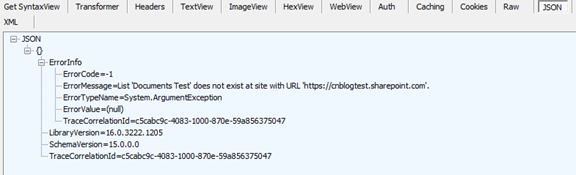
这个JSON对象里面明确的显示了在执行GetListById的时候,返回的异常信息。
当通过currentWeb.Lists.GetByTitle("Documents Test") 获取List的时候,如果服务器端如果不存在这个List,会出现异常。我们在写服务器端的应用程序的时候,只需要try catch就可以了,但是我们知道ClientAPI本身的调用时通过WCF来进行调用的,我们只有在执行了ExecuteQuery之后,才知道服务器端是否出现异常,然后服务器把异常信息包装后返回给CSOM。
这种API的行为会给我们带来一系列的问题。如果我们在List不存在的时候,需要新建一个,如果通过不在CSOM引发异常的方式来执行呢?上面的例子中,如果我们在List不存在时新建一个List,仍然需要一次请求,如何能再一次请求中实现呢?
使用ExceptionHandlingScope来提高CSOM程序的性能
这个类就是我们用于处理服务器端异常的常用类。上面的例子中,我们可以用如下代码来实现。
            using (ClientContext clientContext = new ClientContext("https://cnblogtest.sharepoint.com"))

            {

                var pasword = new SecureString();

                "abc123!@#".ToCharArray().ToList().ForEach(pasword.AppendChar);

                clientContext.Credentials = new SharePointOnlineCredentials("test001@cnblogtest.onmicrosoft.com", pasword);//设置权限

                var currentWeb = clientContext.Web;

                var exceptionHandlingScope = new ExceptionHandlingScope(clientContext);

                //List list = null;

                using (var currentScope = exceptionHandlingScope.StartScope())

                {

                    using (exceptionHandlingScope.StartTry())

                    {

                        //此API调用时,如果此List在Server端不存在,会出现异常。

                        var listGetById = currentWeb.Lists.GetByTitle("Documents Test");

                        listGetById.Description = "List Get By Id";

                        listGetById.Update();

                    }

                    using (exceptionHandlingScope.StartCatch())

                    {

                        ListCreationInformation listCreationInfo = new ListCreationInformation();

                        listCreationInfo.Title = "Documents Test";

                        listCreationInfo.TemplateType = (int)ListTemplateType.DocumentLibrary;

                        listCreationInfo.Description = "List create in catch block";

                        currentWeb.Lists.Add(listCreationInfo);

                    }

                }

                List list = currentWeb.Lists.GetByTitle("Documents Test");

                clientContext.Load(list);

                clientContext.ExecuteQuery();//执行查询,不会出异常

                //Server端是否出现了异常

                Console.WriteLine("Server has Exception:" + exceptionHandlingScope.HasException);

                //Server端异常信息

                Console.WriteLine("Server Error Message:" + exceptionHandlingScope.ErrorMessage);

            }
这个类解决了我们上面说的的问题,服务器端在编译的时候,会把ExceptionHandlingScope里面的代码编译成try catch这样的代码,因此我们可以通过一次请求来实现类似try catch这样的逻辑。
上面的代码再已经CSOM编译后的请求报文为:
<Request AddExpandoFieldTypeSuffix="true" SchemaVersion="15.0.0.0" LibraryVersion="15.0.0.0" ApplicationName=".NET Library"

xmlns="http://schemas.microsoft.com/sharepoint/clientquery/2009">

<Actions>

<ObjectPath Id="2" ObjectPathId="1" />

<ObjectPath Id="4" ObjectPathId="3" />

<ExceptionHandlingScope Id="5">

<TryScope Id="7">

<ObjectPath Id="10" ObjectPathId="9" />

<ObjectPath Id="12" ObjectPathId="11" />

<ObjectIdentityQuery Id="13" ObjectPathId="11" />

</TryScope>

<CatchScope Id="15">

<ObjectPath Id="18" ObjectPathId="17" />

<ObjectIdentityQuery Id="19" ObjectPathId="17" />

</CatchScope>

</ExceptionHandlingScope>

<Query Id="22" ObjectPathId="11">

<Query SelectAllProperties="true">

<Properties />

</Query>

</Query>

</Actions>

<ObjectPaths>

<StaticProperty Id="1" TypeId="{3747adcd-a3c3-41b9-bfab-4a64dd2f1e0a}" Name="Current" />

<Property Id="3" ParentId="1" Name="Web" />

<Property Id="9" ParentId="3" Name="Lists" />

<Method Id="11" ParentId="9" Name="GetByTitle">

<Parameters>

<Parameter Type="String">Documents Test</Parameter>

</Parameters>

</Method>

<Method Id="17" ParentId="9" Name="Add">

<Parameters>

<Parameter TypeId="{e247b7fc-095e-4ea4-a4c9-c5d373723d8c}">

<Property Name="CustomSchemaXml" Type="Null" />

<Property Name="DataSourceProperties" Type="Dictionary" />

<Property Name="Description" Type="Null" />

<Property Name="DocumentTemplateType" Type="Int32">0</Property>

<Property Name="QuickLaunchOption" Type="Enum">0</Property>

<Property Name="TemplateFeatureId" Type="Guid">{00000000-0000-0000-0000-000000000000}</Property>

<Property Name="TemplateType" Type="Int32">101</Property>

<Property Name="Title" Type="String">Documents Test</Property>

<Property Name="Url" Type="Null" />

</Parameter>

</Parameters>

</Method>

</ObjectPaths>

</Request>
从这个报文,中我们已经可以大致看出CSOM如何表示这种try catch finally的代码块。我们可以看到ExceptionHandlingScope也是和ClientObject一样有Id信息,这样服务器端就可以把对应的代码编译成server端的try catch finally了。
由于CSOM是基于http请求的,因此尽可能的减少请求,对于我们写出高效的程序至关重要。
下一篇文章主要会介绍 ConditionalScope的使用。
使用ExceptionHandlingScope进行高效的SharePoint CSOM编程的更多相关文章
- 使用ConditionalScope进行高效的SharePoint CSOM编程
在上一篇文章中讲述了 ExceptionHandlingScope的使用后,本章主要讲述ConditionalScope的用法. ConditionalScope在设计思路和解决问题上同Excepti ...
- 使用SharePoint CSOM 编写高效的程序
上一篇文章中简单的介绍了使用CSOM进行编程.今天主要讲一下CSOM使用中一些小技巧,可以让你的程序运行的更快. 单独加载某些属性 在上文中的例子,需要返回Web对象信息的时候,我们使用了如下的代码: ...
- 在设置代理的环境下使用SharePoint CSOM
SharePoint 的CSOM都是通过HttpRequest来实现和SharePoint服务器的交互的,那么我们如何设置HttpWebRequest的一些特性呢,如Cookie,WebProxy? ...
- SharePoint 2013的REST编程基础
1. SharePoint 2013对REST编程的支持 自从SharePoint2013开始, SharePoint开始了对REST 编程的支持,这样除了.NET , Silverlight, Po ...
- SharePoint 2013 开发——搜索架构及扩展
博客地址:http://blog.csdn.net/FoxDave SharePoint 2013高度整合了搜索引擎,在一个场中只有一个搜索服务应用程序(SSA).它集成了FAST,只有一个代码库 ...
- SharePoint 入门书籍推荐 转载来源http://www.cnblogs.com/jianyus/p/3513238.html
最近,总有人说刚入门SharePoint,没有好的资料或者电子书,资料推荐大家多看看博客园和CSDN的博客.对于看博客,我一般是两个思路,要么找一个人的从头到尾看一遍,觉得有意义的,就把地址加收藏:或 ...
- 什么是SharePoint?
在聊SharePoint开发之前,有必要说下什么是SharePoint. 在我工作的过程中,经常遇到客户对SharePoint不太了解的情况.有客户说,SharePoint太烂了,DropBox能做到 ...
- SharePoint 入门书籍推荐
最近,总有人说刚入门SharePoint,没有好的资料或者电子书,资料推荐大家多看看博客园和CSDN的博客.对于看博客,我一般是两个思路,要么找一个人的从头到尾看一遍,觉得有意义的,就把地址加收藏:或 ...
- 实现一个基于 SharePoint 2013 的 Timecard 应用(中)
门户视图 随着 Timecard 列表的增多,如何查找和管理这许多的 Timecard 也就成了问题.尤其对于团队经理而言,他除了自己填写的 Timecard,还要审核团队成员的 Timecard 任 ...
随机推荐
- 循序渐进Python3(三) -- 3 -- 内置函数
上一篇我们又介绍了26个Python内置函数.现回忆一下吧: 1.all 2.any 3.ascii 4.bin 5.bool 6.bytes 7.bytearray 8.callable 9.chr ...
- SQL Server 阻止了对组件 'Ad Hoc Distributed Queries' 的 STATEMENT 'OpenRowset/OpenDatasource' 的访问,因为此组件已作为此服务器安全配置的一部分而被关闭。系统管理员可以通过使用 sp_configure 启用 'Ad Hoc Distributed Queries'。
今天单位一ASP.NET网站,里面有个功能是导出数据,发现一导出就报错,报错内容是:SQL Server 阻止了对组件 'Ad Hoc Distributed Queries' 的 STATEMENT ...
- componentsSeparatedByString,componentsJoinedByString,componentsSeparatedByCharactersInSet
将string字符串转换为array数组 NSArray *array = [Str componentsSeparatedByString:@","]; ==反向方法 将arr ...
- jQuery2
一.类型选择器 jQuery的类型选择器 选择器 说明 :button 选择所有按钮 :checkbox 选择所有复选框 :file 选择所有文件上传输入框 :header 选择所有标题元素(h1,h ...
- [转] swf文件加密基础
本来打算下班回来就写这个东西,一方面算是对今天学习的一个笔记记录,另外一方面,给一些朋友普及一些swf文件加密基础知识.之所以说是基础,那是因为我也是刚学习了一点,灰常的基础.不过晚上看了一会我是传奇 ...
- hdu 5720 Wool
hdu 5720 问题描述 黎明时,Venus为Psyche定下了第二个任务.她要渡过河,收集对岸绵羊身上的金羊毛. 那些绵羊狂野不驯,所以Psyche一直往地上丢树枝来把它们吓走.地上现在有n n ...
- JDBC连接数据库(SQLServer和MySQL)配置总结
[JDBC连接SQL Server] [准备工作] 1.下载Eclipse-JavaEE: 2.下载Tomcat8.0: 3.下载Microsoft JDBCDriver 4.1 for SQL Se ...
- 2d,3d中旋转推导
二维绕原点旋转,其实点为(x,y),旋转角度为黄色标注的角度. 推导过程如下: x' = r cos(al+be); y' = r sin(al+be);x '= rcosalcosbe-rsinal ...
- iOS模拟各种网络状态
在iOS开发中我们有在各种不同网络状态下测试app运行状态的需求.苹果给我们提供了在模拟器和真机状态下,模拟各种网络状态的软件. 在模拟器中 苹果提供的模拟网络状态的工具官网地址下载该工具需要登录Ap ...
- [JS]应用splice删除多元素时出现的坑
------------------------------------------------------------------------------------- 先看一个片段: var fr ...