
VUE里子组件获取父组件动态变化的值
在VUE里父组件给子组件间使用props方式传递数据,但是希望父组件的一个状态值改变然后子组件也能监听到这个数据的改变来更新子组件的状态。
场景:子组件通过props获取父组件传过来的数据,子组件存在操作传过来的数据并且传递给父组件。
比如想实现一个switch开关按钮的公用组件:
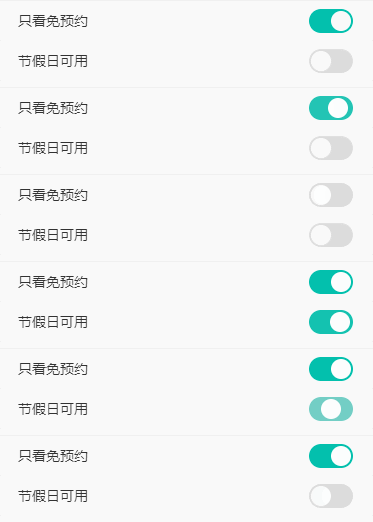
1.父组件可以向按钮组件传递默认值。
2.子组件的操作可以改变父组件的数据。
3.父组件修改传递给子组件的值,子组件能动态监听到改变。
比如父组件点击重置,开关组件的状态恢复为关闭状态:
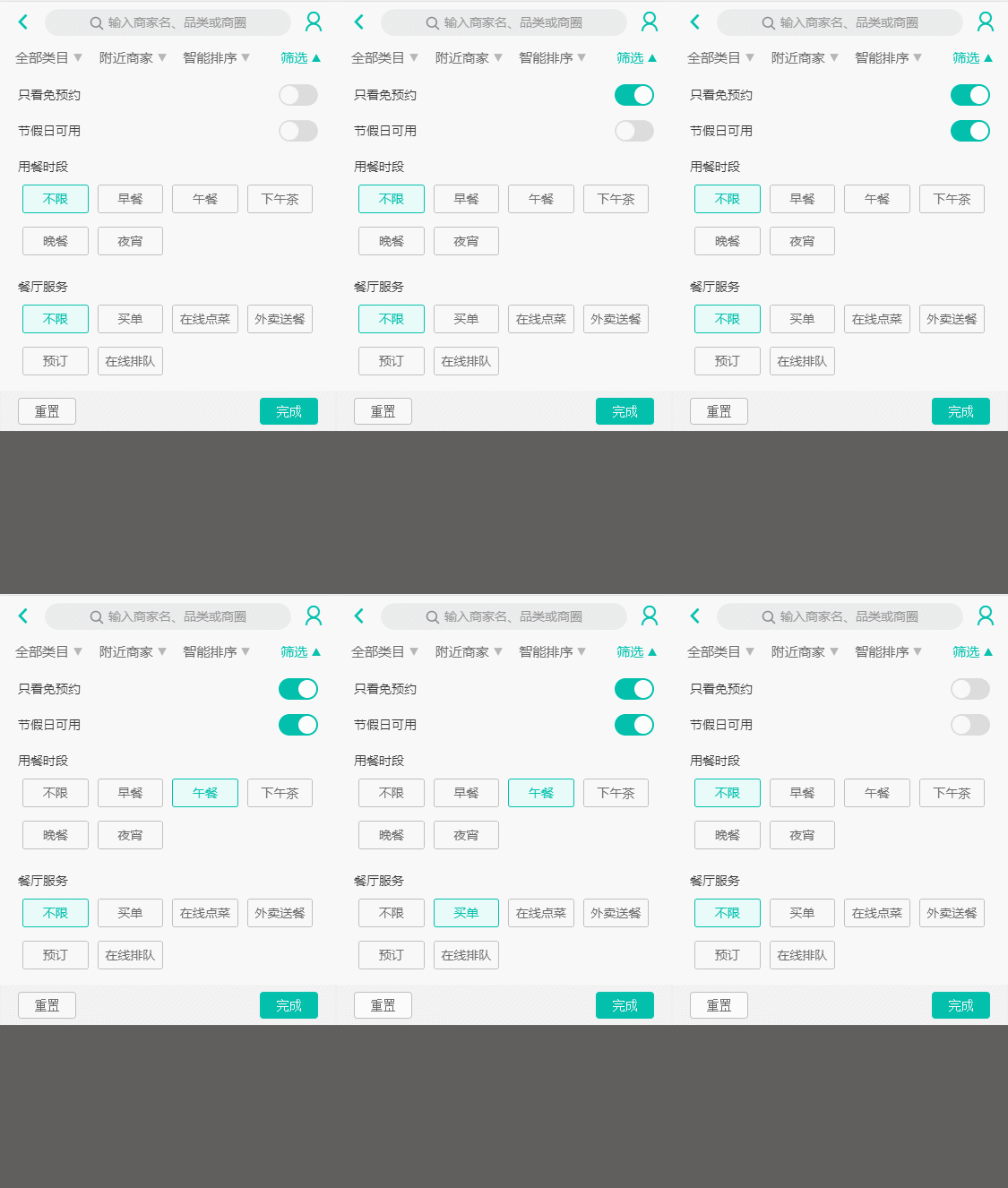
方法1:
1、因为存在子组件要更改父组件传递过来的数据,但是直接操作props里定义的数据vue会报错,所以需要在data里重新定义属性名并将props里的数据接收。
2、首先想到的肯定是在computed计算属性里监听数据的变化,那就直接在computed里监听父组件传递过来的props数据的变化,如果有变动就进行操作,如:
export default {

  name: 'SwitchButton',

  props: {

    status: {

      type: Boolean,

      default () {

        return false

      }

    }

  },

  data () {

    return {

      switchStatusData: this.status // 重新定义数据

    }

  },

  computed: {

    switchStatus: function () {

      return this.status // 直接监听props里的status状态

    }

  }

  }

}
这样就可以在使用switchStatus的地方动态的监听到父组件status的变化。似乎只针对简单的数据类型有效。
方法2:
使用watch和computed组合实现:如
export default {

  name: 'SwitchButton',

  props: {

    status: {

      type: Boolean,

      default () {

        return false

      }

    }

  },

  data () {

    return {

      switchStatusData: this.status

    }

  },

  computed: {

    switchStatus: function () {

      return this.switchStatusData  // 监听switchStatusData 的变化

    }

  },

  watch: {

    status (newV, oldV) { // watch监听props里status的变化,然后执行操作

      console.log(newV, oldV)

      this.switchStatusData = newV

    }

  },

  methods: {

    switchHandleClick () {

      this.switchStatusData = !this.switchStatusData

      this.$emit('switchHandleClick', this.switchStatusData)

    }

  }

}
下面是实现该组件的代码:
<template>

  <span class="switch-bar" :class="{'active': switchStatus}" @click="switchHandleClick"><span class="switch-btn"></span></span>

</template>

<script>

export default {

  name: 'SwitchButton',

  props: {

    status: {

      type: Boolean,

      default () {

        return false

      }

    }

  },

  computed: {

    switchStatus: function () {

      return this.status

    }

  },

  // watch: {

  //   status (newV, oldV) {

  //     console.log(newV, oldV)

  //     this.switchStatusData = newV

  //   }

  // },

  methods: {

    switchHandleClick () {

      const switchStatusData = !this.switchStatus

      this.$emit('switchHandleClick', switchStatusData)

    }

  }

}

</script>

<style lang="stylus" scoped>

  @import "~styles/varibles.styl"

  .area-wrapper

    line-height: .8rem;

    padding: 0 .4rem;

    .switch

      float: right;

      font-size: 0;

    .switch-bar

      position: relative;

      display: inline-block;

      width: .8rem;

      height: .4rem;

      border-radius: .4rem;

      background: #ddd;

      border: 2px solid #ddd;

      vertical-align: middle;

      transition: background .3s, border .3s;

      &.active

        background: $bgColor;

        border: 2px solid $bgColor;

        .switch-btn

          left: .4rem;

          background: #fff;

    .switch-btn

      position: absolute;

      left: 0px;

      display: inline-block;

      width: .4rem;

      height: .4rem;

      border-radius: .2rem;

      background: #fff;

      transition: background .3s, left .3s;

</style>
VUE里子组件获取父组件动态变化的值的更多相关文章
- 子组件获取父组件数据 propsDown, 父组件获取子组件数据 eventUp
(一) popsDowm 三种方法获取父组件数据:被动获得(1):主动获取(2). 1.被动获得: 父组件:v-bind: 绑定变量参数和方法参数:子组件:props 接收参数.可以在模板中直接使用也 ...
- vue子组件获取父组件方法
注:以下代码未使用esLint语法检查 父组件: <template> <div class="wrapper"> <cp_action @paren ...
- vue子组件获取父组件的数据
- vue子组件改变父组件的值
1 在父组件的coment绑定事件 <template> <div :class="classObj" class="app-wrapper" ...
- React子组件和父组件通信
React子组件和父组件通信包括以下几个方面: 子组件获取父组件属性:props或者state 子组件调用父组件的方法 父组件获取子组件的属性:props或者state 父组件调用子组件的方法 我们从 ...
- vue 父组件主动获取子组件的数据和方法 子组件主动获取父组件的数据和方法
Header.vue <template> <div> <h2>我是头部组件</h2> <button @click="getParen ...
- Vue 父组件主动获取子组件的值,子组件主动获取父组件的值
父组件主动获取子组件的值 1. 在调用子组件的时候定义一个ref-> ref="header"2. 在父组件中通过this.$refs.header.属性,调用子组件的属性, ...
- vue 如何重绘父组件,当子组件的宽度变化时候
vue 如何重绘父组件,当子组件的宽度变化时候 vue & dynamic el-popover position demo https://codepen.io/xgqfrms/pen/wv ...
- vue.js 父组件主动获取子组件的数据和方法、子组件主动获取父组件的数据和方法
父组件主动获取子组件的数据和方法 1.调用子组件的时候 定义一个ref <headerchild ref="headerChild"></headerchild& ...
随机推荐
- wsimport 使用方法具体解释
wsimport 使用方法 本文主要介绍wsimport的简单使用方法.帮助大家在webserviceclient开发过程中生成接口代码: 打开java JDK文件夹我们会看到wsimport工具,这 ...
- leetCode解题报告5道题(七)
题目一:Interleaving String Given s1, s2, s3, find whether s3 is formed by the interleaving of s1 and s2 ...
- jquery-easyui的datagrid在checkbox多选时,行选中不正确应,去除高亮的解决方法
jquery-easyui的datagrid在checkbox多选时,行选中不正确应,去除高亮的解决方法 工作中用到一个具有多选功能的easyui-datagrid在处理cell的点击事件时,不同 ...
- glm编译错误问题解决 formal parameter with __declspec(align('16')) won't be aligned
參考:http://stackoverflow.com/questions/25300116/directxxmmatrix-error-c2719-declspecalign16-wont-be-a ...
- JAVA学习第四十六课 — 其它对象API(二)Date类 & Calendar类(重点掌握)
Date类(重点) 开发时,会时常遇见时间显示的情况,所以必须熟练Date的应用 <span style="font-family:KaiTi_GB2312;font-size:18p ...
- TCO14 1B L3: EagleInZoo, dp,tree
题目:http://community.topcoder.com/stat?c=problem_statement&pm=13117&rd=15950 看到树,又是与节点有关,通常是d ...
- 51nod-1131: 覆盖数字的数量
[传送门:51nod-1131] 简要题意: 给出A,B,表示有一个区间为A到B 给出X,Y,表示有一个区间为X到Y 求出X到Y中能够被A到B中的数(可重复)相加得到的不同的数的个数 题解: 乱搞题, ...
- hpuoj--校赛--爬楼梯(模拟)
问题 E: 感恩节KK专场--爬楼梯 时间限制: 1 Sec 内存限制: 1000 MB 提交: 382 解决: 89 [提交][状态][讨论版] 题目描述 来机房比赛的时候大家都会爬楼梯,但是每 ...
- Dictionary as a set of counters
Suppose you are given a string and you want to count how many times each letters appears. There are ...
- Ubuntu18.04 更改GRUB引导菜单背景图片和默认启动项
一.更改GRUB引导菜单背景图片1.首先准备一张想要的照片,文件名是啥无所谓,只要格式是*.jpg *.JPG *.jpeg *.JPEG *.png *.PNG *.tga *.TGA都行,都能自动 ...