
[-] Failed to load plugin from /usr/share/metasploit-framework/plugins/db_autopwn: No classes were loaded from /usr/share/metasploit-framework/plugins/db_autopwn in the Msf::Plugin namespace.
问题详情
然后,执行,出现如下问题,则说明大家的这个文件,下载不是完整的或者你上传不完整。
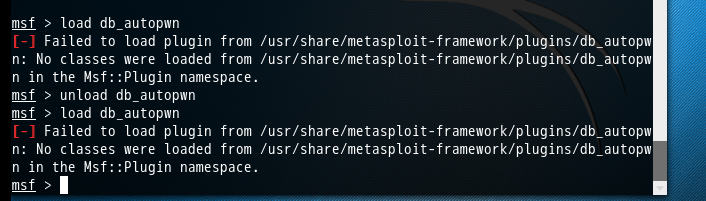
msf > load db_autopwn

[-] Failed to load plugin from /usr/share/metasploit-framework/plugins/db_autopwn: No classes were loaded from /usr/share/metasploit-framework/plugins/db_autopwn in the Msf::Plugin namespace.
解决办法
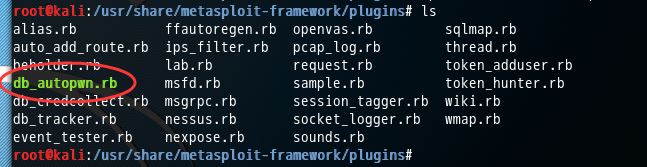
你也许会,像我也一样,第一次弄的时候,是先下载别人的,再上传。其实,这样,很有可能下载到的是别人的不完整或不干净的
我建议,大家按照如下来。

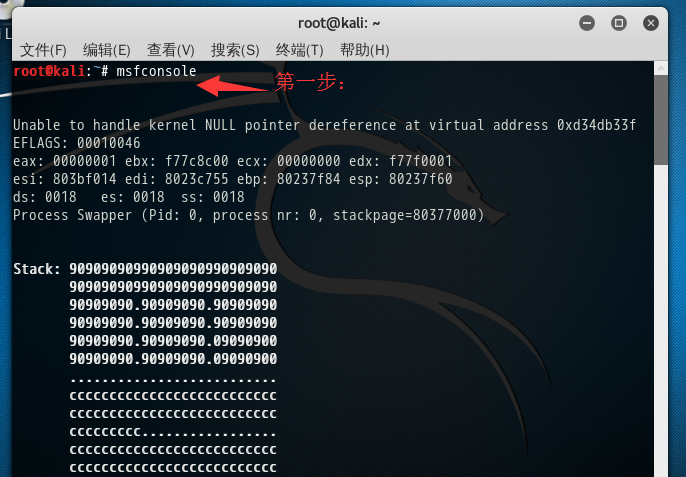
root@kali:~# msfconsole

Unable to handle kernel NULL pointer dereference at virtual address 0xd34db33f

EFLAGS:

eax:  ebx: f77c8c00 ecx:  edx: f77f0001

esi: 803bf014 edi: 8023c755 ebp: 80237f84 esp: 80237f60

ds:    es:   ss:

Process Swapper (Pid: , process nr: , stackpage=)

Stack:

       90909090.90909090.

       90909090.90909090.

       90909090.90909090.

       90909090.90909090.

       ..........................

       cccccccccccccccccccccccccc

       cccccccccccccccccccccccccc

       ccccccccc.................

       cccccccccccccccccccccccccc

       cccccccccccccccccccccccccc

       .................ccccccccc

       cccccccccccccccccccccccccc

       cccccccccccccccccccccccccc

       ..........................

       ffffffffffffffffffffffffff

       ffffffff..................

       ffffffffffffffffffffffffff

       ffffffff..................

       ffffffff..................

       ffffffff..................

Code:     M3 T4 SP L0 1T FR 4M 3W OR K! V3 R5 I0 N4

Aiee, Killing Interrupt handler

Kernel panic: Attempted to kill the idle task!

In swapper task - not syncing

Frustrated with proxy pivoting? Upgrade to layer- VPN pivoting with

Metasploit Pro -- learn more on http://rapid7.com/metasploit

       =[ metasploit v4.12.41-dev                         ]

+ -- --=[  exploits -  auxiliary -  post        ]

+ -- --=[  payloads -  encoders -  nops             ]

+ -- --=[ Free Metasploit Pro trial: http://r-7.co/trymsp ]

msf >
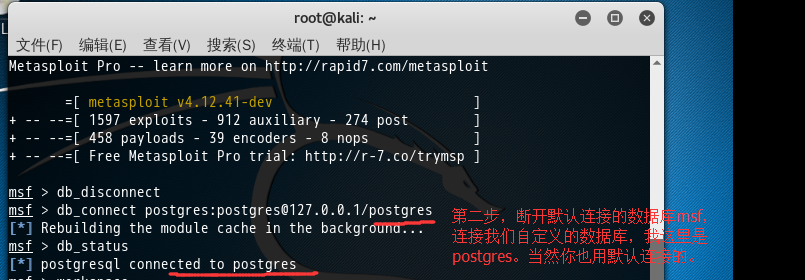
msf > db_disconnect

msf > db_connect postgres:postgres@127.0.0.1/postgres

[*] Rebuilding the module cache in the background...

msf > db_status

[*] postgresql connected to postgres

msf >
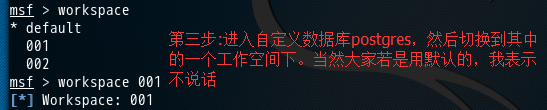
msf > workspace

* default

msf > workspace

[*] Workspace:
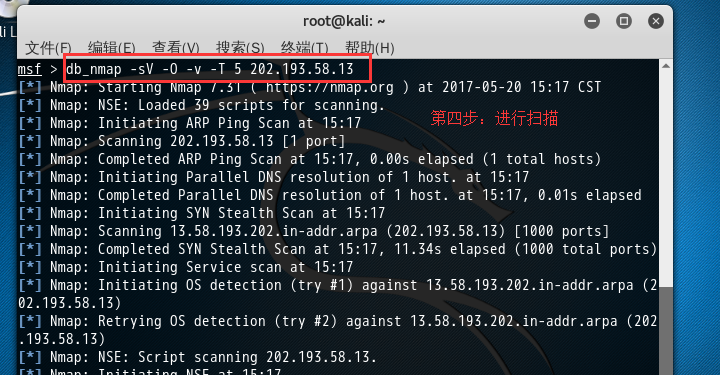
msf > db_nmap -sV -O -v -T  202.193.58.13

[*] Nmap: Starting Nmap 7.31 ( https://nmap.org ) at 2017-05-20 15:17 CST

[*] Nmap: NSE: Loaded  scripts for scanning.

[*] Nmap: Initiating ARP Ping Scan at :

[*] Nmap: Scanning 202.193.58.13 [ port]

[*] Nmap: Completed ARP Ping Scan at :, .00s elapsed ( total hosts)

[*] Nmap: Initiating Parallel DNS resolution of  host. at :

[*] Nmap: Completed Parallel DNS resolution of  host. at :, .01s elapsed

[*] Nmap: Initiating SYN Stealth Scan at :

[*] Nmap: Scanning 13.58.193.202.in-addr.arpa (202.193.58.13) [ ports]

[*] Nmap: Completed SYN Stealth Scan at :, .34s elapsed ( total ports)

[*] Nmap: Initiating Service scan at :

[*] Nmap: Initiating OS detection (try #) against 13.58.193.202.in-addr.arpa (202.193.58.13)

[*] Nmap: Retrying OS detection (try #) against 13.58.193.202.in-addr.arpa (202.193.58.13)

[*] Nmap: NSE: Script scanning 202.193.58.13.

[*] Nmap: Initiating NSE at :

[*] Nmap: Completed NSE at :, .00s elapsed

[*] Nmap: Initiating NSE at :

[*] Nmap: Completed NSE at :, .00s elapsed

[*] Nmap: Nmap scan report for 13.58.193.202.in-addr.arpa (202.193.58.13)

[*] Nmap: Host is up (.0012s latency).

[*] Nmap: All  scanned ports on 13.58.193.202.in-addr.arpa (202.193.58.13) are filtered

[*] Nmap: MAC Address: :AD::::5C (Unknown)

[*] Nmap: Too many fingerprints match this host to give specific OS details

[*] Nmap: Network Distance:  hop

[*] Nmap: Read data files from: /usr/bin/../share/nmap

[*] Nmap: OS and Service detection performed. Please report any incorrect results at https://nmap.org/submit/ .

[*] Nmap: Nmap done:  IP address ( host up) scanned in 16.88 seconds

[*] Nmap: Raw packets sent:  (.700KB) | Rcvd:  (.528KB)

msf > hosts

Hosts

=====

address        mac                name                        os_name   os_flavor  os_sp  purpose  info  comments

-------        ---                ----                        -------   ---------  -----  -------  ----  --------

202.193.58.13  :AD::::5C  13.58.193.202.in-addr.arpa  embedded                    device

msf > load db_autopwn

[*] Successfully loaded plugin: db_autopwn

msf >
欧克,本博文解决问题,后续工作,我这不赘述。
[-] Failed to load plugin from /usr/share/metasploit-framework/plugins/db_autopwn: No classes were loaded from /usr/share/metasploit-framework/plugins/db_autopwn in the Msf::Plugin namespace.的更多相关文章
- QT5 Failed to load platform plugin "windows" 终极解决方式 命令行问题
Failed to load platform plugin "windows" 这个错误在双击exe运行时不会出现,当传递命令行參数时出问题 ,解决方法: int main(in ...
- 启动elasticsearch的时候报出Exception in thread "main" SettingsException[Failed to load settings from /usr/local/elasticsearch/config/elasticsearch.yml]; nested: MarkedYAMLException[while scanning a simple ke
故障现象: [elasticsearch@tiantianml- ~]$ /usr/local/elasticsearch/bin/elasticsearch Exception in thread ...
- Failed to issue method call: Unit mysql.service failed to load: No such file or directory解决的方式
Failed to issue method call: Unit mysql.service failed to load: No such file or directory解决的方式 作者:ch ...
- Failed to issue method call: Unit httpd.service failed to load: No such file or directory.
centos7修改httpd.service后运行systemctl restart httpd.service提示 Failed to issue method call: Unit httpd.s ...
- 解决 RHEL 7/ CentOS 7/Fedora 出现Unit iptables.service failed to load
一直用CentOS 6 习惯了,一下没适应过来.防火墙配置后执行service iptables save 出现”Failed to restart iptables.service: Unit ip ...
- Failed to load libGL.so问题解决
Ubuntu 14.04下启动模拟设备Android 4.2.2的时候报错: failed to load libgl.so 先用locate 命令定位libGL库, 然后加入�一个链接就可以: de ...
- Ubuntu14.04下安装ZendStudio10.6.1+SVN出现Failed to load JavaHL Library
Subclipse不能正常工作,打开后报错: Failed to load JavaHL Library. These are the errors that were encountered: no ...
- mac eclipse svn subeclipse: Failed to load JavaHL Library.
Failed to load JavaHL Library. These are the errors that were encountered: no libsvnjavahl-1 in java ...
- Failed to load ApplicationContext ,Error creating bean with name 'adminUserService': Injection of autowired dependencies failed;
Druid配置的时候出现这个问题: "C:\Program Files\Java\jdk1.8.0_191\bin\java" -ea -Didea.test.cyclic.buf ...
随机推荐
- cocos2d-x3.2 下使用多线程
事实上在cocos2dx下使用多线程事实上就是用C++去写,这里提供几个简单的样例: 原文地址:http://blog.csdn.net/qqmcy/article/details/36227377 ...
- Hibernate关系映射中的注解
一.@Entity 写在映射表的类上面,表示这是映射来的实体 二.@Id @Column(name = "fid", nullable = false) @Basic @Colum ...
- node之版本号升级和管理
如今非常多人预计和我一样项目中已经開始应用起nodeJS,而伴随着项目的需求,对nodejs版本号也有着各种需求.好了直接进入主题,如今node版本号管理网上有非常多方式.这里说两种: 第一种modu ...
- App 签名过期或泄露怎么办?别担心,Google 已经给出解决方案!
一.序 在将 App 发布到市场之前,很重要的一个步骤就是为 APK 进行签名,大部分时候,这个操作隐藏在了打包的流程中,而不被我们注意到. 签名的作用,除了证明 App 的所有权之外,还可以帮助 A ...
- keras安装及使用
安装全称参考https://keras-cn.readthedocs.io/en/latest/for_beginners/keras_linux/ 环境中已配置cuda8.0.cudnn5.0,ub ...
- Nginx访问VM虚拟机CentOS 7系统与本地Windows系统共享目录403
用VMware安装了CentOS7系统,并搭建了Nginx,MySQL,PHP的web项目运行环境,为了方便Windows本地主机进行程序调试把Windows本地项目目录共享到了虚拟机CentOS中的 ...
- 7.boostUDP通信
客户端 #include <iostream> #include<string> #include <boost/asio.hpp> #include <st ...
- xBIM 实战03 使用WPF技术实现IFC模型的加载与浏览
系列目录 [已更新最新开发文章,点击查看详细] WPF应用程序在底层使用 DirectX ,无论设计复杂的3D图形(这是 DirectX 的特长所在)还是绘制简单的按钮与文本,所有绘图工作都是 ...
- SP1487 PT07J - Query on a tree III 主席树+dfs序
Code: #include<iostream> #include<cstdio> #include<algorithm> #include<string&g ...
- 修改maven打包名字
仅需在pom.xml添加下列配置 build> <finalName>userapi</finalName> </build>