
CSS3 过渡、动画、多列、用户界面
CSS3 过渡、动画、多列、用户界面
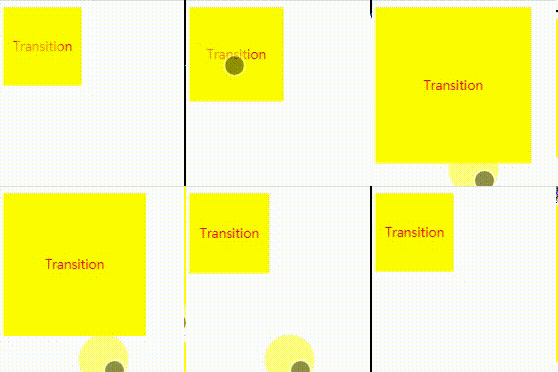
transition过渡
transition: transition-property transition-duration transition-timing-function transition-delay;//过渡名称 过渡时长 过渡时间曲线 过渡延时
.box {

    width: 100px;

    height: 100px;

    line-height: 100px;

    color: red;

    text-align: center;

    background-color: yellow;

    transition: width 2s, height 2s, line-height 2s;

    -webkit-transition: width 2s, height 2s, line-height 2s;

    -moz-transition: width 2s, height 2s, line-height 2s;

    -o-transition: width 2s, height 2s, line-height 2s;

}

.box:hover {

    width: 200px;

    height: 200px;

    line-height: 200px;

}
animation 动画
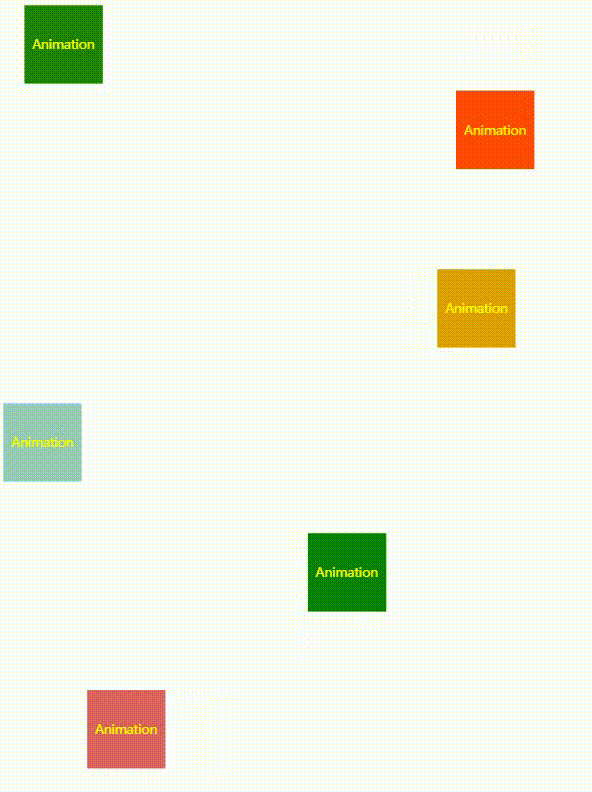
animation: animation-name animation-duration animation-timing-function animation-delay animation-iteration-count animation-direction animation-play-state animation-fill-mode;
/*动画名称 动画周期 动画时间曲线 动画延时 动画次数 动画方向(normal、alternate) 动画暂停或运行(paused、running) 动画在播放之前或之后,其动画效果是否可见(none、forwards、backwards、both)*/
.box {

    position: relative;

    width: 100px;

    height: 100px;

    line-height: 100px;

    text-align: center;

    background-color: green;

    color: yellow;

    -webkit-animation: move  5s linear infinite;

}

@-webkit-keyframes move {

    0% { left:; top:; }

    25% { left: 200px; top:; background-color: orange;}

    50% { left: 200px; top: 200px; background-color: red; }

    75% { left:; top: 200px; background-color: lightblue; }

    100% { left:; top:; }

}
多列
column-count 元素应该被分隔的列数
column-gap 列与列之间的间隔
column-rule 列与列之间的宽度、样式、颜色规则
div {

  -moz-column-count:;     /* Firefox */

  -moz-column-rule:3px outset #ff0000;

  -moz-column-gap:40px;

  -webkit-column-count:; /* Safari 和 Chrome */

  -webkit-column-gap:40px;

  -webkit-column-rule:3px outset #ff0000;

  column-count:;

  column-gap:40px;

  column-rule:3px outset #ff0000;

}
用户界面
resize 规定是否可由用户调整元素的尺寸
resize: none|both|horizontal|vertical;
box-sizing 允许您以确切的方式定义适应某个区域的具体内容
box-sizing: content-box|border-box|inherit;
outline-offset 对轮廓进行偏移,并在边框边缘进行绘制
outline-offset: length|inherit;
CSS3 过渡、动画、多列、用户界面的更多相关文章
- css3过渡动画 transition
transition CSS3 过渡是元素从一种样式逐渐改变为另一种的效果. 要实现这一点,必须规定两项内容: 指定要添加效果的CSS属性 指定效果的持续时间 例如 这是下面代码的预览界面预览界面 & ...
- CSS3过渡动画&关键帧动画
一.过渡动画 过渡(transition)动画,就是从初始状态过渡到结束状态这个过程中所产生的动画. 所谓的状态就是指大小.位置.颜色.变形(transform)等等这些属性. Note:不是所有属性 ...
- CSS3 过渡动画
实现如下效果:当鼠标移动到图片上是图片有类似于放大镜放大的效果 transition : CSS属性 时间 当transition中监测的css属性发生变化时,会触发动画 .img_box img{ ...
- css3贝塞尔曲线过渡动画速率——transition-timing-function:cubic-bezier(n,n,n,n)
css3过渡动画速率用到的是三阶贝塞尔曲线,曲线有四个点,p0,p1,p2,p3 有几个属性: linear 规定以相同速度开始至结束的过渡效果(等于 cubic-bezier(0,0,1,1)). ...
- css3中动画(transition)和过渡(animation)详析
css3中动画(transition)和过渡(animation)详析
- CSS3过渡、变形和动画
1.CSS3过渡 所谓CSS3过渡,就是使用CSS3让元素从一种状态慢慢转换到另一种状态.如鼠标的悬停状态就是一种过渡.如下例子: #content a{ text-decoration: n ...
- CSS3学习(CSS3过渡、CSS3动画)
CSS3过渡:transition属性--专门应对颜色.长度.宽度.位置等变化的过渡 通过CSS3,我们可以在不使用Flash和JavaScript的情况下,为当前某元素从某样式改变为某样式的时候添加 ...
- 从零开始学习前端开发 — 15、CSS3过渡、动画
一.css3过渡 语法: transition: 过渡属性 过渡时间 延迟时间 过渡方式; 1.过渡属性(transition-property) 取值:all 所有发生变化的css属性都添加过渡 e ...
- CSS3过渡与动画
一.CSS3 过渡 transition-property 规定过渡效果的 CSS 属性名 -webkit-transition-property: none / all / property; -m ...
随机推荐
- Nagios Windows客户端NSClient++ 0.4.x安装配置
NSClient++ 0.3.x和NSClient++ 0.4.x的配置完全不一样,官方的文档也没有全部更新.我记录下自己的一些操作. 一.下载安装NSClient++ 1.到http://nsc ...
- iframe里面开启全屏allowfullscreen="true"
<iframe id="J_iframe" width="100%" height="100%" src="client-a ...
- 【深入理解Java虚拟机】自动内存管理机制——垃圾回收机制
Java与C++之间有一堵有内存动态分配和垃圾收集技术所围成的"高墙",墙外面的人想进去,墙里面的人却想出来.C/C++程序员既拥有每一个对象的所有权,同时也担负着每一个对象生 ...
- [TJOI2018]xor
题目大意: 有一棵树,根节点为1.每个点有点权.有两种操作. 1. 求节点x所在子树中点权与y异或的最大值.2. 求x到y的路径上点权与z异或的最大值. 解题思路: 可持久化字典树. 对于第一种操作, ...
- vue 2.0 购物车小球抛物线
备注:此项目模仿 饿了吗.我用的是最新的Vue, 视频上的一些写法已经被废弃了. 布局代码 <div class="ball-container"> <trans ...
- eclipse debug的时候提示debug Edit Source Lookup path
原因可能是代码资源包未加载到debug的路径中,解决方法如下: Debug 视图下 ->在调试的线程上 右键单击 ->选择Edit Source Lookup Path ->选择Ad ...
- [Beginning SharePoint Designer 2010]Chapter2 编辑页面
本章概要: 1.如何展开隐藏任务面板和ribbon标签 2.页面编辑模式 3.代码视图模式和智能提示 4.如何组合SharePoint和页面上其他元素
- java中继承关系学习小结
继承:把多个类中同样的内容提取出来.定义到一个类中,其它类仅仅须要继承该类.就能够使用该类公开的属性和公开的方法. 继承的优点:提高代码的复用性.提高代码的可维护性.让类与类之间产生关系,是多态存 ...
- FATAL ERROR in native method: JDWP No transports initialized, jvmtiError=AGENT_ERROR_TRANSPORT_INIT
FATAL ERROR in native method:JDWP No transports initialized,jvmtiError=AGENT_ERROR_TRANSPORT_INIT(19 ...
- Windows 8.1内置微软五笔输入法
微软五笔输入法採用86版编码,不是Windows 8.1系统的中文语言的缺省输入法,你在使用它之前须要把它加入到系统输入法中. 在控制面板双击"",然后加入微软五笔输入法. wat ...