
WPF里DataGrid分页控件
1.主要代码:
 using System;

 using System.Collections.ObjectModel;

 using System.Windows;

 using System.Windows.Controls;

 using System.Windows.Input;

 using GalaSoft.MvvmLight.Command;

 namespace PaggingDataGrid.CustomCtrl

 {

     /// <summary>按照步骤 1a 或 1b 操作,然后执行步骤 2 以在 XAML 文件中使用此自定义控件。 步骤 1a) 在当前项目中存在的 XAML 文件中使用该自定义控件。 将此 XmlNamespace 特性添加到要使用该特性的标记文件的根 元素中: xmlns:MyNamespace="clr-namespace:PaggingDataGrid" 步骤 1b) 在其他项目中存在的 XAML 文件中使用该自定义控件。 将此 XmlNamespace 特性添加到要使用该特性的标记文件的根 元素中: xmlns:MyNamespace="clr-namespace:PaggingDataGrid;assembly=PaggingDataGrid" 您还需要添加一个从 XAML 文件所在的项目到此项目的项目引用, 并重新生成以避免编译错误: 在解决方案资源管理器中右击目标项目,然后依次单击 “添加引用”->“项目”->[浏览查找并选择此项目] 步骤 2) 继续操作并在 XAML 文件中使用控件。

     /// <MyNamespace:PaggingControl />

     /// </summary>

     public class PaggingControl : Control

     {

         // Using a DependencyProperty as the backing store for TotalPages.  This enables animation, styling, binding, etc...

         public static readonly DependencyProperty TotalPagesProperty =

             DependencyProperty.Register("TotalPages", typeof (uint), typeof (PaggingControl),

                                         new PropertyMetadata(1u, TotalPagesPropertyChangeCallback));

         // Using a DependencyProperty as the backing store for CurrentPage.  This enables animation, styling, binding, etc...

         public static readonly DependencyProperty CurrentPageProperty =

             DependencyProperty.Register("CurrentPage", typeof (uint), typeof (PaggingControl),

                                         new PropertyMetadata(1u, CurrentPagePropertyChangeCallback));

         // Using a DependencyProperty as the backing store for PageSize.  This enables animation, styling, binding, etc...

         public static readonly DependencyProperty PageSizeProperty =

             DependencyProperty.Register("PageSize", typeof (uint), typeof (PaggingControl),

                                         new PropertyMetadata(10u, PageSizePropertyChangecallback));

         // Using a DependencyProperty as the backing store for PageSizeList.  This enables animation, styling, binding, etc...

         public static readonly DependencyProperty PageSizeListProperty =

             DependencyProperty.Register("PageSizeList", typeof (ObservableCollection<uint>), typeof (PaggingControl),

                                         new PropertyMetadata(new ObservableCollection<uint> {10u, 20u, 50u, 100u}));

         // Using a DependencyProperty as the backing store for ItemsCount.  This enables animation, styling, binding, etc...

         public static readonly DependencyProperty ItemsCountProperty =

             DependencyProperty.Register("ItemsCount", typeof (uint), typeof (PaggingControl),

                                         new PropertyMetadata(1u, ItemsCountPropertyChangeCallback));

         // Using a DependencyProperty as the backing store for PageRefreshCommand.  This enables animation, styling, binding, etc...

         public static readonly DependencyProperty PageRefreshCommandProperty =

             DependencyProperty.Register("PageRefreshCommand", typeof (ICommand), typeof (PaggingControl),

                                         new PropertyMetadata(null));

         static PaggingControl()

         {

             DefaultStyleKeyProperty.OverrideMetadata(typeof (PaggingControl),

                                                      new FrameworkPropertyMetadata(typeof (PaggingControl)));

         }

         public PaggingControl()

         {

             //第一次时候 刷新一下列表

             Loaded += delegate { RaisePageRefreshEvent(); };

         }

         /// <summary>总页数</summary>

         public uint TotalPages

         {

             get { return (uint) GetValue(TotalPagesProperty); }

             set { SetValue(TotalPagesProperty, value); }

         }

         /// <summary>当前页</summary>

         public uint CurrentPage

         {

             get { return (uint) GetValue(CurrentPageProperty); }

             set { SetValue(CurrentPageProperty, value); }

         }

         /// <summary>每页的大小</summary>

         public uint PageSize

         {

             get { return (uint) GetValue(PageSizeProperty); }

             set { SetValue(PageSizeProperty, value); }

         }

         /// <summary>每页大小列表,即页面大小选择框的数据源</summary>

         public ObservableCollection<uint> PageSizeList

         {

             get { return (ObservableCollection<uint>) GetValue(PageSizeListProperty); }

             set { SetValue(PageSizeListProperty, value); }

         }

         /// <summary>转到首页</summary>

         public ICommand FirstPageCmd

         {

             get

             {

                 return new RelayCommand(() => { CurrentPage = ; }

                                         , () => CurrentPage != );

             }

         }

         /// <summary>上一页</summary>

         public ICommand PreviousPageCmd

         {

             get { return new RelayCommand(() => { CurrentPage -= ; }, () => CurrentPage > ); }

         }

         /// <summary>下一页</summary>

         public ICommand NextPageCmd

         {

             get { return new RelayCommand(() => { CurrentPage += ; }, () => CurrentPage < TotalPages); }

         }

         /// <summary>尾页</summary>

         public ICommand LastPageCmd

         {

             get { return new RelayCommand(() => { CurrentPage = TotalPages; }, () => CurrentPage != TotalPages); }

         }

         /// <summary>转到某一页</summary>

         public ICommand TurnToPageCmd

         {

             get { return new RelayCommand(RaisePageRefreshEvent); }

         }

         /// <summary>数据总大小</summary>

         public uint ItemsCount

         {

             get { return (uint) GetValue(ItemsCountProperty); }

             set { SetValue(ItemsCountProperty, value); }

         }

         /// <summary>参数 选择Tuple(uint, uint)代表页数 和页大小,即index和length</summary>

         public ICommand PageRefreshCommand

         {

             get { return (ICommand) GetValue(PageRefreshCommandProperty); }

             set { SetValue(PageRefreshCommandProperty, value); }

         }

         private static void TotalPagesPropertyChangeCallback(DependencyObject d, DependencyPropertyChangedEventArgs e)

         {

             var ctrl = d as PaggingControl;

             if (ctrl != null)

             {

                 if (ctrl.CurrentPage > ctrl.TotalPages)

                 {

                     ctrl.CurrentPage = ctrl.TotalPages;

                 }

                 else if (ctrl.CurrentPage <= )

                 {

                     ctrl.CurrentPage = ;

                 }

                 ctrl.RaisePageRefreshEvent();

             }

         }

         private static void CurrentPagePropertyChangeCallback(DependencyObject d, DependencyPropertyChangedEventArgs e)

         {

             var ctrl = d as PaggingControl;

             if (ctrl != null)

             {

                 if (ctrl.CurrentPage > ctrl.TotalPages)

                 {

                     ctrl.CurrentPage = ctrl.TotalPages;

                 }

                 else if (ctrl.CurrentPage <= )

                 {

                     ctrl.CurrentPage = ;

                 }

                 ctrl.RaisePageRefreshEvent();

             }

         }

         private static void PageSizePropertyChangecallback(DependencyObject d, DependencyPropertyChangedEventArgs e)

         {

             var ctrl = d as PaggingControl;

             if (ctrl != null)

             {

                 ctrl.TotalPages = ctrl.ItemsCount/ctrl.PageSize + (ctrl.ItemsCount%ctrl.PageSize ==  ?  : 1u);

                 ctrl.RaisePageRefreshEvent();

             }

         }

         private static void ItemsCountPropertyChangeCallback(DependencyObject d, DependencyPropertyChangedEventArgs e)

         {

             var ctrl = d as PaggingControl;

             if (ctrl != null)

             {

                 ctrl.TotalPages = ctrl.ItemsCount/ctrl.PageSize + (ctrl.ItemsCount%ctrl.PageSize ==  ?  : 1u);

             }

         }

         private void RaisePageRefreshEvent()

         {

             if (PageRefreshCommand != null)

             {

                 PageRefreshCommand.Execute(Tuple.Create(CurrentPage, PageSize));

             }

         }

     }

 }
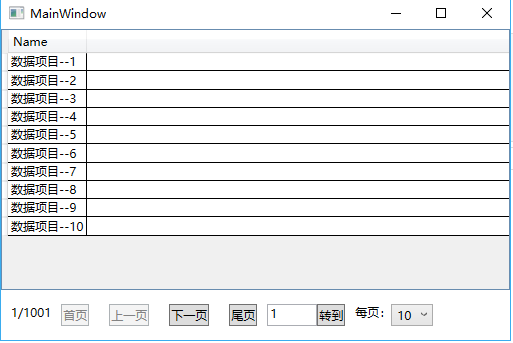
2.效果图:
外部接口最少,只需要外部两个接口即可实现分页的所有功能。
3.参考网页:
https://www.codeproject.com/Articles/350447/WPF-Paging-in-DataGrid-ListBox
将其代码进行了改进,忽略了不需要的部分,加入了一些简单的特性。更符合MVVM思想。
4.源码下载
https://files.cnblogs.com/files/chlm/PaggingDataGrid.rar
WPF里DataGrid分页控件的更多相关文章
- WPF自定义DataGrid分页控件
新建Custom Control,名:PagingDataGrid 打开工程下面的Themes\Generic.xaml xaml里面代码替换如下 <Style x:Key="{x:T ...
- WPF管理系统自定义分页控件 - WPF特工队内部资料
最近做一个演示的管理系统项目,需要用到分页控件,在网上找了很多,依然找到与UI模版匹配的,最后干脆自己写一个. 分页控件分析: 1.分页控件分简单显示和复杂显示两种: 2.包含上一页.下一页以及页码明 ...
- WPF简单的分页控件实现
XAML代码(使用ItemsControl控件实现): <UserControl x:Class="SunCreate.Vipf.Client.UI.CityDoor.PageCont ...
- ajax 分页控件,基于jquery
/* 分页插件,依赖jQuery库 version: 1.1.0 author: Harrison Cao release date: 2013-09-23 相对 v1.0版本 修正了分页居中 使用方 ...
- WPF 实现 DataGrid/ListView 分页控件
在WPF中,通常会选用DataGrid/ListView进行数据展示,如果数据量不多,可以直接一个页面显示出来.如果数据量很大,2000条数据,一次性显示在一个页面中,不仅消耗资源,而且用户体验也很糟 ...
- 两款不同应用场景的Wpf分页控件
简介 今天给大家分享两个Wpf分页控件,本篇博客主要介绍一些实现思路和使用方法,具体实现和应用代码请参考文末的Demo链接 废话不多说,先看一下效果~ (两款控件显示效果是一样的) 实现思路 一款控件 ...
- WPF 分页控件 WPF 多线程 BackgroundWorker
WPF 分页控件 WPF 多线程 BackgroundWorker 大家好,好久没有发表一篇像样的博客了,最近的开发实在头疼,很多东西无从下口,需求没完没了,更要命的是公司的开发从来不走正规流程啊, ...
- WPF 分页控件的实现 -用户控件
效果图:
- WPF自定义分页控件,样式自定义,简单易用
WPF自定义分页控件 做了许久伸手党,终于有机会贡献一波,搜索一下WPF分页控件,还是多,但是不太通用,主要就是样式问题,这个WPF很好解决,还有一个就是分页控件嘛,只关心几个数字的变动就行了,把页码 ...
随机推荐
- react渲染和diff算法
1.生成虚拟dom createElement的作用就是生成虚拟dom.虚拟dom到底是个啥,其实它就是个javascript对象~,这个对象的属性有props,vType,type, 而props也 ...
- [React Router v4] Parse Query Parameters
React Router v4 ignores query parameters entirely. That means that it is up to you to parse them so ...
- JM-2 jQuery Mobile的使用(多看学习视频)
JM-2 jQuery Mobile的使用(多看学习视频) 一.总结 一句话总结:前端框架的使用全都一个样,本质都是css和js,引入文件也是这些.使用都是看手册,超简单. 1.jQuery Mobi ...
- Android中获取当前位置的使用步骤
在Android中得到当前位置的步骤 1.在AndroidManifest.xml中声明权限 android.permission.ACCESS_FINE_LOCATION(或者android.per ...
- JSP 九大内置对象(转)
九大对象: 内置对象(又叫隐含对象,有9个内置对象):不需要预先声明就可以在脚本代码和表达式中随意使用 out: javax.servlet.jsp.JspWriter类型,代表输出流的对象.作用域为 ...
- push的时候隐藏底部的tabbar
push的时候隐藏底部的tabbar #import "mainNavigationControllers.h" @interface mainNavigationControll ...
- WPF入门(三)->几何图形之矩形(RectangleGeometry)
原文:WPF入门(三)->几何图形之矩形(RectangleGeometry) 我们可以使用RectangleGeometry来绘制一个矩形或者正方形 RectangleGeometry 类:描 ...
- Zygote总结
Zygote是由init进程通过解析 init.zygote.rc 文件而创建的,zygote所对应的可执行程序 app_process,所对应的源文件是App_main.cpp,进程名为zygote ...
- spring boot jar 部署linux服务器
用命令启动spring boot 项目,一旦终端命令窗口关闭,项目也就关闭了,所以我们采用脚本的方式来运行jar 正常命令 java -jar xxx.jar 脚本启动,vim 创建 start.sh ...
- PostThreadMessage发送进程间消息(对话框向控制台发消息,控制台也可有消息循环)
函数原型 BOOL PostThreadMessage( DWORD idThread, UINT Msg, WPARAM wParam, LPARAM lParam ); 1 2 3 4 5 6 T ...