
RabbitMQ问题解决:TCP connection succeeded but Erlang distribution failed
说明
本来是要先把Hystrix 仪表盘更完的,但是出现了Turbine、Dashboard、RabbitMQ整合实现监控。
所以先在学RabbitMq的基本操作,在安装过程中出现了
E:\RabbitMQ Server\rabbitmq_server-3.6.5\sbin>rabbitmqctl status

Status of node 'rabbit@DESKTOP-T5RBR6M' ...

Error: unable to connect to node 'rabbit@DESKTOP-T5RBR6M': nodedown

DIAGNOSTICS

===========

attempted to contact: ['rabbit@DESKTOP-T5RBR6M']

rabbit@DESKTOP-T5RBR6M:

  * connected to epmd (port 4369) on DESKTOP-T5RBR6M

  * epmd reports node 'rabbit' running on port 25672

  * TCP connection succeeded but Erlang distribution failed

  * suggestion: hostname mismatch?

  * suggestion: is the cookie set correctly?

  * suggestion: is the Erlang distribution using TLS?

current node details:

- node name: 'rabbitmq-cli-27@DESKTOP-T5RBR6M'

- home dir: C:\Users\Administrator

- cookie hash: +Xg8GwzCRQiqRrJZqqF30A==
重点在TCP connection succeeded but Erlang distribution failed、suggestion: is the cookie set correctly?这两行,在网上看了两个小时了,发现很多都是不明所以弄成了就随便捊一下就写。。
有一些现在没有suggestion的输出,这不是很重要,这里我先恢复事故现场,大家一起踩坑
WorkArounds
问题复现
分别安装 Erlang (otp_win64_20.3.exe) 、RabbitMQ Server(rabbitmq-server-3.7.5.exe)
这里为了能看清晰问题是出在安装目录上还是其它,都装到D盘,其他不变
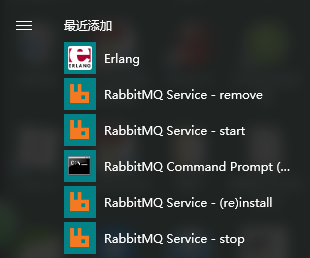
安装完成在菜单栏中会有这个显示,这里用win10演示(公司电脑)
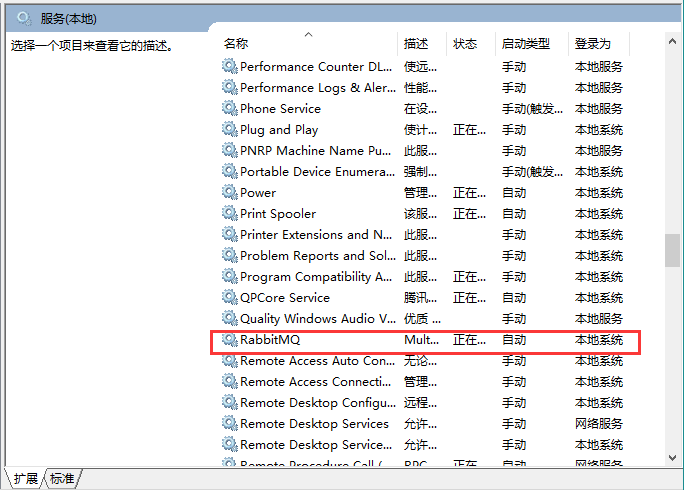
查看服务,服务已经正常启动
cmd命令cd到D:\RabbitMQ Server\rabbitmq_server-3.7.5\sbin (你实际的安装位置)
小提示:如果是默认的安装位置,用
可以直接定位到sbin下
输入rabbitmqctl status
D:\RabbitMQ Server\rabbitmq_server-3.7.5\sbin>rabbitmqctl status

Status of node rabbit@DESKTOP-T5RBR6M ...

Error: unable to perform an operation on node 'rabbit@DESKTOP-T5RBR6M'. Please see diagnostics information and suggestions below.

Most common reasons for this are:

 * Target node is unreachable (e.g. due to hostname resolution, TCP connection or firewall issues)

 * CLI tool fails to authenticate with the server (e.g. due to CLI tool's Erlang cookie not matching that of the server)

 * Target node is not running

In addition to the diagnostics info below:

 * See the CLI, clustering and networking guides on http://rabbitmq.com/documentation.html to learn more

 * Consult server logs on node rabbit@DESKTOP-T5RBR6M

DIAGNOSTICS

===========

attempted to contact: ['rabbit@DESKTOP-T5RBR6M']

rabbit@DESKTOP-T5RBR6M:

  * connected to epmd (port 4369) on DESKTOP-T5RBR6M

  * epmd reports node 'rabbit' uses port 25672 for inter-node and CLI tool traffic

  * TCP connection succeeded but Erlang distribution failed

  * Authentication failed (rejected by the remote node), please check the Erlang cookie

Current node details:

 * node name: 'rabbitmqcli49@DESKTOP-T5RBR6M'

 * effective user's home directory: C:\Users\Administrator

 * Erlang cookie hash: joVCp1tjZbhK/nWhgoYyjQ==
问题复现。
Authentication failed (rejected by the remote node), please check the Erlang cookie是重点,说明cookie可能有问题。
问题解决
这里直接告诉大家问题出在哪吧,是Erlang新版本的cookie位置换了!
两种解决办法:
- 使用旧版本Erlang
- cookie替换到正确的位置
打开路径C:\Windows\System32\config\systemprofile
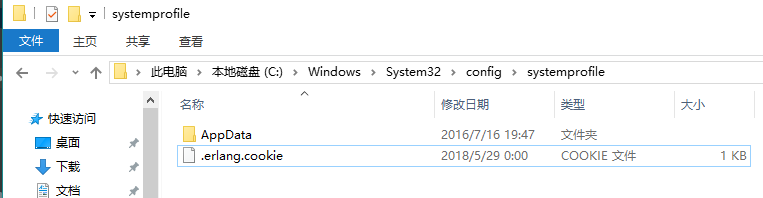
我们看到了这里有一个.erlang.cookie,复制这个文件到C:\Users\你的用户名下
如果没有这个文件,请打开菜单栏的Erlang快捷方式,出现白色窗口的时候,
C:\Windows\System32\config\systemprofile这个目录下就会出现这个文件,可能会慢一些耐心等
要确保C:\Windows\System32\config\systemprofile和C:\Users\你的用户名下的cookie是同一个文件!
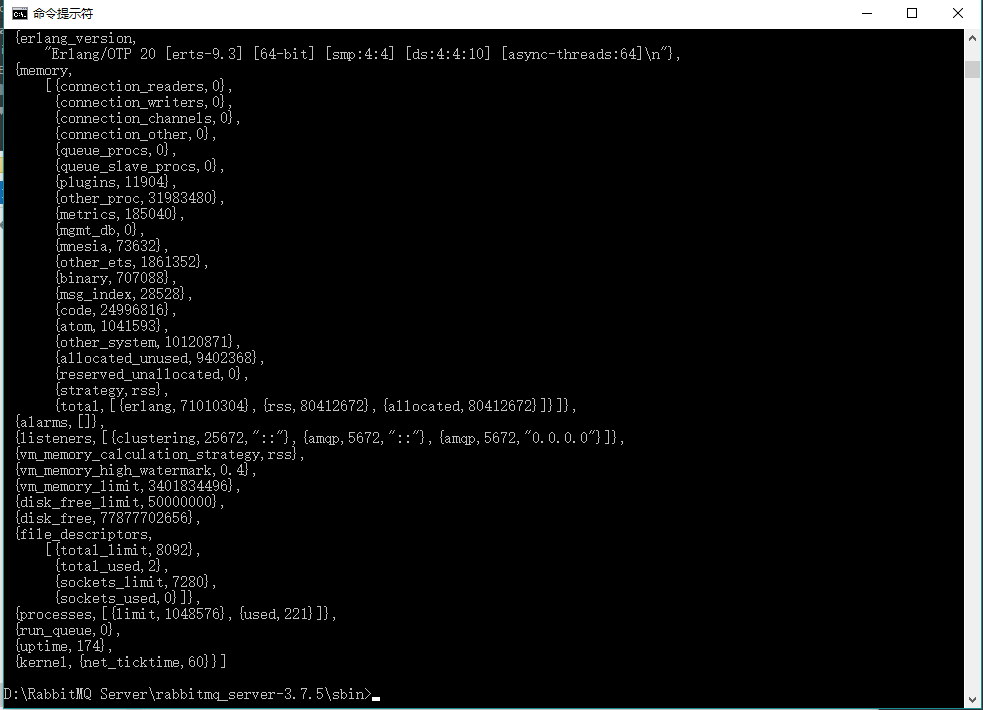
替换完成后,无需重启服务,直接rabbitmqctl status,如图这样就成功了。
以上
RabbitMQ问题解决:TCP connection succeeded but Erlang distribution failed的更多相关文章
- [RabbitMQ]Windows环境下rabbitmqclt(Command Line Tools)出现Erlang distribution failed错误的解决方法
摘要 当使用rabbitmqctl时出现Erlang distribution failed,把%SystemRoot%Windows\System32\config\systemprofile下的. ...
- TCP connection status
A TCP connection progresses through a series of states during its lifetime. The following diagram il ...
- linux上TCP connection timeout的原因查找
linux上TCP connection timeout的原因查找 好久没有写文章了, 今天解决了一个网络连接超时的问题, 记录以备查看. 最近在线上nginx经常出现输出connection tim ...
- TCP Connection Establishment and Termination
Three-Way Handshake The following scenario occurs when a TCP connection is established: The server m ...
- RT:How HTTP use TCP connection
In HTTP/0.9 (not used anymore), each request uses a separate TCP connection, and the end of a respon ...
- Caused by: com.rabbitmq.client.ShutdownSignalException: connection error
周五下午的时候升级了一个环境,跑了批处理sh升级脚本后,启动时报下列错误: INFO | jvm 1 | 2017/02/24 17:39:09 | java.io.IOException INFO ...
- tcp connection
三次握手与四次挥手的原因 https://yq.aliyun.com/articles/7435?spm=5176.8091938.0.0.N4v33a linux里的backlog详解 tcp co ...
- Exception in thread "RMI TCP Connection(idle)" java.lang.OutOfMemoryError: PermGen space
在Eclipse 调试 springside showcase项目中,tomcat报异常 Exception in thread "RMI TCP Connection(idle)" ...
- the age of the TCP connection TCP Slow Start
w防止网络过载和拥塞 HTTP The Definitive Guide The performance of TCP data transfer also depends on the age of ...
随机推荐
- 构建基于Chromium的应用程序(Winform程序加载Html页面)
chromium是google chrome浏览器所采用的内核,最开始由苹果的webkit发展而出,由于webkit在发展上存在分歧,而google希望在开发上有更大的自由度,2013年google决 ...
- Linux操作系统(三)
文件系统: boot sector:记录引导文件 sb: super block 每个文件系统只有一个sb,其余black group均是它的备份 读写文件会进入到inode operation vf ...
- 深入理解JAVA集合系列一:HashMap源码解读
初认HashMap 基于哈希表(即散列表)的Map接口的实现,此实现提供所有可选的映射操作,并允许使用null值和null键. HashMap继承于AbstractMap,实现了Map.Cloneab ...
- NET Core 部署到 Windows服务
https://www.cnblogs.com/linezero/p/5159927.html https://www.cnblogs.com/emrys5/p/nssm-netcore.html h ...
- Beta阶段团队项目开发篇章4
例会时间 2016.12.11 例会照片 个人工作 上阶段任务验收 删除robot功能较为简单,基本实现,但是一直Question版块任务量过大,考虑到最近要进行编译课设第二次测试,为该任务再分配一段 ...
- [转帖]NVMe到底是什么?用它的SSD有啥优势?
NVMe到底是什么?用它的SSD有啥优势? 2015-8-20 14:00 | 作者:Strike | 关键字:NVMe,SSD,PCI-E SSD,超能课堂 分享到 有关注SS ...
- SQL DATACOMPARE 实现两个数据库的同步处理.
1. SQL DATACOMPARE 实现 两个数据库的同步 安装破解. 然后进行对比 然后进行 deploy 生成sql 等. 貌似很好用 但是前提是数据库是可用的... 这里面能够看到 生成的脚本 ...
- SpannableString的基本用法
原文地址:http://www.cnblogs.com/kross/p/3645594.html 以前一直好奇QQ的输入框里面是如何出现表情的,今天看了下这个,心中发出“原来是这样啊”的感叹. 通常情 ...
- kafka重新启动时出现:found a corrupted index file due to requirement failed问题解决方法
问题如下: 解决方法: 删除kafka目录下的日志文件即可解决
- ldap禁止匿名用户登录
此处默认ldap已经安装完成,安装文档传送门:https://www.cnblogs.com/crysmile/p/9470508.html openldap默认安装完成,是允许匿名用户登录的,因此需 ...