
【Apache】 ab进行压力测试
前言:
ab是apache自带的压力测试工具,当安装完apache的时候,就可以在bin下面找到ab然后进行apache 负载压力测试。
工具:
Apache ab压测工具
一、安装
(1) 下载 : http://httpd.apache.org/
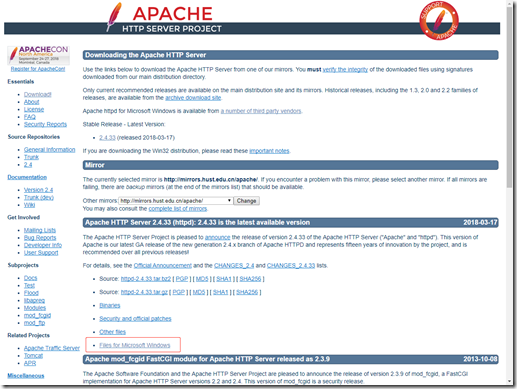
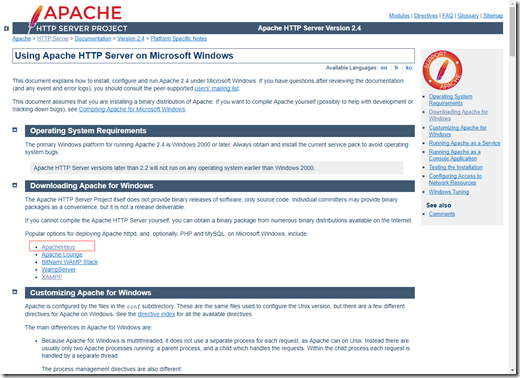
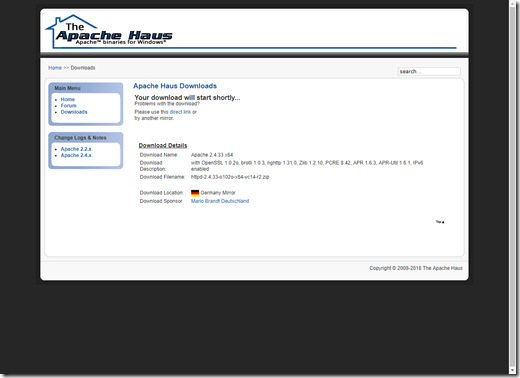
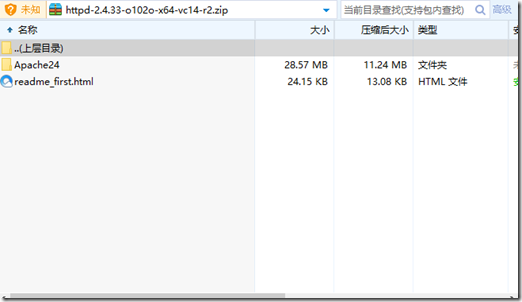
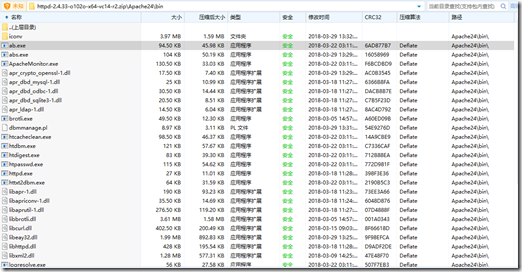
(2)解压
二、使用
(1) 选择 ab 文件位置 bin 下
Microsoft Windows [版本 10.0.16299.371]
(c) 2017 Microsoft Corporation。保留所有权利。C:\Users\Eddie>E:
E:\>cd E:\Apache24\bin
E:\\Apache24\bin>ab
ab: wrong number of arguments
Usage: ab [options] [http://]hostname[:port]/path
Options are:
-n requests Number of requests to perform
-c concurrency Number of multiple requests to make at a time
-t timelimit Seconds to max. to spend on benchmarking
This implies -n 50000
-s timeout Seconds to max. wait for each response
Default is 30 seconds
-b windowsize Size of TCP send/receive buffer, in bytes
-B address Address to bind to when making outgoing connections
-p postfile File containing data to POST. Remember also to set -T
-u putfile File containing data to PUT. Remember also to set -T
-T content-type Content-type header to use for POST/PUT data, eg.
'application/x-www-form-urlencoded'
Default is 'text/plain'
-v verbosity How much troubleshooting info to print
-w Print out results in HTML tables
-i Use HEAD instead of GET
-x attributes String to insert as table attributes
-y attributes String to insert as tr attributes
-z attributes String to insert as td or th attributes
-C attribute Add cookie, eg. 'Apache=1234'. (repeatable)
-H attribute Add Arbitrary header line, eg. 'Accept-Encoding: gzip'
Inserted after all normal header lines. (repeatable)
-A attribute Add Basic WWW Authentication, the attributes
are a colon separated username and password.
-P attribute Add Basic Proxy Authentication, the attributes
are a colon separated username and password.
-X proxy:port Proxyserver and port number to use
-V Print version number and exit
-k Use HTTP KeepAlive feature
-d Do not show percentiles served table.
-S Do not show confidence estimators and warnings.
-q Do not show progress when doing more than 150 requests
-l Accept variable document length (use this for dynamic pages)
-g filename Output collected data to gnuplot format file.
-e filename Output CSV file with percentages served
-r Don't exit on socket receive errors.
-m method Method name
-h Display usage information (this message)
翻译
格式: ./ab [options] [http://]hostname[:port]/path
Ab命令参数注释:
-n #指定在测试会话中所执行的请求个数。默认时,仅执行一个请求。
-c #指定一次产生的请求个数。默认是一次一个。
-t #测试所进行的最大秒数。其内部隐含值是-n 50000。它可以使对服务器的测试限制在一个固定的总时间以内。默认时,没有时间限制。
-p #包含了需要POST的数据的文件.
-T #POST数据所使用的Content-type头信息。
-v #设置显示信息的详细程度 - 4或更大值会显示头信息, 3或更大值可以显示响应代码(404, 200等), 2或更大值可以显示警告和其他信息。 -V 显示版本号并退出。
-w #以HTML表的格式输出结果。默认时,它是白色背景的两列宽度的一张表。
-I #执行HEAD请求,而不是GET。
(2)压力测试
E:\Apache24\bin>ab -n 500 -c 100 http://127.0.0.1:8080/test/eddie/order/123456
This is ApacheBench, Version 2.3 <$Revision: 1826891 $>
Copyright 1996 Adam Twiss, Zeus Technology Ltd, http://www.zeustech.net/
Licensed to The Apache Software Foundation, http://www.apache.org/Benchmarking 127.0.0.1 (be patient)
Completed 100 requests
Completed 200 requests
Completed 300 requests
Completed 400 requests
Completed 500 requests
Finished 500 requestsServer Software:
Server Hostname: 127.0.0.1
Server Port: 8080Document Path: /test/eddie/order/123456
Document Length: 109 bytesConcurrency Level: 100
Time taken for tests: 50.755 seconds
Complete requests: 500
Failed requests: 491
(Connect: 0, Receive: 0, Length: 491, Exceptions: 0)
Total transferred: 122392 bytes
HTML transferred: 55392 bytes
Requests per second: 9.85 [#/sec] (mean)
Time per request: 10151.063 [ms] (mean)
Time per request: 101.511 [ms] (mean, across all concurrent requests)
Transfer rate: 2.35 [Kbytes/sec] receivedConnection Times (ms)
min mean[+/-sd] median max
Connect: 0 1 0.5 1 3
Processing: 154 9024 5635.0 8417 19876
Waiting: 152 9023 5635.8 8416 19875
Total: 155 9025 5635.1 8418 19878Percentage of the requests served within a certain time (ms)
50% 8418
66% 11432
75% 13650
80% 15025
90% 17446
95% 18675
98% 19451
99% 19675
100% 19878 (longest request)
三、提示
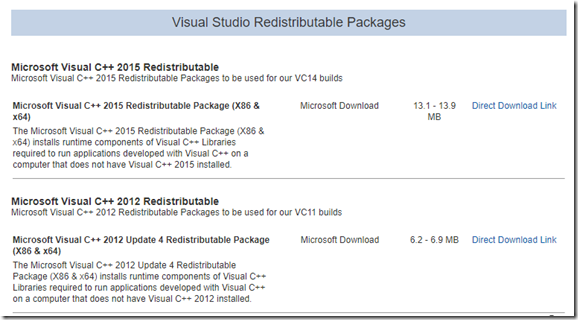
(1) 需要安装 Microsoft Visual C++ xxxx Redistributable, 在下载 ab 页面哪里最低
(2)闪退?
{path}\Apache24\bin\ab.exe
答:只能使用 cmd 方式
【Apache】 ab进行压力测试的更多相关文章
- 使用Apache ab进行压力测试(参数说明)
我们一般会使用Apache自带的ab来对项目进行压力测试,看项目的执行情况如何. 我们可以使用 ab -v 来查看ab的详细参数使用方法. [root@node234 bin]# ./ab -v ab ...
- Apache ab参数--压力测试
Apache附带的ab,它非常容易使用,ab可以直接在Web服务器本地发起测试请求.这至关重要,因为我们希望测试的服务器的处理时间,而不包含数据的网络传输时间以及用户PC本地的计算时间. 需要清楚的是 ...
- Apache自带压力测试工具ab用法简介
ab命令原理 ab命令会创建很多的并发访问线程,模拟多个访问者同时对某一URL进行访问.它的测试目标是基于URL的,因此,既可以用来测试Apache的负载压力,也可以测试nginx.lighthttp ...
- PHP性能:序——谈ab(Apache Bench)压力测试工具
PHP性能:序——谈ab(Apache Bench)压力测试工具 ab(Apache Bench)是啥? ab是Apache自带的一个压力测试软件,可以通过ab命令和选项对某个URL进行压力测试.a ...
- 转:PHP性能:序——谈ab(Apache Bench)压力测试工具
PHP性能:序——谈ab(Apache Bench)压力测试工具 ab(Apache Bench)是啥? ab是Apache自带的一个压力测试软件,可以通过ab命令和选项对某个URL进行压力测试.a ...
- 开源的类似于Apache ab的压力测试命令行工具SuperBenchmarker
SuperBenchmarker 是ㄧ个开源的类似于Apache ab的压力测试命令行工具.可以在 .NET 4.52+ 或者 .NET Core 2.0+ 平台上运行. 可支持Get.Post.Pu ...
- 使用Apache Benchmark做压力测试遇上的5个常见问题
这一篇文章主要记录我在使用Apache Benchmark(一下检测ab)做网站压力测试的过程中,遇到的一些问题以及解决办法,方便日后使用. 这一篇文章主要记录我在使用Apache Benchmark ...
- kubernetes:基于ab的压力测试
基于ab的压力测试 # cat apache-test.yaml ################################################################### ...
- 使用Apache的ab进行压力测试
概述 ab是apache自带的压力测试工具,当安装完apache的时候,就可以在bin下面找到ab然后进行apache 负载压力测试. 后台测试开发中,常用的压力测试服务,php一般选择xampp,下 ...
- Apache自带压力测试工具----linux环境中ab命令简介及结果分析
ab(apache bench)是apache下的一个工具,主要用于对web站点做压力测试, 基础用法: 其中-c选项为一次发送的请求数量,及并发量.-n选项为请求次数. 实验测试: [dev@web ...
随机推荐
- 【转】【Flex】#010 操作XML文件(E4X)
该教程转载来自于:http://blog.chinaunix.net/uid-14767524-id-2785506.html [看到这边文章的位置,具体原作者未知] 经过一些排版的修改,其他内 ...
- Maven实战(九)Maven仓库简介
目录 一.作用 Maven仓库分为本地仓库和远程仓库,集中存放项目引用的jar包,无需将jar包放在程序中,结合Maven项目的pom.xml,使得项目管理jar包更容易,有以下几个优点: 对于项目来 ...
- 20165318 2017-2018-2 《Java程序设计》第四周学习总结
20165318 2017-2018-2 <Java程序设计>第四周学习总结 IDEA安装 按照娄老师Intellj IDEA 简易教程,我下载了IDEA但是由于没有注册学校邮箱,我没办法 ...
- sql按月模糊查询
select * from tb where convert(varchar(7),date,120) = '2011-05'
- [Java123] JavaBean
https://stackoverflow.com/questions/3295496/what-is-a-javabean-exactly A JavaBean is just a standard ...
- Java反射学习一
Java 反射机制 基本概念 在Java运行时环境中,对于任意一个类,能否知道这个类有哪些属性和方法?对于任意一个对象,能否调用它的任意一个方法? 答案是肯定的. 这种动态获取类的信息以及动态调用对象 ...
- 703. Kth Largest Element in a Stream
题目来源: https://leetcode.com/problems/kth-largest-element-in-a-stream/ 自我感觉难度/真实难度: 题意: 这个题目的意思解读了半天,没 ...
- JS实现sleep()方法
这种实现方式是利用一个伪死循环阻塞主线程.因为JS是单线程的.所以通过这种方式可以实现真正意义上的sleep(). function sleep(delay) { var start = (new D ...
- caffe 安装记录
为了使用caffe,特地装了linux系统,版本:Ubuntu14.04 X64 可参照 http://www.cnblogs.com/platero/p/3993877.html 这个博客写的更好h ...
- Google 历年笔试面试30题
1.正整数序列Q中的每个元素都至少能被正整数a和b中的一个整除,现给定a和b,需要计算出Q中的前几项,例如,当a=3,b=5,N=6时,序列为3,5,6,9,10,12(1).设计一个函数void g ...