
ThinkPHP 数据库操作之数据表模型和基础模型 ( Model )
一、定义数据表模型
1.模型映射
要测试数据库是否正常连接,最直接的办法就是在当前控制器中实例化数据表,然后使用 dump 函数输出,查看数据库的链接状态。代码:
public function testdb(){

    $obj=M("User");

    dump($obj);

}
此时浏览器输出:
object(Model)#5 (20) {

  ["_extModel:private"] => NULL

  ["db:protected"] => object(DbMysql)#7 (18) {

    ["dbType:protected"] => string(5) "MYSQL"

    ["autoFree:protected"] => bool(false)

    ["model:protected"] => string(7) "_think_"

    ["pconnect:protected"] => bool(false)

    ["queryStr:protected"] => string(28) "SHOW COLUMNS FROM `tpk_user`"

    ["modelSql:protected"] => array(1) {

      ["user"] => string(28) "SHOW COLUMNS FROM `tpk_user`"

    }

    ["lastInsID:protected"] => NULL

    ["numRows:protected"] => int(2)

    ["numCols:protected"] => int(0)

    ["transTimes:protected"] => int(0)

    ["error:protected"] => string(0) ""

    ["linkID:protected"] => array(1) {

      [0] => resource(27) of type (mysql link)

    }

    ["_linkID:protected"] => resource(27) of type (mysql link)

    ["queryID:protected"] => resource(28) of type (mysql result)

    ["connected:protected"] => bool(true)

    ["comparison:protected"] => array(10) {

      ["eq"] => string(1) "="

      ["neq"] => string(2) "<>"

      ["gt"] => string(1) ">"

      ["egt"] => string(2) ">="

      ["lt"] => string(1) "<"

      ["elt"] => string(2) "<="

      ["notlike"] => string(8) "NOT LIKE"

      ["like"] => string(4) "LIKE"

      ["in"] => string(2) "IN"

      ["notin"] => string(6) "NOT IN"

    }

    ["selectSql:protected"] => string(96) "SELECT%DISTINCT% %FIELD% FROM %TABLE%%JOIN%%WHERE%%GROUP%%HAVING%%ORDER%%LIMIT% %UNION%%COMMENT%"

    ["bind:protected"] => array(0) {

    }

  }

  ["pk:protected"] => string(2) "id"

  ["tablePrefix:protected"] => string(4) "tpk_"

  ["name:protected"] => string(4) "user"

  ["dbName:protected"] => string(0) ""

  ["connection:protected"] => string(0) ""

  ["tableName:protected"] => string(0) ""

  ["trueTableName:protected"] => string(8) "tpk_user"

  ["error:protected"] => string(0) ""

  ["fields:protected"] => array(5) {

    [0] => string(2) "id"

    [1] => string(8) "username"

    ["_autoinc"] => bool(true)

    ["_pk"] => string(2) "id"

    ["_type"] => array(2) {

      ["id"] => string(7) "int(11)"

      ["username"] => string(11) "varchar(20)"

    }

  }

  ["data:protected"] => array(0) {

  }

  ["options:protected"] => array(0) {

  }

  ["_validate:protected"] => array(0) {

  }

  ["_auto:protected"] => array(0) {

  }

  ["_map:protected"] => array(0) {

  }

  ["_scope:protected"] => array(0) {

  }

  ["autoCheckFields:protected"] => bool(true)

  ["patchValidate:protected"] => bool(false)

  ["methods:protected"] => array(13) {

    [0] => string(5) "table"

    [1] => string(5) "order"

    [2] => string(5) "alias"

    [3] => string(6) "having"

    [4] => string(5) "group"

    [5] => string(4) "lock"

    [6] => string(8) "distinct"

    [7] => string(4) "auto"

    [8] => string(6) "filter"

    [9] => string(8) "validate"

    [10] => string(6) "result"

    [11] => string(4) "bind"

    [12] => string(5) "token"

  }

}
http://127.0.0.26/index.php/index/testdb

object(Model)#5 (20) {
["_extModel:private"] => NULL
["db:protected"] => object(DbMysql)#7 (18) {
["dbType:protected"] => string(5) "MYSQL"
["autoFree:protected"] => bool(false)
["model:protected"] => string(7) "_think_"
["pconnect:protected"] => bool(false)
["queryStr:protected"] => string(28) "SHOW COLUMNS FROM `tpk_user`"
["modelSql:protected"] => array(1) {
["user"] => string(28) "SHOW COLUMNS FROM `tpk_user`"
}
["lastInsID:protected"] => NULL
["numRows:protected"] => int(2)
["numCols:protected"] => int(0)
["transTimes:protected"] => int(0)
["error:protected"] => string(0) ""
["linkID:protected"] => array(1) {
[0] => resource(27) of type (mysql link)
}
["_linkID:protected"] => resource(27) of type (mysql link)
["queryID:protected"] => resource(28) of type (mysql result)
["connected:protected"] => bool(true)
["comparison:protected"] => array(10) {
["eq"] => string(1) "="
["neq"] => string(2) "<>"
["gt"] => string(1) ">"
["egt"] => string(2) ">="
["lt"] => string(1) "<"
["elt"] => string(2) "<="
["notlike"] => string(8) "NOT LIKE"
["like"] => string(4) "LIKE"
["in"] => string(2) "IN"
["notin"] => string(6) "NOT IN"
}
["selectSql:protected"] => string(96) "SELECT%DISTINCT% %FIELD% FROM %TABLE%%JOIN%%WHERE%%GROUP%%HAVING%%ORDER%%LIMIT% %UNION%%COMMENT%"
["bind:protected"] => array(0) {
}
}
["pk:protected"] => string(2) "id"
["tablePrefix:protected"] => string(4) "tpk_"
["name:protected"] => string(4) "user"
["dbName:protected"] => string(0) ""
["connection:protected"] => string(0) ""
["tableName:protected"] => string(0) ""
["trueTableName:protected"] => string(8) "tpk_user"
["error:protected"] => string(0) ""
["fields:protected"] => array(5) {
[0] => string(2) "id"
[1] => string(8) "username"
["_autoinc"] => bool(true)
["_pk"] => string(2) "id"
["_type"] => array(2) {
["id"] => string(7) "int(11)"
["username"] => string(11) "varchar(20)"
}
}
["data:protected"] => array(0) {
}
["options:protected"] => array(0) {
}
["_validate:protected"] => array(0) {
}
["_auto:protected"] => array(0) {
}
["_map:protected"] => array(0) {
}
["_scope:protected"] => array(0) {
}
["autoCheckFields:protected"] => bool(true)
["patchValidate:protected"] => bool(false)
["methods:protected"] => array(13) {
[0] => string(5) "table"
[1] => string(5) "order"
[2] => string(5) "alias"
[3] => string(6) "having"
[4] => string(5) "group"
[5] => string(4) "lock"
[6] => string(8) "distinct"
[7] => string(4) "auto"
[8] => string(6) "filter"
[9] => string(8) "validate"
[10] => string(6) "result"
[11] => string(4) "bind"
[12] => string(5) "token"
}
}
如果没有提示错误即为成功。
M("User") 就是模型映射,M 函数等于 new Model() ,Model 类是模型的基类,也是数据库操作的基类, "User" 是该类的一个成员属性,表示模型名称,模型名称与数据库中的数据表进行映射。注意:User "U" 要大写,数据库中此时应该存在一张 user 表,系统会根据配置文件中的设置给 user 表添加前缀,例如 tpk_user。如果不需要为表添加前缀,将模型名称首字母改为小写,例如 M("user")。
2.自定义模型
D 函数用于快速实例化自定义模型,可以进行复杂的数据库操作,比如数据检验、数据缓存、数据加工等。自定义模型存放在 Lib/Model 目录下,例如为数据表 tpk_article 数据表建立模型映射,则需要创建 ArticleModel.class.php,然后使用 D 函数进行实例化,ArticleModel 模型将与 tpk_article 表进行映射。
例:使用 select() 输出 tpk_article 表的数据 ( select() 方法用于列出所有符合条件的数据 ) :
class IndexAction extends Action {

    public function article(){

    $obj=D("Article");

    $rows=$obj->select();

        dump($rows);

   }

}
浏览器输出:
array(6) {

  [0] => array(7) {

    ["id"] => string(1) "1"

    ["title"] => string(4) "test"

    ["content"] => string(12) "test_content"

    ["category"] => string(13) "test_category"

    ["area"] => string(6) "北京"

    ["add_user"] => string(5) "admin"

    ["add_time"] => string(19) "2014-11-20 23:03:44"

  }

  [1] => array(7) {

    ["id"] => string(1) "2"

    ["title"] => string(12) "吼吼吼吼"

    ["content"] => string(18) "任溶溶柔然人"

    ["category"] => string(14) "test_category2"

    ["area"] => string(6) "河北"

    ["add_user"] => string(5) "admin"

    ["add_time"] => string(19) "2014-11-22 15:16:12"

  }

  [2] => array(7) {

    ["id"] => string(1) "4"

    ["title"] => string(7) "test2_m"

    ["content"] => string(4) "haha"

    ["category"] => string(0) ""

    ["area"] => string(6) "福建"

    ["add_user"] => NULL

    ["add_time"] => string(19) "2014-11-22 11:44:26"

  }

  [3] => array(7) {

    ["id"] => string(1) "5"

    ["title"] => string(2) "22"

    ["content"] => NULL

    ["category"] => string(0) ""

    ["area"] => string(6) "福建"

    ["add_user"] => NULL

    ["add_time"] => string(19) "2014-11-22 12:40:58"

  }

  [4] => array(7) {

    ["id"] => string(1) "6"

    ["title"] => string(1) "1"

    ["content"] => string(1) "2"

    ["category"] => string(0) ""

    ["area"] => string(6) "福建"

    ["add_user"] => NULL

    ["add_time"] => NULL

  }

  [5] => array(7) {

    ["id"] => string(1) "7"

    ["title"] => string(6) "lalala"

    ["content"] => string(6) "hohoho"

    ["category"] => string(0) ""

    ["area"] => string(6) "北京"

    ["add_user"] => NULL

    ["add_time"] => NULL

  }

}
http://127.0.0.26/index.php/index/article
array(6) {
[0] => array(7) {
["id"] => string(1) "1"
["title"] => string(4) "test"
["content"] => string(12) "test_content"
["category"] => string(13) "test_category"
["area"] => string(6) "北京"
["add_user"] => string(5) "admin"
["add_time"] => string(19) "2014-11-20 23:03:44"
}
[1] => array(7) {
["id"] => string(1) "2"
["title"] => string(12) "吼吼吼吼"
["content"] => string(18) "任溶溶柔然人"
["category"] => string(14) "test_category2"
["area"] => string(6) "河北"
["add_user"] => string(5) "admin"
["add_time"] => string(19) "2014-11-22 15:16:12"
}
[2] => array(7) {
["id"] => string(1) "4"
["title"] => string(7) "test2_m"
["content"] => string(4) "haha"
["category"] => string(0) ""
["area"] => string(6) "福建"
["add_user"] => NULL
["add_time"] => string(19) "2014-11-22 11:44:26"
}
[3] => array(7) {
["id"] => string(1) "5"
["title"] => string(2) "22"
["content"] => NULL
["category"] => string(0) ""
["area"] => string(6) "福建"
["add_user"] => NULL
["add_time"] => string(19) "2014-11-22 12:40:58"
}
[4] => array(7) {
["id"] => string(1) "6"
["title"] => string(1) "1"
["content"] => string(1) "2"
["category"] => string(0) ""
["area"] => string(6) "福建"
["add_user"] => NULL
["add_time"] => NULL
}
[5] => array(7) {
["id"] => string(1) "7"
["title"] => string(6) "lalala"
["content"] => string(6) "hohoho"
["category"] => string(0) ""
["area"] => string(6) "北京"
["add_user"] => NULL
["add_time"] => NULL
}
}
例2:让 tpk_article 表的内容根据客户所在的地区显示当地的新闻:
ArticleModel.class.php:
<?php

class ArticleModel extends Model{

    public function article(){

        $rows=$this->where("area='{$this->checkUserArea()}'")->select();

        return $rows;

    }

    protected function checkUserArea(){

        return "北京";

    }
控制器代码:
IndexAction.class.php:
<?php

class IndexAction extends Action {

    $obj=D("Article");

    $rows=$obj->article();

    $this->assign("list",$rows);

    $this->display();
同时视图代码:
TPL/Index/article.html:
<!DOCTYPE html>

<html>

<body>

<volist name="list" id="vo">

    <li><{$vo.title}> - <{$vo.area}> - <{$vo.content}></li>

</volist>

</body>

</html>
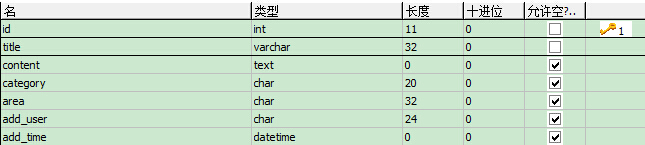
附:数据表 tpk_article 的表结构为:
总结:自定义模型映射,一个模型对应一个数据表,所有增删改查都在模型类中完成。M 实例化的参数是数据库的表名,D 实例化的是自己在 model 文件夹下建立的模型文件。
3.create 方法
TP 对数据的插入和更新都做了高度封装:提供了 create() 方法用于创建数据对象。
概念:数据对象 —— 数据字段与数据表之间的关系,数据会被映射为类成员,再与数据表映射,最后实现数据的插入或更新。
create() 方法是连贯操作、CURD 操作的集合 ( 包括数据创建、数据检验、表单验证、自动完成等 )。
cerate() 的数据源由 POST 表单提供,比如表单中有 username 表单元素,则该元素会被自动映射为数据表中的 username 字段。数据对象创建成功以后,对象被存放于内存中。
例:添加数据
控制器:IndexAction,动作:add_article,代码:
IndexAction.class.php:
<?php

class IndexAction extends Action {

    Public function add_article(){

        $this->display();

    }

}
视图: Tpl/Index/add_article.html:
<!DOCTYPE html>

<html>

<body>

    <form method="post" action="__URL__/add">

        <input type="text" name="title" placeholder="标题"><br><br>

        <textarea name="content" id="content" placeholder="内容"></textarea><br><br>

        <input type="submit" name="submit" value="提交">

    </form>

</body>

</html>
__URL__/add 表示当前控制器的 add 动作。
add 动作代码:
<?php

class IndexAction extends Action {

    public function add(){

        //表单处理

        $articleObj = M('Article');

        $articleObj->create();

        $articleObj->add_time = date("Y-m-d H:i:s",time());

        if($articleObj->add()){

            $this->success("数据添加成功");

        }else{

            $this->error("数据添加失败");

        }

}
例子结束。
4.模型属性( Model )
_map 属性:字段映射
为了避免前台表单元素与数据库字段名相同而使数据库字段暴露,可以修改前台表单元素的 name,同时在 Model 中使用 _map 属性。代码:
视图:Tpl/Index/add_article.html:
<!DOCTYPE html>

<html>

<body>

    <form method="post" action="__URL__/add">

        <input type="text" name="subject" placeholder="标题"><br><br>

        <textarea name="textEdit" id="content" placeholder="内容"></textarea><br><br>

        <input type="submit" name="submit" value="提交">

    </form>

</body>

</html>
模型:ArticleModel.class.php:
<?php

class ArticleModel extends Model{

    //使用_map属性(字段映射)将表单元素映射为相应表字段

    protected $_map = array(

        "subject"=>"title",

        "textEdit"=>"content"

    );

}
控制器:IndexAction.class.php:
<?php

class IndexAction extends Action {

        $articleObj = D("Article");

        $articleObj->create();

        $articleObj->add_time = date("Y-m-d H:i:s",time());

        if($articleObj->add()){

            $this->success("数据添加成功");

        }else{

            $this->error("数据添加失败");

        }

}
例子结束。
二、基础模型
1.连贯操作
连贯方法除了 select() 方法外,其他的连贯方法不区分前后顺序。
例:
$rows=$obj->where("add_user='dee'")->order("add_time desc")->limit(10)->select();
2.CURD
① 创建数据 add()
<?php

class IndexAction extends Action {

    public function post(){

        $articleObj = D("Article");

        $data['title'] = $_POST['subject'];

        $data['content'] = $_POST['textEdit'];

        $data['add_time'] = date("Y-m-d H:i:s",time());

        if($articleObj->add($data)){

            $this->success("数据添加成功");

        }else{

            $this->error("数据添加失败");

        }

    }

}
另一个例子:
<?php

class IndexAction extends Action {

    public function post(){

        $articleObj = D("Article");

        $data['title'] = $_POST['subject'];

        $data['content'] = $_POST['textEdit'];

        $data['add_time'] = date("Y-m-d H:i:s",time());

          if($articleObj->data($data)->add()){

            $this->success("数据添加成功");

        }else{

            $this->error("数据添加失败");

        }

    }

}
② 更新数据 save()
<?php

class IndexAction extends Action {

    public function post2(){

        $articleObj = M("Article");

        $data['id'] = 2;

        $data['title'] = $_POST['subject'];

        $data['content'] = $_POST['textEdit'];

        $data['area'] = '河北';

        $data['add_time'] = date("Y-m-d H:i:s",time());

        if($articleObj->save($data)){

            $this->success("数据修改成功");

        }else{

            $this->error("数据修改失败");

        }

    }

}
③ 读取数据 select 和 getFiled
getField 例子:
<?php

class IndexAction extends Action {

    public function post3(){

        $articleObj = M("Article");

        if($articleObj->where("id=3")->setField("content","{$_POST['subject']}")){

            $this->success("数据修改成功");

        }else{

            $this->error("数据修改失败");

        }

    }

}
④ 删除数据 delete
<?php

class IndexAction extends Action {

    public function delete(){

        $articleObj = M("Article");

        if($articleObj->where("id=".$_GET['id'])->delete()){

            $this->success("数据删除成功");

        }else{

            $this->error("数据删除失败");

        }

    }

}
3.查询语言
例子:
<?php

class IndexAction extends Action {

    public function archives(){

        $obj = M("Archives");

//      $data['writer'] = array("eq","网络营销中心");

//      $data['title'] = array("like","精诚%");

        $data['id'] = array("lt","100");

        $rows=$obj->where($data)->select();

        $count=$obj->where($data)->count();

        $tb=C("DB_PREFIX");

        $this->assign("list",$rows);

        $this->assign("count",$count);

        $this->assign("tb",$tb);

        $this->display("Article");

    }

        public function archives2(){

        $obj = M("Archives");

        $data['id'] = array(array("lt","1034"),array("GT","1029"),"and");

        $rows=$obj->where($data)->select();

        $this->assign("list",$rows);

        $this->display("Article");

    }

}
可以在控制器中使用 echo $obj->getLastSql(); 查看转换后的 SQL 语句。
参考资料:《PHP MVC 开发实战》
ThinkPHP 数据库操作之数据表模型和基础模型 ( Model )的更多相关文章
- ThinkPHP 学习笔记 ( 三 ) 数据库操作之数据表模型和基础模型 ( Model )
//TP 恶补ing... 一.定义数据表模型 1.模型映射 要测试数据库是否正常连接,最直接的办法就是在当前控制器中实例化数据表,然后使用 dump 函数输出,查看数据库的链接状态.代码: publ ...
- 孤荷凌寒自学python第四十九天继续研究跨不同类型数据库的通用数据表操作函数
孤荷凌寒自学python第四十九天继续研究跨不同类型数据库的通用数据表操作函数 (完整学习过程屏幕记录视频地址在文末,手写笔记在文末) 今天继续建构自感觉用起来顺手些的自定义模块和类的代码. 不同类型 ...
- thinkPHP数据库操作
thinkPHP如果要对数据库操作,一般来说首先要做的是在配置文件中链接数据库,然后用M方法实例化一张表,然后就是对表的操作了 可以开启调试功能查看程序执行的sql语句: 1.开启调试功能(默认是已经 ...
- ThinkPHP 数据库操作(三) : 查询方法、查询语法、链式操作
查询方法 条件查询方法 where 方法 可以使用 where 方法进行 AND 条件查询: Db::table('think_user') ->where('name','like','%th ...
- 孤荷凌寒自学python第四十八天通用同一数据库中复制数据表函数最终完成
孤荷凌寒自学python第四十八天通用同一数据库中复制数据表函数最终完成 (完整学习过程屏幕记录视频地址在文末) 今天继续建构自感觉用起来顺手些的自定义模块和类的代码. 今天经过反复折腾,最终基本上算 ...
- 孤荷凌寒自学python第四十七天通用跨数据库同一数据库中复制数据表函数
孤荷凌寒自学python第四十七天通用跨数据库同一数据库中复制数据表函数 (完整学习过程屏幕记录视频地址在文末) 今天继续建构自感觉用起来顺手些的自定义模块和类的代码. 今天打算完成的是通用的(至少目 ...
- 0420-mysql命令(数据库操作层级,建表,对表的操作)
注意事项: 符号必须为英文. 数据库操作层级: 建表大全: #新建表zuoye1:drop table if exists zuoye1;create table zuoye1( id int ...
- android 一个SQLite数据库多个数据表的基本使用框架 (带demo)
android 一个SQLite数据库多个数据表(带demo) 前言 demo演示 一.搭建 二.建立实体类 三.建立数据库操作类 ...
- 统计各个数据库的各个数据表的总数,然后写入到excel中
1.最近项目基本进入最后阶段了,然后会统计一下各个数据库的各个数据表的数据量,开始使用的报表工具,report-designer,开源的,研究了两天,发现并不是很好使,最后自己下班回去,晚上思考,想着 ...
随机推荐
- No.2 selenium学习之路之八种基本定位
selenium的八种定位方式 1.通过id定位 find_element_by_id() send_keys() 输入框输入字符串 click() 鼠标点击事件 注:send_keys输入 ...
- jersey HTTP Status 400 - Bad Request
原因是jersey 内置的转换器,只能做简单的类型转换如: 首先客户端提交上来的一定是String; String ----> String/Long/Boolean 这些基本的 可以转换,但是 ...
- opencv(2)绘图
绘制直线 函数为:cv2.line(img,Point pt1,Point pt2,color,thickness=1,line_type=8 shift=0) 有值的代表有默认值,不用给也行.可以看 ...
- HDU 3861 The King’s Problem(强连通分量+最小路径覆盖)
题目链接:http://acm.hdu.edu.cn/showproblem.php?pid=3861 题目大意: 在csdn王国里面, 国王有一个新的问题. 这里有N个城市M条单行路,为了让他的王国 ...
- 使用django发送邮件时的连接超时问题解决
一.报错 研究报错半天,没看出代码有什么毛病,就是发送邮件时连接超时,发送邮件的连接用户名密码都没有错误,于是就网上各种查... 终于皇天不负有心人,找到答案了.. 在服务器上输入telnet smt ...
- CVE-2012-4792Microsoft Internet Explorer 释放后使用漏洞
Microsoft Internet Explorer是微软Windows操作系统中默认捆绑的WEB浏览器. Microsoft Internet Explorer 6至8版本中存在释放后使用漏洞.通 ...
- Mongodb配置:error:10061 由于目标计算机积极拒绝,无法连接
相信很多学Node的同学,在进入MongoDB后台管理 Shell的时候都会“遇到error:10061 由于目标计算机积极拒绝,无法连接”这种情况,很多情况都是dbpath与dblog的路径没有配置 ...
- Spark(三)RDD与广播变量、累加器
一.RDD的概述 1.1 什么是RDD RDD(Resilient Distributed Dataset)叫做弹性分布式数据集,是Spark中最基本的数据抽象,它代表一个不可变.可分区.里面的元素可 ...
- bzoj 2819
2819 思路: 手工栈: 代码: #include <bits/stdc++.h> using namespace std; #define maxn 500005 #define ma ...
- Jersey入门三:创建一个JavaEE的Web项目
1.在终端中输入如下命令,创建一个名为的simple-service-webapp项目: mvn archetype:generate -DarchetypeArtifactId=jersey-qui ...