
Python_oldboy_自动化运维之路(二)
本节内容:
1.pycharm工具的使用
2.进制运算
3.表达式if ...else语句
4.表达式for 循环
5.break and continue
6.表达式while 循环
1.pycharm工具的使用
【下载安装】
下载:http://pan.baidu.com/s/1jHPbo5g 密码:yhhf
破解:pycharm有两个版本,社区版和专业版,建议购买专业版~~~~
安装:下一步下一步,比较简单,就不废话了。
视频:http://list.youku.com/albumlist/show?id=28961509&ascending=1&page=1&qq-pf-to=pcqq.group
【使用】
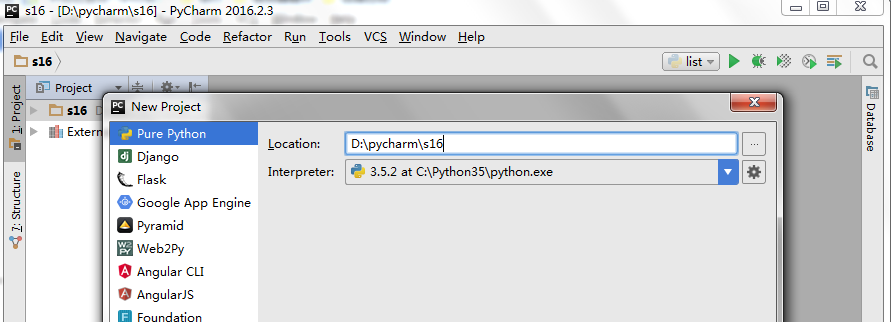
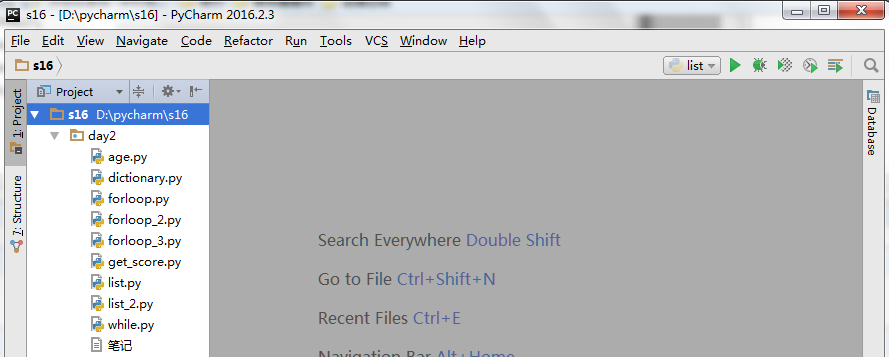
1. 养成一个好习惯,一个项目里面建立相关的文件夹和脚本

2.优化设置
- 更改脚本里面内容的字体大小:File>Settings>Ediror>Colors & Fonts>Font
- 设置脚本的抬头注释:File>Settings>Editor>File and Code Templates>Python Script
- 设置显示脚本的行数:File>Setting>Editor>General>Apperance>勾选“Show line numbers”。
- pycharm Tab键设置成4个空格:File>Setting>Editor>Code Style>python
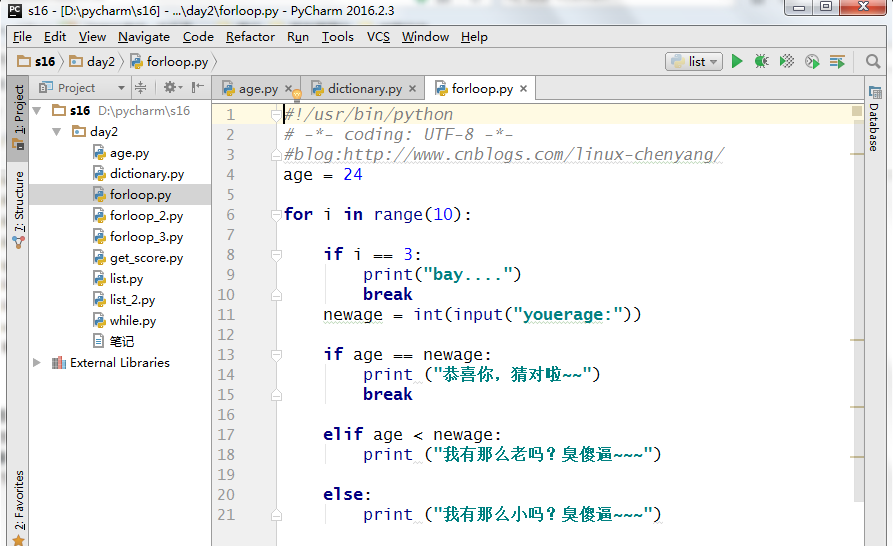
3.效果演示
2.进制运算
【补充知识:变量】
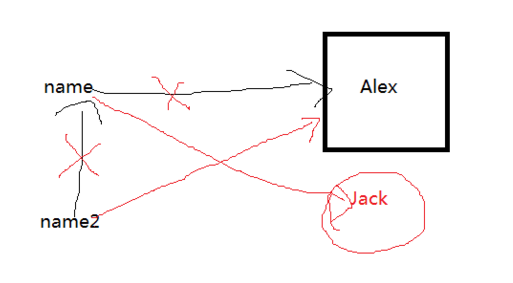
python中的变量是指向内存单元的值。
 name = "alex"

 name2 = name

 print(name,name2)

 name = "jack"

 print(name,name2)
alex alex

jack alex
【%s,%d,%f,%r】
%s 任意字符
%d 必须是整形数字
%f 浮点型
%r raw string 原生字符,不转译
 msg = "my name is %s and age is %s" %("lijun","")

 print(msg)

 msg = "my name is %s and age is %d" %("lijun",22)

 print(msg)

 msg = "my name is %s and age is %f" %("lijun",22)

 print(msg)

 msg = "my name is %s and age is %r" %("lijun","aaa\n\tbbb")

 print(msg)

 msg = "my name is %s and age is %s" %("lijun","aaa\n\tbbb")

 print(msg)
my name is lijun and age is 22

my name is lijun and age is 22

my name is lijun and age is 22.000000

my name is lijun and age is 'aaa\n\tbbb'

my name is lijun and age is aaa

    bbb
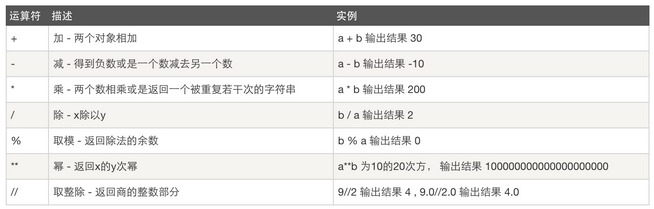
【算数运算】
【比较运算】
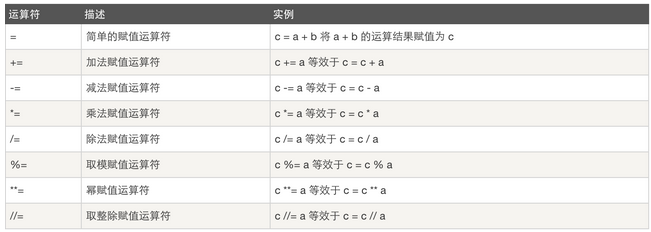
【赋值运算】
【逻辑运算】

【成员运算】

【位运算】
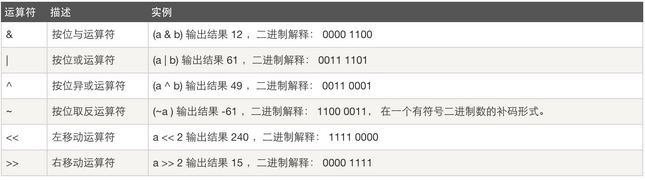
a = 22
o = 56

    128 64 32 16 8 4 2 1
a = 0   0   0  1 0 1 1 0
o = 0   0   1  1 1 0 0 0

a&o = 0 0 0 1 0 0 0 0 = 32
a|o = 0 0 1 1 1 1 1 0 = 62
a<<1 = 0 0 1 0 1 1 0 0 = 44
o>>1 = 0 0 0 1 1 1 0 0 = 28
【运算符优先级】
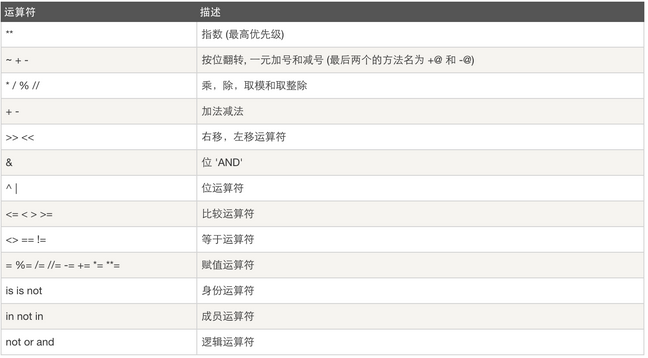
3.表达式if ...else语句
案例1:用户登录验证
 # 提示输入用户名和密码

 # 验证用户名和密码

 #     如果错误,则输出用户名或密码错误

 #      如果输入的用户名是chenlijun,就显示禁止登陆

 #     如果成功,则输出 成功

 #      最多允许输错三次

 login = "root"

 passwd = "root123"

 for i in range(3):

         newlogin = input("please input your user:")

         newpasswd = input("please input youer passwd:")

         if login == newlogin and passwd == newpasswd:

                 print ("login successfyl")

                 break

         elif newlogin == 'chenlijun':

                 print ("use %s is disable" % newlogin)

                 break

         else:

                 print ("user or passwd error")

 else:

     print ("你的密码输错三次以上,被锁到海枯石烂,哈哈哈!You input the wrong password three times, locked to the end, ha ha ha!")
案例2:猜年龄游戏
在程序里设定好你的年龄,然后启动程序让用户猜测,用户输入后,根据他的输入提示用户输入的是否正确,如果错误,提示是猜大了还是小了
 #!/usr/bin/python

 # -*- coding: UTF-8 -*-

 age = 24

 newage = int(input("youerage:"))

 if age == newage:

     print ("恭喜你,猜对啦~~")

 elif age < newage:

     print ("我有那么老吗?臭傻逼~~~")

 else:

     print ("我有那么小吗?臭傻逼~~~")
4.表达式for 循环
【循环原理其实就是一个列表】
案例1:年龄输错三次就退出,结束,猜小了提示年龄小,猜大了提示年龄大。
 #!/usr/bin/python

 # -*- coding: UTF-8 -*-

 #blog:http://www.cnblogs.com/linux-chenyang/

 age = 24

 for i in range(10):

     if i == 3:

         print("bay....")

         break

     newage = int(input("youerage:"))

     if age == newage:

         print ("恭喜你,猜对啦~~")

         break

     elif age < newage:

         print ("我有那么老吗?臭傻逼~~~")

     else:

         print ("我有那么小吗?臭傻逼~~~")
youerage:23

我有那么小吗?臭傻逼~~~

youerage:47

我有那么老吗?臭傻逼~~~

youerage:100

我有那么老吗?臭傻逼~~~

bay....
案例2:增加提示,如果输入三次还想继续猜,输入Y,输入N退出。
 #!/usr/bin/python

 # -*- coding: UTF-8 -*-

 #blog:http://www.cnblogs.com/linux-chenyang/

 age = 24

 count = 0

 for i in range(10):

     if count == 3:

         prompt = input("do you want to continue(Y/N):")

         if prompt == "Y":

             count = 0

         else:

             break

     newage = int(input("youerage:"))

     if age == newage:

         print ("恭喜你,猜对啦~~")

         break

     elif age < newage:

         print ("我有那么老吗?臭傻逼~~~")

     else:

         print ("我有那么小吗?臭傻逼~~~")

     count += 1
youerage:22

我有那么小吗?臭傻逼~~~

youerage:29

我有那么老吗?臭傻逼~~~

youerage:30

我有那么老吗?臭傻逼~~~

do you want to continue(Y/N):Y

youerage:22

我有那么小吗?臭傻逼~~~

youerage:22

我有那么小吗?臭傻逼~~~

youerage:22

我有那么小吗?臭傻逼~~~

do you want to continue(Y/N):N

Process finished with exit code 0
5.break and continue
案例1:循环套循环
 #!/usr/bin/python

 # -*- coding: UTF-8 -*-

 #blog:http://www.cnblogs.com/linux-chenyang/

 for i in range(10):

     if i == 5:

         for j in range(10):

             print("inner forloop", j)

             if j == 8:

                 break

         continue

     print("forloop", i)
forloop 0

forloop 1

forloop 2

forloop 3

forloop 4

inner forloop 0

inner forloop 1

inner forloop 2

inner forloop 3

inner forloop 4

inner forloop 5

inner forloop 6

inner forloop 7

inner forloop 8

forloop 6

forloop 7

forloop 8

forloop 9

Process finished with exit code 0
6.表达式while 循环
案例1:两种方法对比时间的快慢
 #!/usr/bin/python

 # -*- coding: UTF-8 -*-

 #blog:http://www.cnblogs.com/linux-chenyang/

 import time                      #导入时间模块

 t0_start = time.time()                #time.time()表示当前时间

 count=0

 while True:

     if count == 1000000:

         break

 #    print ("计数开始:", count)

     count += 1

 print ("count:",time.time()-t0_start,count)

 t_start = time.time()

 count0=0

 while count0 < 1000000:

     count0 += 1

 print ("count0:",time.time()-t_start,count0)
count: 0.488048791885376 1000000

count0: 0.4170417785644531 1000000

Process finished with exit code 0
案例2:还是猜年龄,猜错三次就提示笨蛋,并退出。
 age = 24

 count = 0

 while count < 3:

     newage = int(input("youerage:"))

     if age == newage:

         print ("恭喜你,猜对啦~~")

     elif age < newage:

         print ("我有那么老吗?臭傻逼~~~")

     else:

         print ("我有那么小吗?臭傻逼~~~")

     count += 1

 else:

     print("笨死了,猜那么多次还是猜不对~")
youerage:1

我有那么小吗?臭傻逼~~~

youerage:2

我有那么小吗?臭傻逼~~~

youerage:3

我有那么小吗?臭傻逼~~~

笨死了,猜那么多次还是猜不对~

Process finished with exit code 0
7.知识补充
【三元运算】
result = 值1 if 条件 else 值2
如果条件为假:result = 值2

Python_oldboy_自动化运维之路(二)的更多相关文章
- Python_oldboy_自动化运维之路_paramiko,mysql(十二)
本节内容: paramiko mysql 1.paramiko http://www.cnblogs.com/wupeiqi/articles/5095821.html paramiko是一个模块,s ...
- Python_oldboy_自动化运维之路_线程,进程,协程(十一)
本节内容: 线程 进程 协程 IO多路复用 自定义异步非阻塞的框架 线程和进程的介绍: 举个例子,拿甄嬛传举列线程和进程的关系: 总结:1.工作最小单元是线程,进程说白了就是提供资源的 2.一个应用程 ...
- Python_oldboy_自动化运维之路_面向对象2(十)
本节内容: 面向对象程序设计的由来 什么是面向对象的程序设计及为什么要有它 类和对象 继承与派生 多的态与多态性 封装 静态方法和类方法 面向对象的软件开发 反射 类的特殊成员方法 异常处理 1.面向 ...
- Python_oldboy_自动化运维之路(八)
本节内容: 列表生成式,迭代器,生成器 Json & pickle 数据序列化 软件目录结构规范 作业:ATM项目开发 1.列表生成式,迭代器,生成器 1.列表生成式 #[列表生成] #1.列 ...
- Python_oldboy_自动化运维之路_函数,装饰器,模块,包(六)
本节内容 上节内容回顾(函数) 装饰器 模块 包 1.上节内容回顾(函数) 函数 1.为什么要用函数? 使用函数之模块化程序设计,定义一个函数就相当于定义了一个工具,需要用的话直接拿过来调用.不使用模 ...
- Python_oldboy_自动化运维之路(三)
本节内容 列表,元组,字典 字符串操作 copy的用法 文件操作 1.列表,元组,字典 [列表] 1.定义列表 names = ['Alex',"Tenglan",'Eric'] ...
- Python_oldboy_自动化运维之路(一)
python简介: Python 是一个高层次的结合了解释性.编译性.互动性和面向对象的脚本语言. Python 的设计具有很强的可读性,相比其他语言经常使用英文关键字,其他语言的一些标点符号,它具有 ...
- Python_oldboy_自动化运维之路_socket编程(十)
链接:http://www.cnblogs.com/linhaifeng/articles/6129246.html 1.osi七层 引子: 须知一个完整的计算机系统是由硬件.操作系统.应用软件三者组 ...
- Python_oldboy_自动化运维之路_面向对象(十)
面向对象编程 OOP编程是利用“类”和“对象”来创建各种模型来实现对真实世界的描述,使用面向对象编程的原因一方面是因为它可以使程序的维护和扩展变得更简单,并且可以大大提高程序开发效率 ,另外,基于面向 ...
随机推荐
- All flavors must now belong to a named flavor dimension
FAQ: All flavors must now belong to a named flavor dimension. Learn more at https://d.android.com/r/ ...
- (转)编码规范系列(一):Eclipse Code Templates设置
背景:长久以来,对java编程中的注释不甚理解.再次学习<疯狂JAVA讲义>基础,深深的感到自己基本功的不牢固.所以要做到事无巨细,好好修炼. 认识注释 常识 注释的作用: 回顾原有的代码 ...
- python与pycharm
什么叫自动化测试? 通俗来说,自动化测试就是通过写代码来帮我们测试软件.用来做自动化测试的语言很多,python,Java,php,Go,ruby等.而且软件系统开发语言与自动化测试语言可以不一致.例 ...
- 数据科学的完整学习路径—Python版(转载)
时间 2015-01-29 14:14:11 数盟原文 http://dataunion.org/?p=9805 译者: Allen 从Python菜鸟到Python Kaggler的旅程(译注: ...
- P2572 [SCOI2010]序列操作
对自己 & \(RNG\) : 骄兵必败 \(lpl\)加油! P2572 [SCOI2010]序列操作 题目描述 lxhgww最近收到了一个01序列,序列里面包含了n个数,这些数要么是0,要 ...
- Java基础-进程与线程之Thread类详解
Java基础-进程与线程之Thread类详解 作者:尹正杰 版权声明:原创作品,谢绝转载!否则将追究法律责任. 一.进程与线程的区别 简而言之:一个程序运行后至少有一个进程,一个进程中可以包含多个线程 ...
- java基础-引用数据类型之二维数组(Array)
java基础-引用数据类型之二维数组(Array) 作者:尹正杰 版权声明:原创作品,谢绝转载!否则将追究法律责任. 之前我们学习过了Java的一维数组,所谓的二维数组就是元素是一堆一维数组的数组,换 ...
- 怎么在.net里面解析JSON文件?
我在网上搜了好多的文章,讲了很多的方法.但是无一例外的都看不懂...可能是因为我在这方面是个白痴吧... 所幸的是,我搜到了一个博客,写的很是清晰,比我之前看的大片文章写的好多了,在这里:http:/ ...
- HashMap源码分析-基于JDK1.8
hashMap数据结构 类注释 HashMap的几个重要的字段 hash和tableSizeFor方法 HashMap的数据结构 由上图可知,HashMap的基本数据结构是数组和单向链表或红黑树. 以 ...
- spring-data-redis,jedis和redis主从集成和遇到的问题
Redis主从加哨兵的部署详见http://www.cnblogs.com/dupang/p/6414365.html spring-data-redis和jedis集成代码总体结构 代码地址http ...