
【代码笔记】iOS-iOS图片的原生(Graphics)
一,效果图。

二,工程图。
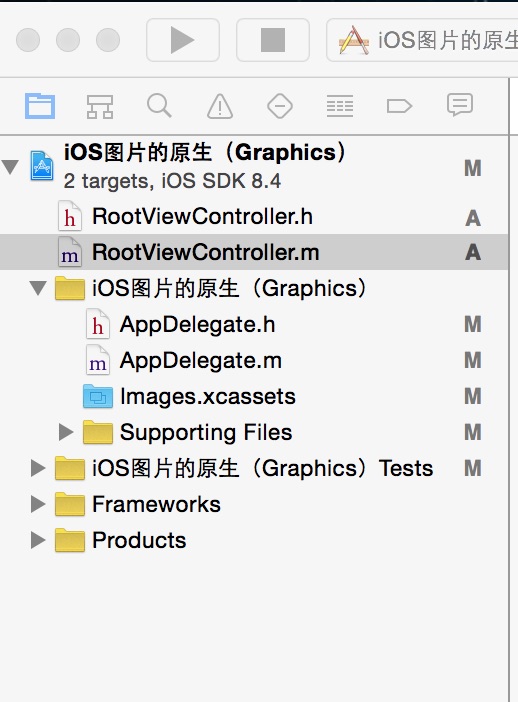
三,代码。
RootViewController.h
#import <UIKit/UIKit.h>

@interface RootViewController : UIViewController

@end
RootViewController.m

#import "RootViewController.h"

@interface RootViewController ()

@end

@implementation RootViewController

- (id)initWithNibName:(NSString *)nibNameOrNil bundle:(NSBundle *)nibBundleOrNil

{

    self = [super initWithNibName:nibNameOrNil bundle:nibBundleOrNil];

    if (self) {

        // Custom initialization

    }

    return self;

}

- (void)viewDidLoad

{

    [super viewDidLoad];

    // Do any additional setup after loading the view.

    //背景图

    [self addView];

}

#pragma -mark -functions

//背景图

-(void)addView

{

    UIImageView *imageView=[[UIImageView alloc]initWithFrame:CGRectMake(50, 100, 44, 44)];

    imageView.image=[self defaultImage];

    [self.view addSubview:imageView];

}

//图片原生

-(UIImage *)defaultImage {

    static UIImage *defaultImage = nil;

    static dispatch_once_t onceToken;

    dispatch_once(&onceToken, ^{

        UIGraphicsBeginImageContextWithOptions(CGSizeMake(20.f, 13.f), NO, 0.0f);

        [[UIColor blackColor] setFill];

        [[UIBezierPath bezierPathWithRect:CGRectMake(0, 0, 20, 1)] fill];

        [[UIBezierPath bezierPathWithRect:CGRectMake(0, 5, 20, 1)] fill];

        [[UIBezierPath bezierPathWithRect:CGRectMake(0, 10, 20, 1)] fill];

        [[UIColor whiteColor] setFill];

        [[UIBezierPath bezierPathWithRect:CGRectMake(0, 1, 20, 2)] fill];

        [[UIBezierPath bezierPathWithRect:CGRectMake(0, 6,  20, 2)] fill];

        [[UIBezierPath bezierPathWithRect:CGRectMake(0, 11, 20, 2)] fill];

        defaultImage = UIGraphicsGetImageFromCurrentImageContext();

        UIGraphicsEndImageContext();

    });

    return defaultImage;

}

- (void)didReceiveMemoryWarning

{

    [super didReceiveMemoryWarning];

    // Dispose of any resources that can be recreated.

}
【代码笔记】iOS-iOS图片的原生(Graphics)的更多相关文章
- 【代码笔记】iOS-使图片两边不拉伸,中间拉伸
代码: - (void)viewDidLoad { [super viewDidLoad]; // Do any additional setup after loading the view. // ...
- 【代码笔记】iOS-将图片处理成圆的
一,效果图. 二,工程图. 三,代码. ViewController.m - (void)viewDidLoad { [super viewDidLoad]; // Do any additional ...
- 【代码笔记】iOS-gif图片播放
一,效果图. 二,工程图. 三,代码. RootViewController.h #import <UIKit/UIKit.h> @interface RootViewController ...
- 谈谈 iOS 中图片的解压缩
原文 对于大多数 iOS 应用来说,图片往往是最占用手机内存的资源之一,同时也是不可或缺的组成部分.将一张图片从磁盘中加载出来,并最终显示到屏幕上,中间其实经过了一系列复杂的处理过程,其中就包括了对图 ...
- 【转】谈谈 iOS 中图片的解压缩
转自:http://blog.leichunfeng.com/blog/2017/02/20/talking-about-the-decompression-of-the-image-in-ios/ ...
- IOS中图片拉伸技巧与方法总结(转载)
以下内容转载自:http://my.oschina.net/u/2340880/blog/403996 IOS中图片拉伸技巧与方法总结 一.了解几个图像拉伸的函数和方法 1.直接拉伸法 简单暴力,却是 ...
- ios开发图片点击放大
图片点击放大,再次点击返回原视图.完美封装,一个类一句代码即可调用.IOS完美实现 创建了一个专门用于放大图片的类,以下为.h文件 #import <Foundation/Foundation. ...
- iOS多图片下载
iOS多图片下载.在cell里面下载图片.做了缓存优化. (app.icon是图片地址) // 先从内存缓存中取出图片 UIImage *image = self.images[app.icon]; ...
- iOS UIButton 图片文字上下垂直布局 解决方案
实现如图所示效果: 这是一个UIButton,需要改变image和title相对位置. 解决如下: //设置文字偏移:向下偏移图片高度+向左偏移图片宽度 (偏移量是根据[图片]大小来的,这点是关键)b ...
随机推荐
- 客户端集成IdentityServer4
1. vs code 终端执行 dotnet new webapi --name ClientCredentialApi 2. 找到ValuesController.cs 引用 using Mic ...
- Lora通信解决方案对比
欢迎大家进群交流分享:QQ群:773082801
- jsp页面,jstl标签中的数据在<%%>java中使用
可参考jsp的API隐式对象.. 这部分数据其实被保存在page域中,但jsp中如果使用java代码需要在特定的标签中<%%>,在这个标签中可使用的只有pageContext对象,所以可以 ...
- C# 5.0-.Net新特性
调用者信息特性 CallerMemberNameAttribute | CallerFilePathAttribute | CallerLineNumberAttribute .NET Framewo ...
- WebDriverAPI(10)
操作Frame页面元素 测试网址代码 frameset.html: <html> <head> <title>frameset页面</title> &l ...
- 一文详解python的类方法,普通方法和静态方法
首先形式上的区别,实例方法隐含的参数为类实例self,而类方法隐含的参数为类本身cls. 静态方法无隐含参数,主要为了类实例也可以直接调用静态方法. 所以逻辑上,类方法被类调用,实例方法被实例调用,静 ...
- editplus配置csharp
只要是写代码的,我们肯定常有用到EditPlus..Net开发也是如此.有时我们需要调试一小段C#(或VB.Net)代码,这时去大动干戈在臃肿的VS.Net中新建“控制台应用程序”项目,写满“Cons ...
- Odoo9.0模块开发全流程
构建Odoo模块 模块组成 业务对象 业务对象声明为Python类, 由Odoo自己主动加载. 数据文件 XML或CSV文件格式, 在当中声明了元数据(视图或工作流).配置数据(模块參数).演示数据等 ...
- python算法之冒泡排序
目录 python之冒泡排序 算法原理 算法分析 代码实现 总结 python之冒泡排序 概念: 重复地走访过要排序的元素列,依次比较两个相邻的元素,如果他们的顺序(如从大到小.首字母从A到Z)错误就 ...
- Linux 文件流管理
1. 打开/关闭文件 1). 打开文件 / fopen 作用: 打开一个文件,将其与文件流联系起来,方便后续的操作 头文件: #include <stdio.h> 函数原型: FILE * ...