
C#使用Linq对DataGridView进行模糊查找
针对DataGridView中已进行过数据绑定,即已向DataGridView中添加了一些数据,可以结合Linq查询,并让匹配查询的行高亮显示,如下图:
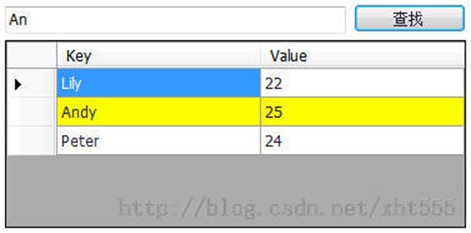
具体实现如下:
[csharp] view plain copy
using System;
using System.Collections.Generic;
using System.Linq;
using System.Windows.Forms;
namespace Maxes_PC_Client {
public partial class frmWelcome : Form {
private int beforeMatchedRowIndex = 0;
public frmWelcome()
{
InitializeComponent();
}
private void frmWelcome_Load(object sender, EventArgs e) {
this.dataGridViewInit();
}
/// <summary>
/// DataGridView添加数据、初始化
/// </summary>
private void dataGridViewInit() {
Dictionary<String, String> map = new Dictionary<String, String>();
map.Add("Lily", "22");
map.Add("Andy", "25");
map.Add("Peter", "24");
// 在这里必须创建一个BindIngSource对象,用该对象接收Dictionary<T, K>泛型集合的对象
BindingSource bindingSource = new BindingSource();
// 将泛型集合对象的值赋给BindingSourc对象的数据源
bindingSource.DataSource = map;
this.dataGridView.DataSource = bindingSource;
}
private void SearchButton_Click(object sender, EventArgs e) {
if (this.KeyWord.Text.Equals("")) {
return;
}
// Linq模糊查询
IEnumerable<DataGridViewRow> enumerableList = this.dataGridView.Rows.Cast<DataGridViewRow>();
List<DataGridViewRow> list = (from item in enumerableList
where item.Cells[0].Value.ToString().IndexOf(this.KeyWord.Text) >= 0
select item).ToList();
// 恢复之前行的背景颜色为默认的白色背景
this.dataGridView.Rows[beforeMatchedRowIndex].DefaultCellStyle.BackColor = System.Drawing.Color.White;
if (list.Count > 0) {
// 查找匹配行高亮显示
int matchedRowIndex = list[0].Index;
this.dataGridView.Rows[matchedRowIndex].DefaultCellStyle.BackColor = System.Drawing.Color.Yellow;
this.beforeMatchedRowIndex = matchedRowIndex;
}
}
}
}
C#使用Linq对DataGridView进行模糊查找的更多相关文章
- C# 用Linq查询DataGridView行中的数据是否包含(各种操作)
http://blog.csdn.net/xht555/article/details/38685845 https://www.cnblogs.com/wuchao/archive/2012/12/ ...
- 用DataGridView导入TXT文件,并导出为XLS文件
使用 DataGridView 控件,可以显示和编辑来自多种不同类型的数据源的表格数据.也可以导出.txt,.xls等格式的文件.今天我们就先介绍一下用DataGridView把导入txt文件,导出x ...
- 从DataGridView导出Excel
从DataGridView导出Excel的两种情况,不多说,直接记录代码(新建类,直接引用传入参数). using System; using System.Collections.Generic; ...
- LINQ使用细节之.AsEnumerable()和.ToList()的区别
先看看下面的代码,用了 .AsEnumerable(): 1 var query = (from a in db.Table2 where a = SomeCondition3 select a.So ...
- .NET组件控件实例编程系列——5.DataGridView数值列和日期列
在使用DataGridView编辑数据的时候,编辑的单元格一般会显示为文本框,逻辑值和图片会自动显示对应类型的列.当然我们自己可以手工选择列的类型,例如ComboBox列.Button列.Link列. ...
- C# DataGridView自定义分页控件
好些日子不仔细写C#代码了,现在主要是Java项目,C#.Net相关项目不多了,有点手生了,以下代码不足之处望各位提出建议和批评. 近日闲来无事想研究一下自定义控件,虽然之前也看过,那也仅限于皮毛,粗 ...
- WinForm DataGridView分页功能
WinForm 里面的DataGridView不像WebForm里面的GridView那样有自带的分页功能,需要自己写代码来实现分页,效果如下图: 分页控件 .CS: 1 using System; ...
- 如何在在WinFrom的DataGridView中做到数据持续动态加载而不卡死
1.在这个过程我用过好几种办法 (1)使用委托的办法,这个方法可以做到持续加载,但是效果不理想会卡死 (2)开启线程的方法,会造成卡死 (3)使用另一个窗体的线程做持续加载(子窗体),让子窗体作为一个 ...
- WinForm中DataGridView显示更新数据--人性版
using System; using System.Collections.Generic; using System.ComponentModel; using System.Data; usin ...
随机推荐
- docker在centos和Ubuntu的安装
CentOS: http://blog.csdn.net/wuapeng/article/details/51728614 rpm -Uvh http://www.elrepo.org/elrepo- ...
- vmware搭建vSAN提示磁盘不合格或者看不到磁盘的解决办法
1.如果磁盘不合格,或者在创建磁盘组的时候看不到该磁盘,一般的原因都是该磁盘有其他分区,可以使用下面的方法来解决 a.首先开启esxi主机的ssh功能 b.登陆到esxi的后台 c. ls /dev/ ...
- C# .net MD5加密函数
using System.Web.Security; string password =FormsAuthentication.HashPasswordForStoringInConfigFile(t ...
- PAT 1055 集体照 (25)(STL-list+代码)
1055 集体照 (25)(25 分)提问 拍集体照时队形很重要,这里对给定的N个人K排的队形设计排队规则如下: 每排人数为N/K(向下取整),多出来的人全部站在最后一排: 后排所有人的个子都不比前排 ...
- dedecms连表查询参照
ixingmeib2c/ds/entity_clas/tc_coupon_index.ls.php下面的getIndexInfo()方法
- MessagePack 使用
MessagePack 使用 MessagePack(https://msgpack.org/) 是一个基于二进制高效的对象序列化 Library 用于跨语言通信.它可以像 JSON 那样,在许多种语 ...
- 【文件下载】Java下载文件的几种方式
[文件下载]Java下载文件的几种方式 摘自:https://www.cnblogs.com/sunny3096/p/8204291.html 1.以流的方式下载. public HttpServl ...
- linux(rhel) rescue修复详解
修复linux,先准备好一张安装光盘,光驱安装好后开机,选择从光驱启动.等待安装盘显示操作界面时选择"rescue"选项,如果有光标提示的话,也可以输入:linux rescue进 ...
- android textview settext卡顿深层次原因
最近在公司项目里面发现listview里面的textview在调用settext函数的时候非常耗时,当时都有点不敢相信,这是因为如果你把textview设置成wrap_content,则每次调用set ...
- android 混淆文件proguard.cfg详解 (转载)
-injars androidtest.jar[jar包所在地址] -outjars out[输出地址] -libraryjars 'D:\android-sdk-windows\platf ...