
C#使用Linq对DataGridView进行模糊查找
针对DataGridView中已进行过数据绑定,即已向DataGridView中添加了一些数据,可以结合Linq查询,并让匹配查询的行高亮显示,如下图:
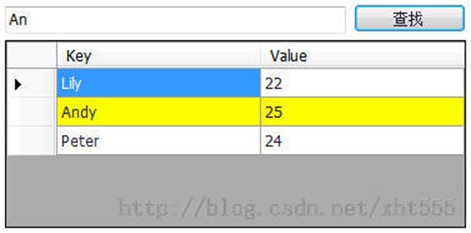
具体实现如下:
[csharp] view plain copy
using System;
using System.Collections.Generic;
using System.Linq;
using System.Windows.Forms;
namespace Maxes_PC_Client {
public partial class frmWelcome : Form {
private int beforeMatchedRowIndex = 0;
public frmWelcome()
{
InitializeComponent();
}
private void frmWelcome_Load(object sender, EventArgs e) {
this.dataGridViewInit();
}
/// <summary>
/// DataGridView添加数据、初始化
/// </summary>
private void dataGridViewInit() {
Dictionary<String, String> map = new Dictionary<String, String>();
map.Add("Lily", "22");
map.Add("Andy", "25");
map.Add("Peter", "24");
// 在这里必须创建一个BindIngSource对象,用该对象接收Dictionary<T, K>泛型集合的对象
BindingSource bindingSource = new BindingSource();
// 将泛型集合对象的值赋给BindingSourc对象的数据源
bindingSource.DataSource = map;
this.dataGridView.DataSource = bindingSource;
}
private void SearchButton_Click(object sender, EventArgs e) {
if (this.KeyWord.Text.Equals("")) {
return;
}
// Linq模糊查询
IEnumerable<DataGridViewRow> enumerableList = this.dataGridView.Rows.Cast<DataGridViewRow>();
List<DataGridViewRow> list = (from item in enumerableList
where item.Cells[0].Value.ToString().IndexOf(this.KeyWord.Text) >= 0
select item).ToList();
// 恢复之前行的背景颜色为默认的白色背景
this.dataGridView.Rows[beforeMatchedRowIndex].DefaultCellStyle.BackColor = System.Drawing.Color.White;
if (list.Count > 0) {
// 查找匹配行高亮显示
int matchedRowIndex = list[0].Index;
this.dataGridView.Rows[matchedRowIndex].DefaultCellStyle.BackColor = System.Drawing.Color.Yellow;
this.beforeMatchedRowIndex = matchedRowIndex;
}
}
}
}
C#使用Linq对DataGridView进行模糊查找的更多相关文章
- C# 用Linq查询DataGridView行中的数据是否包含(各种操作)
http://blog.csdn.net/xht555/article/details/38685845 https://www.cnblogs.com/wuchao/archive/2012/12/ ...
- 用DataGridView导入TXT文件,并导出为XLS文件
使用 DataGridView 控件,可以显示和编辑来自多种不同类型的数据源的表格数据.也可以导出.txt,.xls等格式的文件.今天我们就先介绍一下用DataGridView把导入txt文件,导出x ...
- 从DataGridView导出Excel
从DataGridView导出Excel的两种情况,不多说,直接记录代码(新建类,直接引用传入参数). using System; using System.Collections.Generic; ...
- LINQ使用细节之.AsEnumerable()和.ToList()的区别
先看看下面的代码,用了 .AsEnumerable(): 1 var query = (from a in db.Table2 where a = SomeCondition3 select a.So ...
- .NET组件控件实例编程系列——5.DataGridView数值列和日期列
在使用DataGridView编辑数据的时候,编辑的单元格一般会显示为文本框,逻辑值和图片会自动显示对应类型的列.当然我们自己可以手工选择列的类型,例如ComboBox列.Button列.Link列. ...
- C# DataGridView自定义分页控件
好些日子不仔细写C#代码了,现在主要是Java项目,C#.Net相关项目不多了,有点手生了,以下代码不足之处望各位提出建议和批评. 近日闲来无事想研究一下自定义控件,虽然之前也看过,那也仅限于皮毛,粗 ...
- WinForm DataGridView分页功能
WinForm 里面的DataGridView不像WebForm里面的GridView那样有自带的分页功能,需要自己写代码来实现分页,效果如下图: 分页控件 .CS: 1 using System; ...
- 如何在在WinFrom的DataGridView中做到数据持续动态加载而不卡死
1.在这个过程我用过好几种办法 (1)使用委托的办法,这个方法可以做到持续加载,但是效果不理想会卡死 (2)开启线程的方法,会造成卡死 (3)使用另一个窗体的线程做持续加载(子窗体),让子窗体作为一个 ...
- WinForm中DataGridView显示更新数据--人性版
using System; using System.Collections.Generic; using System.ComponentModel; using System.Data; usin ...
随机推荐
- 9-sort使用时的错误
/* 矩形嵌套 题目内容: 有n个矩形,每个矩形可以用a,b来描述,表示长和宽.矩形X(a,b)可以嵌套在矩形 ...
- android SQLiteDatabase数据库使用的时候 常见问题
用数据库的时候有时候一定要用_id否则会报错 对于Contentprovider的查询用contentResolver.insert() 一般的数据库操作用db.insert();
- php 账号不能同时登陆,当其它地方登陆时,当前账号失效
解决的思路是每当用户登陆时我们必需记录当前的用户id和session_id,如果有人在其它地方用此账号登陆时,我们把此用户id对应的session_id的session文件删除,并重新记录当前的ses ...
- Jmeter的log输出控制
Jmeter的log输出控制(jmeter.log) log_level.jmeter=ERROR log_level.jmeter.junit=DEBUG 在jmeter.properties中,修 ...
- Perl的调试模式熟悉和应用
perl -d file.pl perl -c file.pl DB<1> hList/search source lines: Control script ...
- crontab误删除
命令如下: cat /var/log/cron* | grep -i "`which cron`" > ./all_temp cat ./all_temp | grep -v ...
- const stirng* 类型的指针cp,当cout<<*cp<<endl:会提示没有与之匹配的“<<”运算符
#include<iostream> #include<cstring> #include<cstdio> #include<cstdlib> usin ...
- Python自动化面试必备 之 你真明白装饰器么?
Python自动化面试必备 之 你真明白装饰器么? 装饰器是程序开发中经常会用到的一个功能,用好了装饰器,开发效率如虎添翼,所以这也是Python面试中必问的问题,但对于好多小白来讲,这个功能 有点绕 ...
- 前端之JavaScript笔记4
一 按键事件 <!DOCTYPE html> <html lang="en"> <head> <meta charset="UT ...
- 2018.10.18 bzoj4105: [Thu Summer Camp 2015]平方运算(线段树)
传送门 线段树妙题. 显然平方几次就会循环(打表证明不解释). 然后所有环长度的lcmlcmlcm不大于70. 因此维护一下当前区间中的节点是否全部在环上. 不是直接暴力到叶子节点修改. 否则整体打标 ...