
ubuntu 12.04下如何编译hadoop2.4
问题导读:
1.如果获取hadoop src maven包?
2.编译hadoop需要装哪些软件?
3.如何编译hadoop2.4?
扩展:
编译hadoop为何安装这些软件?

一、首先下载hadoop源码包
下载的方式还是比较多的
1.svn的方式
svn下载首先需要安装SVN,如果想尝试使用svn,可以参考源码管理、获取网络源码工具:TortoiseSVN使用手册,hadoop的svn下载地址点此
2.压缩包的方式
这里我们介绍一种压缩包的方式。
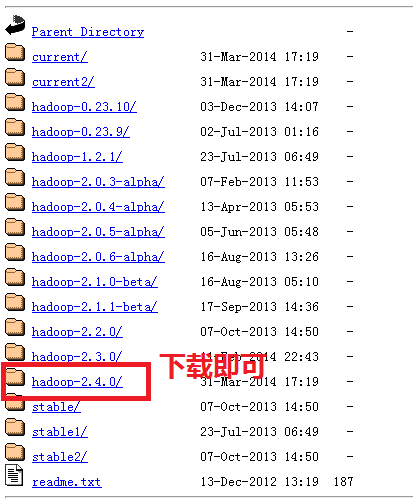
首先我们登录官网:
http://hadoop.apache.org/,我们找到下面链接,点进去下载即可。如果刚接触,不知道怎么下载,可以查看帖子新手指导:hadoop官网介绍及如何下载hadoop(2.4)各个版本与查看hadoop API介绍,里面介绍的很详细。
二、解压
- aboutyun@master:~$ tar zxvf hadoop-2.4.0-src.tar.gz
解压完毕,我们会看到相应的文件夹:

三、解压完毕,我们开始准备编译所需要的软件
这里软件的准备,很多文章写的都不全,这里整理一下。哪些软件是需要安装的。
这里需要说明的是有的Linux有自带的这些工具,这个需要仔细看一下版本是否匹配,不匹配则升级一下,有些不能升级,那么就重装一下吧
1、jdk的安装
步骤下载压缩包、解压、配置环境变量
(1)jdk下载
链接: http://pan.baidu.com/s/1jGr41SU 密码: rawv
(2)jdk解压
- tar zxvf jdk-7u51-linux-x64.tar.gz
然后重命令为:
(3)配置环境变量:
如下图所示红字部分为:(记得这里的路径改成自己的实际安装路径)
- /usr/jdk1.7/bin

(4)检验是否安装成功
2、maven的安装
- sudo apt-get install maven
复制代码
我这里已经安装
上面可能还需要配置环境变量之类的,但是我这里没有好像是系统自带的,网上的资料也比较多,注意maven的版本,我这里是3.0.4,hadoop2.4需要maven的这个版本或则更高的版本3.2.1版本也是可以的。
验证安装是否成功
- mvn -version

3.protobuf的安装
为防止出错,这里补充一些内容,
3.1先安装g++
- sudo apt-get install g++
(1)下载
- sudo wget https://protobuf.googlecode.com/files/protobuf-2.5.0.tar.gz
由于google不能访问,可以从网盘下载链接:http://pan.baidu.com/s/1dDgWe6P 密码:xgiu
(2)解压
- tar zxvf protobuf-2.5.0.tar.gz
如下效果:
>
然后进入protobuf-2.5.0文件夹,进行如下操作:
- $ sudo ./configure
- $ sudo make
- $ sudo make check
- $ sudo make install
- $ sudo ldconfig
修改环境变量:
- sudo nano /etc/profile
- export LD_LIBRARY_PATH=~/protobuf-2.5.0
(LD_LIBRARY_PATH的这里,填写的是protobuf文件的位置)
- source /etc/profile
注意:配置/etc/profile,在虚拟机重启后,可能配置会失效,所以重启后,需要再次执行source操作。
(3)验证
- protoc --version

4.安装openssl库
- sudo apt-get install libssl-dev
5.CMake安装
- sudo yum install cmake
或则
- sudo apt-get install cmake
6.ant安装
(1)首先下载ant
百度网盘: apache-ant-1.9.4-bin.tar.gz
http://pan.baidu.com/s/1c0vjhBy
或则下面链接:
apache-ant-1.9.4-bin.tar.gz
(2)解压
- tar zxvf apache-ant-1.9.4-bin.tar.gz
(3)配置环境变量
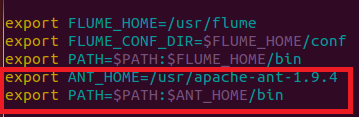
如下图所示:
1.打开profile
- sudo vi /etc/profile
2.添加下图红字部分,记得修改成自己的路径
3.生效
- source /etc/profile
4.检验
- ant -version

四、编译hadoop2.4
上面准备工作已经做的差不多了,我们终于可以开始,记得进入src文件夹下,输入下面命令
- mvn package -Pdist,native -DskipTests -Dtar

等了40多分钟,ok
在目录~/hadoop-2.4.0-src/hadoop-dist/target下有文件:
hadoop-2.4.0.tar.gz

更多内容:hadoop2.4汇总:hadoop2.4插件下载、完全分布式、伪分布、eclipse插件开发大全
问题总结:
这里还需要在补充:
1.遇到错误1:CMake没有安装
- [ERROR] Failed to execute goal org.apache.maven.plugins:maven-antrun-
- plugin:1.6:run (make) on project hadoop-common: An Ant BuildException has
- occured: Execute failed: java.io.IOException: Cannot run program "cmake" (in
- directory "/home/wyf/hadoop-2.0.2-alpha-src/hadoop-common-project/hadoop-
- common/target/native"): java.io.IOException: error=2, No such file or directory
- -> [Help 1]
- [ERROR]
- [ERROR] To see the full stack trace of the errors, re-run Maven with the -e
- switch.
- [ERROR] Re-run Maven using the -X switch to enable full debug logging.
- [ERROR]
- [ERROR] For more information about the errors and possible solutions, please
- read the following articles:
- [ERROR] [Help 1]
- http://cwiki.apache.org/confluence/display/MAVEN/MojoExecutionException
解决方法:
CMake没有安装
- sudo yum install cmake
或则使用
- sudo apt-get install cmake

2.遇到错误2:ant没有安装
- ERROR] Failed to execute goal org.codehaus.mojo.jspc:jspc-maven-plugin:2.0-
- alpha-3:compile (hdfs) on project hadoop-hdfs: Execution hdfs of goal
- org.codehaus.mojo.jspc:jspc-maven-plugin:2.0-alpha-3:compile failed: Plugin
- org.codehaus.mojo.jspc:jspc-maven-plugin:2.0-alpha-3 or one of its dependencies
- could not be resolved: Could not transfer artifact ant:ant:jar:1.6.5 from/to
- central (http://repo.maven.apache.org/maven2): GET request of:
- ant/ant/1.6.5/ant-1.6.5.jar from central failed: Read timed out -> [Help 1]
- [ERROR]
- [ERROR] To see the full stack trace of the errors, re-run Maven with the -e
- switch.
- [ERROR] Re-run Maven using the -X switch to enable full debug logging.
- [ERROR]
- [ERROR] For more information about the errors and possible solutions, please
- read the following articles:
- [ERROR] [Help 1]
- http://cwiki.apache.org/confluence/display/MAVEN/PluginResolutionException
- [ERROR]
- [ERROR] After correcting the problems, you can resume the build with the command
- [ERROR] mvn <goals> -rf :hadoop-hdfs
1.首先下载ant
百度网盘: apache-ant-1.9.4-bin.tar.gz
http://pan.baidu.com/s/1c0vjhBy
或则下面链接:
apache-ant-1.9.4-bin.tar.gz
2.解压
- tar zxvf apache-ant-1.9.4-bin.tar.gz
3.配置环境变量
记得配置环境变量
如下图所示:
1.打开profile
- sudo vi /etc/profile
2.添加下图红字部分,记得修改成自己的路径
3.生效
- source /etc/profile
4.检验
- ant -version
3.protobuf版本过低,错误现象
- [ERROR] Failed to execute goal org.apache.hadoop:hadoop-maven-plugins:2.4.0:prot
- oc (compile-protoc) on project hadoop-common: org.apache.maven.plugin.MojoExecut
- ionException: 'protoc --version' did not return a version -> [Help 1]
- [ERROR]
- [ERROR] To see the full stack trace of the errors, re-run Maven with the -e swit
- ch.
- [ERROR] Re-run Maven using the -X switch to enable full debug logging.
- [ERROR]
- [ERROR] For more information about the errors and possible solutions, please rea
- d the following articles:
- [ERROR] [Help 1] http://cwiki.apache.org/confluence/display/MAVEN/MojoExecutionE
- xception
- [ERROR]
- [ERROR] After correcting the problems, you can resume the build with the command
- [ERROR] mvn <goals> -rf :hadoop-common

hadoop2.4对应的版本是protobuf-2.5.0
解决办法:按照安装步骤中protobuf的安装即可
4.权限问题

解决办法:
(1)加上sudo
(2)通过
- ll
安装包解压之后,所属用户可能发生变化:
改变用户
sudo chown -R aboutyun:aboutyun hadoop-2.4.0-src
上面aboutyun改成自己的所属组和用户
命令查看是否属于当前用户
[ERROR] Failed to execute goal org.apache.maven.plugins:maven-antrun-plugin:1.6:run (make) on project hadoop-common: An Ant BuildException has occured: exec returned: 1 -> [Help 1]

[ERROR]

[ERROR] To see the full stack trace of the errors, re-run Maven with the -e switch.

[ERROR] Re-run Maven using the -X switch to enable full debug logging.

安装zlib-devel

ubuntu安装是

sudo apt-get install zlib1g-dev
[ERROR] Failed to execute goal org.apache.maven.plugins:maven-antrun-plugin:1.7:run (make) on project hadoop-pipes: An Ant BuildException has occured: exec returned: 1

[ERROR] around Ant part ...<exec dir="/home/xxl/hadoop-2.5.2-src/hadoop-tools/hadoop-pipes/target/native" executable="cmake" failonerror="true">... @ 5:120 in /home/xxl/hadoop-2.5.2-src/hadoop-tools/hadoop-pipes/target/antrun/build-main.xml

[ERROR] -> [Help 1]
安装:sudo apt-get install libssl-dev
[ERROR] Failed to execute goal org.apache.maven.plugins:maven-antrun-plugin:1.7:run (tar) on project hadoop-dist: An Ant BuildException has occured: exec returned: 1

[ERROR] around Ant part ...<exec dir="/home/xxl/hadoop-2.5.2-src/hadoop-dist/target" executable="sh" failonerror="true">... @ 21:96 in /home/xxl/hadoop-2.5.2-src/hadoop-dist/target/antrun/build-main.xml
安装:sudo apt-get install build-essential
sudo apt-get install libglib2.0-dev
错误信息:
|
1
2
3
4
5
6
7
8
9
10
|
[ERROR] Failed to execute goal on project hadoop-auth: Could not resolve dependencies for project org.apache.hadoop:hadoop-auth:jar:2.2.0: Could not transfer artifact org.mortbay.jetty:jetty:jar:6.1.26 from/to central (https://repo.maven.apache.org/maven2): GET request of: org/mortbay/jetty/jetty/6.1.26/jetty-6.1.26.jar from central failed: SSL peer shut down incorrectly -> [Help 1][ERROR][ERROR] To see the full stack trace of the errors, re-run Maven with the -e switch.[ERROR] Re-run Maven using the -X switch to enable full debug logging.[ERROR][ERROR] For more information about the errors and possible solutions, please read the following articles:[ERROR] [Help 1] http://cwiki.apache.org/confluence/display/MAVEN/DependencyResolutionException[ERROR][ERROR] After correcting the problems, you can resume the build with the command[ERROR] mvn -rf :hadoop-auth |
解决办法:
这是hadoop的一个bug,在pom.xml中添加下面patch即可,详见https://issues.apache.org/jira/browse/HADOOP-10110 。
编辑`hadoop-common-project/hadoop-auth/pom.xml`文件:
|
1
|
vi hadoop-common-project/hadoop-auth/pom.xml |
在<dependencys></dependencys>节点中插入:
|
1
2
3
4
5
|
<dependency> <groupId>org.mortbay.jetty</groupId> <artifactId>jetty-util</artifactId> <scope>test</scope></dependency> |
错误信息:
|
1
2
3
4
5
6
7
8
9
10
|
[ERROR] Failed to execute goal org.apache.maven.plugins:maven-antrun-plugin:1.6:run (make) on project hadoop-pipes: An Ant BuildException has occured: exec returned: 1 -> [Help 1][ERROR][ERROR] To see the full stack trace of the errors, re-run Maven with the -e switch.[ERROR] Re-run Maven using the -X switch to enable full debug logging.[ERROR][ERROR] For more information about the errors and possible solutions, please read the following articles:[ERROR] [Help 1] http://cwiki.apache.org/confluence/display/MAVEN/MojoExecutionException[ERROR][ERROR] After correcting the problems, you can resume the build with the command[ERROR] mvn -rf :hadoop-pipes |
解决办法:
|
1
|
apt-get install libssl-dev |
ubuntu 12.04下如何编译hadoop2.4的更多相关文章
- 在Ubuntu 12.04下编译qtiplot
不在windows下,再加上不想用盗版,所以需要一个origin的替代品——qtiplot.虽然我非常抵抗用这种不停点来点去的软件,用R的ggplot2画图多好啊,高效.优雅.漂亮,但是终抵不过老板一 ...
- 在Ubuntu 12.04下采用apt-get的方法安装Qt4
在Ubuntu 12.04下采用apt-get的方法安装Qt4 注:之前发表的一篇博客是采用编译源码的方式安装Qt4,这是很有用的方式,因为源码安装对于所有系统都是通用的,其次,在使用交叉编译器的时候 ...
- Angularjs学习---angularjs环境搭建,ubuntu 12.04下安装nodejs、npm和karma
1.下载angularjs 进入其官网下载:https://angularjs.org/,建议下载最新版的:https://ajax.googleapis.com/ajax/libs/angular ...
- Ubuntu 12.04下Hadoop 2.2.0 集群搭建(原创)
现在大家可以跟我一起来实现Ubuntu 12.04下Hadoop 2.2.0 集群搭建,在这里我使用了两台服务器,一台作为master即namenode主机,另一台作为slave即datanode主机 ...
- 升级Ubuntu 12.04下的gcc到4.7
我们知道C++11标准开始支持类内初始化(in-class initializer),Qt creator编译出现error,不支持这个特性,原因在于,Ubuntu12.04默认的是使用gcc4.6, ...
- Ubuntu 12.04下GAMIT10.40安装说明
转载于:http://www.itxuexiwang.com/a/liunxjishu/2016/0225/164.html?1456481297 Ubuntu 12.04下GAMIT10.40安装步 ...
- [转]ubuntu(12.04)下, 命令 ,内核 源代码的获取
[转]ubuntu(12.04)下, 命令 ,内核 源代码的获取 http://blog.chinaunix.net/uid-18905703-id-3446099.html 1.命令:例如:要查看l ...
- Ubuntu 12.04 下安装 Eclipse
方法一:(缺点是安装时附加openjdk等大量程序并无法去除,优点是安装简单) $ sudo apt-get install eclipse 方法二:(优点是安装内容清爽,缺点是配置麻烦)1.安装JD ...
- 在Ubuntu 12.04下创建eclipse的桌面链接
在Ubuntu 12.04下创建eclipse的桌面链接 作者:凯鲁嘎吉 - 博客园 http://www.cnblogs.com/kailugaji/ 在Ubuntu 12.04上安装Hadoop并 ...
随机推荐
- div css水平垂直居中
<!DOCTYPE html> <html> <head> <meta charset="utf-8"> <title> ...
- 利用js_API 执行对html文档元素的属性的CRUD操作
转自:http://my.oschina.net/felay/blog/303470 <!DOCTYPE html> <html> <head> <meta ...
- Android开发之对话框高级应用
Android开发之对话框高级应用 创建并显示一个对话框非常easy.可是假设想进行一些更高级点的操作,就须要一些技巧了.以下将和大家分享一下对话框使用的一些高级技巧. 1.改变对话框的显示位置: 大 ...
- MSP430F5438 I2C学习笔记——AT24C02
0.前言 对于大多数单片机来说,I2C成了一个老大难问题.从51时代开始,软件模拟I2C成了主流,甚至到ARMCortex M3大行其道的今天,软件模拟I2C依然是使用最广的方法.虽然软件模拟可以解决 ...
- cp 命令(转)
原文:http://www.cnblogs.com/peida/archive/2012/10/29/2744185.html cp命令用来复制文件或者目录,是Linux系统中最常用的命令之一.一般情 ...
- Android 英文文档下载地址
通过英文Android API学习Android技术是一个不错选择,当然养鸡的专业户要小心了,以下分享一些下载英文文档的链接(请使用迅雷下载): https://dl-ssl.google.com/a ...
- python之函数用法id(),了解即可
# -*- coding: utf-8 -*- #python 27 #xiaodeng #python之函数用法id(),了解即可 #http://www.cnblogs.com/hongfei/p ...
- python线程详解
#线程状态 #线程同步(锁)#多线程的优势在于可以同时运行多个任务,至少感觉起来是这样,但是当线程需要共享数据时,可能存在数据不同步的问题. #threading模块#常用方法:'''threadin ...
- 19、java内存分配 常量池详解
在class文件中,“常量池”是最复杂也最值得关注的内容. Java是一种动态连接的语言,常量池的作用非常重要,常量池中除了包含代码中所定义的各种基本类型(如int.long等等)和对象型(如Stri ...
- HDUOJ--------(1312)Red and Black
Red and Black Time Limit: 2000/1000 MS (Java/Others) Memory Limit: 65536/32768 K (Java/Others) To ...