
动画隐藏UITabBarController与UINavigationController
动画隐藏UITabBarController与UINavigationController

效果图:
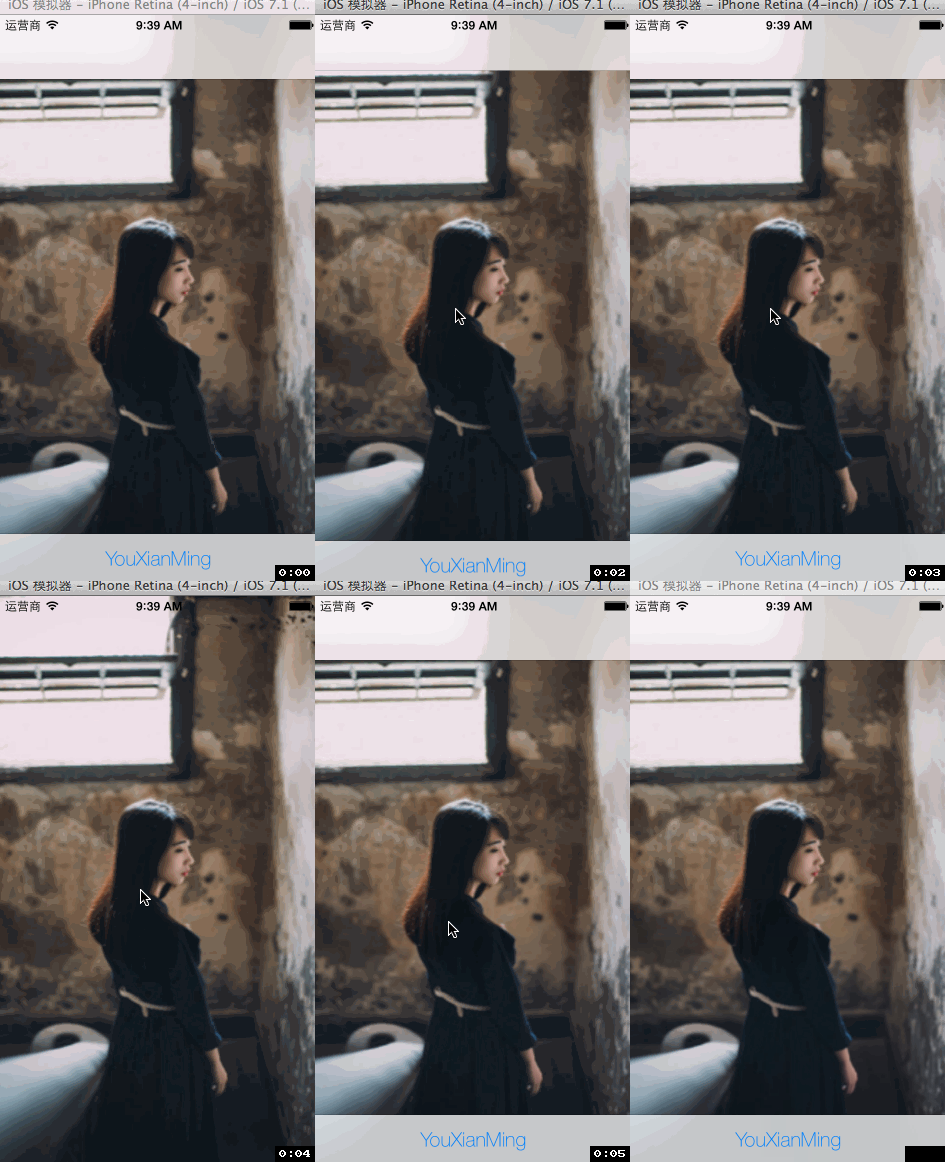
源码:
AppDelegate.m
//

//  AppDelegate.m

//  HideTabbar

//

//  Copyright (c) 2014年 Y.X. All rights reserved.

//

#import "AppDelegate.h"

#import "RootViewController.h"

@implementation AppDelegate

- (BOOL)application:(UIApplication *)application didFinishLaunchingWithOptions:(NSDictionary *)launchOptions

{

    self.window = [[UIWindow alloc] initWithFrame:[[UIScreen mainScreen] bounds]];

    // Override point for customization after application launch.

    UITabBarController *tab        = [[UITabBarController alloc] init];

    tab.viewControllers            = @[[RootViewController new]];

    UITabBar     *tabBar           = tab.tabBar;

    UITabBarItem *tabBarItem       = [tabBar.items objectAtIndex:];

    tabBarItem.title               = @"YouXianMing";

    NSDictionary *textDic          = \

        @{NSFontAttributeName: [UIFont fontWithName:@"HelveticaNeue-Thin"

                                               size:.f]};

    [tabBarItem setTitlePositionAdjustment:UIOffsetMake(, -.f)];

    [tabBarItem setTitleTextAttributes:textDic

                              forState:UIControlStateNormal];

    UINavigationController *NC     = \

        [[UINavigationController alloc] initWithRootViewController:tab];

    self.window.rootViewController = NC;

    self.window.backgroundColor    = [UIColor whiteColor];

    [self.window makeKeyAndVisible];

    return YES;

}

@end
RootViewController.m
//

//  RootViewController.m

//  HideTabbar

//

//  Copyright (c) 2014年 Y.X. All rights reserved.

//

#import "RootViewController.h"

@interface RootViewController ()

@property (nonatomic, assign) BOOL      flag;

@end

@implementation RootViewController

- (void)viewDidLoad

{

    [super viewDidLoad];

    self.view.layer.contents    = (__bridge id)([UIImage imageNamed:@"back"].CGImage);

    // 添加手势

    UITapGestureRecognizer *tap = \

        [[UITapGestureRecognizer alloc] initWithTarget:self

                                                action:@selector(event:)];

    [self.view addGestureRecognizer:tap];

}

- (void)event:(UITapGestureRecognizer *)tap

{

    if (!_flag)

    {

        [self hideTabBar:self.tabBarController];

    }

    else

    {

        [self showTabBar:self.tabBarController];

    }

    _flag = !_flag;

}

- (void)hideTabBar:(UITabBarController *)tabbarcontroller

{

    // 隐藏导航栏

    [self.navigationController setNavigationBarHidden:YES animated:YES];

    // 隐藏tabbar

    [UIView animateWithDuration:UINavigationControllerHideShowBarDuration animations:^{

        for(UIView *view in tabbarcontroller.view.subviews)

        {

            if([view isKindOfClass:[UITabBar class]])

            {

                [view setFrame:CGRectMake(view.frame.origin.x,

                                          view.frame.origin.y + ,

                                          view.frame.size.width,

                                          view.frame.size.height)];

            }

            else

            {

                [view setFrame:CGRectMake(view.frame.origin.x,

                                          view.frame.origin.y,

                                          view.frame.size.width,

                                          view.frame.size.height + )];

            }

        }

    }];

}

- (void)showTabBar:(UITabBarController *)tabbarcontroller

{

    // 显示导航栏

    [self.navigationController setNavigationBarHidden:NO animated:YES];

    // 显示tabbar

    [UIView animateWithDuration:UINavigationControllerHideShowBarDuration animations:^{

        for(UIView *view in tabbarcontroller.view.subviews)

        {

            if([view isKindOfClass:[UITabBar class]])

            {

                [view setFrame:CGRectMake(view.frame.origin.x,

                                          view.frame.origin.y - ,

                                          view.frame.size.width,

                                          view.frame.size.height)];

            }

            else

            {

                [view setFrame:CGRectMake(view.frame.origin.x,

                                          view.frame.origin.y,

                                          view.frame.size.width,

                                          view.frame.size.height - )];

            }

        }

    }];

}

@end
核心的地方:

动画隐藏UITabBarController与UINavigationController的更多相关文章
- 和iPhone有关的视图控制器:UIViewController、UITabBarController、UINavigationController及其混合用法
iPhone中的view视图是应用程序对于数据最直观.最直接的呈现方式,如下是我在学习了iPhone中的视图控制器以及由其衍生的特殊子类的总结,希望对那些初学者有所帮助: UIViewControll ...
- IOS开发之UITabBarController与UINavigationController混合使用
ios开发中UITabBarController与UINavigationController混合使用是很多app的基础页面结构,下面是简单的的页面初始化的方法,在AppDelegate.m的 - ( ...
- UITabBarController 和 UINavigationController 的详解
首先得搞清这两个控制器之间的层级关系,我们直接看官网给的图,如下所示: 从这张图可以看到:最右边的Assembled views是呈现给用户的界面,它左边的Window是最底层的窗口,重点来了,再往左 ...
- iOS 自定义Tabbar实现push动画隐藏效果
http://wonderffee.github.io/blog/2013/08/07/hide-custom-tab-bar-with-animation-when-push/ 在之前的一篇文章(链 ...
- 混合使用UITabBarController和UINavigationController
混合使用这两个控件的好处是我们可以在NavigationBar添加更多的东西,如标题,按钮等.让用户能够获得更多的信息. UITabBarController的属性ViewControllers接受以 ...
- swift:用UITabBarController、UINavigationController、模态窗口简单的搭建一个QQ界面
搭建一个QQ界面其实是一个很简单的实现,需要几种切换视图的控制器组合一起使用,即导航控制器.标签栏控制器.模态窗口.其中,将标签栏控制器设置为window的rootViewController,因为Q ...
- UITabBarController 笔记(三) UITabBarController 配合 UINavigationController 的使用
建个空的iOS工程 - (BOOL)application:(UIApplication *)application didFinishLaunchingWithOptions:(NSDictiona ...
- jquery动画(控制动画隐藏、显示时间轴)
<!DOCTYPE html><html> <head> <meta http-equiv="Content-type" conte ...
- UINavigationController与UITabBarController相关问题
UINavigationController与UITabBarController相关问题 UINavigationController与UITabBarController混用是非常常见的,有时候会 ...
随机推荐
- js便签笔记(4)——简单说说getAttributeNode()和setAttributeNode()
1.前言: 前两天写过一片<分析dom元素的特性Attribute和属性Property>,分析了特性和属性的区别.那篇文章却忽略了一个主要知识点——getAttributeNode()和 ...
- java学习-sha1散列算法
直接调用HashKit.sha1(String str)方法就可以了,,返回的是16进制的字符串长度是40, 也就是用md.digest()方法解析出来的字节数是160字节长度. 而MD5散列算法生成 ...
- 一次tomcat数据乱码事件
一次环境变量出错导致的tomcat数据乱码事件 1.1 事件起因 由于业务的调整,我们需要将在A服务器上的后台系统迁移到B服务器上的后台,我们选择在下班后进行迁移,因为那个时间点,后台系统已经几乎没有 ...
- springboot-17-springboot的文件上传和下载
单文件上传 1, 需要使用thymeleaf模板: http://www.cnblogs.com/wenbronk/p/6565834.html src/main/resource/template ...
- 通用数据库连接池-C3PO
C3PO是一个开放源代码的JDBC数据连接池实现项目,实现了数据源和JNDI绑定,支持JDBC3规范和JDBC2的标准扩展.开源项目在使用:Hibernate,Spring,MYSQL等. 下载: h ...
- 安装Oracle需要调整的linux内核参数
在安装Oracle的时候需要调整linux的内核参数,但是各参数代表什么含义呢,下面做详细解析. Linux安装文档中给出的最小值: fs.aio-max-nr = 1048576 fs.file-m ...
- CUBA 使用 Spring 查询接口
原文链接:https://www.cuba-platform.com/blog/spring-query-interfaces-in-cuba 翻译:CUBA China CUBA-Platform ...
- JS中的编码,解码类型及说明
使用ajax向后台提交的时候 由于参数中含有# 默认会被截断 只保留#之前的字符 json格式的字符串则不会被请求到后台的action 可以使用encodeURIComponent在前台进行编码, ...
- javascript正则表达式获取控制
正则表达式的元字符是包含特殊含义的字符,他们有一些特殊的功能,可以控制匹配模式的方式,反斜杠后的元字符将失去其特殊含义 单个字符 元字符 匹配情况 . 匹配除换行符外的任意字符 [a-z0-9] 匹配 ...
- [C语言] 数据结构-算法效率的度量方法-事前分析估算方法
事前分析估算方法:在计算机程序编制前,依据统计方法对算法进行估算,抛开与计算机硬件软件有关的因素,一个程序的运行时间,依赖于算法的,好坏和问题的输入规模,所谓问题输入规模是指输入量的多少 推导过程,比 ...