
动画隐藏UITabBarController与UINavigationController
动画隐藏UITabBarController与UINavigationController

效果图:
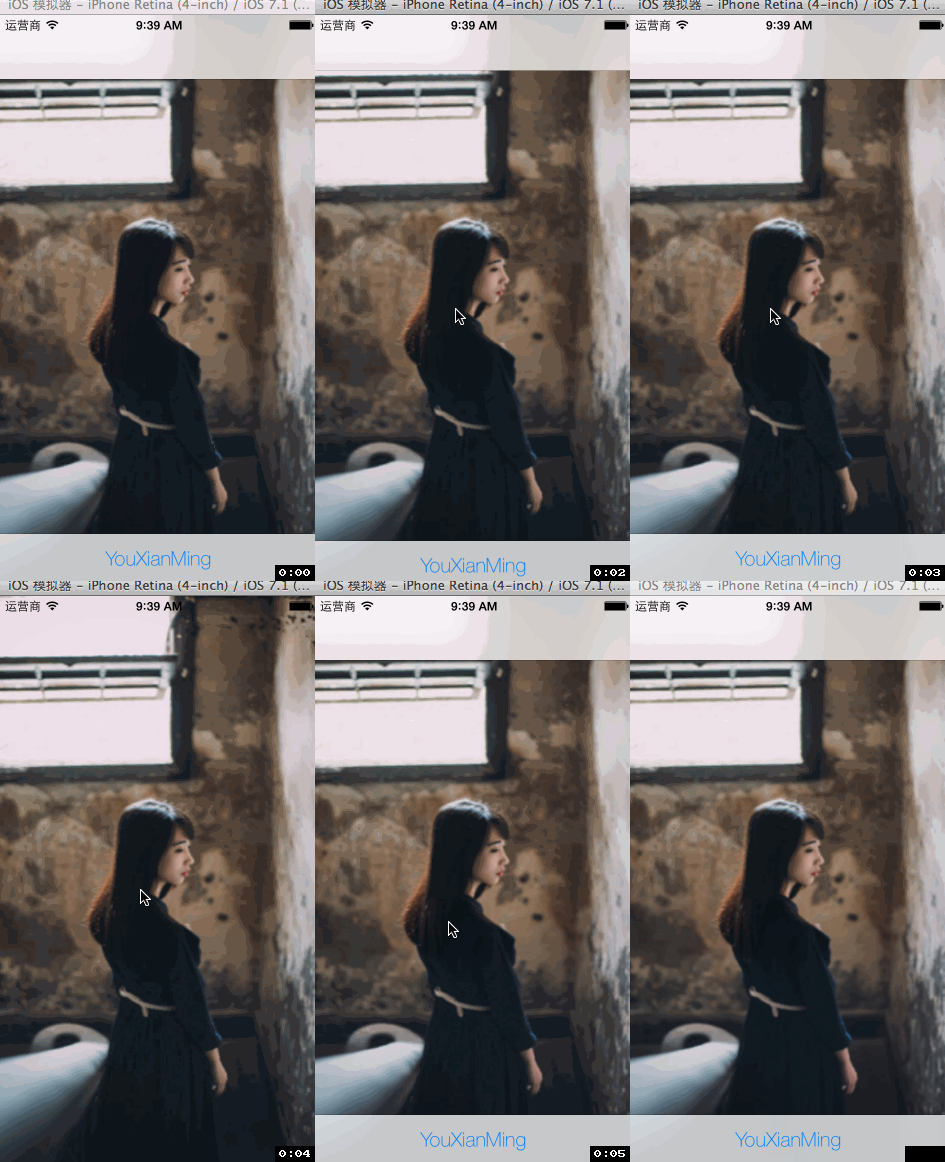
源码:
AppDelegate.m
//

//  AppDelegate.m

//  HideTabbar

//

//  Copyright (c) 2014年 Y.X. All rights reserved.

//

#import "AppDelegate.h"

#import "RootViewController.h"

@implementation AppDelegate

- (BOOL)application:(UIApplication *)application didFinishLaunchingWithOptions:(NSDictionary *)launchOptions

{

    self.window = [[UIWindow alloc] initWithFrame:[[UIScreen mainScreen] bounds]];

    // Override point for customization after application launch.

    UITabBarController *tab        = [[UITabBarController alloc] init];

    tab.viewControllers            = @[[RootViewController new]];

    UITabBar     *tabBar           = tab.tabBar;

    UITabBarItem *tabBarItem       = [tabBar.items objectAtIndex:];

    tabBarItem.title               = @"YouXianMing";

    NSDictionary *textDic          = \

        @{NSFontAttributeName: [UIFont fontWithName:@"HelveticaNeue-Thin"

                                               size:.f]};

    [tabBarItem setTitlePositionAdjustment:UIOffsetMake(, -.f)];

    [tabBarItem setTitleTextAttributes:textDic

                              forState:UIControlStateNormal];

    UINavigationController *NC     = \

        [[UINavigationController alloc] initWithRootViewController:tab];

    self.window.rootViewController = NC;

    self.window.backgroundColor    = [UIColor whiteColor];

    [self.window makeKeyAndVisible];

    return YES;

}

@end
RootViewController.m
//

//  RootViewController.m

//  HideTabbar

//

//  Copyright (c) 2014年 Y.X. All rights reserved.

//

#import "RootViewController.h"

@interface RootViewController ()

@property (nonatomic, assign) BOOL      flag;

@end

@implementation RootViewController

- (void)viewDidLoad

{

    [super viewDidLoad];

    self.view.layer.contents    = (__bridge id)([UIImage imageNamed:@"back"].CGImage);

    // 添加手势

    UITapGestureRecognizer *tap = \

        [[UITapGestureRecognizer alloc] initWithTarget:self

                                                action:@selector(event:)];

    [self.view addGestureRecognizer:tap];

}

- (void)event:(UITapGestureRecognizer *)tap

{

    if (!_flag)

    {

        [self hideTabBar:self.tabBarController];

    }

    else

    {

        [self showTabBar:self.tabBarController];

    }

    _flag = !_flag;

}

- (void)hideTabBar:(UITabBarController *)tabbarcontroller

{

    // 隐藏导航栏

    [self.navigationController setNavigationBarHidden:YES animated:YES];

    // 隐藏tabbar

    [UIView animateWithDuration:UINavigationControllerHideShowBarDuration animations:^{

        for(UIView *view in tabbarcontroller.view.subviews)

        {

            if([view isKindOfClass:[UITabBar class]])

            {

                [view setFrame:CGRectMake(view.frame.origin.x,

                                          view.frame.origin.y + ,

                                          view.frame.size.width,

                                          view.frame.size.height)];

            }

            else

            {

                [view setFrame:CGRectMake(view.frame.origin.x,

                                          view.frame.origin.y,

                                          view.frame.size.width,

                                          view.frame.size.height + )];

            }

        }

    }];

}

- (void)showTabBar:(UITabBarController *)tabbarcontroller

{

    // 显示导航栏

    [self.navigationController setNavigationBarHidden:NO animated:YES];

    // 显示tabbar

    [UIView animateWithDuration:UINavigationControllerHideShowBarDuration animations:^{

        for(UIView *view in tabbarcontroller.view.subviews)

        {

            if([view isKindOfClass:[UITabBar class]])

            {

                [view setFrame:CGRectMake(view.frame.origin.x,

                                          view.frame.origin.y - ,

                                          view.frame.size.width,

                                          view.frame.size.height)];

            }

            else

            {

                [view setFrame:CGRectMake(view.frame.origin.x,

                                          view.frame.origin.y,

                                          view.frame.size.width,

                                          view.frame.size.height - )];

            }

        }

    }];

}

@end
核心的地方:

动画隐藏UITabBarController与UINavigationController的更多相关文章
- 和iPhone有关的视图控制器:UIViewController、UITabBarController、UINavigationController及其混合用法
iPhone中的view视图是应用程序对于数据最直观.最直接的呈现方式,如下是我在学习了iPhone中的视图控制器以及由其衍生的特殊子类的总结,希望对那些初学者有所帮助: UIViewControll ...
- IOS开发之UITabBarController与UINavigationController混合使用
ios开发中UITabBarController与UINavigationController混合使用是很多app的基础页面结构,下面是简单的的页面初始化的方法,在AppDelegate.m的 - ( ...
- UITabBarController 和 UINavigationController 的详解
首先得搞清这两个控制器之间的层级关系,我们直接看官网给的图,如下所示: 从这张图可以看到:最右边的Assembled views是呈现给用户的界面,它左边的Window是最底层的窗口,重点来了,再往左 ...
- iOS 自定义Tabbar实现push动画隐藏效果
http://wonderffee.github.io/blog/2013/08/07/hide-custom-tab-bar-with-animation-when-push/ 在之前的一篇文章(链 ...
- 混合使用UITabBarController和UINavigationController
混合使用这两个控件的好处是我们可以在NavigationBar添加更多的东西,如标题,按钮等.让用户能够获得更多的信息. UITabBarController的属性ViewControllers接受以 ...
- swift:用UITabBarController、UINavigationController、模态窗口简单的搭建一个QQ界面
搭建一个QQ界面其实是一个很简单的实现,需要几种切换视图的控制器组合一起使用,即导航控制器.标签栏控制器.模态窗口.其中,将标签栏控制器设置为window的rootViewController,因为Q ...
- UITabBarController 笔记(三) UITabBarController 配合 UINavigationController 的使用
建个空的iOS工程 - (BOOL)application:(UIApplication *)application didFinishLaunchingWithOptions:(NSDictiona ...
- jquery动画(控制动画隐藏、显示时间轴)
<!DOCTYPE html><html> <head> <meta http-equiv="Content-type" conte ...
- UINavigationController与UITabBarController相关问题
UINavigationController与UITabBarController相关问题 UINavigationController与UITabBarController混用是非常常见的,有时候会 ...
随机推荐
- Python2.x 中文乱码问题
Python 文件中如果未指定编码,在执行过程会出现报错: #!/usr/bin/pythonprint "你好,世界"; 以上程序执行输出结果为: File "test ...
- Maven 添加 Tomcat 插件
若想在 Maven 中使用 Tomcat 服务器,需要在 pom.xml 文件中的 <build></build> 标签中添加以下代码 <!-- Maven项目编译插件 ...
- JS事件细分
鼠标相关事件执行顺序 与 onmousedown 事件相关连得事件发生次序( 鼠标左侧/中间 按钮): onmousedown onmouseup onclick 与 onmousedown 事件相关 ...
- [转]RDL Report in Visual Studio New page per Record
本文转自:https://social.msdn.microsoft.com/Forums/sqlserver/en-US/f58cd5cf-4296-40f0-b3c8-7e4e15d73762/r ...
- [转]COPY OR MOVE FILES AND FOLDERS USING OLE AUTOMATION
本文转自:http://sqlindia.com/copy-move-files-folders-using-ole-automation-sql-server/ I love playing aro ...
- 深入分析 Java 中的中文编码问题【转】
转:https://www.ibm.com/developerworks/cn/java/j-lo-chinesecoding/ 几种常见的编码格式 为什么要编码 不知道大家有没有想过一个问题,那就是 ...
- 比较ArrayList和LinkedList的异同
1.ArrayList是实现了基于动态数组的数据结构,而LinkedList是基于链表的数据结构: 2.对于随机访问get和set,ArrayList要优于LinkedList; 3.对于添加和删除操 ...
- AutoFac使用方法总结四:生命周期续
控制反转(IoC/Inverse Of Control): 调用者不再创建被调用者的实例,由autofac框架实现(容器创建)所以称为控制反转. 依赖注入(DI/Depende ...
- CSS垂直翻转/水平翻转提高web页面资源重用性——张鑫旭
一.CSS下兼容性的元素水平/垂直翻转实现 随着现代浏览器对CSS3的支持愈发完善,对于实现各个浏览器兼容的元素的水平翻转或是垂直翻转效果也就成为了可能.相关的CSS代码如下: /*水平翻转*/ .f ...
- git常用命令和场景
总结: git init //初始化本地git环境 git clone XXX//克隆一份代码到本地仓库 git pull //把远程库的代码更新到工作台 git pull --rebase orig ...