
Python学习---爬虫学习[requests模块]180411
模块安装
安装requests模块
pip3 install requests

安装beautifulsoup4模块
[更多参考]https://blog.csdn.net/sunhuaqiang1/article/details/65936616
pip install beautifulsoup4

初识requests模块
【更多参考】http://www.cnblogs.com/wupeiqi/articles/6283017.html
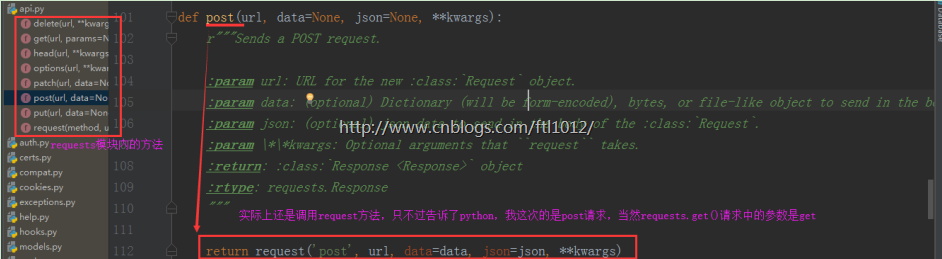
requests.post(url="", data="data", json="json", **kwargs)

requests.get(url="", params="", **kwargs)

requests.options(url="", **kwargs)

requests.put(url="", data="data", **kwargs)

requests.delete(url="", **kwargs)

requests.head(url="", **kwargs)
requests.get请求实例
import requests

from bs4 import BeautifulSoup

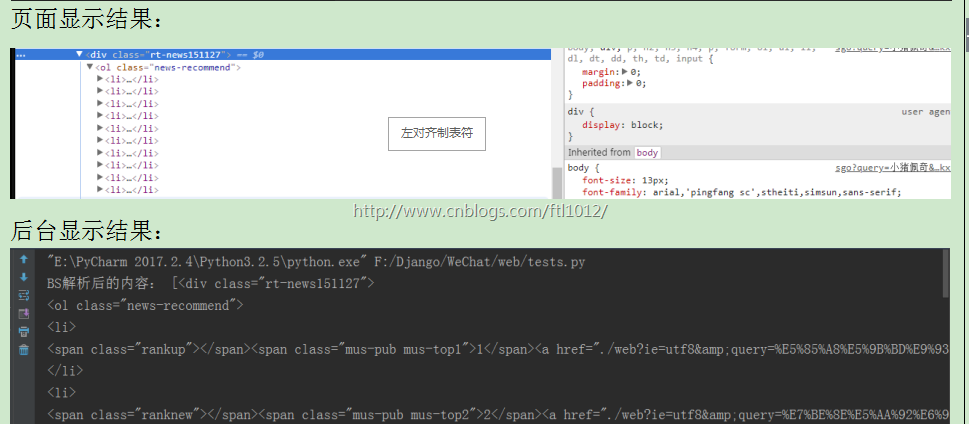
response = requests.get(url="https://www.sogou.com/sgo?query=小猪佩奇")

# print("GET请求结果:", response.text)

soup = BeautifulSoup(response.text, "html.parser")

str = soup.find_all(name="div", class_="rt-news151127")  # 因为class是关键字,所以这里带了下划线

print("BS解析后的内容:", str)
requests.post请求实例
import requests

from bs4 import BeautifulSoup

form_data = {

    'phone': '13235',

    'password': 'asdf',

    'oneMonth': 1

}

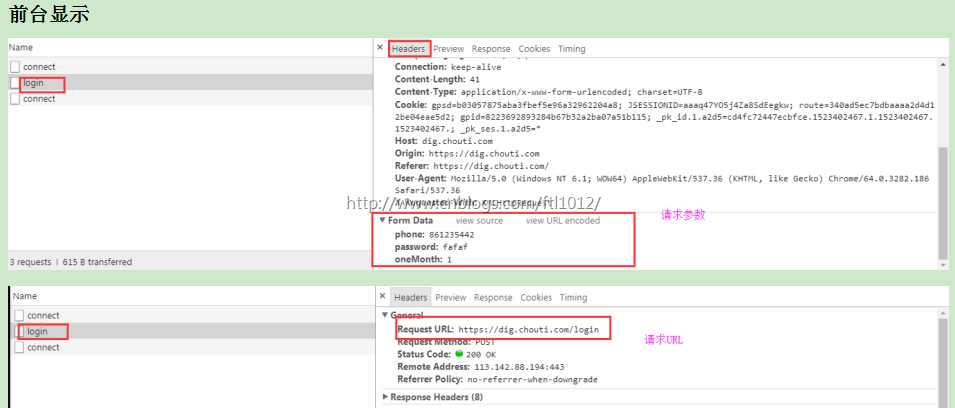
response_post = requests.post(

    url='http://dig.chouti.com/login',

    data=form_data

)

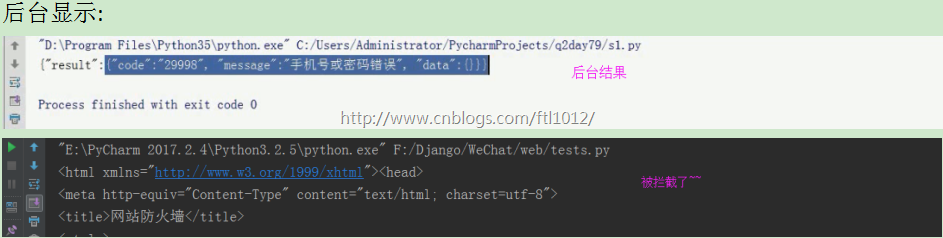
print(response_post.text)

requests参数
【更多参考】http://www.cnblogs.com/wupeiqi/articles/6283017.html
- requests模块
a. 基本参数:method,url,params,data,json,headers,cookies
b. 其他参数:files,auth,proxies....
实例演示POST/GET请求参数
settings.py
INSTALLED_APPS = [

   ...

 'app01',   # 注册app

]

MIDDLEWARE = [

...

# 'django.middleware.csrf.CsrfViewMiddleware',

      ...

]

STATICFILES_DIRS = (os.path.join(BASE_DIR, "statics"),)  # 现添加的配置,这里是元组,注意逗号

TEMPLATES = [

   ...

   'DIRS': [os.path.join(BASE_DIR, 'templates')],

]
urls.py
from django.contrib import admin

from django.urls import path

from django.conf.urls import url, include

from app01 import views

urlpatterns = [

   url('test/', views.Test),

]
views.py
from django.shortcuts import render, redirect, HttpResponse

from app01 import models

def Test(request):

    print("request.method:", request.method)

    print("request.GET:", request.GET)

    print("request.POST:", request.POST)

    print("request.body:", request.body)

    return HttpResponse("OK ")
test.py -->[Django的服务端启动后执行该py文件,get和post分开请求]
import requests

# POST请求中data和json参数并无实际意义

requests.request(

    method='get',  # get请求的参数都会在浏览器内显示

    url='http://127.0.0.1:8000/test/',

    # 这里是字典形式的拼接

    params={'username': 'hhh', 'passwd': 'hhh800@'},  # rqeuests会自动拼接为 test?username=hhh&passwd=hhh800@

    # 直接传递拼接好的字符串也是可以的

    # params="username=hhh&passwd=hhh800@"  # test?username=hhh&passwd=hhh800@

)

# POST请求中可有params、data和json参数

import json

requests.request(

    method='post',

    url='http://127.0.0.1:8000/test/',

# 这里是字典形式的拼接

    # params参数需要: request.GET.get('username')来获取

    # 直接传递拼接好的字符串也是可以的

    # params="username=hhh&passwd=hhh800@"  # test?username=hhh&passwd=hhh800@

    params={'username': 'hhh', 'passwd': 'hhh800@'}, # rqeuests会自动拼接为 test?username=hhh&passwd=hhh800@

    # data 参数需要 request.POST.get('username')来获取

    # data可以直接传递字符串过去: data="username=hhh;passwd=hhh800@"  【用封号区分开,实际上也是这样发送数据的】

# data属性默认的请求头为: content-type: application/x-www-form-urlencoded

    data={'age': 24, 'school': 'peking'},  # 这里的请求参数是以Form_Data传递过去,不再浏览器显示

# json默认请求头是: content-type: application/json,所以body有内容,POST内无内容

    # json.dumps后的结果是字符串

    # json=json.dumps({'age': 24, 'school': 'peking'})

)
Data格式的POST后台显示:

JSON格式的POST后台显示:

GET后台显示

如果需要手动添加App则命令为:
python manage.py startapp app01
实例演示Header请求
一般我们会在post请求的headers里面放2个参数:
'User-Agent': '告诉服务器是正常的浏览器访问服务【Chrome/64.0.3282.186 Safari/537.36】',
'Referer' : '告诉服务器我不是直接登录,上次访问过官网,这次是在上次访问基础上登录操作
import requests

response = requests.post(

    url="https://www.zhihu.com/",

    headers={

        'User-Agent':'Mozilla/5.0 (Windows NT 6.1; WOW64) AppleWebKit/537.36 (KHTML, like Gecko) Chrome/64.0.3282.186 Safari/537.36',

        'Referer': 'https://www.zhihu.com',   # 告诉网站我上次访问过本官网

    }

)

print("带header的请求:\n", response.text)
不带请求头的访问:

带请求头的访问:

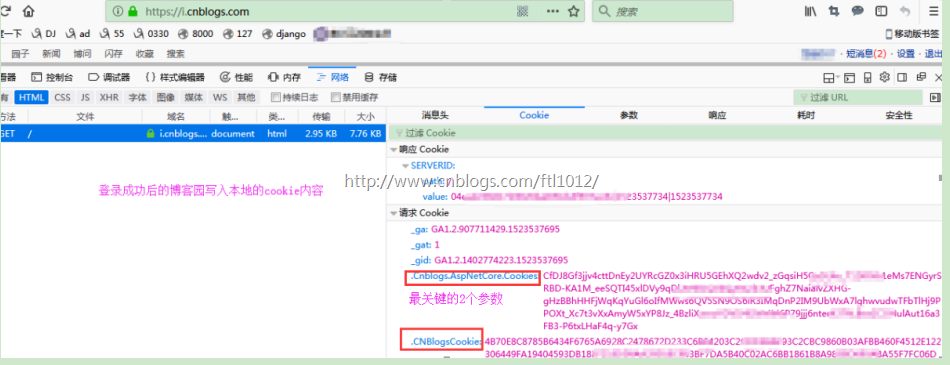
实例演示Cookies请求:session和cookie都是用于保持和服务器之间的对话
一般我们在post请求的Cookies里面放的参数都是根据前台获取的cookies,进行参数传递
import requests

response = requests.post(

    url="https://home.cnblogs.com/set/",  # 进入设置页面

    cookies={

        '.Cnblogs.AspNetCore.Cookies':'CfDJ8Gf34cttDnEy2UYRcGZ0x3iHRU51QX',

        '.CNBlogsCookie':'4BB40C02AC6BB1861B8A9835F7FC06D'  # 这里仅举例,非正常cookie内容

    }

)

print("带cookie进行请求:\n", response.text)
前台登录成功后的cookies信息:
后台访问设置页面:

Python学习---爬虫学习[requests模块]180411的更多相关文章
- 04.Python网络爬虫之requests模块(1)
引入 Requests 唯一的一个非转基因的 Python HTTP 库,人类可以安全享用. 警告:非专业使用其他 HTTP 库会导致危险的副作用,包括:安全缺陷症.冗余代码症.重新发明轮子症.啃文档 ...
- Python网络爬虫之requests模块(1)
引入 Requests 唯一的一个非转基因的 Python HTTP 库,人类可以安全享用. 警告:非专业使用其他 HTTP 库会导致危险的副作用,包括:安全缺陷症.冗余代码症.重新发明轮子症.啃文档 ...
- 04,Python网络爬虫之requests模块(1)
引入 Requests 唯一的一个非转基因的 Python HTTP 库,人类可以安全享用. 警告:非专业使用其他 HTTP 库会导致危险的副作用,包括:安全缺陷症.冗余代码症.重新发明轮子症.啃文档 ...
- 06.Python网络爬虫之requests模块(2)
今日内容 session处理cookie proxies参数设置请求代理ip 基于线程池的数据爬取 知识点回顾 xpath的解析流程 bs4的解析流程 常用xpath表达式 常用bs4解析方法 引入 ...
- Python网络爬虫之requests模块(2)
session处理cookie proxies参数设置请求代理ip 基于线程池的数据爬取 xpath的解析流程 bs4的解析流程 常用xpath表达式 常用bs4解析方法 引入 有些时候,我们在使用爬 ...
- Python网络爬虫之requests模块
今日内容 session处理cookie proxies参数设置请求代理ip 基于线程池的数据爬取 知识点回顾 xpath的解析流程 bs4的解析流程 常用xpath表达式 常用bs4解析方法 引入 ...
- Python爬虫之requests模块(1)
一.引入 Requests 唯一的一个非转基因的 Python HTTP 库,人类可以安全享用. 警告:非专业使用其他 HTTP 库会导致危险的副作用,包括:安全缺陷症.冗余代码症.重新发明轮子症.啃 ...
- 孤荷凌寒自学python第六十七天初步了解Python爬虫初识requests模块
孤荷凌寒自学python第六十七天初步了解Python爬虫初识requests模块 (完整学习过程屏幕记录视频地址在文末) 从今天起开始正式学习Python的爬虫. 今天已经初步了解了两个主要的模块: ...
- python爬虫值requests模块
- 基于如下5点展开requests模块的学习 什么是requests模块 requests模块是python中原生的基于网络请求的模块,其主要作用是用来模拟浏览器发起请求.功能强大,用法简洁高效.在 ...
- Python爬虫练习(requests模块)
Python爬虫练习(requests模块) 关注公众号"轻松学编程"了解更多. 一.使用正则表达式解析页面和提取数据 1.爬取动态数据(js格式) 爬取http://fund.e ...
随机推荐
- 国际化实现之安装脚手架vue以及打包问题
做这个项目用的是vue+element UI来实现的响应式布局,现主要说一下国际化这块的实现. 第一步:新建文件夹i18n 第二步:配置cn.js.en.js等文件内容 cn.js import en ...
- 详解ruby的attr_accessor和cattr_accessor
原文地址:http://lee2013.iteye.com/blog/1098914 1. attr_accessor的用法相当简单, 就相当于getter和setter,看一个类就知道怎样用了: c ...
- Asterist搭建步骤
环境: # cat /proc/version Linux version 2.6.18-308.el5 (mockbuild@x86-010.build.bos.redhat.com) (gcc v ...
- sql中的分页实现
1.两种方式 1.1:row_number() over()函数 1.2:OFFSET ....FETCH OFFSET { integer_constant | offset_row_count_e ...
- c#与IronPython Clojure-clr的调用
一,python 安装ironpython http://ironpython.net/ 新建控制台程序,引入 IronPython,Microsoft.Scripting 新建xxx.py文件 va ...
- C语言读取配置文件
自从大学学完C之后,就再也没用过它了, 在网上找代码,七拼八凑之后,终于成形~~勉强能用,不喜勿喷,^_^! int GetValue(const wchar_t *key, wchar_t *val ...
- Guidlines and rules About Overwriting hashCode()
Preface "The code is more what you’d call guidelines than actual rules" – truer words were ...
- Implementation:Segment Tree 线段树
早就听人提起过线段树,今天有题搞不出来,讨论上说要用一下线段树,看了下,本质上是空间划分索引,只不过是一维上面的,如果在二维则是四叉树,三维则是八叉树,如果可以动态调整那么跟R-Tree就很相似了,他 ...
- RequestAnimationFrame更好的实现Javascript动画
一直以来,JavaScript的动画都是通过定时器和间隔来实现的.虽然使用CSS transitions 和 animations使Web开发实现动画更加方便,但多年来以JavaScript为基础来实 ...
- angular基于ui-router实现系统权限控制
前端去实现权限控制听起来有点扯淡(实际也有点扯淡),掩耳盗铃,主要是担心安全问题,但是如果在前后端分离的情况下,需要做一个带有权限控制的后台管理系统,angular基于ui-router应该怎么做呢? ...