
[翻译] NMBottomTabBarController
NMBottomTabBarController

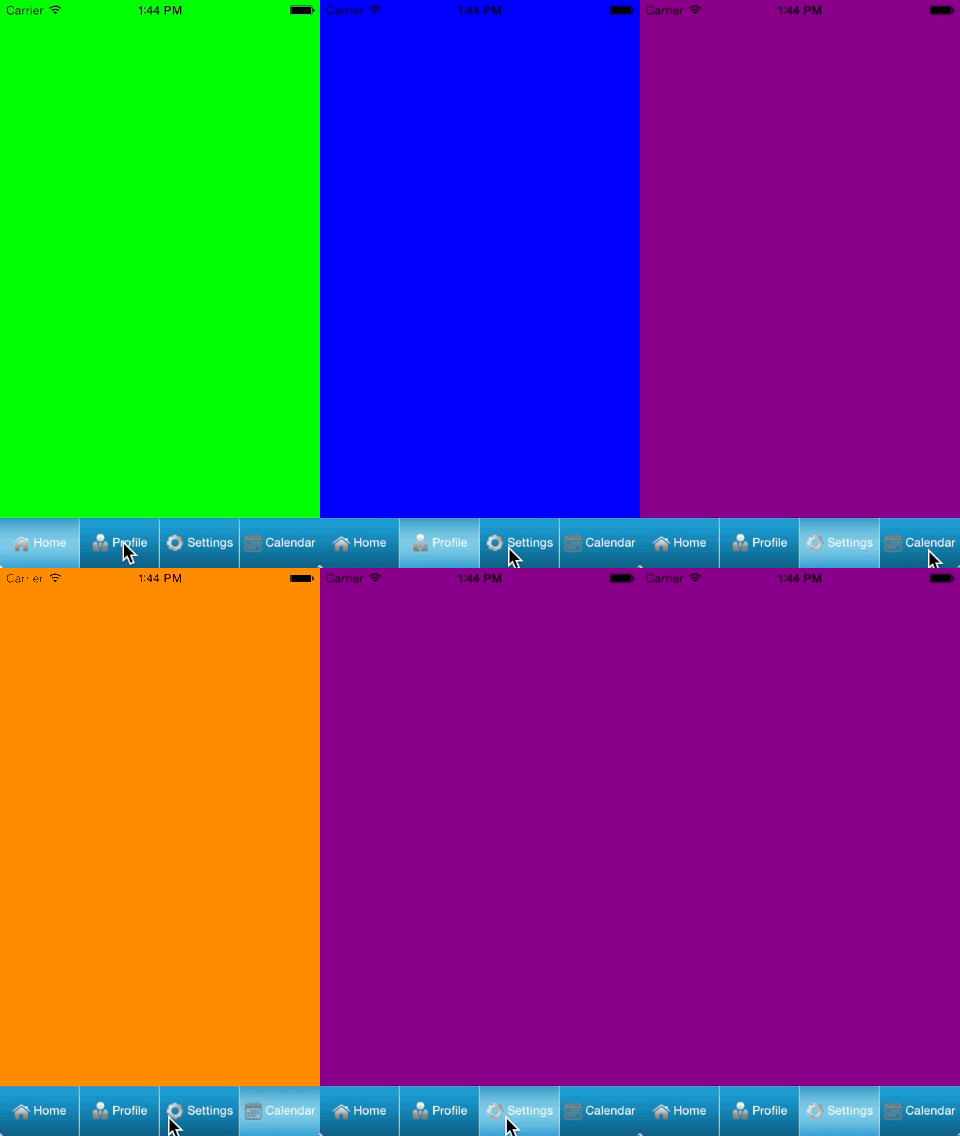
A customisable tab bar controller for iOS written in Objective C. It uses auto layout.
一个自定义的Tabbar控制器,使用了自动布局。
Requirements
- iOS 7.1 +
- ARC
Image Requirements for configuring the tab bar items
- Icon image 图标文件
- Selected and unselected background image 选中状态和未选中状态的背景图
Features
- Uses autolayout 使用了自动布局
- You can set custom background images, icons and text( custom font and colour) for selected, unselected states of the tabs. 你可以使用自定义的背景图,图标,文本(包括字体颜色以及颜色)的选中和未选中状态值
- There are two configurations for the arrangement of text and icon image (Text to the right of icon image and text to the bottom of icon image) 有两种关于文本和图片的配置(图片在左文本在右或者图片在下文本在上)
- You can assign controllers for each of the tabs. 你可以给每一个tab设置一个控制器
- NMBottomTabBarController will take care of the switching and displaying of the controller views when user switches the tabs. NMBottomTabBarController会处理好控制器的切换操作
- In addition the tabs can be switched programatically as required. tabs会自动切换,所以不用你担心什么
Installation
- Please Download the source files 先下载文件
- Drag and drop the NMBottomTabBarController folder into your project 将NMBottomTabBarController文件夹拖到你的项目当中
- Include
objective-c #import "NMBottomTabBarController.h"wherever necessary 在需要的地方引入头文件NMBottomTabBarController.h
Usage
Add a controller and change its custom class to NMBottomTabBarController.
添加一个控制器,然后让他继承自NMBottomTabBarController。
From the controller where you want to display the tab bar controller you can do the initial set up.
然后在你的控制器中进行初始化。
To add a set of controllers that the tab bar controller manages
UIViewController *oneController = [UIViewController new];

oneController.view.backgroundColor = [UIColor greenColor];

UIViewController *twoController = [UIViewController new];

twoController.view.backgroundColor = [UIColor blueColor];

UIViewController *threeController = [UIViewController new];

threeController.view.backgroundColor = [UIColor purpleColor];

UIViewController *fourController = [UIViewController new];

fourController.view.backgroundColor = [UIColor orangeColor];

NMBottomTabBarController *tabBarController = (NMBottomTabBarController *)self.window.rootViewController;

tabBarController.controllers = [NSArray arrayWithObjects:oneController,twoController,threeController,fourController, nil];
To set the separator image used between tabs
tabBarController.tabBar.separatorImage = [UIImage imageNamed:@"separator.jpg"];
Title and Text Orientation
There are two title and text orientations
有两种文本显示方式:
- kTitleToRightOfIcon - Places title to the right of the icon image 标题在右图标在左
- kTItleToBottomOfIcon - Places title to the nottom of the icon image You can learn how to set these in the next step 标题在下图标在上
To set custom background images, icon, title text and title text orientation
[tabBarController.tabBar configureTabAtIndex:0 andTitleOrientation :kTitleToRightOfIcon withUnselectedBackgroundImage:[UIImage imageNamed:@"unselected.jpeg"] selectedBackgroundImage:[UIImage imageNamed:@"selected.jpeg"] iconImage:[UIImage imageNamed:@"home"] andText:@"Home"andTextFont:[UIFont systemFontOfSize:12.0] andFontColour:[UIColor whiteColor]];
To select a particular tab programatically
[tabBarController selectTabAtIndex:0];
Delegates
There are two delegates available for NMBottomTabBarController
NMBottomTabBarController提供两个代理方法:
-(BOOL)shouldSelectTabAtIndex : (NSInteger)index;
It can be used to determine whether to allow the selection of a particular tab
这个可以用来决定是否允许某个tab被选中:
-(void)didSelectTabAtIndex : (NSInteger)index;
It can be used to perform any action once a tab is selected
这个可以用来执行任何的操作,当某个tab被选中的时候
To Do
- Set selected and unselected attributed text, icon images 设置选中与未选中状态的富文本
- Add a more button and display the controllers on next page when the tabs exceed a certain limit. 添加一个按钮,在另外的一个控制器中显示tab。
License
The project is licensed under the MIT license. For more information please see the [LICENSE][https://github.com/priankaliz/NMBottomTabBarController/blob/master/LICENSE] file
Credits
NMBottomTabBarController was developed for a project I work on. Please feel free to reach me atpriankaliz@gmail.com
[翻译] NMBottomTabBarController的更多相关文章
- 《Django By Example》第五章 中文 翻译 (个人学习,渣翻)
书籍出处:https://www.packtpub.com/web-development/django-example 原作者:Antonio Melé (译者@ucag注:大家好,我是新来的翻译, ...
- 《Django By Example》第四章 中文 翻译 (个人学习,渣翻)
书籍出处:https://www.packtpub.com/web-development/django-example 原作者:Antonio Melé (译者注:祝大家新年快乐,这次带来<D ...
- [翻译]开发文档:android Bitmap的高效使用
内容概述 本文内容来自开发文档"Traning > Displaying Bitmaps Efficiently",包括大尺寸Bitmap的高效加载,图片的异步加载和数据缓存 ...
- 【探索】机器指令翻译成 JavaScript
前言 前些时候研究脚本混淆时,打算先学一些「程序流程」相关的概念.为了不因太枯燥而放弃,决定想一个有趣的案例,可以边探索边学. 于是想了一个话题:尝试将机器指令 1:1 翻译 成 JavaScript ...
- 《Django By Example》第三章 中文 翻译 (个人学习,渣翻)
书籍出处:https://www.packtpub.com/web-development/django-example 原作者:Antonio Melé (译者注:第三章滚烫出炉,大家请不要吐槽文中 ...
- 《Django By Example》第二章 中文 翻译 (个人学习,渣翻)
书籍出处:https://www.packtpub.com/web-development/django-example 原作者:Antonio Melé (译者注:翻译完第一章后,发现翻译第二章的速 ...
- 《Django By Example》第一章 中文 翻译 (个人学习,渣翻)
书籍出处:https://www.packtpub.com/web-development/django-example 原作者:Antonio Melé (译者注:本人目前在杭州某家互联网公司工作, ...
- 【翻译】Awesome R资源大全中文版来了,全球最火的R工具包一网打尽,超过300+工具,还在等什么?
0.前言 虽然很早就知道R被微软收购,也很早知道R在统计分析处理方面很强大,开始一直没有行动过...直到 直到12月初在微软技术大会,看到我软的工程师演示R的使用,我就震惊了,然后最近在网上到处了解和 ...
- ASP.NET MVC with Entity Framework and CSS一书翻译系列文章之第一章:创建基本的MVC Web站点
在这一章中,我们将学习如何使用基架快速搭建和运行一个简单的Microsoft ASP.NET MVC Web站点.在我们马上投入学习和编码之前,我们首先了解一些有关ASP.NET MVC和Entity ...
随机推荐
- docker “no space left on device”问题定位解决
在paas环境上使用docker加载镜像的时候出现了如下问题 第一反应应该是存储镜像的路径磁盘满了 docker info查看docker的根路径,可以看到为/opt/docker: 查看/opt/d ...
- mysql 导出数据到csv文件的命令
1.导出本地数据库数据到本地文件 mysql -A service_db -h your_host -utest -ptest mysql> select * from t_apps where ...
- 【转】SQL SERVER 日期格式化
0 或 100 (*) 默认值 mon dd yyyy hh:miAM(或 PM) 1 101 美国 mm/dd/yyyy ...
- 如何移动 nuget 缓存文件夹
本文告诉大家如何移动 nuget 缓存文件夹. 因为 nuget 文件夹一般比较大,现在我的 nuget 文件夹有 10 G,默认的 nuget 文件夹是在C盘,所以需要移动他. 可以使用下面的代码查 ...
- JavaScript 带参数函数定义
函数的参数parameters在函数中充当占位符(也叫形参)的作用,参数可以为一个或多个.调用一个函数时所传入的参数为实参,实参决定着形参真正的值. 这是带有两个参数的函数, param1 和 par ...
- 解决升级Nodepad++都会让插件失效
主要原因是Plugin Manager失效导致的,需要重新导入 导入一下PluginManager就可以了地址:https://github.com/bruderstein/nppPluginMana ...
- O(∩_∩)O~~
1.在一切ac的路上,所以的难题都是纸老虎. 2.加油吧,少年.
- 浅谈Cookie、Session与Cache的区别
以前实现数据的缓存有多种方法,如客户端的Cookie,服务器端的Session.Application. 一.Cookie Cookie是保存客户端的一组数据,主要用来保存用户的个人信息,主要存放浏览 ...
- cf605D. Board Game(BFS 树状数组 set)
题意 题目链接 有\(n\)张牌,每张牌有四个属性\((a, b, c, d)\),主人公有两个属性\((x, y)\)(初始时为(0, 0)) 一张牌能够被使用当且仅当\(a < x, b & ...
- 移动端h5实现拍照上传图片并预览&webuploader
.移动端实现图片上传并预览,用到h5的input的file属性及filereader对象:经测除了android上不支持多图片上传,其他基本ok实用: 一:先说一下单张图片上传(先上代码): html ...