
iOS7 UIWebview加载进度条实现
不同于WKWebview,wk是有自己的加载进度值的,我们可以直接通过kvo检测到,并显示到进度条内。
但如果我们为了适配ios7,只能使用UIWebview了,这里的加载进度,就比较尴尬了
所以我们的实现方式就是:模拟进度-俗称假进度。
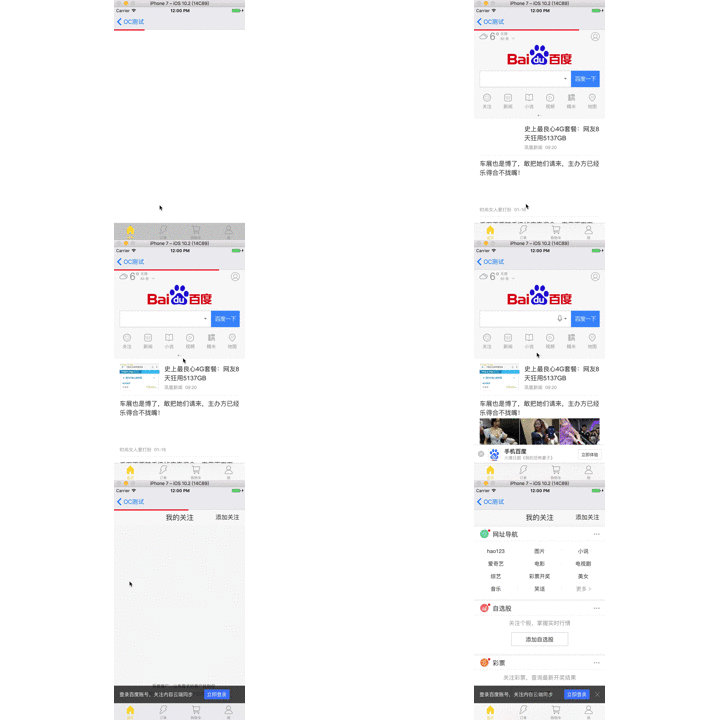
实现原理:
自定义一个UIView的进度条,添加到Nav下方,给予两个方法:
1、startLoadingAnimation 开始加载
2、endLoadingAnimation 结束加载
开始加载,先动画模拟一个0.4s的加载,加载宽度为0.6倍屏幕宽度,动画结束,再0.4s实现,总共0.8倍的屏幕宽度。
结束动画,动画模拟1.0倍数的屏幕宽度,实现全部加载完成,并最后隐藏掉进度条。
代码:
.h文件
#import <UIKit/UIKit.h>

@interface WebviewProgressLine : UIView

//进度条颜色

@property (nonatomic,strong) UIColor  *lineColor;

//开始加载

-(void)startLoadingAnimation;

//结束加载

-(void)endLoadingAnimation;

@end
.m文件
#import "WebviewProgressLine.h"

@implementation WebviewProgressLine

-(instancetype)initWithFrame:(CGRect)frame{

    self = [super initWithFrame:frame];

    if (self) {

        self.hidden = YES;

        self.backgroundColor = [UIColor whiteColor];

    }

    return self;

}

-(void)setLineColor:(UIColor *)lineColor{

    _lineColor = lineColor;

    self.backgroundColor = lineColor;

}

-(void)startLoadingAnimation{

    self.hidden = NO;

    self.width = 0.0;

    __weak UIView *weakSelf = self;

    [UIView animateWithDuration:0.4 animations:^{

        weakSelf.width = KScreenWidth * 0.6;

    } completion:^(BOOL finished) {

        [UIView animateWithDuration:0.4 animations:^{

            weakSelf.width = KScreenWidth * 0.8;

        }];

    }];

}

-(void)endLoadingAnimation{

    __weak UIView *weakSelf = self;

    [UIView animateWithDuration:0.2 animations:^{

        weakSelf.width = KScreenWidth;

    } completion:^(BOOL finished) {

        weakSelf.hidden = YES;

    }];

}

@end
webview页面使用:
#import "webviewViewController.h"

#import "WebviewProgressLine.h"

@interface webviewViewController ()<UIWebViewDelegate>

@property (nonatomic,strong) UIWebView  *webview;

@property (nonatomic,strong) WebviewProgressLine  *progressLine;

@end

@implementation webviewViewController

- (void)viewDidLoad {

    [super viewDidLoad];

    self.view.backgroundColor = [UIColor whiteColor];

    self.webview = [[UIWebView alloc] initWithFrame:self.view.frame];

    self.webview.delegate = self;

    [self.view addSubview:self.webview];

    self.progressLine = [[WebviewProgressLine alloc] initWithFrame:CGRectMake(, , KScreenWidth, )];

    self.progressLine.lineColor = [UIColor redColor];

    [self.view addSubview:self.progressLine];

    NSURL *url = [NSURL URLWithString:@"https://www.baidu.com"];

    [self.webview loadRequest:[NSURLRequest requestWithURL:url]];

}

-(void)webViewDidStartLoad:(UIWebView *)webView{

    [self.progressLine startLoadingAnimation];

}

-(void)webViewDidFinishLoad:(UIWebView *)webView{

    [self.progressLine endLoadingAnimation];

}

-(void)webView:(UIWebView *)webView didFailLoadWithError:(NSError *)error{

    [self.progressLine endLoadingAnimation];

}
由于内容比较简单,就不放Demo了,直接贴代码,大家可以试一下~
iOS7 UIWebview加载进度条实现的更多相关文章
- iOS UIWebView 加载进度条的使用-WKWebView的使用,更新2017.6.26
1.由于项目中加载网络插件,直接使用了webview加载.使用了三方NJKWebViewProgress进度条的使用,近期在测试时发现,网络缓慢时出现白屏,有卡顿现象. 于是采用了WKWebView进 ...
- 一个KVO 实现WKWebView加载进度条的例子 (注意最后移除观察者)
// // OpenWebViewController.m // Treasure // // Created by 蓝蓝色信子 on 16/7/29. // Copyright © 2016年 GY ...
- css3 linear-gradient实现页面加载进度条效果
最终效果图: html结构: <div> <p class="p1"> <span></span> < ...
- ajax页面加载进度条插件
下面两个都是youtube视频的加载进度条效果的ajax插件 一.官网:http://ricostacruz.com/nprogress/官网 github:https://github.com/rs ...
- pace.js – 加载进度条插件
这儿只是简单介绍一下这个插件pace.js. 在页面中引入Pace.js,页面就会自动监测你的请求(包括Ajax请求),在事件循环滞后,会在页面记录加载的状态以及进度情况.此插件的兼容性很好,可以兼容 ...
- 仿UC浏览器图片加载进度条
前几天用UC浏览器看新闻(无意中给UC打了广告),看到它的图片加载进度条,正好最近有时间,所以就自己写了一个. 效果图如下 进度条的底色和填充颜色都可以调整. 首先中间的笑脸作为一个整体,其实现代码如 ...
- 【Web前沿技术】纯 CSS3 打造的10个精美加载进度条动画
之前向大家介绍8款优秀的 jQuery 加载动画和进度条插件,今天这篇文章向大家推荐10个纯 CSS3 代码实现精美加载进度条动画效果的方案.加载动画和进度条在网站和 Web 应用中的使用非常流行,特 ...
- jQuery模拟页面加载进度条
因为我们无法通过任何方法获取整个页面的大小和当前加载了多少,所以想制作一个加载进度条的唯一办法就是模拟.那要怎么模拟呢? 我们知道,页面是从上往下执行的,也就是说我们可以大致估算出在页面的某个位置加载 ...
- js页面加载进度条
<!DOCTYPE html PUBLIC "-//W3C//DTD XHTML 1.0 Transitional//EN" "http://www.w3.org/ ...
随机推荐
- Android之判断时间是否为今天
字符串: sdate = 2013-07-16 13:35:02 /** * 判断给定字符串时间是否为今日 * @param sdate * @return boolean */ publ ...
- UML状态图
状态图(Statechart digram)是系统分析的一种经常使用工具,系统分析员在对系统建模时,最先考虑的不是基于活动之间的控制流,而是基于状态之间的控制流,由于系统中对象的状态变化最易被发现和理 ...
- 如何在Jenkins中使用环境变量
以BUILD_NUMBER为例, 1.在windows batch命令中使用此环境变量,使用%BUILD_NUMBER%即可 2.在Linux shell命令中使用此环境变量,使用${BUILD_NU ...
- 【BZOJ】【2595】【WC2008】游览计划
Orz zky神犇http://blog.csdn.net/iamzky/article/details/42029921 spfa的灵活应用!(好像是求了一个叫做斯坦纳树的东西……) o(︶︿︶)o ...
- OTL使用指南
1 OTL简介 OTL 是 Oracle, Odbcand DB2-CLI Template Library 的缩写,是一个C++编译中操控关系数据库的模板库,它目前几乎支持当前所有的各种主流数据库, ...
- Android -- VelocityTracker
VelocityTracker 主要应用于touch event, VelocityTracker通过跟踪一连串事件实时计算出当前的速度. 方法 //获取一个VelocityTracker对象, 用完 ...
- Android -- SDcard文件读取和保存
背景 一些东西可以 ...
- (转)Unity3D新手引导开发手记
转自:http://www.cnblogs.com/ybgame/p/3844315.html 最近开始接手新手引导的开发,记录下这块相关的心得 首先客户端是Unity,在接手前,前面的同学已经初步完 ...
- (转)[unity3d]easytouch的使用
对于移动平台上的RPG类的游戏,我们常用虚拟摇杆来控制人物角色的行走和一些行为,相信我们对它并不陌生,之前尝试了EasyTouch2.5,发现并没有最新版的3.1好用,2.5版本的对于自适应没有做的很 ...
- Ensemble_learning 集成学习算法 stacking 算法
原文:https://herbertmj.wikispaces.com/stacking%E7%AE%97%E6%B3%95 stacked 产生方法是一种截然不同的组合多个模型的方法,它讲的是组合学 ...