
Winform—C#读写config配置文件
现在FrameWork2.0以上使用的是:ConfigurationManager或WebConfigurationManager。并且AppSettings属性是只读的,并不支持修改属性值.
一、如何使用ConfigurationManager?
1、添加引用:添加System.configguration


2、引用空间

3、config配置文件配置节
常用配置节:
(1)普通配置节
<appSettings>
<add key="COM1" value="COM1,9600,8,None,1,已启用" />
</appSettings>
(2)数据源配置节
<connectionStrings>
<add name="kyd" connectionString="server=.;database=UFDATA_999_2017;user=sa;pwd=123"/>
</connectionStrings>
(3)自定义配置节

二、config文件读写
1、依据连接串名字connectionName返回数据连接字符串
//依据连接串名字connectionName返回数据连接字符串

        public static string GetConnectionStringsConfig(string connectionName)

        {

            //指定config文件读取

            string file = System.Windows.Forms.Application.ExecutablePath;

            System.Configuration.Configuration config = ConfigurationManager.OpenExeConfiguration(file);

            string connectionString =

                config.ConnectionStrings.ConnectionStrings[connectionName].ConnectionString.ToString();

            return connectionString;

        }
2、更新连接字符串
///<summary>

        ///更新连接字符串

        ///</summary>

        ///<param name="newName">连接字符串名称</param>

        ///<param name="newConString">连接字符串内容</param>

        ///<param name="newProviderName">数据提供程序名称</param>

        public static void UpdateConnectionStringsConfig(string newName, string newConString, string newProviderName)

        {

            //指定config文件读取

            string file = System.Windows.Forms.Application.ExecutablePath;

            Configuration config = ConfigurationManager.OpenExeConfiguration(file);

            bool exist = false; //记录该连接串是否已经存在

            //如果要更改的连接串已经存在

            if (config.ConnectionStrings.ConnectionStrings[newName] != null)

            {

                exist = true;

            }

            // 如果连接串已存在,首先删除它

            if (exist)

            {

                config.ConnectionStrings.ConnectionStrings.Remove(newName);

            }

            //新建一个连接字符串实例

            ConnectionStringSettings mySettings =

                new ConnectionStringSettings(newName, newConString, newProviderName);

            // 将新的连接串添加到配置文件中.

            config.ConnectionStrings.ConnectionStrings.Add(mySettings);

            // 保存对配置文件所作的更改

            config.Save(ConfigurationSaveMode.Modified);

            // 强制重新载入配置文件的ConnectionStrings配置节

            ConfigurationManager.RefreshSection("connectionStrings");

        }
3、返回*.exe.config文件中appSettings配置节的value项
///<summary>

        ///返回*.exe.config文件中appSettings配置节的value项

        ///</summary>

        ///<param name="strKey"></param>

        ///<returns></returns>

        public static string GetAppConfig(string strKey)

        {

            string file = System.Windows.Forms.Application.ExecutablePath;

            Configuration config = ConfigurationManager.OpenExeConfiguration(file);

            foreach (string key in config.AppSettings.Settings.AllKeys)

            {

                if (key == strKey)

                {

                    return config.AppSettings.Settings[strKey].Value.ToString();

                }

            }

            return null;

        }
4、在*.exe.config文件中appSettings配置节增加一对键值对
///<summary>

        ///在*.exe.config文件中appSettings配置节增加一对键值对

        ///</summary>

        ///<param name="newKey"></param>

        ///<param name="newValue"></param>

        public static void UpdateAppConfig(string newKey, string newValue)

        {

            string file = System.Windows.Forms.Application.ExecutablePath;

            Configuration config = ConfigurationManager.OpenExeConfiguration(file);

            bool exist = false;

            foreach (string key in config.AppSettings.Settings.AllKeys)

            {

                if (key == newKey)

                {

                    exist = true;

                }

            }

            if (exist)

            {

                config.AppSettings.Settings.Remove(newKey);

            }

            config.AppSettings.Settings.Add(newKey, newValue);

            config.Save(ConfigurationSaveMode.Modified);

            ConfigurationManager.RefreshSection("appSettings");

        }
5、修改IP地址
// 修改system.serviceModel下所有服务终结点的IP地址

        public static void UpdateServiceModelConfig(string configPath, string serverIP)

        {

            Configuration config = ConfigurationManager.OpenExeConfiguration(configPath);

            ConfigurationSectionGroup sec = config.SectionGroups["system.serviceModel"];

            ServiceModelSectionGroup serviceModelSectionGroup = sec as ServiceModelSectionGroup;

            ClientSection clientSection = serviceModelSectionGroup.Client;

            foreach (ChannelEndpointElement item in clientSection.Endpoints)

            {

                string pattern = @"\b\d{1,3}\.\d{1,3}\.\d{1,3}\.\d{1,3}\b";

                string address = item.Address.ToString();

                string replacement = string.Format("{0}", serverIP);

                address = Regex.Replace(address, pattern, replacement);

                item.Address = new Uri(address);

            }

            config.Save(ConfigurationSaveMode.Modified);

            ConfigurationManager.RefreshSection("system.serviceModel");

        }

        // 修改applicationSettings中App.Properties.Settings中服务的IP地址

        public static void UpdateConfig(string configPath, string serverIP)

        {

            Configuration config = ConfigurationManager.OpenExeConfiguration(configPath);

            ConfigurationSectionGroup sec = config.SectionGroups["applicationSettings"];

            ConfigurationSection configSection = sec.Sections["DataService.Properties.Settings"];

            ClientSettingsSection clientSettingsSection = configSection as ClientSettingsSection;

            if (clientSettingsSection != null)

            {

                SettingElement element1 = clientSettingsSection.Settings.Get("DataService_SystemManagerWS_SystemManagerWS");

                if (element1 != null)

                {

                    clientSettingsSection.Settings.Remove(element1);

                    string oldValue = element1.Value.ValueXml.InnerXml;

                    element1.Value.ValueXml.InnerXml = GetNewIP(oldValue, serverIP);

                    clientSettingsSection.Settings.Add(element1);

                }

                SettingElement element2 = clientSettingsSection.Settings.Get("DataService_EquipManagerWS_EquipManagerWS");

                if (element2 != null)

                {

                    clientSettingsSection.Settings.Remove(element2);

                    string oldValue = element2.Value.ValueXml.InnerXml;

                    element2.Value.ValueXml.InnerXml = GetNewIP(oldValue, serverIP);

                    clientSettingsSection.Settings.Add(element2);

                }

            }

            config.Save(ConfigurationSaveMode.Modified);

            ConfigurationManager.RefreshSection("applicationSettings");

        }

        private static string GetNewIP(string oldValue, string serverIP)

        {

            string pattern = @"\b\d{1,3}\.\d{1,3}\.\d{1,3}\.\d{1,3}\b";

            string replacement = string.Format("{0}", serverIP);

            string newvalue = Regex.Replace(oldValue, pattern, replacement);

            return newvalue;

        }
修改IP地址
config 读写方法
using System.Configuration;

//省略其他代码

public SalesOrderData()

        {

            string str = "";

            str = ConfigurationManager.ConnectionStrings["kyd"].ToString();

            conn = new SqlConnection(str);

            cmd = conn.CreateCommand();

        }
实际应用:
1、获取配置节的值
button1 点击获取配置节<appSettings>指定key的value值
button2 点击获取配置节<connectionStrings>指定name的connectionString值


结果为:

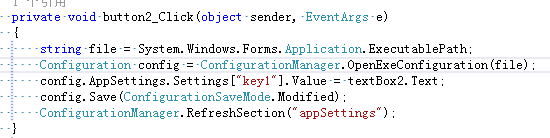
2、修改配置节的值
button1 点击获取配置节<appSettings>指定key的value值
button2 点击修改配置节<connectionStrings>指定key的value值为文本框的值
button3 点击获取配置节<appSettings>指定key新的value值


结果为:

此时配置文件key1的value值为,获取key值仍为修改前的值

如何重置为修改前的值?

如何保存修改后的值?
Winform—C#读写config配置文件的更多相关文章
- C#读写config配置文件
应用程序配置文件(App.config)是标准的 XML 文件,XML 标记和属性是区分大小写的.它是可以按需要更改的,开发人员可以使用配置文件来更改设置,而不必重编译应用程序. 对于一个config ...
- C#读写config配置文件--读取配置文件类
一:通过Key访问Value的方法: //判断App.config配置文件中是否有Key(非null) if (ConfigurationManager.AppSettings.HasKeys()) ...
- winform 写App.config配置文件——IT轮子系列(八)
前言 在winform项目中,常常需要读app.config文件.如: var version = System.Configuration.ConfigurationManager.AppSetti ...
- WPF读写config配置文件
1. 在你的工程中,添加app.config文件.文件的内容默认为: 1 <?xml version="1.0" encoding="utf-8" ?&g ...
- C# 读写App.config配置文件的方法
我们经常会希望在程序中写入一些配置信息,例如版本号,以及数据库的连接字符串等.你可能知道在WinForm应用程序中可以利用Properties.Settings来进行类似的工作,但这些其实都利用了Ap ...
- 读写App.config配置文件的方法
我们经常会希望在程序中写入一些配置信息,例如版本号,以及数据库的连接字符串等.你可能知道在WinForm应用程序中可以利用Properties.Settings来进行类似的工作,但这些其实都利用了Ap ...
- C#中动态读写App.config配置文件
转自:http://blog.csdn.net/taoyinzhou/article/details/1906996 app.config 修改后,如果使用cofnigurationManager立即 ...
- C# 读写App.config配置文件
一.C#项目中添加App.config配置文件 在控制台程序中,默认会有一个App.config配置文件,如果不小心删除掉,或者其他程序需要配置文件,可以通过添加得到. 添加步骤:右键项目名称,选择“ ...
- 关于App.config配置文件
今天在做复习的时候,突然发现自己无法读取配置文件中的数据库连接字符串,而且检查了半天也没找出原因,最后求助万能的度娘才得以解决—— 1.App.config配置文件在项目中添加后不要修改名称,否则会出 ...
随机推荐
- 2018.09.11 bzoj3629: [JLOI2014]聪明的燕姿(搜索)
传送门 一道神奇的搜索. 直接枚举每个质因数的次数,然后搜索就行了. 显然质因数k次数不超过logkn" role="presentation" style=" ...
- 2018.08.31 bzoj1419 Red is good(期望dp)
描述 桌面上有R张红牌和B张黑牌,随机打乱顺序后放在桌面上,开始一张一张地翻牌,翻到红牌得到1美元,黑牌则付 出1美元.可以随时停止翻牌,在最优策略下平均能得到多少钱. 输入 一行输入两个数R,B,其 ...
- 处理jQuery选择器中的特殊符号,如(、#等
前几天解决一个外网问题,客服反馈页面数据加载不出来,首先看一下服务端日志也没报错异常,自己测试了一下,在chrome的Console发现有js报错,原来是js报错导致的数据加载不出来. 调试了一番,发 ...
- 解决yum安装时 Cannot retrieve repository metadata (repomd.xml) for repository
打开/etc/yum.repos.d/CentOS6-Base-163.repo 将下面的baseUrl的地址换成网上最新 # CentOS-Base.repo## The mirror system ...
- excel绝对引用中间添加符号
=F1&"_"&J1 绝对引用 相对引用 按F4 然后复制全部,选择性黏贴,值和数字即可
- 大文件上传插件webupload插件
版权所有 2009-2018荆门泽优软件有限公司 保留所有权利 官方网站:http://www.ncmem.com/ 产品首页:http://www.ncmem.com/webapp/up6.2/in ...
- Android ContentProvider和Uri详解
一.使用ContentProvider(内容提供者)共享数据 ContentProvider在android中的作用是对外共享数据, 也就是说你可以通过ContentProvider把应用中的数据共享 ...
- ZOJ2481 Unique Ascending Array 2017-04-18 23:08 33人阅读 评论(0) 收藏
Unique Ascending Array Time Limit: 2 Seconds Memory Limit: 65536 KB Given an array of integers ...
- 哈希连接(hash join) 原理
哈希连接(hashjoin) 访问次数:驱动表和被驱动表都只会访问0次或1次. 驱动表是否有顺序:有. 是否要排序:否. 应用场景: 1. 一个大表,一个小表的关联: ...
- js实现回车登陆
2018-11-15 $(document).keydown(function (event) { if (event.keyCode == 13) { $("#LoginBtn" ...