
OSGi 系列(十二)之 Http Service
OSGi 系列(十二)之 Http Service
1. 原始的 HttpService
(1) 新建 web-osgi 工程,目录结构如下:
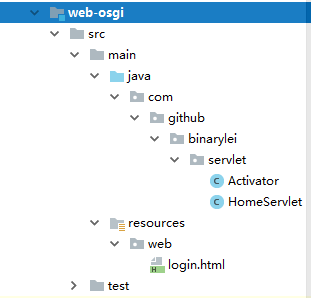
(2) HomeServlet
package com.github.binarylei.servlet;

import javax.servlet.ServletException;

import javax.servlet.http.HttpServlet;

import javax.servlet.http.HttpServletRequest;

import javax.servlet.http.HttpServletResponse;

import java.io.IOException;

public class HomeServlet extends HttpServlet {

    private static final long serialVersionUID = 1L;

    protected void doGet(HttpServletRequest req, HttpServletResponse resp) throws ServletException, IOException {

        resp.getWriter().write("<h1>osgi http service</h1>");

    }

}
(3) Activator
package com.github.binarylei.servlet;

import org.osgi.framework.BundleActivator;

import org.osgi.framework.BundleContext;

import org.osgi.framework.ServiceReference;

import org.osgi.framework.ServiceRegistration;

import org.osgi.service.http.HttpContext;

import org.osgi.service.http.HttpService;

import javax.servlet.Servlet;

import java.util.Dictionary;

import java.util.Hashtable;

public class Activator implements BundleActivator {

    private HttpService http = null;

    private ServiceRegistration<Servlet> serviceRegistration;

    public void start(BundleContext context) throws Exception {

        ServiceReference<HttpService> ref = context.getServiceReference(HttpService.class);

        if(ref == null) {

            System.out.println("http service is null");

        } else {

            http = context.getService(ref);

            HttpContext httpContext = http.createDefaultHttpContext();

            //注册servlet

            http.registerServlet("/home", new HomeServlet(), null, httpContext);

            //注册静态资源

            http.registerResources("/static", "web", httpContext);

        }

        //通过发布服务的方式,注册servlet。不能注册静态资源

        Dictionary<String, String> properties = new Hashtable<>();

        properties.put("alias", "/home2");

        serviceRegistration = context.registerService(Servlet.class, new HomeServlet(), properties);

    }

    public void stop(BundleContext context) throws Exception {

        if(http != null) {

            http.unregister("/home");

            http.unregister("/static");

        }

        serviceRegistration.unregister();

    }

}
(4) karaf 测试:
先测试 http.registerServlet() 注册方式
feature:install http
注意: 要先启动 http 服务,再启动 web-osgi
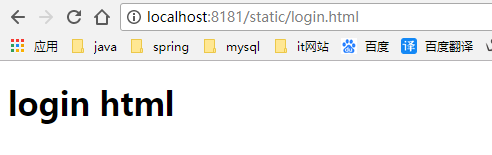
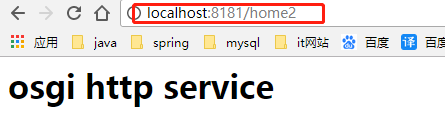
再测试 context.registerService(Servlet.class, new HomeServlet(), properties) 注册方式
feature:install http http-whiteboard
2. OSGi 中运行 war 包
(1) 新建 webapp-osgi 工程,目录结构如下:
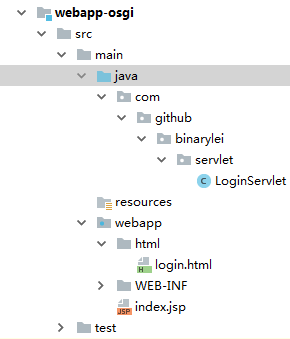
(2) LoginServlet
@WebServlet("/web/app")

public class LoginServlet extends HttpServlet {

    private static final long serialVersionUID = 1L;

    protected void doGet(HttpServletRequest req, HttpServletResponse resp) throws ServletException, IOException {

        resp.getWriter().write("this is osgi web app");

    }

}
(3) web.xml
<?xml version="1.0" encoding="UTF-8"?>

<web-app xmlns="http://java.sun.com/xml/ns/javaee"

  xmlns:xsi="http://www.w3.org/2001/XMLSchema-instance"

  xsi:schemaLocation="http://java.sun.com/xml/ns/javaee

                      http://java.sun.com/xml/ns/javaee/web-app_3_0.xsd"

  version="3.0"

  metadata-complete="false">

</web-app>
(4) 配制 war 打包方式
<plugin>

    <groupId>org.apache.maven.plugins</groupId>

    <artifactId>maven-war-plugin</artifactId>

    <version>2.6</version>

    <configuration>

        <archive>

            <!-- 表示 MANIFEST.MF 的内容由 maven-bundle-plugin 插件生成 -->

            <manifestFile>${project.build.outputDirectory}/META-INF/MANIFEST.MF</manifestFile>

        </archive>

    </configuration>

</plugin>

<plugin>

    <groupId>org.apache.felix</groupId>

    <artifactId>maven-bundle-plugin</artifactId>

    <version>3.0.0</version>

    <executions>

        <execution>

            <id>bundle-manifest</id>

            <phase>process-classes</phase>

            <goals>

                <goal>manifest</goal>

            </goals>

        </execution>

    </executions>

    <configuration>

        <supportedProjectTypes>

            <supportedProjectType>war</supportedProjectType>

        </supportedProjectTypes>

        <instructions>

            <Web-ContextPath>/osgiweb</Web-ContextPath>

            <Bundle-ClassPath>.,WEB-INF/classes</Bundle-ClassPath>

        </instructions>

    </configuration>

</plugin>
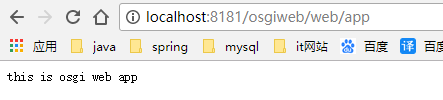
(5) 测试:
karaf 默认是不支持 war 包安装方式
feature:install war
OSGi 系列(十二)之 Http Service的更多相关文章
- Web 前端开发精华文章推荐(jQuery、HTML5、CSS3)【系列十二】
2012年12月12日,[<Web 前端开发人员和设计师必读文章>系列十二]和大家见面了.梦想天空博客关注 前端开发 技术,分享各种增强网站用户体验的 jQuery 插件,展示前沿的 HT ...
- SQL Server 2008空间数据应用系列十二:Bing Maps中呈现GeoRSS订阅的空间数据
原文:SQL Server 2008空间数据应用系列十二:Bing Maps中呈现GeoRSS订阅的空间数据 友情提示,您阅读本篇博文的先决条件如下: 1.本文示例基于Microsoft SQL Se ...
- Alamofire源码解读系列(十二)之请求(Request)
本篇是Alamofire中的请求抽象层的讲解 前言 在Alamofire中,围绕着Request,设计了很多额外的特性,这也恰恰表明,Request是所有请求的基础部分和发起点.这无疑给我们一个Req ...
- OSGi 系列(二)之 Hello World
OSGi 系列(二)之 Hello World 之前曾介绍过 OSGi 是什么,下面将继续上篇介绍的内容,讲述一个简单的 OSGi Bundle:Hello World 是如何开发的. 在 OSGi ...
- struts2官方 中文教程 系列十二:控制标签
介绍 struts2有一些控制语句的标签,本教程中我们将讨论如何使用 if 和iterator 标签.更多的控制标签可以参见 tags reference. 到此我们新建一个struts2 web 项 ...
- 爬虫系列(十二) selenium的基本使用
一.selenium 简介 随着网络技术的发展,目前大部分网站都采用动态加载技术,常见的有 JavaScript 动态渲染和 Ajax 动态加载 对于爬取这些网站,一般有两种思路: 分析 Ajax 请 ...
- Alamofire源码解读系列(十二)之时间轴(Timeline)
本篇带来Alamofire中关于Timeline的一些思路 前言 Timeline翻译后的意思是时间轴,可以表示一个事件从开始到结束的时间节点.时间轴的概念能够应用在很多地方,比如说微博的主页就是一个 ...
- 学习ASP.NET Core Razor 编程系列十二——在页面中增加校验
学习ASP.NET Core Razor 编程系列目录 学习ASP.NET Core Razor 编程系列一 学习ASP.NET Core Razor 编程系列二——添加一个实体 学习ASP.NET ...
- SpringBoot系列(十二)过滤器配置详解
SpringBoot(十二)过滤器详解 往期精彩推荐 SpringBoot系列(一)idea新建Springboot项目 SpringBoot系列(二)入门知识 springBoot系列(三)配置文件 ...
- 打开order by的大门,一探究竟《死磕MySQL系列 十二》
在日常开发工作中,你一定会经常遇到要根据指定字段进行排序的需求. 这时,你的SQL语句类似这样. select id,phone,code from evt_sms where phone like ...
随机推荐
- multiprocess模块---进程---进程队列
首先明白几个概念: 同步:做完一件事情,再做另外一件事情 异步:做一件事情的时候,可以再做另外一件事情 阻塞:recv sleep accept input recvfrom 非阻塞:没有遇见上面这 ...
- 30. CentOS终端命令行显示中文乱码的解决方法
安装CentOS的时候选择了中文,结果在终端不能显示中文,都是乱码,解决方法:修改/etc/sysconfig/i18n,内容为 代码如下: LANG="zh_CN.GB18030&qu ...
- 在Apache下开启SSI配置
开启SSI:html.shtml页面include网页文件 使用SSI(Server Side Include)的html文件扩展名,SSI(Server Side Include),通常称为&quo ...
- ABAP-Generate subroutine
1.定义 data:zprog like abapsource occurs with header line, prog() type c, msg() type c. 2.动态语句 zprog-l ...
- Struts2 利用AJAX 导出大数据设置遮罩层
Struts2 利用AJAX 导出大数据设置遮罩层 需求背景: 每次我们导出excel的时候 ,如果数据量很大,导出花费的时间会很长,页面却有没人任何反应,这个时候用户会认为系统有问题,要么关了页面, ...
- UITableView cell 半透明效果,改变cell高度时背景不闪的解决方法
如果直接指定cell.backgroundColor = = [UIColor colorWithRed:255.0/255.0 green:255.0/255.0 blue:255.0/255.0 ...
- event bManualResult
MSDN: bManualReset [in] If this parameter is TRUE, the function creates a manual-reset event object, ...
- 在spring MVC 中关于session失效的判断 有一个类SessionStatus
SessionStatus status 表示的是当前Session的状态 status.isComplete()-->为true时,表示当前Session还未过期;-->false,表 ...
- spring ioc xml配置
一个完整的spring xml配置:是把action,service,dao以及其它的资源性配置(如basedao)和公共性配置(如连接数据库)配置在resource.xml中,这样就有四个xml配置 ...
- 如何使用Python画地图数据
http://blog.csdn.net/wen_fei/article/details/78355699