
iOS:删除、插入、移动单元格
删除、插入、移动单元格的具体实例如下:


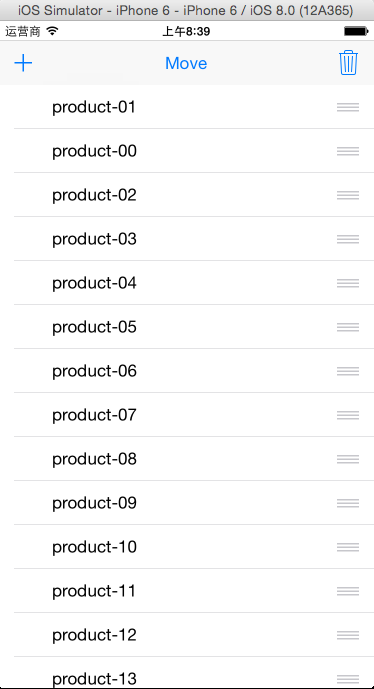
代码如下:
 #import "ViewController.h"

 #define NUM 20

 typedef enum

 {

     deleteCell,

     addCell,

     moveCell,

 }cellState;

 @interface ViewController ()<UITableViewDataSource,UITableViewDelegate>

 @property (weak, nonatomic) IBOutlet UITableView *tableView;

 @property (strong,nonatomic)NSMutableArray *arrayM;

 @property (assign,nonatomic)cellState state; //对单元格要处理的状态

 @end

 @implementation ViewController

 //删除单元格

 - (IBAction)addCellClicked:(UIBarButtonItem *)sender

 {

     self.state = addCell;

     self.tableView.editing = !self.tableView.editing;

 }

 //插入单元格

 - (IBAction)deleteCellClicked:(UIBarButtonItem *)sender

 {

     self.state = deleteCell;

     self.tableView.editing = !self.tableView.editing;

 }

 //移动单元格

 - (IBAction)moveCellClicked:(UIBarButtonItem *)sender

 {

     self.state = moveCell;

     self.tableView.editing = !self.tableView.editing;

 }

 - (void)viewDidLoad {

     [super viewDidLoad];

     //初始化

     self.arrayM = [NSMutableArray arrayWithCapacity:NUM];

     for(int i=; i<NUM; i++)

     {

         NSString *productName = [NSString stringWithFormat:@"product-%02d",i+];

         [self.arrayM addObject:productName];

     }

     //设置数据源和代理

     self.tableView.dataSource = self;

     self.tableView.delegate = self;

 }

 #pragma mark -tableView的方法

 //每一个section有多少个row

 -(NSInteger)tableView:(UITableView *)tableView numberOfRowsInSection:(NSInteger)section

 {

     return self.arrayM.count;

 }

 //设置每一个单元格的内容

 -(UITableViewCell *)tableView:(UITableView *)tableView cellForRowAtIndexPath:(NSIndexPath *)indexPath

 {

     //1.根据reuseIdentifier,先到对象池中去找重用的单元格对象

     static NSString *reuseIdentifier = @"productCell";

     UITableViewCell *cell = [self.tableView dequeueReusableCellWithIdentifier:reuseIdentifier];

     //2.如果没有找到,自己创建单元格对象

     if(cell == nil)

     {

         cell = [[UITableViewCell alloc]initWithStyle:UITableViewCellStyleDefault reuseIdentifier:reuseIdentifier];

     }

     //3.设置单元格对象的内容

     cell.textLabel.text = self.arrayM[indexPath.row];

     return cell;

 }

 #pragma mark -tableView的方法

 //返回单元格编辑类型

 -(UITableViewCellEditingStyle)tableView:(UITableView *)tableView editingStyleForRowAtIndexPath:(NSIndexPath *)indexPath

 {

     if(self.state == deleteCell)

     {

         return UITableViewCellEditingStyleDelete; //删除

     }

     else if(self.state == addCell)

     {

         return UITableViewCellEditingStyleInsert; //插入

     }

     else

     {

         return UITableViewCellEditingStyleNone;   //移动

     }

 }

 //对单元格做编辑处理

 -(void)tableView:(UITableView *)tableView commitEditingStyle:(UITableViewCellEditingStyle)editingStyle forRowAtIndexPath:(NSIndexPath *)indexPath

 {

     //取出当前的单元格

     UITableViewCell *cell = [self.tableView cellForRowAtIndexPath:indexPath];

     if(cell.editingStyle == UITableViewCellEditingStyleDelete)//删除单元格

     {

         //1.删除该单元格

         [self.arrayM removeObjectAtIndex:indexPath.row];

         //2.局部刷新表格

         [self.tableView deleteRowsAtIndexPaths:@[indexPath] withRowAnimation:UITableViewRowAnimationMiddle];

     }

     if(cell.editingStyle == UITableViewCellEditingStyleInsert)//插入单元格

     {

         //1.创建产品资源

         NSString *product = [NSString stringWithFormat:@"product-%02d",arc4random_uniform()];

         //2.插入该数据到当前单元格

         [self.arrayM insertObject:product atIndex:indexPath.row];

         //3.整体刷新表格

         [self.tableView reloadData];

     }

 }

 //是否可以移动

 -(BOOL)tableView:(UITableView *)tableView canMoveRowAtIndexPath:(NSIndexPath *)indexPath

 {

     if(self.state == deleteCell || self.state == addCell)

     {

         return NO;

     }

     else

     {

         return YES;

     }

 }

 //移动单元格

 -(void)tableView:(UITableView *)tableView moveRowAtIndexPath:(NSIndexPath *)sourceIndexPath toIndexPath:(NSIndexPath *)destinationIndexPath

 {

     //修改数组中元素的顺序

     //取出数组中要移动的元素

     NSString *item = [self.arrayM objectAtIndex:sourceIndexPath.row];

     //删除原来位置的元素

     [self.arrayM removeObjectAtIndex:sourceIndexPath.row];

     //在新的位置上重新插入新的元素

     [self.arrayM insertObject:item atIndex:destinationIndexPath.row];

 }

 @end
iOS:删除、插入、移动单元格的更多相关文章
- Swift - 动态添加删除TableView的单元格(以及内部元件)
在Swift开发中,我们有时需要动态的添加或删除列表的单元格. 比如我们做一个消息提醒页面,默认页面只显示两个单元格.当点击第二个单元格(时间标签)时,下面会再添加一个单元格放置日期选择控件(同时新增 ...
- [Xcode 实际操作]五、使用表格-(10)插入UITableView单元格
目录:[Swift]Xcode实际操作 本文将演示如何插入一行单元格. 在项目导航区,打开视图控制器的代码文件[ViewController.swift] import UIKit //首先添加两个协 ...
- IOS之表视图单元格删除、移动及插入
1.实现单元格的删除,实现效果如下 - (void)viewDidLoad { [super viewDidLoad]; //设置导航栏 self.editButtonItem.title = @&q ...
- 关于Aspose.Words插入表格单元格的高度问题的解决
最近在工作中遇到客户要将PDF打印的文档插入的表格行高缩小.为解决这个问题,我百度了好长时间,让没有直接来说明这个问题的,我不清楚是我遇到的问题太low了,各位大神不屑一顾.终于我在几个家之所长,把问 ...
- Java删除word合并单元格时的重复值
Spire.Doc提供了Table.applyVerticalMerge()方法来垂直合并word文档里面的表格单元格,Table.applyHorizontalMerge()方法来水平合并表格单元格 ...
- iOS UITableView 移除单元格选中时的高亮状态
在处理UITableView表格时,我们希望用户能够和触摸单元格式进行交互,但是希望用户在完成交互之后,这些单元格的选中状态能够消失,.Cocoa Touch 提供了两种方法来防止单元格背持久选中. ...
- iOS下UITableView的单元格重用逻辑
终于有时间继续UITableView的接口调用顺序这篇文章了,之前测试过,模拟器都是按照height,cellForRow这样的顺序调用接口的,iOS8以前一直是这样,但是到了iOS8,这个顺序倒过来 ...
- iOS中重用UITableView单元格时,千万别忘了这个
不多说,看截图
- iOS:多个单元格的删除(方法一)
采用存取indexPath的方式,来对多个选中的单元格进行删除 删除前: 删除后: 分析:如何实现删除多个单元格呢?这需要用到UITableView的代理方法,即选中单元格时对单元格做的处理,同时我们 ...
- EXCEL 将网络图片地址插入为锁定的图片单元格宏
Sub InsertPic2(ByVal 图片链接 As String, ByVal 插入图片表名 As String, ByVal 插入图片单元格地址 As String) On Error Res ...
随机推荐
- Ionic Js八:头部和底部
1.ion-header-bar 这个是固定在屏幕顶部的一个头部标题栏.如果给它加上'bar-subheader' 这个样式,它就是副标题. <ion-header-bar align-titl ...
- thinkphp3.2链接数据库常用的配置选项
thinkphp3.2常用配置选项,app/Common/Conf/config.php 或者 app/Home/Conf/config.php 1 2 3 4 5 6 7 8 'SHOW_PAGE_ ...
- Java 异常处理之 论 finally块何时候不走
一. exit退出异常: import java.util.Scanner; public class Test3exit { /** * @param 房山的猫 * finally什么时候不走 * ...
- 用Python开始机器学习(3:数据拟合与广义线性回归)
机器学习中的预测问题通常分为2类:回归与分类. 简单的说回归就是预测数值,而分类是给数据打上标签归类. 本文讲述如何用Python进行基本的数据拟合,以及如何对拟合结果的误差进行分析. 本例中使用一个 ...
- 【WIN10】判斷程序運行在哪個平台
其中的一個方法是: string x = AnalyticsInfo.VersionInfo.DeviceFamily; 判斷 x 的值,有”Windows.Mobile“,”Windows.Des ...
- IIS Server Farms入门
概念了解 IIS Server Farms,实际上应该叫“Microsoft Web Farm Framework (WFF)”,依赖于“Web Platform Installer”才能安装,依赖于 ...
- [BZOJ5303][HAOI2018]反色游戏(Tarjan)
暴力做法是列异或方程组后高斯消元,答案为2^自由元个数,可以得60分.但这个算法已经到此为止了. 从图论的角度考虑这个问题,当原图是一棵树时,可以从叶子开始唯一确定每条边的选择情况,所以答案为1. 于 ...
- BZOJ 1449: [JSOI2009]球队收益 最小费用最大流 网络流
https://www.lydsy.com/JudgeOnline/problem.php?id=1449 给每条路加上一个权值,每条路的费用是这条路的流量*权值,求最大流的最小费用. 每次spfa记 ...
- Codeforces Round #351 (VK Cup 2016 Round 3, Div. 2 Edition) B. Problems for Round 水题
B. Problems for Round 题目连接: http://www.codeforces.com/contest/673/problem/B Description There are n ...
- Codeforces Round #234 (Div. 2) A. Inna and Choose Options 模拟题
A. Inna and Choose Options time limit per test 1 second memory limit per test 256 megabytes input st ...