
Spring+Ehcache
这里记录一下Spring+Ehcache的结合使用
1、添加依赖
<dependency>

  <groupId>org.springframework</groupId>

  <artifactId>spring-context-support</artifactId>

  <version>4.3.0.RELEASE</version>

</dependency>

<dependency>

  <groupId>net.sf.ehcache</groupId>

  <artifactId>ehcache</artifactId>

  <version>2.10.3</version>

</dependency>
2、配置文件
ehcache.xml:
<?xml version="1.0" encoding="UTF-8"?>

<ehcache xmlns:xsi="http://www.w3.org/2001/XMLSchema-instance"

       xsi:noNamespaceSchemaLocation="http://ehcache.org/ehcache.xsd">

  <!-- 磁盘缓存位置 -->

  <diskStore path="/Users/fengzp/Documents/ehcache"/>

  <!-- 默认缓存 -->

  <defaultCache

          maxEntriesLocalHeap="10000"

          eternal="false"

          timeToIdleSeconds="120"

          timeToLiveSeconds="120"

          maxEntriesLocalDisk="10000000"

          diskExpiryThreadIntervalSeconds="120"

          memoryStoreEvictionPolicy="LRU"/>

  <!-- cachetest缓存 缓存时间为5秒 -->

  <cache name="cachetest"

         maxElementsInMemory="1000"

         eternal="false"

         timeToIdleSeconds="5"

         timeToLiveSeconds="5"

         overflowToDisk="false"

         memoryStoreEvictionPolicy="LRU"/>

</ehcache>
spring.xml:
<?xml version="1.0" encoding="UTF-8"?>

<beans xmlns="http://www.springframework.org/schema/beans"

     xmlns:xsi="http://www.w3.org/2001/XMLSchema-instance"

     xmlns:context="http://www.springframework.org/schema/context"

     xmlns:cache="http://www.springframework.org/schema/cache"

     xsi:schemaLocation="http://www.springframework.org/schema/beans http://www.springframework.org/schema/beans/spring-beans.xsd http://www.springframework.org/schema/context http://www.springframework.org/schema/context/spring-context.xsd http://www.springframework.org/schema/cache http://www.springframework.org/schema/cache/spring-cache.xsd">

  <context:component-scan base-package="com.yitop.feng" />

  <cache:annotation-driven cache-manager="cacheManager" />

  <bean id="cacheManager" class="org.springframework.cache.ehcache.EhCacheCacheManager">

      <property name="cacheManager" ref="ehcache"></property>

  </bean>

  <bean id="ehcache" class="org.springframework.cache.ehcache.EhCacheManagerFactoryBean">

      <property name="configLocation" value="classpath:ehcache.xml"></property>

  </bean>

</beans>
3、测试使用
随便写个接口
/**

 * @author fengzp

 * @date 17/3/1下午2:16

 * @email fengzp@gzyitop.com

 * @company 广州易站通计算机科技有限公司

 */

public interface EhcacheTestService {

    String getName(String name);

}

/**

 * @author fengzp

 * @date 17/3/1下午2:17

 * @email fengzp@gzyitop.com

 * @company 广州易站通计算机科技有限公司

 */

@Service

public class EhcacheTestServiceImpl implements EhcacheTestService {

    //这里的cachetest和配置文件的一样,key=#name表示缓存使用参数name作为key

    @Cacheable(value = "cachetest", key = "#name")

    public String getName(String name) {

        return String.valueOf(System.currentTimeMillis());

    }

}
测试
/**

 * @author fengzp

 * @date 17/3/1下午2:19

 * @email fengzp@gzyitop.com

 * @company 广州易站通计算机科技有限公司

 */

@RunWith(SpringJUnit4ClassRunner.class)

@ContextConfiguration(locations = {"classpath:spring.xml"})

public class EhcacheTest {

    @Autowired

    private EhcacheTestService ehcacheTestService;

    @Test

    public void test() throws InterruptedException {

        String name = "feng";

        System.out.println(ehcacheTestService.getName(name));

        System.out.println("休眠2秒");

        Thread.sleep(2000);

        System.out.println(ehcacheTestService.getName(name));

        System.out.println("休眠10秒");

        Thread.sleep(10000);

        System.out.println(ehcacheTestService.getName(name));

    }

}
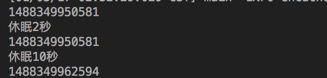
运行结果
4、缓存配置参数详解
1. <diskStore> 当内存缓存中对象数量超过maxElementsInMemory时,将缓存对象写到磁盘缓存中(需对象实现序列化接口)

2. <diskStore path=""> 用来配置磁盘缓存使用的物理路径,Ehcache磁盘缓存使用的文件后缀名是*.data和*.index

3. name 缓存名称,cache的唯一标识(ehcache会把这个cache放到HashMap里)

4. maxElementsOnDisk 磁盘缓存中最多可以存放的元素数量,0表示无穷大

5. maxElementsInMemory内存缓存中最多可以存放的元素数量,若放入Cache中的元素超过这个数值,则有以下两种情况

  1)若overflowToDisk=true,则会将Cache中多出的元素放入磁盘文件中

    2)若overflowToDisk=false,则根据memoryStoreEvictionPolicy策略替换Cache中原有的元素

6. eternal 缓存中对象是否永久有效,即是否永驻内存,true时将忽略timeToIdleSeconds和timeToLiveSeconds

7. timeToIdleSeconds 缓存数据在失效前的允许闲置时间(单位:秒),仅当eternal=false时使用,默认值是0表示可闲置时间无穷大,此为可选属性,即访问这个cache中元素的最大间隔时间,若超过这个时间没有访问此Cache中的某个元素,那么此元素将被从Cache中清除

8. timeToLiveSeconds 缓存数据在失效前的允许存活时间(单位:秒),仅当eternal=false时使用,默认值是0表示可存活时间无穷大,即Cache中的某元素从创建到清除的生存时间,也就是说从创建开始计时,当超过这个时间时,此元素将从Cache中清除

9. overflowToDisk 内存不足时,是否启用磁盘缓存(即内存中对象数量达到maxElementsInMemory时,Ehcache会将对象写到磁盘中)会根据标签中path值查找对应的属性值,写入磁盘的文件会放在path文件夹下,文件的名称是cache的名称,后缀名是data

10. diskPersistent 是否持久化磁盘缓存,当这个属性的值为true时,系统在初始化时会在磁盘中查找文件名为cache名称,后缀名为index的文件,这个文件中存放了已经持久化在磁盘中的cache的index,找到后会把cache加载到内存,要想把cache真正持久化到磁盘,写程序时注意执行net.sf.ehcache.Cache.put(Element element)后要调用flush()方法

11. diskExpiryThreadIntervalSeconds 磁盘缓存的清理线程运行间隔,默认是120秒

12. diskSpoolBufferSizeMB 设置DiskStore(磁盘缓存)的缓存区大小,默认是30MB

13. memoryStoreEvictionPolicy 内存存储与释放策略,即达到maxElementsInMemory限制时,Ehcache会根据指定策略清理内存,共有三种策略,分别为LRU(最近最少使用)、LFU(最常用的)、FIFO(先进先出)
5、springboot引入ehcache
springboot使用ehcache,spring.xml里面不需要写下面这3个东西
  <cache:annotation-driven cache-manager="cacheManager" />

  <bean id="cacheManager" class="org.springframework.cache.ehcache.EhCacheCacheManager">

      <property name="cacheManager" ref="ehcache"></property>

  </bean>

  <bean id="ehcache" class="org.springframework.cache.ehcache.EhCacheManagerFactoryBean">

      <property name="configLocation" value="classpath:ehcache.xml"></property>

  </bean>
只需要在启动上添加 @EnableCaching,并且在application.properties中加上spring.cache.ehcache.config=classpath:ehcache.xml指定ehcache配置文件,springboot就会自动加载ehcache,其他和spring上一样。
Spring+Ehcache的更多相关文章
- 转载:Spring+EhCache缓存实例
转载来自:http://www.cnblogs.com/mxmbk/articles/5162813.html 一.ehcahe的介绍 EhCache 是一个纯Java的进程内缓存框架,具有快速.精干 ...
- Spring+EhCache缓存实例
一.ehcahe的介绍 EhCache 是一个纯Java的进程内缓存框架,具有快速.精干等特点,是Hibernate中默认的CacheProvider.Ehcache是一种广泛使用的开源Java分布式 ...
- Spring+EhCache缓存实例(详细讲解+源码下载)(转)
一.ehcahe的介绍 EhCache 是一个纯Java的进程内缓存框架,具有快速.精干等特点,是Hibernate中默认的CacheProvider.Ehcache是一种广泛使用的开源Java分布式 ...
- Spring+EhCache缓存实例(详细讲解+源码下载)
一.ehcahe的介绍 EhCache 是一个纯Java的进程内缓存框架,具有快速.精干等特点,是Hibernate中默认的CacheProvider.Ehcache是一种广泛使用的开源Java分布式 ...
- Spring+ehcache+redis两级缓存
问题描述 场景:我们的应用系统是分布式集群的,可横向扩展的.应用中某个接口操作满足以下一个或多个条件: 1. 接口运行复杂代价大, 2. 接口返回数据量大, 3. 接口的数据基本不会更改, 4. 接口 ...
- Spring+EhCache缓存实例(具体解说+源代码下载)
一.ehcahe的介绍 EhCache 是一个纯Java的进程内缓存框架,具有高速.精干等特点,是Hibernate中默认的CacheProvider.Ehcache是一种广泛使用的开源Java分布式 ...
- spring ehcache 页面、对象缓存
一.Ehcache基本用法 CacheManager cacheManager = CacheManager.create(); // 或者 cacheManager = CacheManager.g ...
- spring+ehcache实战--性能优化之道
在做系统集成平台项目的时候遇到了一个比較麻烦的问题.原因是使用考试系统的时候所依赖的是基础系统公布的webservice来获取基础数据,webservice的跨网络传输本身或多或少会对系统性能产生一定 ...
- 玩转spring ehcache 缓存框架
一.简介 Ehcache是一个用Java实现的使用简单,高速,实现线程安全的缓存管理类库,ehcache提供了用内存,磁盘文件存储,以及分布式存储方式等多种灵活的cache管理方案.同时ehcache ...
随机推荐
- Codeforces 681C. Heap Operations 优先队列
C. Heap Operations time limit per test:1 second memory limit per test:256 megabytes input:standard i ...
- ubuntu 设置静态ip地址不生效问题
出现了一个问题是,配置了静态ip地址之后,重启网络服务,查看ip地址是生效的,过会再看就 不生效了,查看网上说是由于 network-manager 管理ip地址时候出现的冲突,将network-ma ...
- Byte字节与位
位(bit)字节(byte)一字节是8位所以2Byte是16位二进制
- Laravel 的 Events(事件) 及 Observers(观察者)
你是否听说过单一职责原则(single responsibility principle)?我希望是的.它是程序设计的基本原则之一,它基本上的意思就是,一个类有且只有一个职责.换句话说,一个类必须且只 ...
- [SoapUI] Compare JSON Response(比较jsonobject)
http://jsonassert.skyscreamer.org/ 从这个网站下载jsonassert-1.5.0.jar ,也可以下载到源代码 JSONObject data = getRESTD ...
- 2018.09.10 loj#10172. 涂抹果酱(状压dp)
传送门 三进制状压感觉有点难写啊. 不过这题状态转移方程挺简单的. 就直接f[i][j]表示前i行第i行状态为j时的选法总数,分情况转移就行了. 代码: #include<bits/stdc++ ...
- 37 The Benefits of Cutting Salt 减少盐分摄取量的益处
The Benefits of Cutting Salt 减少盐分摄取量的益处 ①Just when you had figured out how to manage fat in your die ...
- javascript对数组分页
function pagination(pageNo, pageSize, array) { var offset = (pageNo - 1) * pageSize; return (offset ...
- 破解Unity5.3.4f1
破解的目的是将受限的个人版变为全功能的Pro版,破解后就可以使用所有功能了,界面也变成了黑色的主题. 破解网址(支持最新版的5.3.4f1): http://www.ceeger.com/forum/ ...
- Mysql & Hive 导入导出数据
---王燕行转列sql select split(concat_ws(',',collect_set(cast(smzq as string))),',')[1] ,split(concat_ws(' ...