
20162314 Experiment 1: Linear structure - experiment report.
Experiment report of Besti
course:《Program Design & Data Structures》
Class: 1623
Student Name: Wang, Yixiao
Student Number:20162314
Tutor:Mr.Lou、Mr.Wang
Experiment date:2017.9.26
Secret level: Unsecretive
Experiment time:60 minutes
Major/Elective:Major
Experiment order:5
Experiment content
- Linear-list test of Java :Process, Problem.
- Linear-list application of Java :Process, Problem.
- Implement ArrayList(Pseudocode, Productcode, Testcode): Process(Analysis, Design,implement,test),Problem.
- Implement LinkedList (Pseudocode, Productcode, Testcode): Process(Analysis, Design,implement,test),Problem.
- Analyze source code of ArrayList and LinkedList:Process,Skill.
Experiment situation
Exp1 Linear-list test of Java

- It's easy to finish this experiment.
- To start with , import to form a new Linked-list to start the experiment.
- Next , use the method list.add() to ealuation.
- Then , use the for-loop to test the Linked-list.add method respectively.
- Last , export the value of three loops respectively.
Exp2 Linear-list application of Java
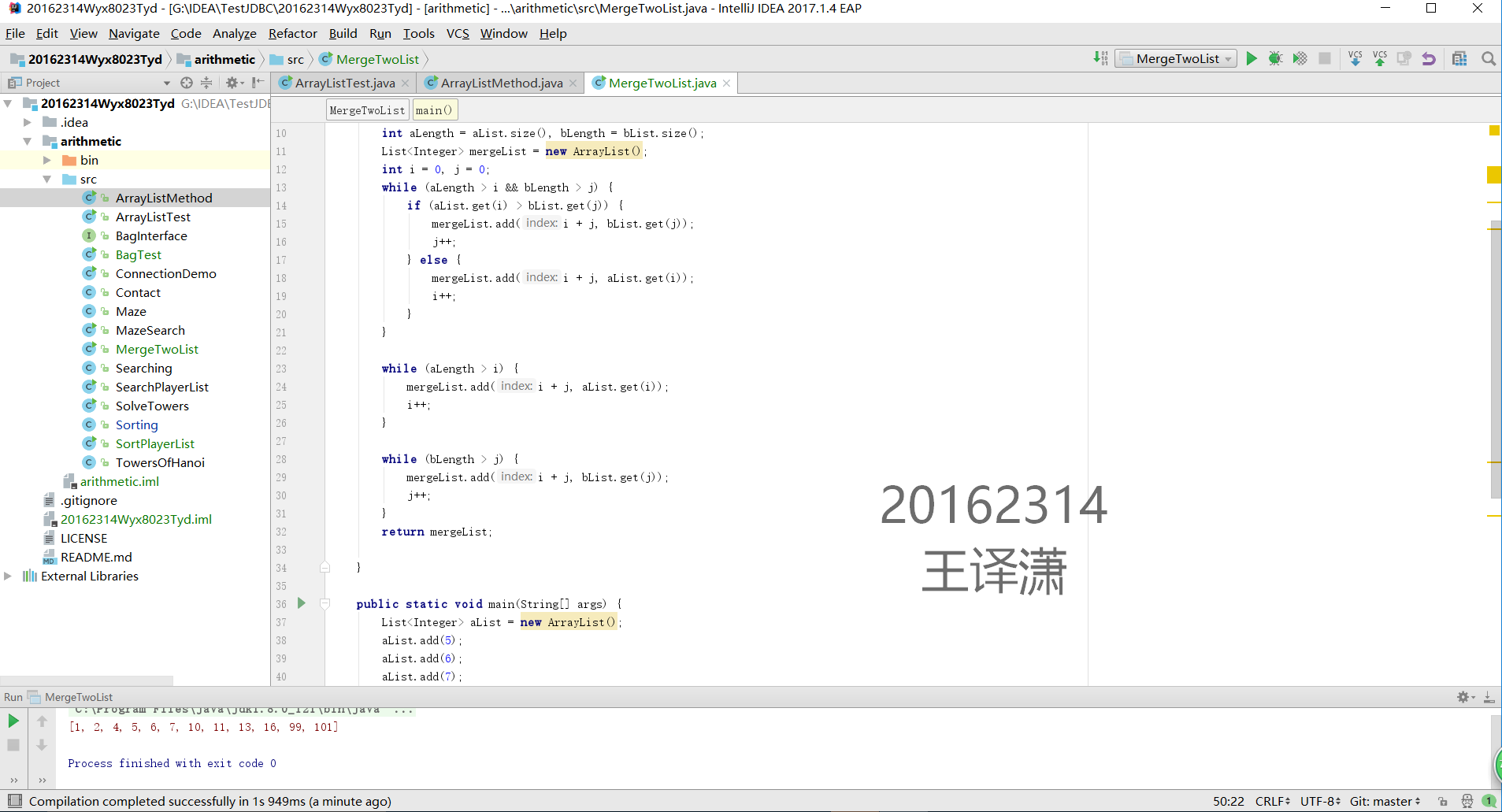
- To start with , set a class by using List to creat alist and blist, make the two lists' size equally.
- Next , use the sentence while-if, value alist(i) and blist(j)
- If the alist(i) > blist(j) , then merge the first place with index i+j by bList.get(j)
- Else , take the opposite.
- Then , when the length of alist > i , merge the list with index i+j by alist.get(i)
- while the length of blist > j , do the opposite
- After the loops end , return the result of merging lists.
- Last , write a test with valuing two arraylists by using list.add() and print the result.
Exp3 Implement ArrayList
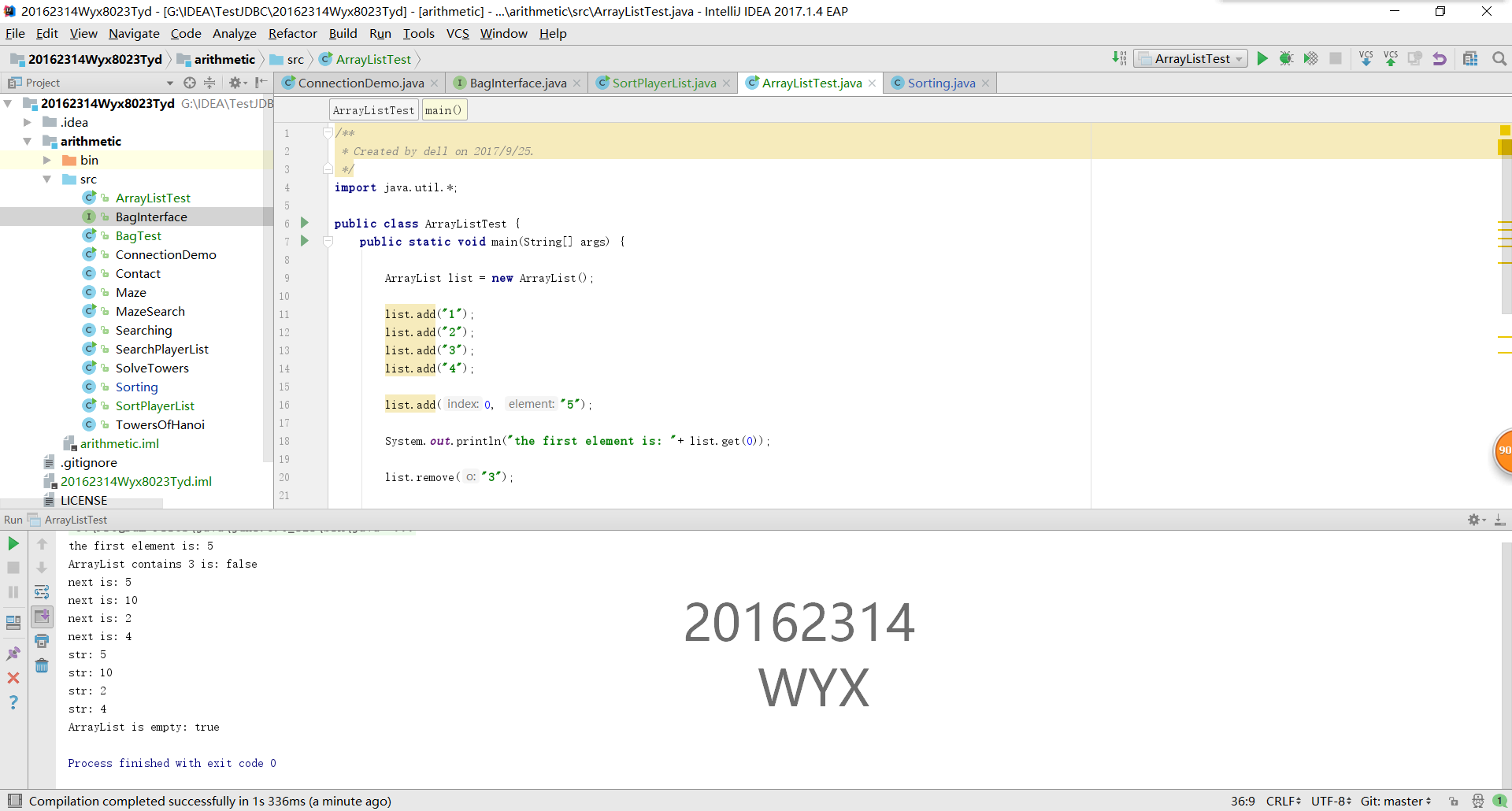
- To start with , import to form a new Array-list to start the experiment.
- Next , write the index and the first element
- Next , use the method list.add to make the array list.
- Then , output and explain the fist element.
- Then , use the method list.remove to remove a number.
- Next , use the method list.contain to check whether the number is in list right now.
- Then , use the for-loop and leam.iterator to print iter.next() .
- Next , form a new String Array to print string.
- Then , use the list.clear to clear the list number.
- Last , use the method list.isEmpty to check whether the list is empty now.
Exp4 Implement LinkedList

- The whole test is made of three methods:testLinkedListAPIs(),useLinkedListAsLIFO();,useLinkedListAsFIFO();
- Then creat a class to explain this three methods.
- import a new linkedlist
- Next, use list.add to print
- Then, use stack to pop and peek.
- Next, creat a new queue
- Use the method to add and remove ,last print.
Exp5 Analyze source code of ArrayList and LinkedList
>.
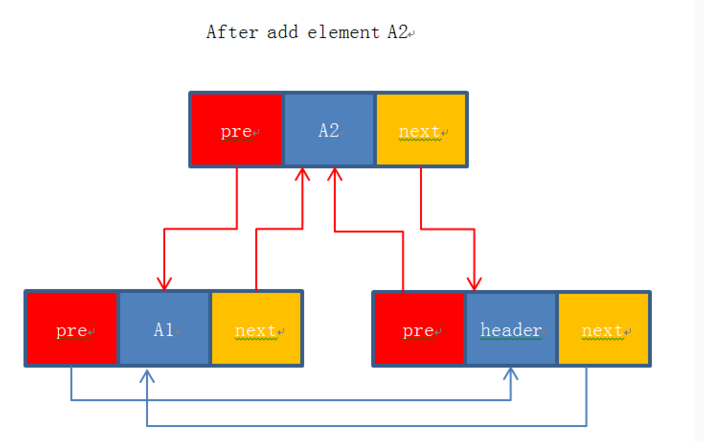
Assume when we creat a Linkedlist at the start, there is only a hearder point,as the following picture.
There is a elementA1 insert ahead the header.
Now,insert a element A2 after implementing the code as the following
Entry newEntry = new Entry(A2, header, header.previous);
//Make newEntry.next point to the header, new Entry point to header.previous(A1)
newEntry.previous.next = newEntry;
newEntry.next.previous = newEntry;
Then, the picture turn to this

Code hosting
PSP5.1(Personal Software Process)
| Steps | Time | percent |
|---|---|---|
| requirement | 45minutes | 16.7% |
| design | 50minutes | 18.5% |
| coding | 1.5hours | 32.2% |
| test | 30minutes | 11.1% |
| summary | 55minutes | 19.2% |
20162314 Experiment 1: Linear structure - experiment report.的更多相关文章
- PCA tries to preserve linear structure, MDS tries to preserve global geometry, and t-SNE tries to preserve topology (neighborhood structure)
https://colah.github.io/posts/2014-10-Visualizing-MNIST/
- 20162314 Experiment 2 - Tree
Experiment report of Besti course:<Program Design & Data Structures> Class: 1623 Student N ...
- 20162314 Experiment 4 - Graph
Experiment report of Besti course:<Program Design & Data Structures> Class: 1623 Student N ...
- 20162314 Experiment 3 - Sorting and Searching
Experiment report of Besti course:<Program Design & Data Structures> Class: 1623 Student N ...
- 20162314 《Program Design & Data Structures》Learning Summary Of The Eighth Week
20162314 2017-2018-1 <Program Design & Data Structures>Learning Summary Of The Eighth Week ...
- cvpr2015papers
@http://www-cs-faculty.stanford.edu/people/karpathy/cvpr2015papers/ CVPR 2015 papers (in nicer forma ...
- N-Gram
N-Gram是大词汇连续语音识别中常用的一种语言模型,对中文而言,我们称之为汉语语言模型(CLM, Chinese Language Model). 中文名 汉语语言模型 外文名 N-Gram 定 ...
- IoT experitment
Abstract: In order to solve the problems of complex experiment management, complicated teaching task ...
- 论文翻译:2021_Towards model compression for deep learning based speech enhancement
论文地址:面向基于深度学习的语音增强模型压缩 论文代码:没开源,鼓励大家去向作者要呀,作者是中国人,在语音增强领域 深耕多年 引用格式:Tan K, Wang D L. Towards model c ...
随机推荐
- oracle 事务 数据伪列
在用户进行数据更新操作(DML)事务一定会起作用. 事务的出现会保证数据的完整性.一致性.在整个事务的处理过程之中主要使用两个操作命令: · 事务的提交(COMMIT):是真正的向数据库之中发出更新指 ...
- Vue+axios 实现http拦截及vue-router拦截
现如今,每个前端对于Vue都不会陌生,Vue框架是如今最流行的前端框架之一,其势头直追react.最近我用vue做了一个项目,下面便是我从中取得的一点收获. 基于现在用vue+webpack搭建项目的 ...
- linux 虚拟机 磁盘空间压缩
/usr/bin/vmware-toolbox-cmd disk list /usr/bin/vmware-toolbox-cmd disk shrink / init 0
- springboot快速入门(五)——事务管理
一.入门 概念就不再赘述了,由于一般我们是通过service控制事务,这里给出注解式的示例: package com.example.demo; import com.example.demo.bea ...
- IntelliJ IDEA 添加jar包
事先下载完成需要的javacsv.jar包. java项目在没有导入该jar包之前,显示如下图所示 点击 File -> Project Structure(快捷键 Ctrl + Al ...
- git push 每次都要输入用户名密码
添加远程库的时候使用了https的方式..所以每次都要用https的方式push到远程库,速度还慢.. 查看使用的传输协议: git remote -v 重新设置成ssh的方式: git remote ...
- python之shutil模块详解
shutil模块 -- --High-level file operations 高级的文件操作模块. os模块提供了对目录或者文件的新建/删除/查看文件属性,还提供了对文件以及目录的路径操作.比如 ...
- SQL Server 日期格式和日期操作
SQL Server发展至今,关于日期的格式的控制方法,有传统的方法,比如CONVERT(),也有比较便利的新方法,比如FORMAT():同样,关于日期的操作函数,也分为传统方法:DATEADD()等 ...
- 【windows server 2008R2】windows server 2008R2自动重启
客户反映2018.3.20早上8点多数据库重启. 我找了半天原因,看了一下告警日志没发现什么问题.后来我再跟他确认,他说他练上去的时候正在准备桌面.这感觉像是服务器重启导致数据库重启. 于是我远程上去 ...
- js简单时间比较的方法(转)
//时间比较(yyyy-MM-dd) function compareDate(startDate, endDate) { var arrStart = startDate.split(" ...