
Android之TabHost实现Tab切换
TabHost是整个Tab的容器,包含TabWidget和FrameLayout两个部分,TabWidget是每个Tab的表情,FrameLayout是Tab内容。
实现方式有两种:
1、继承TabActivity
2、继承Activity类
方法一:继承TabActivity
从TabActivity中用getTabHost()方法获取TabHost,然后设置标签内容
布局:
1、TabHost 必须设置android:id为@android:id/tabhost
2、TabWidget 必须设置android:id为@android:id/tabs
3、FrameLayout 必须设置android:id为@android:id/tabcontent
否则将出现类似报错:

<?xml version="1.0" encoding="utf-8"?>

<TabHost xmlns:android="http://schemas.android.com/apk/res/android"

    android:layout_width="match_parent"

    android:layout_height="match_parent"

    android:id="@android:id/tabhost"

     >

<LinearLayout

    android:layout_width="match_parent"

    android:layout_height="match_parent"

    android:orientation="vertical"

    >

    <TabWidget

        android:layout_width="match_parent"

        android:layout_height="wrap_content"

        android:id="@android:id/tabs"

        ></TabWidget>

    <FrameLayout

        android:layout_width="match_parent"

        android:layout_height="0dp"

        android:layout_weight="1"

        android:id="@android:id/tabcontent"

        >

        <LinearLayout

            android:layout_width="match_parent"

            android:layout_height="match_parent"

            android:id="@+id/widget_layout_red"

            android:background="#ff0000"

            android:orientation="vertical"

            ></LinearLayout>

         <LinearLayout

            android:layout_width="match_parent"

            android:layout_height="match_parent"

            android:id="@+id/widget_layout_yellow"

            android:background="#FCD209"

            android:orientation="vertical"

            ></LinearLayout>

    </FrameLayout>

</LinearLayout>

</TabHost>
继承TabActivity
public class MainActivity extends TabActivity {

private TabHost tabhost;

    @Override

    protected void onCreate(Bundle savedInstanceState) {

        super.onCreate(savedInstanceState);

        setContentView(R.layout.demo);

        //从TabActivity上面获取放置Tab的TabHost

        tabhost = getTabHost();

        tabhost.addTab(tabhost

                 //创建新标签one

                .newTabSpec("one")

                //设置标签标题

                .setIndicator("红色")

                //设置该标签的布局内容

                .setContent(R.id.widget_layout_red));

        tabhost.addTab(tabhost.newTabSpec("two").setIndicator("黄色").setContent(R.id.widget_layout_yellow));

    }

}
其中创建标签的方法:
tabhost.addTab(tabhost

.newTabSpec("one")

.setIndicator("红色")

.setContent(R.id.widget_layout_red));
也可以拆分写成:
TabHost.TabSpec tab1 = tabhost.newTabSpec("one");

tab1.setIndicator("红色");

tab1.setContent(R.id.widget_layout_red);

tabhost.addTab(tab1);
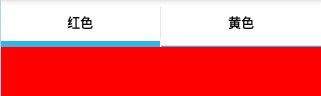
预览:
点击"黄色"标签

点击"红色"标签
方法二:继承Activity类
布局:
1、TabHost 可自定义id
2、TabWidget 必须设置android:id为@android:id/tabs
3、FrameLayout 必须设置android:id为@android:id/tabcontent
public class MainActivity extends Activity{

private TabHost tabhost;

    @Override

    protected void onCreate(Bundle savedInstanceState) {

        super.onCreate(savedInstanceState);

        setContentView(R.layout.demo);

        //得到TabHost对象实例

        tabhost =(TabHost) findViewById(R.id.mytab);

        //调用 TabHost.setup()

        tabhost.setup();

        //创建Tab标签

        tabhost.addTab(tabhost.newTabSpec("one").setIndicator("红色").setContent(R.id.widget_layout_red));

        tabhost.addTab(tabhost.newTabSpec("two").setIndicator("黄色").setContent(R.id.widget_layout_yellow));

    }

}
TabHost切换Tab字体的颜色背景颜色改变
private TabHost tabHost;
private TabWidget tabWidget;

//得到TabHost对象实例

tabHost =(TabHost) findViewById(R.id.taskdescribe_buildingmeter_tabhost);

//调用 TabHost.setup()

tabHost.setup();

tabWidget = tabHost.getTabWidget();

//创建Tab标签

tabHost.addTab(tabHost.newTabSpec("one").setIndicator("按单元名").setContent(R.id.buildingmeter_layout_unitname));

tabHost.addTab(tabHost.newTabSpec("two").setIndicator("按安装状态").setContent(R.id.buildingmeter_layout_installstatus));

tabHost.addTab(tabHost.newTabSpec("three").setIndicator("按楼层").setContent(R.id.buildingmeter_layout_storey));

//注意这个就是改变Tabhost默认样式的地方,一定将这部分代码放在上面这段代码的下面,不然样式改变不了

for (int i =0; i < tabWidget.getChildCount(); i++)

{

    tabWidget.getChildAt(i).getLayoutParams().height = 65;

    //tabWidget.getChildAt(i).getLayoutParams().width = 65;

    TextView tv = (TextView) tabWidget.getChildAt(i).findViewById(android.R.id.title);

    tv.setTextSize(15);

    tv.setTextColor(this.getResources().getColorStateList(android.R.color.white));

}

//设置第一次打开时默认显示的标签

tabHost.setCurrentTab(0);

//初始化Tab的颜色,和字体的颜色

updateTab(tabHost);

//选择监听器

tabHost.setOnTabChangedListener(new tabChangedListener());
/**

     * 更新Tab标签的颜色,和字体的颜色

     * @param tabHost

     */

    private void updateTab(final TabHost tabHost)

    {

        for (int i = 0; i < tabHost.getTabWidget().getChildCount(); i++)

        {

            View view = tabHost.getTabWidget().getChildAt(i);

            TextView tv = (TextView) tabHost.getTabWidget().getChildAt(i).findViewById(android.R.id.title);

            tv.setTextSize(16);

            tv.setTypeface(Typeface.SERIF, 2); // 设置字体和风格

            if (tabHost.getCurrentTab() == i)

            {

                //选中

                view.setBackground(getResources().getDrawable(R.drawable.tabhost_current));//选中后的背景

                tv.setTextColor(this.getResources().getColorStateList(android.R.color.white));

            }

            else

            {

                //不选中

                view.setBackground(getResources().getDrawable(R.drawable.tabhost_default));//非选择的背景

                tv.setTextColor(this.getResources().getColorStateList(android.R.color.black));

            }

        }

    }

    /**

     * TabHost选择监听器

     * @author

     *

     */

    private class tabChangedListener implements OnTabChangeListener {

          @Override

          public void onTabChanged(String tabId)

          {

              tabHost.setCurrentTabByTag(tabId);

              updateTab(tabHost);

          }

    }
布局文件
<?xml version="1.0" encoding="utf-8"?>

<TabHost xmlns:android="http://schemas.android.com/apk/res/android"

    android:id="@+id/taskdescribe_buildingmeter_tabhost"

    android:layout_width="match_parent"

    android:layout_height="match_parent"

    android:background="@color/white" >

    <LinearLayout

        android:layout_width="match_parent"

        android:layout_height="match_parent"

        android:orientation="vertical">

        <TabWidget

            android:id="@android:id/tabs"

            android:layout_width="match_parent"

            android:layout_height="wrap_content">

        </TabWidget>

        <FrameLayout

            android:id="@android:id/tabcontent"

            android:layout_width="match_parent"

            android:layout_height="0dp"

            android:layout_weight="1">

            <LinearLayout

                android:id="@+id/buildingmeter_layout_unitname"

                android:layout_width="match_parent"

                android:layout_height="match_parent"

                android:orientation="vertical"

                android:background="@color/white">

            </LinearLayout>

            <LinearLayout

                android:id="@+id/buildingmeter_layout_installstatus"

                android:layout_width="match_parent"

                android:layout_height="match_parent"

                android:orientation="vertical"

                android:background="@color/white">

            </LinearLayout>

            <LinearLayout

                android:id="@+id/buildingmeter_layout_storey"

                android:layout_width="match_parent"

                android:layout_height="match_parent"

                android:orientation="vertical"

                android:background="@color/white">

            </LinearLayout>

        </FrameLayout>

    </LinearLayout>

</TabHost>
TabHost切换Tab页面使用Intent
切换效果

先是layout文件夹中的布局文件,代码如下:
<TabHost xmlns:android="http://schemas.android.com/apk/res/android"

    android:id="@android:id/tabhost"

    android:layout_width="fill_parent"

    android:layout_height="fill_parent"

    >

    <LinearLayout

        android:layout_width="fill_parent"

        android:layout_height="fill_parent"

        android:orientation="vertical"

        android:background="@drawable/category_bg"

        android:padding="0dp" >

        <TabWidget

            android:id="@android:id/tabs"

            android:layout_width="wrap_content"

            android:layout_height="40dp"/>

        <FrameLayout

            android:id="@android:id/tabcontent"

            android:layout_width="fill_parent"

            android:layout_height="fill_parent"

            android:background="@drawable/context_bg"

            android:padding="0dp" />

    </LinearLayout>

</TabHost>
java文件
import android.app.TabActivity;

import android.content.Intent;

import android.graphics.Typeface;

import android.os.Bundle;

import android.view.KeyEvent;

import android.view.View;

import android.view.Window;

import android.view.WindowManager;

import android.widget.TabHost;

import android.widget.TabHost.OnTabChangeListener;

import android.widget.TextView;

import com.dzdc.R;

@SuppressWarnings("deprecation")

public class IndexActivity extends TabActivity {

    private String[] tabMenu = { "热菜", "冷菜", "海鲜", "川菜", "酒饮", "招牌菜" };

    private Intent intent0, intent1, intent2, intent3, intent4, intent5;

    private Intent[] intents = { intent0, intent1, intent2, intent3, intent4,

            intent5 };

    private TabHost.TabSpec tabSpec0, tabSpec1, tabSpec2, tabSpec3, tabSpec4,

            tabSpec5;

    private TabHost.TabSpec[] tabSpecs = { tabSpec0, tabSpec1, tabSpec2,

            tabSpec3, tabSpec4, tabSpec5 };

    private TabHost tabHost = null;

    @Override

    protected void onCreate(Bundle savedInstanceState) {

        super.onCreate(savedInstanceState);

        requestWindowFeature(Window.FEATURE_NO_TITLE);// 去掉标题栏

        getWindow().setFlags(WindowManager.LayoutParams.FLAG_FULLSCREEN,

                WindowManager.LayoutParams.FLAG_FULLSCREEN);

        setContentView(R.layout.index);

        tabHost = getTabHost();

        for (int i = 0; i < tabMenu.length; i++) {

            intents[i] = new Intent();

            intents[i].setClass(this, IndexContentActivity.class);

            tabSpecs[i] = tabHost.newTabSpec(tabMenu[i]);

            tabSpecs[i].setIndicator(tabMenu[i]);// 设置文字

            tabSpecs[i].setContent(intents[i]);// 设置该页的内容

            tabHost.addTab(tabSpecs[i]);// 将该页的内容添加到Tabhost

        }

        tabHost.setCurrentTabByTag(tabMenu[0]); // 设置第一次打开时默认显示的标签,

        updateTab(tabHost);//初始化Tab的颜色,和字体的颜色

        tabHost.setOnTabChangedListener(new OnTabChangedListener()); // 选择监听器

    }

    class OnTabChangedListener implements OnTabChangeListener {

        @Override

        public void onTabChanged(String tabId) {

            tabHost.setCurrentTabByTag(tabId);

            updateTab(tabHost);

        }

    }

    @Override

    public boolean onKeyDown(int keyCode, KeyEvent event) {

        if (keyCode == KeyEvent.KEYCODE_BACK && event.getRepeatCount() == 0) {

            System.exit(0);

            return false;

        } else if (keyCode == KeyEvent.KEYCODE_MENU

                && event.getRepeatCount() == 0) {

            return true; // 返回true就不会弹出默认的setting菜单

        }

        return false;

    }

    /**

     * 更新Tab标签的颜色,和字体的颜色

     * @param tabHost

     */

    private void updateTab(final TabHost tabHost) {

        for (int i = 0; i < tabHost.getTabWidget().getChildCount(); i++) {

            View view = tabHost.getTabWidget().getChildAt(i);

            TextView tv = (TextView) tabHost.getTabWidget().getChildAt(i).findViewById(android.R.id.title);

            tv.setTextSize(16);

            tv.setTypeface(Typeface.SERIF, 2); // 设置字体和风格

            if (tabHost.getCurrentTab() == i) {//选中

                view.setBackgroundDrawable(getResources().getDrawable(R.drawable.category_current));//选中后的背景

                tv.setTextColor(this.getResources().getColorStateList(

                        android.R.color.black));

            } else {//不选中

                view.setBackgroundDrawable(getResources().getDrawable(R.drawable.category_bg));//非选择的背景

                tv.setTextColor(this.getResources().getColorStateList(

                        android.R.color.white));

            }

        }

    }

}
Android之TabHost实现Tab切换的更多相关文章
- Android:TabHost实现Tab切换
TabHost是整个Tab的容器,包含TabWidget和FrameLayout两个部分,TabWidget是每个Tab的表情,FrameLayout是Tab内容. 实现方式有两种: 1.继承TabA ...
- Android典型界面设计——FragmentTabHost+Fragment实现底部tab切换
一.问题描述 在上次博文中,我们使用RadioGroup+ViewPage+Fragmen实现了顶部滑动导航(查看文章:http://www.cnblogs.com/jerehedu/p/460759 ...
- Android 常用UI控件之TabHost(5)Tab栏在底部且在最上层也不盖tab页
tab栏在底部 <TabHost android:id="@android:id/tabhost" android:layout_width="match_pare ...
- Android Studio精彩案例(二)《仿微信动态点击底部tab切换Fragment》
转载本专栏文章,请注明出处,尊重原创 .文章博客地址:道龙的博客 现在很多的App要么顶部带有tab,要么就底部带有tab.用户通过点击tab从而切换不同的页面(大部分情况时去切换fragment). ...
- Android典型界面设计(3)——访网易新闻实现双导航tab切换
一.问题描述 双导航tab切换(底部区块+区域内头部导航),实现方案底部区域使用FragmentTabHost+Fragment, 区域内头部导航使用ViewPager+Fragment,可在之前博客 ...
- Android典型界面设计-访网易新闻实现双导航tab切换
一.问题描述 双导航tab切换(底部区块+区域内头部导航),实现方案底部区域使用FragmentTabHost+Fragment, 区域内头部导航使用ViewPager+Fragment,可在之前博客 ...
- Android -- FragmentTabHost实现微信底部切换
1,在商城类的项目中我们开始一个项目的时候经常出现这样的需求,如下图所示: 下面使用户可以切换的模块,上面是对应的模块的详细内容,实现这个效果有很多方式,可以使用radiobutton+fragmen ...
- android学习--TabHost选项卡组件
TabHost是一种非常有用的组件,TabHost能够非常方便地在窗体上放置多个标签页,每一个标签页获得了一个与外部容器同样大小的组件摆放区域.在手机系统的应用类似"未接电话".& ...
- Android学习Tabhost、gallery、listview、imageswitcher
Tabhost控件又称分页控件,在很多的开发语言中都存在.它可以拥有多个标签页,每个标签页可以拥有不同的内容.android中,一个标签页可以放 一个view或者一个activity.TabHost是 ...
随机推荐
- document文档对象
document 文挡对象 - JavaScript脚本语言描述———————————————————————注:页面上元素name属性和JavaScript引用的名称必须一致包括大小写否则会提示你一 ...
- 简单shell expect程序
1 expect程序 用的Ubuntu,本身没带expect,安装. sudo apt-get install expect (关于expect,参见http://www.tclchina.com/a ...
- (转)AIX rootvg 镜像创建与磁盘更换
# prtconf | grep disk # chdev -l hdisk1 -a pv=yes # extendvg rootvg hdisk1 # chvg -Qn rootvg # lsvg ...
- 第7章—SpringMVC高级技术—处理异常
处理异常 处理异常 不管发生什么事情,不管是好的还是坏的,Servlet请求的输出都是一个Servlet响应.如果在请求处理的时候,出现了异常,那它的输出依然会是Servlet响应.异常必须要以某种方 ...
- Python 开发
1.GIL,CPython,Python跟编译器没关系,语言有多个编译器,如:JPython.IronPython等,其他语言如是.GIL对IO密集型友好,计算密集型惨淡 2.pass,定义空执行函数 ...
- webbrowser在html中写入内容并添加js
在html中写入内容,并添加js private void btnTestJs_Click(object sender, EventArgs e) { this.webBrowser1.Navigat ...
- httpSession的正确理解
关于HttpSession的误解实在是太多了,本来是一个很简单的问题,怎会搞的如此的复杂呢?下面说说我的理解吧: 一个session就是一系列某用户和服务器间的通讯.服务器有能力分辨出不同的用户.一个 ...
- nginx重启报错:nginx: [error] invalid PID number "" in "/run/nginx.pid"
问题描述:执行 nginx -t 是OK的,然而在执行 nginx -s reload 的时候报错 nginx: [error] invalid PID number “” in “/run/ngin ...
- 关于Mysql+EF6本地运行和发布没有问题,发布到服务器上出现问题的解决方案
这个问题折磨了我差不多两天,网上各种方法也找了个遍,但是都没有解决我的问题,后面通过自己仔细分析问题和排查,终于把问题解决了,以下是我的解决问题的步骤,希望能帮到各位,不要再被这些问题坑了 1,项目实 ...
- WPF备忘录(7)WPF图片资源路径介绍
在项目中增加两张图片Content.jpg和Resource.jpg,分别将其生成操作属性设置为Content和Resource. 在界面中增加两个Image控件ImgContent和ImgR ...