
AS 代码模板 文件模板 Templates MD
修改 File and Code Templates
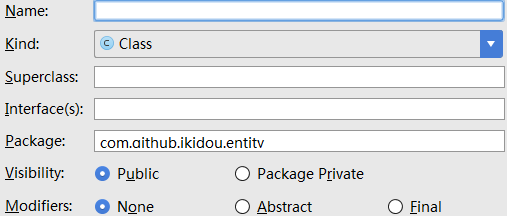
添加、修改文件模板 Files
#if (${PACKAGE_NAME} != "")package ${PACKAGE_NAME};#end

#if (${IMPORT_BLOCK} != "")${IMPORT_BLOCK}

#end

#parse("File Header.java")

#if (${VISIBILITY} == "PUBLIC")public #end #if (${ABSTRACT} == "TRUE")abstract #end #if (${FINAL} == "TRUE")final #end class ${NAME} #if (${SUPERCLASS} != "")extends ${SUPERCLASS} #end #if (${INTERFACES} != "")implements ${INTERFACES} #end {

}
添加、修改文件头 Includes【重要】
/**

 * 作者:<a href="http://www.cnblogs.com/baiqiantao">白乾涛</a><p>

 * 创建时间:${DATE} ${HOUR}:${MINUTE} <p>

 * 描述:

*/预定义的变量
- ${PACKAGE_NAME} //name of the package in which the new file is created
- ${USER} //current user system login name
- ${DATE} //current system date
- ${TIME} //current system time
- ${YEAR} //current year
- ${MONTH} //current month
- ${MONTH_NAME_SHORT} //first 3 letters of the current month name. Example: Jan, Feb, etc.
- ${MONTH_NAME_FULL} //full name of the current month. Example: January, February, etc.
- ${DAY} //current day of the month
- ${HOUR} //current hour
- ${MINUTE} //current minute
- ${PROJECT_NAME} //the name of the current project
添加代码模板 Live Templates【重要】
- Abbreviation:表示这个模板的快捷方式,你敲这些【字符+回车】后,模板就自动输出了
- Description:表示这个模板描述
- Template text:模板的内容
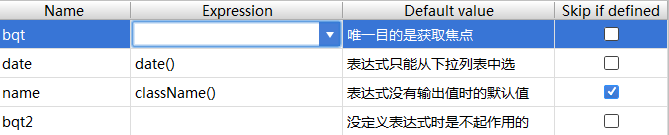
- bqt:可将鼠标定位在此位置
- date、name:点击下三角【选择】合适的方法,可自动生成日期和类名
- skip if defined:表示当自动生成的值不为空时,光标不停留在此方法处。建议选中
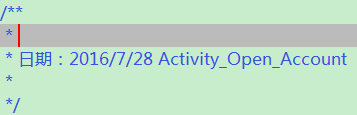
- 焦点首先在定位的第一个方法处,即bqt处;当我输入内容后按下回车,或不输入内容直按回车
- 焦点转移到下一个定义的方法处,即date处;当按下回车
- 这时焦点应该会转移到name处,但因为勾选了skip if defined,且此处有自动生成内容,所以焦点移到下一方法处
- 即转移到bqt2处,此时我再按下回车键,则焦点转移到整个模板的最后(不会添加换行符)
<wiz_tmp_tag id="wiz-table-range-border" contenteditable="false" style="display: none;">
附件列表
AS 代码模板 文件模板 Templates MD的更多相关文章
- eclipse的xml文件提示templates的模板.md
eclipse的xml文件提示templates的模板 <?xml version="1.0" encoding="UTF-8" standalone=& ...
- Django学习总结之模板templates
- django模板: templates - 模板分为两个过程: 1, 加载 : loader.get_template('xxx.html') 返回值是一个template对象 2, 渲染 : t ...
- ##xcode 文件模板自定义
xcode 文件模板自定义 在使用xcode内部模板创建C++类文件时,创建出来的头文件是.hpp结尾的,但是我想用.h结尾的, 所以就网上找了下资料看能不能自定义模板,这样还可以修改文档注释.在网上 ...
- 【Django笔记1】-视图(views)与模板(templates)
视图(views)与模板(templates) 1,视图(views) 将接收到的数据赋值给模板(渲染),再传递给浏览器.HTML代码可以直接放在views.py(文件名可任意更换),也可以放在t ...
- 模板templates的使用
目录 模板及其渲染 模板查找路径 DTL模板语法 常用的模板标签 DTL常用过滤器 模块结构优化 加载静态文件 模板及其渲染 视图函数只是直接返回文本,而在实际生产环境中其实很少这样用,因为实际的页面 ...
- ATL开发 ActiveX控件的 inf文件模板
ATL开发 ActiveX控件的 inf文件模板
- spring 文件模板下载多种实现方式
针对于文件的下载,我们有很多种实现方式.业务场景是这样子的,要实现Excel文件的导入和导出功能,问题对于java的POI操作没有问题,所以实现文件的下载就相对简单,只需要从数据库取出相关的数据,针对 ...
- Pycharm 自定义文件模板
Pycharm 自定义文件模板 每次新建文件都有相同的代码框架,每次重复敲浪费了程序员的寿命啊 按照下面方式自定义自己的模板:
- Jtester+unitils+testng:DAO单元测试文件模板自动生成
定位 本文适合于不愿意手工编写而想自动化生成DAO单元测试的筒鞋.成果是不能照搬的,但其中的"创建模板.填充内容.自动生成"思想是可以复用的.读完本文,可以了解 Python 读取 ...
随机推荐
- Java 内存模型基础
一.并发编程模型的两个关键问题 1. 线程之间如何通信 通信是指线程之间以何种机制来交换信息. 在命令式编程中,线程之间的通信机制有两种:共享内存和消息传递. 在共享内存的并发模型里,线程之间共享程序 ...
- 四、redis系列之主从复制与哨兵机制
1. 绪言 在现实应用环境中,出于数据容量.容灾.性能等因素的考虑,往往不会只使用一台服务器,而是使用集群的方式.Redis 中也有类似的维持一主多从的方式提高 Redis 集群的高可用性的方案,而其 ...
- [leetcode DP]91. Decode Ways
A message containing letters from A-Z is being encoded to numbers using the following mapping: 'A' - ...
- cloudstack模板
玩cloudstack的人都应该玩过模板这个功能,这里还是比较有意思的,我们底层连接vcenter 创建vm采用模板 实际这里的磁盘方案,并不是给系统重新分配的磁盘大小而是又新挂上了一块磁盘,新磁盘的 ...
- 模型构建<3>:交叉验证
交叉验证是模型比较选择的一种常用方法,本文对此进行总结梳理. 1.交叉验证的基本思想 交叉验证(cross validation)的基本思想就是重复地利用同一份数据. 2.交叉验证的作用 1)通过划分 ...
- hdu 1325 判断有向图是否为树
题意:判断有向图是否为树 链接:点我 这题用并查集判断连通,连通后有且仅有1个入度为0,其余入度为1,就是树了 #include<cstdio> #include<iostream& ...
- Linux下动态库和静态库的生成和使用
1.准备头文件和源文件 hello.h #ifndef HELLO_H #define HELLO_H void hello(const char *name): #endif hello.c #in ...
- python开发_configparser_解析.ini配置文件工具_完整版_博主推荐
# # 最近出了一趟差,是从20号去的,今天回来... # 就把最近学习的python内容给大家分享一下... # ''' 在python中,configparser模块提供了操作*.ini配置文件的 ...
- Codeforces Round #355 (Div. 2) A. Vanya and Fence 水题
A. Vanya and Fence 题目连接: http://www.codeforces.com/contest/677/problem/A Description Vanya and his f ...
- ZOJ 2969 Easy Task
E - Easy Task Description Calculating the derivation of a polynomial is an easy task. Given a functi ...