
Ionic Js十一:模态
ionicModal 可以遮住用户主界面的内容框。
你可以在你的 index 文件或者是其他文件内嵌入以下代码(里面的代码可以根据你自己的业务场景相应的改变)。
<script id="my-modal.html" type="text/ng-template">

  <ion-modal-view>

    <ion-header-bar>

      <h1 class="title">My Modal title</h1>

    </ion-header-bar>

    <ion-content>

      Hello!

    </ion-content>

  </ion-modal-view>

</script>
然后你就可以在你的 Controller 里面的注入 $ionicModal 。然后调用你刚刚写入的模板,进行初始化操作。就像下面的代码:
angular.module('testApp', ['ionic'])

.controller('MyController', function($scope, $ionicModal) {

  $ionicModal.fromTemplateUrl('my-modal.html', {

    scope: $scope,

    animation: 'slide-in-up'

  }).then(function(modal) {

    $scope.modal = modal;

  });

  $scope.openModal = function() {

    $scope.modal.show();

  };

  $scope.closeModal = function() {

    $scope.modal.hide();

  };

  //Cleanup the modal when we're done with it!

  $scope.$on('$destroy', function() {

    $scope.modal.remove();

  });

  // Execute action on hide modal

  $scope.$on('modal.hidden', function() {

    // Execute action

  });

  // Execute action on remove modal

  $scope.$on('modal.removed', function() {

    // Execute action

  });

});



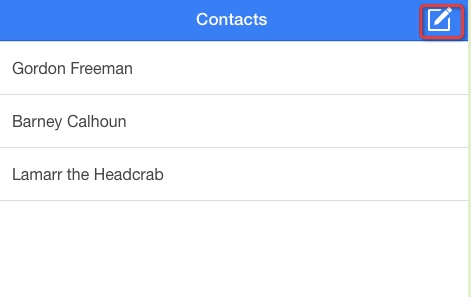
实例
HTML 代码
<html ng-app="ionicApp">

  <head>

    <meta charset="utf-8">

    <meta name="viewport" content="initial-scale=1, maximum-scale=1, user-scalable=no, width=device-width">

    <title>菜鸟教程(runoob.com)</title>

    <link href="http://www.runoob.com/static/ionic/css/ionic.min.css" rel="stylesheet">

    <script src="http://www.runoob.com/static/ionic/js/ionic.bundle.min.js"></script>

  </head>

  <body ng-controller="AppCtrl">

    <ion-header-bar class="bar-positive">

      <h1 class="title">Contacts</h1>

      <div class="buttons">

        <button class="button button-icon ion-compose" ng-click="modal.show()">

        </button>

      </div>

    </ion-header-bar>

    <ion-content>

      <ion-list>

        <ion-item ng-repeat="contact in contacts">

          {{contact.name}}

        </ion-item>

      </ion-list>

    </ion-content>

    <script id="templates/modal.html" type="text/ng-template">

      <ion-modal-view>

        <ion-header-bar class="bar bar-header bar-positive">

          <h1 class="title">New Contact</h1>

          <button class="button button-clear button-primary" ng-click="modal.hide()">Cancel</button>

        </ion-header-bar>

        <ion-content class="padding">

          <div class="list">

            <label class="item item-input">

              <span class="input-label">First Name</span>

              <input ng-model="newUser.firstName" type="text">

            </label>

            <label class="item item-input">

              <span class="input-label">Last Name</span>

              <input ng-model="newUser.lastName" type="text">

            </label>

            <label class="item item-input">

              <span class="input-label">Email</span>

              <input ng-model="newUser.email" type="text">

            </label>

            <button class="button button-full button-positive" ng-click="createContact(newUser)">Create</button>

          </div>

        </ion-content>

      </ion-modal-view>

    </script>

  </body>

</html>
CSS 代码
body {

  cursor: url('http://www.runoob.com/try/demo_source/finger.png'), auto;

}
JavaScript 代码
angular.module('ionicApp', ['ionic'])

.controller('AppCtrl', function($scope, $ionicModal) {

  $scope.contacts = [

    { name: 'Gordon Freeman' },

    { name: 'Barney Calhoun' },

    { name: 'Lamarr the Headcrab' },

  ];

  $ionicModal.fromTemplateUrl('templates/modal.html', {

    scope: $scope

  }).then(function(modal) {

    $scope.modal = modal;

  });

  $scope.createContact = function(u) {

    $scope.contacts.push({ name: u.firstName + ' ' + u.lastName });

    $scope.modal.hide();

  };

});


Ionic Js十一:模态的更多相关文章
- Ionic Js十:加载动作
$ionicLoading 是 ionic 默认的一个加载交互效果.里面的内容也是可以在模板里面修改. 用法 angular.module('LoadingApp', ['ionic']) .cont ...
- Ionic Js九:列表操作
列表是一个应用广泛在几乎所有移动app中的界面元素.ionList 和 ionItem 这两个指令还支持多种多样的交互模式,比如移除其中的某一项,拖动重新排序,滑动编辑等等. <ion-list ...
- ionic js ion-tabs选项卡栏操作
ionic 选项卡栏操作 ion-tabs ion-tabs 是有一组页面选项卡组成的选项卡栏.可以通过点击选项来切换页面. 对于 iOS,它会出现在屏幕的底部,Android会出现在屏幕的顶部(导航 ...
- ionic js 加载动画 ionSpinner 提供了许多种旋转加载的动画图标。当你的界面加载时,你就可以呈现给用户相应的加载图标。 该图标采用的是SVG
ionic 加载动画 ion-spinner ionSpinner 提供了许多种旋转加载的动画图标.当你的界面加载时,你就可以呈现给用户相应的加载图标. 该图标采用的是SVG. 用法 <ion- ...
- 使用异步js解决模态窗口切换的办法
核心代码 js ="setTimeout(function(){document.getElementsByTagName('Button')[3].click()},100);" ...
- Js实例——模态框弹出层
1.描述 百度登录就是一个模态框弹出层.思路分析:先将灰色大背景和登陆盒子设为不可见,利用JS将其动态加载可见. 2.代码 <!DOCTYPE html> <html> < ...
- JS中模态窗口(showModalDialog)的详细使用
基本介绍: showModalDialog() (IE + 支持) showModelessDialog() (IE + 支持) window.showModalDialog() 方法用来创建一个显示 ...
- ionic js 滑动框ion-slide-box 滑动框是一个包含多页容器的组件,每页滑动或拖动切换
ionic 滑动框 ion-slide-box 滑动框是一个包含多页容器的组件,每页滑动或拖动切换: 效果图如下: 用法 <ion-slide-box on-slide-changed=&quo ...
- ionic js 侧栏菜单 把主要内容区域从一边拖动到另一边,来让左侧或右侧的侧栏菜单进行切换
ionic 侧栏菜单 一个容器元素包含侧边菜单和主要内容.通过把主要内容区域从一边拖动到另一边,来让左侧或右侧的侧栏菜单进行切换. 效果图如下所示: 用法 要使用侧栏菜单,添加一个父元素<ion ...
随机推荐
- Machine Learning Trick of the Day (1): Replica Trick
Machine Learning Trick of the Day (1): Replica Trick 'Tricks' of all sorts are used throughout machi ...
- 安装python包时遇到"error: Microsoft Visual C++ 9.0 is required"的简答
简答 在Windows下用pip安装Scrapy报如下错误, error: Microsoft Visual C++ 9.0 is required (Unable to find vcvarsall ...
- python 压缩每周生成的数据文件
为了便于整理部分业务数据,以及存储管理, 写了此脚本.后期如果有需求,再改一下. #!/usr/bin/env python #coding:utf8 import os,sys,time,comma ...
- [整理]C中的静态存储区
静态存储区:即内存在程序编译的时候就已经分配好,这块内存在程序的整个运行期间都存在.它主要存放静态数据.全局数据和常量.栈区:在执行函数时,函数内局部变量的存储单元都可以在栈上创建,函数执行结束时这些 ...
- POJ 1240 Pre-Post-erous! && East Central North America 2002 (由前序后序遍历序列推出M叉树的种类)
题目链接 问题描述 : We are all familiar with pre-order, in-order and post-order traversals of binary trees. ...
- python作业堡垒机(第十三周)
作业需求: 1. 所有的用户操作日志要保留在数据库中 2. 每个用户登录堡垒机后,只需要选择具体要访问的设置,就连接上了,不需要再输入目标机器的访问密码 3. 允许用户对不同的目标设备有不同的访问权限 ...
- JavaScript中函数参数的值传递和引用传递
结论: 对于数字.字符串等基本类型变量,是将它们的值传递给了函数参数,函数参数的改变不会影响函数外部的变量. 对于数组和对象等是将对象(数组)的变量的值传递给了函数参数,这个变量保存的指向对象(数组) ...
- mysql只读模式的设置方法与实验【转】
在MySQL数据库中,在进行数据迁移和从库只读状态设置时,都会涉及到只读状态和Master-slave的设置和关系. 经过实际测试,对于MySQL单实例数据库和master库,如果需要设置为只读状态, ...
- HDU 6214 Smallest Minimum Cut 最小割,权值编码
题目链接:http://acm.hdu.edu.cn/showproblem.php?pid=6214 题意:求边数最小的割. 解法: 建边的时候每条边权 w = w * (E + 1) + 1; 这 ...
- php环境搭建 (window环境下 eclipse+Wampserver)
看了好多的环境搭建感觉好复杂呀,自己搞了一下简单的可以用了 php的手册 http://www.php.net/manual/zh/ 一,下载 1,下载eclipse http://www.ecl ...