
ExtJS基础知识总结:自定义日历和ComboBox控件(二)
概述
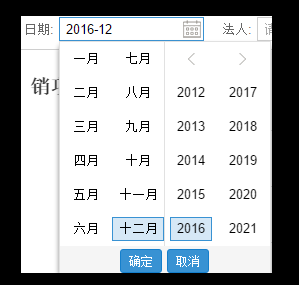
1、ExtJS 5不支持日期选择框中只选择年月,为了满足ExtJs5可以实现选择年月的功能,查询网上资料,整理出来了相应的处理方式,最终实现的效果如下图:
2、ExtJS 控件丰富,如果需要实现下拉列表控件ComboBox中含有Check样式的皮肤,只需要在ComboBox控件中监听相应的下拉事件和选择事件即可。实现的效果如下:

日历控显示年月的实现方式
1、编写ext-extendmonth.js,代码内容如下
Ext.define('Ext.form.field.Month', {

    extend: 'Ext.form.field.Date',

    alias: 'widget.monthfield',

    requires: ['Ext.picker.Month'],

    alternateClassName: ['Ext.form.MonthField', 'Ext.form.Month'],

    selectMonth: null,

    createPicker: function () {

        var me = this,

            format = Ext.String.format,

            pickerConfig;

        pickerConfig = {

            pickerField: me,

            ownerCmp: me,

            renderTo: document.body,

            floating: true,

            hidden: true,

            focusOnShow: true,

            minDate: me.minValue,

            maxDate: me.maxValue,

            disabledDatesRE: me.disabledDatesRE,

            disabledDatesText: me.disabledDatesText,

            disabledDays: me.disabledDays,

            disabledDaysText: me.disabledDaysText,

            format: me.format,

            showToday: me.showToday,

            startDay: me.startDay,

            minText: format(me.minText, me.formatDate(me.minValue)),

            maxText: format(me.maxText, me.formatDate(me.maxValue)),

            listeners: {

                select: { scope: me, fn: me.onSelect },

                monthdblclick: { scope: me, fn: me.onOKClick },

                yeardblclick: { scope: me, fn: me.onOKClick },

                OkClick: { scope: me, fn: me.onOKClick },

                CancelClick: { scope: me, fn: me.onCancelClick }

            },

            keyNavConfig: {

                esc: function () {

                    me.collapse();

                }

            }

        };

        if (Ext.isChrome) {

            me.originalCollapse = me.collapse;

            pickerConfig.listeners.boxready = {

                fn: function () {

                    this.picker.el.on({

                        mousedown: function () {

                            this.collapse = Ext.emptyFn;

                        },

                        mouseup: function () {

                            this.collapse = this.originalCollapse;

                        },

                        scope: this

                    });

                },

                scope: me,

                single: true

            }

        }

        return Ext.create('Ext.picker.Month', pickerConfig);

    },

    onCancelClick: function () {

        var me = this;

        me.selectMonth = null;

        me.collapse();

    },

    onOKClick: function () {

        var me = this;

        if (me.selectMonth) {

            me.setValue(me.selectMonth);

            me.fireEvent('select', me, me.selectMonth);

        }

        me.collapse();

    },

    onSelect: function (m, d) {

        var me = this;

        me.selectMonth = new Date((d[] + ) + '/1/' + d[]);

    }

});
2、引入ext-extendmonth.js以及修改预显示控件 xtype: 'monthfield' 属性值
    //头部菜单栏

    var proctoolbarText = Ext.create('Ext.toolbar.Toolbar', {

        renderTo: 'ReportData',

        items: [{

            xtype: 'monthfield',

            id: 'CountData',

            width: ,

            labelWidth: ,

            format: 'Y-m',

            fieldLabel: '日期',

            emptyText: '请输入开始时间',

            editable: false,        //不可编辑

            value: Ext.get("countDate").getValue()

        }]});
下拉列表控件ComboBox中含有Check实现
1、自定义JS控件Checktool
var Checktool=Ext.create('Ext.form.field.ComboBox',{

    name : 'cmb',

    fieldLabel : '人员',

    margin:'2 0 2 0',

    labelWidth : ,

    labelAlign : 'right',

    editable : false,

    allowBlank : false,

    multiSelect : true,

    store : {

        fields : ['personId', 'personName'],

        data : [

            {'personId':'',personName:'张三'},

            {'personId':'',personName:'李四'},

            {'personId':'',personName:'王五'},

            {'personId':'',personName:'小名'}

        ]

    },

    listConfig : {

        itemTpl : Ext.create('Ext.XTemplate','<input type=checkbox>{[values.personName]}'),

        onItemSelect : function(record) {

            var node = this.getNode(record);

            if (node) {

                Ext.fly(node).addCls(this.selectedItemCls);

                var checkboxs = node.getElementsByTagName("input");

                if (checkboxs != null)

                    var checkbox = checkboxs[];

                checkbox.checked = true;

            }

        },

        listeners : {

            itemclick : function(view, record, item, index, e, eOpts) {

                var isSelected = view.isSelected(item);

                var checkboxs = item.getElementsByTagName("input");

                if (checkboxs != null) {

                    var checkbox = checkboxs[];

                    if (!isSelected) {

                        checkbox.checked = true;

                    } else {

                        checkbox.checked = false;

                    }

                }

            }

        }

    },

    queryMode : 'local',

    displayField : 'personName',

    valueField : 'personId',

});
2、ExtJS引用控件即可
//头部菜单栏

    var proctoolbarText = Ext.create('Ext.toolbar.Toolbar', {

        renderTo: 'ReportData',

        items: [

        Checktool

        ]});
下拉列表控件ComboBox设置默认值
comboBox可以通过setValue设置值,但是准对Store后台返回Json的时候,通过Ext.getCmp('CategoryCode').SetValue('000983')设置相应的值时候,展示到页面的内容是空的,也就是说这样的设置默认值是无效的?比如下面这段代码:
{

xtype: "combobox",

store: Ext.create('Ext.data.Store', {

    fields: ["CategoryCode", "Id"]

    autoLoad: false,

    proxy: {

    type: 'ajax',

    url: '/ProductManagement/GetTaxProfitList',

    reader: {

        type: 'json',

        rootProperty: 'Data',

        totalProperty: 'TotalCount'

        }

    }

}),

displayField: "CategoryCode",// ,   //显示出来的是name

valueField: "Id",       //值是id

fieldLabel: "税收分类编码",     //label

editable: true,        //不可编辑

id: "CategoryCode",           //id

hiddenvalue: ,

labelWidth: ,

//allowBlank: isAllow,

width: ,

minChars:

}
针对这种情况,我们可以通过修改如下代码处理:
{

xtype: "combobox",

store: Ext.create('Ext.data.Store', {

    fields: ["CategoryCode", "Id"]

    autoLoad: false,

    proxy: {

    type: 'ajax',

    url: '/ProductManagement/GetTaxProfitList',

    reader: {

        type: 'json',

        rootProperty: 'Data',

        totalProperty: 'TotalCount'

        }

    }

}),

displayField: "CategoryCode",

valueField: "CategoryCode",

fieldLabel: "税收分类编码",     //label

editable: true,        //不可编辑

id: "CategoryCode",           //id

hiddenvalue: ,

labelWidth: ,

width: ,

minChars:

}
也就是说,将ComboBoxdisplayFiled和valueFile设置成同一个值;这个仅仅是结果内容是单个值的情况,如果是实体对象,另当别论;PS:ComboBox指定非自动加载数据的Store之后,通过点击下拉列表的时候,该Store会自动Load后台数据的;
ExtJS基础知识总结:自定义日历和ComboBox控件(二)的更多相关文章
- PyQt5 基础知识(六):展示控件
目录 3. 展示控件 3.1 QLabel 3.1.1 描述 3.1.2 功能作用 3.1.2.1 基本功能 3.1.2.2 文本交互 3.1.2.3 内容操作 3.1.2.3.1 文本字符串 3.1 ...
- 用ActiveX 创建自己的comboBox 控件(二)
3.0 添加事件 3.1 添加OnSelChange 事件 当用户选中列表项的时候触发该事件.(不只是选择改变时触发,本次选择和上次相同时也触发): 添加完成后,在ActivexcomboBox.id ...
- C#自定义泛型类绑定ComboBox控件
C# WinForm ComboBox 自定义数据项 (ComboBoxItem ) WinForm下的ComboBox默认是以多行文本来设定显示列表的, 这通常不符合大家日常的应用, 因为大家日常应 ...
- Android学习之基础知识五—Android常用的七大控件
一.TextView控件:在界面上显示一段文本信息 先看XML代码和执行效果: 代码分析: 1.android:id属性,给当前控件定义了一个唯一的标识符 2.android:layo ...
- 实现带查询功能的ComboBox控件
实现效果: 知识运用: ComboBox控件的AutoCompleteMode属性 public AutoCompleteMode AutoCompleteMode{get;set;} //属性值为枚 ...
- 用ComboBox控件制作浏览器网址输入框
实现效果: 知识运用: ComboBox控件的FindString public int FindString(string s) //查找数据项集合中指定数据项的索引 和Select方法 publi ...
- 将数据表中的数据添加到ComboBox控件中
实现效果: 知识运用: ComboBox控件的DataSource 属性 //获取或设置ComboBox的数据源 public Object DataResouce{get;set;} //属性值:任 ...
- C#中combobox 控件属性、事件、方法
一 .combobox 属性.事件.方法公共属性 名称 说明 AccessibilityObject 获取分配给该控件的 AccessibleObject. AccessibleDefaultActi ...
- 获取 AlertDialog自定义的布局 的控件
AlertDialog自定义的布局 效果图: 创建dialog方法的代码如下: 1 LayoutInflater inflater = getLayoutInflater(); 2 View layo ...
随机推荐
- MongoDB【第一篇】MongodDB初识
NoSQL介绍 一.NoSQL简介 NoSQL,全称是”Not Only Sql”,指的是非关系型的数据库. 非关系型数据库主要有这些特点:非关系型的.分布式的.开源的.水平可扩展的. 原始的目的是为 ...
- 查看npm全局安装的模块
1.查看所有高级的npm moudles npm list --depth= 2.查看所有全局安装的模块 npm list --depth= -global
- linux 远程连接工具——MTPuTTY
简介 MTPUTTY是一个非常流行的ssh客户端. 安装 官网地址:http://www.ttyplus.com/multi-tabbed-putty/ 下载并安装,运行软件,如图 添加服务器 结语 ...
- JPA入门
JPA是什么 JPA全称Java Persistence API,是一组用于将数据存入数据库的类和方法的集合.JPA通过JDK 5.0注解或XML描述对象-关系表的映射关系,并将运行期的实体对象持久化 ...
- REDHAT一总复习1 禁用颜色
使用man page 研究如何在输出中禁用颜色.将ls命令的相关选项放到server上的文本文件 /home/student/lscolor.txt中. 1. 在ls(l) man page中查询相关 ...
- 07-本地 YUM 源制作
1.YUM相关概念 1.1.什么是YUM YUM(全称为 Yellow dog Updater, Modified)是一个在Fedora和RedHat以及CentOS中的Shell前端软件包管理器.基 ...
- 查找Linux中内存和CPU使用率最高的进程
下面的命令会查看到按照RAM和CPU降序方式的前最高几名进程的列表: [root@iZ25pvjcsyhZ ~]# ps -eo pid,ppid,cmd,%mem,%cpu --sort=-%mem ...
- springmvc.xml的基本配置
<beans xmlns="http://www.springframework.org/schema/beans" xmlns:xsi="http://www.w ...
- BZOJ 2086: [Poi2010]Blocks
Description 每次可以将大于 \(k\) 的一个数 \(-1\), 在左边或右边的数 \(+1\) ,问最大能得到多长的序列每个数都大于等于 \(k\) . Sol 单调栈. 这道题好神啊q ...
- java 保留字符串数字的位数,不够前面补0
@Test public void test() { this.printToConsole(autoGenericCode("10011")); this.printToCons ...