
scala操作HBase2.0
在前面:
scala:2.12
hbase:2.0.2
开发工具:IDEA
准备工作:
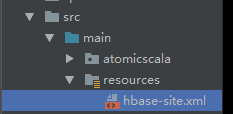
1、将生产上的hbase中的conf/hbase-site.xml文件拷贝到idea中的src/resources目录下
2、将生产环境中hbase中的$HBASE_HOME/lib下的*.jar文件加载到IDEA中

3、点击libraries->中间的"+" ->java
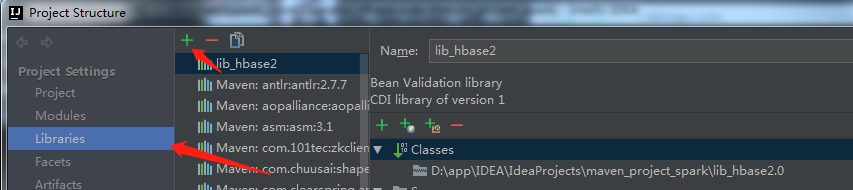
4、选择jar包所放的位置,点击OK
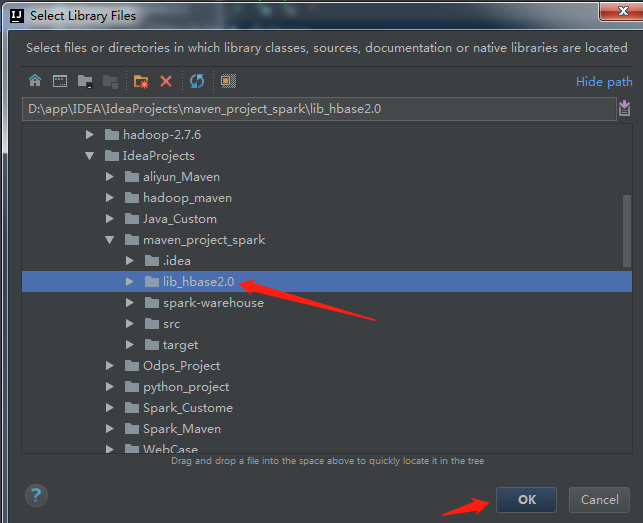
5、继续点击ok即可
6、进行连接代码编写:
package spark._core

import java.io.IOException

import java.util.UUID

import org.apache.hadoop.conf.Configuration

import org.apache.hadoop.hbase.client._

import org.apache.hadoop.hbase._

import org.apache.hadoop.hbase.filter.CompareFilter.CompareOp

import org.apache.hadoop.hbase.filter.SingleColumnValueFilter

import org.apache.hadoop.hbase.filter.SubstringComparator

import org.apache.hadoop.hbase.util.Bytes

import parquet.org.slf4j.LoggerFactory

/**

  * Author Mr. Guo

  * Create 2018/11/5 - 19:08

  */

object Operator_Hbase {

  def LOG = LoggerFactory.getLogger(getClass)

  def getHbaseConf: Configuration = {

    val conf: Configuration = HBaseConfiguration.create

    conf.addResource(".\\main\\resources\\hbase-site.xml")

    conf.set("hbase.zookeeper.property.clientPort","2181")

    /*conf.set("spark.executor.memory","3000m")

    conf.set("hbase.zookeeper.quorum","master,slave1,slave2")

    conf.set("hbase.master","master:60000")

    conf.set("hbase.rootdir","Contant.HBASE_ROOTDIR")*/

    conf

  }

  //创建一张表

  @throws(classOf[MasterNotRunningException])

  @throws(classOf[ZooKeeperConnectionException])

  @throws(classOf[IOException])

  def createTable(hbaseconn: Connection, tableName: String, columnFamilys: Array[String]) = {

    //建立一个数据库操作对象

    var admin: Admin = hbaseconn.getAdmin;

    var myTableName: TableName = TableName.valueOf(tableName)

    if (admin.tableExists(myTableName)) {

      LOG.info(tableName + "Table exists!")

    } else {

      val tableDesc: HTableDescriptor = new HTableDescriptor(myTableName)

      tableDesc.addCoprocessor("org.apache.hadoop.hbase.coprocessor.AggregateImplementation")

      for (columnFamily <- columnFamilys) {

        val columnDesc: HColumnDescriptor = new HColumnDescriptor(columnFamily)

        tableDesc.addFamily(columnDesc)

      }

      admin.createTable(tableDesc)

      LOG.info(tableName + "create table success!")

    }

    admin.close()

  }

  //载入数据

  def addRow(table: Table, rowKey: String, columnFamily: String, quorm: String, value: String) = {

    val rowPut: Put = new Put(Bytes.toBytes(rowKey))

    if (value == null) {

      rowPut.addColumn(columnFamily.getBytes, quorm.getBytes, "".getBytes())

    } else {

      rowPut.addColumn(columnFamily.getBytes, quorm.getBytes, value.getBytes)

    }

    table.put(rowPut)

  }

  //获取数据

  def getRow(table: Table, rowKey: String): Result = {

    val get: Get = new Get(Bytes.toBytes(rowKey))

    val result: Result = table.get(get)

    for (rowKv <- result.rawCells()) {

      println("Famiily:" + new String(rowKv.getFamilyArray, rowKv.getFamilyOffset, rowKv.getFamilyLength, "UTF-8"))

      println("Qualifier:" + new String(rowKv.getQualifierArray, rowKv.getQualifierOffset, rowKv.getQualifierLength, "UTF-8"))

      println("TimeStamp:" + rowKv.getTimestamp)

      println("rowkey:" + new String(rowKv.getRowArray, rowKv.getRowOffset, rowKv.getRowLength, "UTF-8"))

      println("Value:" + new String(rowKv.getValueArray, rowKv.getValueOffset, rowKv.getValueLength, "UTF-8"))

    }

    return result

  }

  //批量添加数据

  def addDataBatch(table: Table, list: java.util.List[Put]) = {

    try {

      table.put(list)

    } catch {

      case e: RetriesExhaustedWithDetailsException => {

        LOG.error(e.getMessage)

      }

      case e: IOException => {

        LOG.error(e.getMessage)

      }

    }

  }

  //查询全部

  def queryAll(table: Table): ResultScanner = {

    val scan: Scan = new Scan

    try {

      val s = new Scan()

      val result: ResultScanner = table.getScanner(s)

      return result

    } catch {

      case e: IOException => {

        LOG.error(e.toString)

      }

    }

    return null

  }

  //查询条记录

  def queryBySingleColumn(table: Table, queryColumn: String, value: String, columns: Array[String]): ResultScanner = {

    if (columns == null || queryColumn == null || value == null) {

      return null

    }

    try {

      val filter: SingleColumnValueFilter = new SingleColumnValueFilter(Bytes.toBytes(queryColumn),

        Bytes.toBytes(queryColumn),CompareOp.EQUAL,new SubstringComparator(value))

      val scan: Scan = new Scan()

      for (columnName <- columns) {

        scan.addColumn(Bytes.toBytes(columnName), Bytes.toBytes(columnName))

      }

      scan.setFilter(filter)

      return table.getScanner(scan)

    } catch {

      case e: Exception => {

        LOG.error(e.toString)

      }

    }

    return null

  }

  //删除表

  def dropTable(hbaseconn: Connection, tableName: String) = {

    try {

      val admin: HBaseAdmin = hbaseconn.getAdmin.asInstanceOf[HBaseAdmin]

      admin.disableTable(TableName.valueOf(tableName))

      admin.deleteTable(TableName.valueOf(tableName))

    } catch {

      case e: MasterNotRunningException => {

        LOG.error(e.toString)

      }

      case e: ZooKeeperConnectionException => {

        LOG.error(e.toString)

      }

      case e: IOException => {

        LOG.error(e.toString)

      }

    }

  }

  def main(args: Array[String]): Unit = {

    val conf: Configuration = getHbaseConf

    val conn = ConnectionFactory.createConnection(conf)

    //定义表名称

    val table:Table = conn.getTable(TableName.valueOf("test"))

    try {

      //列族fam1,fam2

      val familyColumn:Array[String] = Array[String]("info1","info2")

      //建表

//      createTable(conn,"test",familyColumn)

      val uuid:UUID = UUID.randomUUID()

      val s_uuid:String = uuid.toString

      //载入数据

//      addRow(table,s_uuid,"info","column1A",s_uuid+"_1A")

      //获取表中所有数据

//      getRow(table,"9ec78ac4-6042-4c34-8862-f5aca3e")

      //删除表

//     dropTable(conn,"test")

    }catch{

      case e:Exception => {

        if (e.getClass == classOf[MasterNotRunningException]){

          System.out.println("MasterNotRunningException")

        }

        if (e.getClass == classOf[ZooKeeperConnectionException]){

          System.out.println("ZooKeeperConnectionException")

        }

        if (e.getClass == classOf[IOException]){

          System.out.println("IOException")

        }

        e.printStackTrace()

      }

    }finally{

      if (null != table){

        table.close()

      }

    }

  }

}
7、实际操作的过程中可能会遇到如下问题:

解决方案:
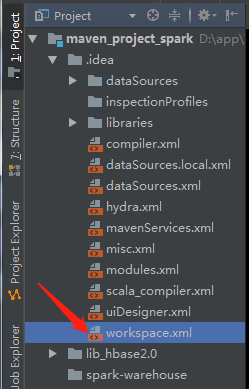
双击打开该文件,找到标签 <component name="PropertiesComponent"> , 在标签里加一行 <property name="dynamic.classpath" value="true" />

保存即可
scala操作HBase2.0的更多相关文章
- Scala操作Hbase空指针异常java.lang.NullPointerException处理
Hbase版本:Hortonworks Hbase 1.1.2 问题描述:使用Scala操作Hbase时,发生空指针异常(java.lang.RuntimeException: java.lang.N ...
- HBase2.0中的Benchmark工具 — PerformanceEvaluation
简介 在项目开发过程中,我们经常需要一些benchmark工具来对系统进行压测,以获得系统的性能参数,极限吞吐等等指标. 而在HBase中,就自带了一个benchmark工具—PerformanceE ...
- HBase2.0新特性解析
作者 | 个推大数据运维工程师 行者 升级背景 个推作为专业的数据智能服务商,在业务开展过程中存在海量的数据存储与查询的需求,为此个推选用了高可靠.高性能.面向列.可伸缩的分布式数据存储系统--HBa ...
- geotrellis使用(五)使用scala操作Accumulo
要想搞明白Geotrellis的数据处理情况,首先要弄清楚数据的存放,Geotrellis将数据存放在Accumulo中. Accumulo是一个分布式的Key Value型NOSQL数据库,官网为( ...
- Hbase-2.0.0_01_安装部署
该文章是基于 Hadoop2.7.6_01_部署 进行的 1. 主机规划 主机名称 IP信息 内网IP 操作系统 安装软件 备注:运行程序 mini01 10.0.0.11 172.16.1.11 C ...
- 基于Hadoop2.6.5(HA)的HBase2.0.5配置
1.配置 在CentOS7Three上配置,注意:一定要安装bin包,不能安装src包 /usr/local/hbase/hbase-2.0.5/conf 编辑hbase-env.sh,替换成如下配置 ...
- hbase2.0.0-安装部署
依赖hadoop 环境,我这边的版本是hadoop-2.6.5 选择hbase2.0.0版本的时候,去官网查看支持的hadoop版本 1.伪分布式安装 下载:http://mirror.bit.edu ...
- Scala操作MongoDB
Scala操作MongoDB // Maven <dependencies> <dependency> <groupId>org.mongodb</group ...
- [转] Scala 2.10.0 新特性之字符串插值
[From] https://unmi.cc/scala-2-10-0-feature-string-interpolation/ Scala 2.10.0 新特性之字符串插值 2013-01-20 ...
随机推荐
- 与HTTP关系密切的三个协议:IP,TCP,DNS
IP(网际协议): 位于网络层 通常易混淆的是“IP”和“IP地址”,单独讲“IP”是指一种协议名称 IP协议的作用是将各种数据包传送给对方.而要保证确实传送到对方那里,则需要满足各类条件. 其中两个 ...
- Fiddler (进阶)内置命令与断点
Fiddler 内置命令与断点 命令 对应请求项 介绍 示例 ? All 问号后边跟一个字符串,可以匹配出包含这个字符串的请求 ?google > Body 大于号后面跟一个数字,可以匹配出请求 ...
- MySQL 误操作后数据恢复(update,delete忘加where条件)
在数据库日常维护中,开发人员是最让人头痛的,很多时候都会由于SQL语句写的有问题导致服务器出问题,导致资源耗尽.最危险的操作就是在做DML操作的时候忘加where条件,导致全表更新,这是作为运维或者D ...
- java框架之SpringBoot(6)-Restful风格的CRUD示例
准备 环境 IDE:Idea SpringBoot版本:1.5.19 UI:BootStrap 4 模板引擎:thymeleaf 3 效果:Restful 风格 CRUD 功能的 Demo 依赖 &l ...
- python基础之 编码进阶,文件操作和深浅copy
1.编码的进阶 字符串在Python内部的表示是unicode编码,因此,在做编码转换时,通常需要以unicode作为中间编码.即先将其他编码的字符串解码(decode)成unicode,再从unic ...
- MySql使用存储过程清除数据库所有表数据,保存数据结构
BEGIN DECLARE strClear VARCHAR(256); DECLARE done INT DEFAULT 0; #定义游标 DECLARE curOne CURSOR FOR sel ...
- iscroll4升级到iscroll5全攻略笔记
前段时间在搞移动终端(移动web)的项目,其中需要用到滚动的功能(html的滚动效果不好,且在低版本上不支持).后面上网找了下资料,发现大部分人都在用iscroll4(下面简称v4),下载下来试了下确 ...
- Zookeeper 3.5启动时 8080端口被占用
今天闲来无事,学习Zookeeper,下载了Zookeeper的最新版本3.5.启动以后显示: ZooKeeper JMX enabled by default Using config: /opt/ ...
- html5 javascript 新增加的高级选择器更精准更实用
<!DOCTYPE html><html lang="en"><head> <meta charset="UTF-8&qu ...
- centos7.5 修改网卡名称
1.修改网卡配置文件中名称信息 vim /etc/sysconfig/network-scripts/ifcfg-ens33 将其中的名称为ens33的改为eth0 ,并将uuid删除以便后面克隆 2 ...