
SpringBoot(十):读取application.yml下配置参数信息,java -jar启动时项目修改参数
读取application.yml下配置参数信息
在application.yml文件内容
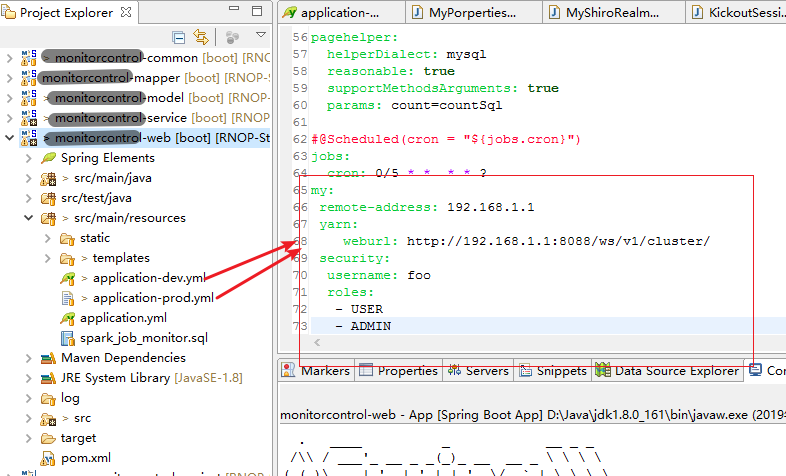
my:

 remote-address: 192.168.1.1

 yarn:

    weburl: http://192.168.1.1:8088/ws/v1/cluster/

 security:

  username: foo

  roles:

   - USER

   - ADMIN
创建FooProperties.java文件,并使用@ConfigurationProperties注解
@Component

@ConfigurationProperties(prefix = "my")

public class MyPorperties {

    private final Yarn yarn = new Yarn();

    private InetAddress remoteAddress;

    private final Security security = new Security();

    public InetAddress getRemoteAddress() {

        return remoteAddress;

    }

    public void setRemoteAddress(InetAddress remoteAddress) {

        this.remoteAddress = remoteAddress;

    }

    public Security getSecurity() {

        return security;

    }

    public Yarn getYarn() {

        return yarn;

    }

    public static class Security {

        private String userName;

        private List<String> roles = new ArrayList<>(Collections.singleton("USER"));

        public String getUserName() {

            return userName;

        }

        public void setUserName(String userName) {

            this.userName = userName;

        }

        public List<String> getRoles() {

            return roles;

        }

        public void setRoles(List<String> roles) {

            this.roles = roles;

        }

        @Override

        public String toString() {

            return "Security{" + "userName='" + userName + '\'' + ", roles=" + roles + '}';

        }

    }

    public static class Yarn {

        private String webUrl;

        public String getWebUrl() {

            return webUrl;

        }

        public void setWebUrl(String webUrl) {

            this.webUrl = webUrl;

        }

        @Override

        public String toString() {

            return "Yarn [webUrl=" + webUrl + "]";

        }

    }

}
调用
@RestController

public class TestController {

    @Autowired

    private MyPorperties my;

    @RequestMapping("/myProperties")

    public Map<String, Object> getFooProperties() {

        Map<String, Object> map = new HashMap<>();

        map.put("remote-address", my.getRemoteAddress());

        map.put("security", my.getSecurity().toString());

        map.put("yarn", my.getYarn().toString());

        return map;

    }

}
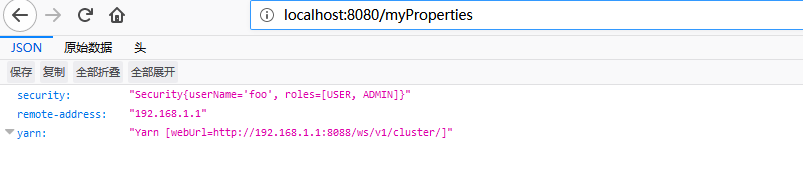
测试
访问:http://localhost:8080/myProperties
参考《https://blog.csdn.net/u013887008/article/details/79368173》
java -jar启动时项目修改参数
项目已经发布,在启动时可以通过传递参数修改启动参数:
 java -jar \
-Dspring.profiles.active=prod \
-Dserver.port=8080 \
my-web-1.0.0-SNAPSHOT.jar
或者可以吧整个application.yml文件放在jar外边,启动时指定文件路径:
java -jar demo.jar --Dspring.config.location=路径(application.yml)
SpringBoot(十):读取application.yml下配置参数信息,java -jar启动时项目修改参数的更多相关文章
- springboot:读取application.yml文件
现在开发主要使用微服务框架springboot,在springboot中经常遇到读取application.yml文件的情形. 一.概述 开发过程中经常遇到要读取application.yml文件中的 ...
- docker-compose如何动态配置springboot项目的application.yml的配置
假如我们再springboot的工程中有配置文件 方式1: application.properties里面存在环境变量: #配置数据库链接 spring.datasource.url = jdbc: ...
- omcat配置多域名站点启动时项目重复加载多次
在tomcat中配置多个Host的时候, 出现项目重复启动多次的情况. 刚开始以为是spring boot发布项目的时候自带了一个tomcat引起的, 后来发现不是 参考了这两篇文章, 解决问题 ht ...
- SpringBoot在logback.xml中读取application.properties中配置的日志路径
1.在springboot项目中使用logback记录日志,在logback.xml中配置日志存储位置时读取application.properties中配置的路径,在 logback.xml中配置引 ...
- 不错的linux下通用的java程序启动脚本
不错的linux下通用的java程序启动脚本(转载) 虽然写起动shell的频率非常不高...但是每次要写都要对付一大堆的jar文件路径,新加jar包也必须要修改起动shell. 在网上找到一个挺好的 ...
- SpringBoot中application.yml基本配置详情
把原有的application.properties删掉.然后 maven -X clean install,或者通过Maven Project双击clean和install(1)端口服务配置 #端口 ...
- SpringBoot application.yml logback.xml,多环境配置,支持 java -jar --spring.profiles.active
趁今天有时间整理了一下 启动命令为 //开发环境 java -jar app.jar --spring.profiles.active=dev--server.port=8060 //测试环境 jav ...
- SpringBoot application.yml logback.xml,多环境配置,支持 java -jar --spring.profiles.active(转)
趁今天有时间整理了一下 启动命令为 //开发环境 java -jar app.jar --spring.profiles.active=dev--server.port=8060 //测试环境 jav ...
- SpringBoot(二) SpringBoot核心配置文件application.yml/properties
我们都知道在Spring中有着application.xml文件对Spring进行相关配置,通过web.xml中的contextConfigLocation指定application.xml文件所在位 ...
随机推荐
- 使用element-ui的常见问题
给组件绑定的事件为什么无法触发? 在 Vue 2.0 中,为自定义组件绑定原生事件必须使用 .native 修饰符: <my-component @click.native="han ...
- oracle左连接连表查询
要想把该表的数据全部查出来,必须select中出现该表的字段. SELECT distinct a.ZGSWSKFJ_DM,b.ZGSWJ_DM,b.SSGLY_DM,b.NSRSBH,b.NSRMC ...
- centos6.9安装mysql5.7.18
详细记录在CentOS 6.9上安装MySQL 5.7.18 过程,希望对大家有所帮助. 下载地址:https://dev.mysql.com/get/Downloads/MySQL-5.7/mysq ...
- 问题 C: Frosh Week(2018组队训练赛第十五场)(签到)
问题 C: Frosh Week 时间限制: 4 Sec 内存限制: 128 MB提交: 145 解决: 63[提交][状态][讨论版][命题人:admin] 题目描述 Professor Zac ...
- 牛客练习赛28B (经典)【线段树】
<题目链接> qn姐姐最好了~ qn姐姐给你了一个长度为n的序列还有m次操作让你玩, 1 l r 询问区间[l,r]内的元素和 2 l r 询问区间[l,r]内的元 ...
- poj 3685 Matrix 【二分】
<题目链接> 题目大意: 给你一个n*n的矩阵,这个矩阵中的每个点的数值由 i2 + 100000 × i + j2 - 100000 × j + i × j 这个公式计算得到,N( ...
- How to check for null/empty/whitespace values with a single test?
SELECT column_name FROM table_name WHERE TRIM(column_name) IS NULL
- maven仓库设置
Maven 中央仓库地址: 1.http://www.sonatype.org/nexus/ 私服nexus工具使用 2.http://mvnrepository.com/ 3.http://repo ...
- 虚幻开放日2017ppt
虚幻开放日2017ppthttp://pan.baidu.com/s/1c1SbcKK 如果挂了QQ+378100977 call我
- 2017-9-8-RaspberryPi安装过程
设备: RaspberryPi 3B 安装版本: 2017-01-11-raspbian-jessie.img 第一步:准备好8G以上tf卡.Win32DiskImager.SD Formatter. ...