
vuex教程,vuex使用介绍案例
1.demopageaction:
import Vue from "vue";

import Store from "../../store.js";

import { apiGET, apiPOST } from "../../../utils/ajax.js";

import * as mtypes from '../../constants/mutation-types';

import * as rmtypes from "../../constants/request-types.js";

import * as utypes from "../../constants/url-types.js";

import isEmpty from "lodash/isEmpty";

import qs from "qs";

import { emptyPage } from "../../../utils/help.js"

export function getAgentsListData({

	commit

}, params) {

	apiGET(utypes.GET_AGENTS_LIST_DATA+params, rmtypes.GET_AGENTS_LIST_DATA, (res) => {

		commit(mtypes.SET_AGENTS_LIST_DATA, res);

	},emptyPage)

}

export function getAgentDetail({

	commit

}, params) {

	if (!isEmpty(Store.state.agentsModule.agentDetailAll[params])) {  //这里判断store中是否有数据,有的话就不在请求了

		commit(mtypes.SET_AGENT_SAVED_DETAIL, params);

		return;

	}

	apiGET(utypes.GET_AGENT_DETAIL_INFO+params, rmtypes.GET_AGENT_DETAIL_INFO, (res) => {  //我们可以在action中请求数据,然后commit给store

		commit(mtypes.SET_AGENT_DETAIL_INFO, {res:res,id:params});

	},emptyPage)

}

export function initAgentDetail({  //基本上action就是这样子,通过commit来改变store中的数据

	commit

}, params) {

	commit(mtypes.SET_AGENT_INIT_DETAIL,'')

}
2.actions集合:
import { setReqState } from "./request/index.js"

import {setTipMsg} from "./stateTip/index.js"

import {getDomainListData,getDomainItemMore,getQrcode,initQrcode} from "./domainList/index.js"

import {getAgentsListData,getAgentDetail,initAgentDetail} from "./agents/index.js"

import {postTradeDomain,postSellDomain,postTellUsNews} from "./form/index.js"

export default {

    setReqState,

    setTipMsg,

    getDomainListData,

    getDomainItemMore,

    initAgentDetail,

    getQrcode,

    initQrcode,

    getAgentsListData,

    getAgentDetail,

    postTellUsNews,

    postTradeDomain,

    postSellDomain,    //本人把分开的action这样集合在一起

};
3.vuex启动action:
import Vue from 'vue'

import Vuex from 'vuex'

import actions from './actions/index'

console.log(actions, 'actions=============')

// modules 模块分类

import request from "./modules/request/index.js"

import stateTip from "./modules/stateTip/index.js"

import domainListModule from "./modules/domainList/index.js"

import agentsModule from "./modules/agents/index.js"

import formModule from "./modules/form/index.js"

Vue.use(Vuex)

Vue.config.debug = true

const debug = process.env.NODE_ENV !== 'production'

export default new Vuex.Store({

	strict: debug,

	actions,  //第2步中集合的action就在这里启动

	modules: {

		request,

		stateTip,

		domainListModule,

		agentsModule,

		formModule

	}

})
4.接下来是个别的store:
import * as types from '../../constants/mutation-types.js'

import Vue from "vue"

import Store from "../../store.js";

const state = {

	agentsListData: null,

	agentDetailAll: {},

	agentDetailInfo: null,

	sucCase: []

}

const mutations = {

	[types.SET_AGENTS_LIST_DATA](state, data) {  //store主要是来存储action发送的数据,然后再给view读取

		state.agentsListData = data;

	},

	[types.SET_AGENT_DETAIL_INFO](state, data) {

		state.agentDetailAll[data.id] = data.res;

		state.agentDetailInfo = data.res;

		state.sucCase = state.agentDetailInfo.AgentSucCase.split(',');

		console.log(state.sucCase,"succase")

	},

	[types.SET_AGENT_SAVED_DETAIL](state, id) {

		state.agentDetailInfo = state.agentDetailAll[id];

		state.sucCase = state.agentDetailInfo.AgentSucCase.split(',');

	},

	[types.SET_AGENT_INIT_DETAIL](state, data) {

		state.agentDetailInfo = null;

	},

}

const getters = {

};

export default {

	state,

	mutations,

	getters

}
5.集合store,启动store:
import Vue from 'vue'

import Vuex from 'vuex'

import actions from './actions/index'

console.log(actions, 'actions=============')

// modules 模块分类

import request from "./modules/request/index.js" //导入每个独立的store

import stateTip from "./modules/stateTip/index.js"

import domainListModule from "./modules/domainList/index.js"

import agentsModule from "./modules/agents/index.js"

import formModule from "./modules/form/index.js"

Vue.use(Vuex)

Vue.config.debug = true

const debug = process.env.NODE_ENV !== 'production'

export default new Vuex.Store({

	strict: debug,

	actions,

	modules: {

		request, //这里启动每个独立的store

		stateTip,

		domainListModule,

		agentsModule,

		formModule

	}

})
总结:上面几部基本上就是一个vuex的使用流程了。
接下来我们看下view中的引入:
<template>

	<div class="bg">

		<Loading v-if="reqState.GET_AGENTS_LIST_DATA"></Loading>

		<div class="list-box" v-else>

			<div class="agent" v-for="(item,index) in agentsListData">

				<router-link :to="{name:'agentdetail',query:{id:item.AgentId},params:{sex:sex}}" class="flex">

					<div class="port-box">

						<img v-if="item.AgentIsChampion==1" src="../../assets/images/huangguan.png" width="20" height="21" class="crown" />

						<div class="port-img" :class="item.AgentIsChampion==1?'port-crown':''"><img width="70px" :src="item.AgentAvatar" /></div>

						<div class="port-name"><span class="ng-binding">{{item.AgentNick}}</span></div>

					</div>

					<div class="agent-info flex1">

						<div class="wx flex">

							<i class="icon"></i>

							<div class="title-info flex1">

								<p class="name">{{item.AgentWeixin}}</p>

								<p class="tit">微信</p>

							</div>

						</div>

						<div class="ph flex">

							<i class="icon"></i>

							<div class="title-info flex1">

								<p class="name"><a href="">{{item.AgentTel}}</a></p>

								<p class="tit">手机</p>

							</div>

						</div>

					</div>

				</router-link>

			</div>

		</div>

	</div>

</template>

<script>

import { mapActions, mapState } from "vuex"

import isEmpty from "lodash/isEmpty";

export default {

	data() {

		return {

			sex: 0 //0代表女

		}

	},

	mounted: function() {

		let that = this;

		if (this.$route.name == "agentsboy") {

			this.sex = 1;

			if (!isEmpty(that.agentsListData)) return;

			this.getAgentsListData(1)  //触发导入的action的名称

		} else {

			this.sex = 2;

			if (!isEmpty(that.agentsListData)) return;

			this.getAgentsListData(2)

		}

	},

	methods: {

		...mapActions([  //这里读取vuex的action,引入需要的action

			'getAgentsListData',

		]),

	},

	computed: {

		...mapState({   //这里是读取store中的每个存储的变量

			agentsListData: state => state.agentsModule.agentsListData,  //agentsModule就是代表独立的那个store模块,下的哪个存储变量
reqState: state => state.request }), }, } </script> <style scoped rel="stylesheet/scss" lang="scss"> </style>
以上就是vuex在view中的基本引入,主要是通过mapState来导入需要的module,mapActions来导入需要的action名称,然后在页面中使用.
基本上vuex的使用思路就是在view中触发action,然后action再通过vuex提供的改变store的方法的commit来改变store中的变量,store中变量的改变就会触发view的改变,这就是一种mvvm模式.
mvvm就是model、modelview、view,具体自己百度这个模式。
vuex中action代表的角色就是modelview,负责作为view和store的中间人,view不能直接改变store,只能读取,所以store是单向流向view的。action可以读取store中的数据,也可以改变store中的数据,当然得需要用vuex提供的方法来改变和读取,比如commit负责改变store中的数据,读取的话,可以通过store总接口来读取,比如:
Store.state.agentsModule.agentDetailAll[params]
这里的store就是vuex总的接口,这个接口可以做很多事情,比如读取module里的数据或触发action等。
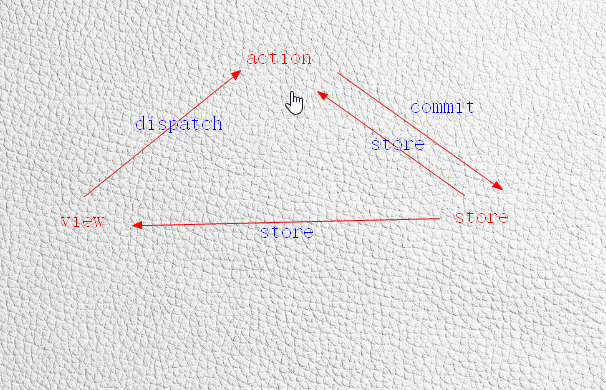
基本mvvm模式就是如图这样做到的。
vuex教程,vuex使用介绍案例的更多相关文章
- Vuex 教程案例:计数器以及列表展示
本案例github:https://github.com/axel10/Vuex_demo-Counter-and-list 本篇教程将以计数器及列表展示两个例子来讲解Vuex的简单用法. 从安装到启 ...
- 最详细的Vuex教程
什么是Vuex? vuex是一个专门为vue.js设计的集中式状态管理架构.状态?我把它理解为在data中的属性需要共享给其他vue组件使用的部分,就叫做状态.简单的说就是data中需要共用的属性. ...
- Vuex教程简单实例
什么是Vuex? vuex是一个专门为vue.js设计的集中式状态管理架构.状态?我把它理解为在data中的属性需要共享给其他vue组件使用的部分,就叫做状态.简单的说就是data中需要共用的属性. ...
- Smart3D系列教程5之 《案例实战演练2——大区域的地形三维重建》
一.前言 Wish3D出品的Smart3D系列教程中,前面一讲说明了小物件的照片三维重建,相信大家对建模的流程有了一定的了解.这次讲解中,我们将演示说明以一组无人机倾斜摄影照片为原始数据,通过Smar ...
- Smart3D系列教程4之 《案例实战演练1——小物件的照片三维重建》
一.前言 Wish3D出品的Smart3D系列教程已经推出3讲了,分别是关于倾斜摄影三维建模原理应用.照片采集技巧.Smart3D各个功能模块的作用,它们都是围绕Smart3D建模软件进行的讲解.那么 ...
- [转帖]MyCat教程【简单介绍】
MyCat教程[简单介绍] 2019-10-15 10:27:23 波波烤鸭 阅读数 618 版权声明:本文为博主原创文章,遵循 CC 4.0 BY-SA 版权协议,转载请附上原文出处链接和本声明. ...
- VB6 GDI+ 入门教程[1] GDI+介绍
http://vistaswx.com/blog/article/category/tutorial/page/2 VB6 GDI+ 入门教程[1] GDI+介绍 2009 年 6 月 18 日 17 ...
- matlab中文论坛视频谷普教程MATLAB压缩包介绍
matlab中文论坛视频谷普教程MATLAB压缩包介绍 我也正在学习这个软件 ,看到这个教程就在这里分享了,希望大家喜欢!Matlab 初学者视频教学1. Matlab视频:Matlab中文论坛为新手 ...
- [Vuex] Split Vuex Store into Modules using TypeScript
When the Vuex store grows, it can have many mutations, actions and getters, belonging to different c ...
随机推荐
- SVN客户端使用
1.在SVN服务器添加新的用户,复制SVN URL(路径/目录). 2.在客户端电脑上下载安装SVN客户端,配置hosts文件中的内容和SVN服务器的hosts文件内容一致. hosts路径:C:\W ...
- CSS3 Transform的perspective属性
以下两行语句有什么区别? Css <div id="animateTest" style="-webkit-transform: perspective(400px ...
- [Leetcode 144]二叉树前序遍历Binary Tree Preorder Traversal
[题目] Given a binary tree, return the preordertraversal of its nodes' values. Example: Input: [1,null ...
- leetcode python 007
## 翻转整数def evert(int0): if int0<0: flg=1 else: flg=0 e=int(str(int0)[flg: ...
- bootstrap validator 出现Maximum call stack size exceeded
如果用 c# 里面用的是 taghelper 的控件,有可能造成 Maximum call stack size exceeded bootstrap validator 必须是继承 bootst ...
- SQL-48 将所有获取奖金的员工当前的薪水增加10%。
题目描述 将所有获取奖金的员工当前的薪水增加10%.create table emp_bonus(emp_no int not null,recevied datetime not null,btyp ...
- java接口中的继承
java.util.concurrent包下的 public interface BlockingDeque<E> extends BlockingQueue<E>, Dequ ...
- oracle 汉字转拼音
oracle汉字转拼音(获得全拼/拼音首字母/拼音截取等) 效果如下: Oracle 字符集 GBK 没有问题 , UTF -8 需要修改一下 Sql代码 --oracle汉字转拼音 PACKAGE ...
- nginx 504 Gateway Time-out
#设定http服务器 http { include mime.types; #文件扩展名与文件类型映射表 default_type application/octet-stream; #默认文件类型 ...
- findHomography(src_points, dst_points, CV_RANSAC)
Homography,即单应性,该函数用于求src_points转换为dst_poinsts的单应性矩阵: 为了理解单应性,必须先引入透视变换的概念:把空间坐标系中的三维物体或对象转变为二维图像表示的 ...