
Android 梯形进度条、下载进度条;
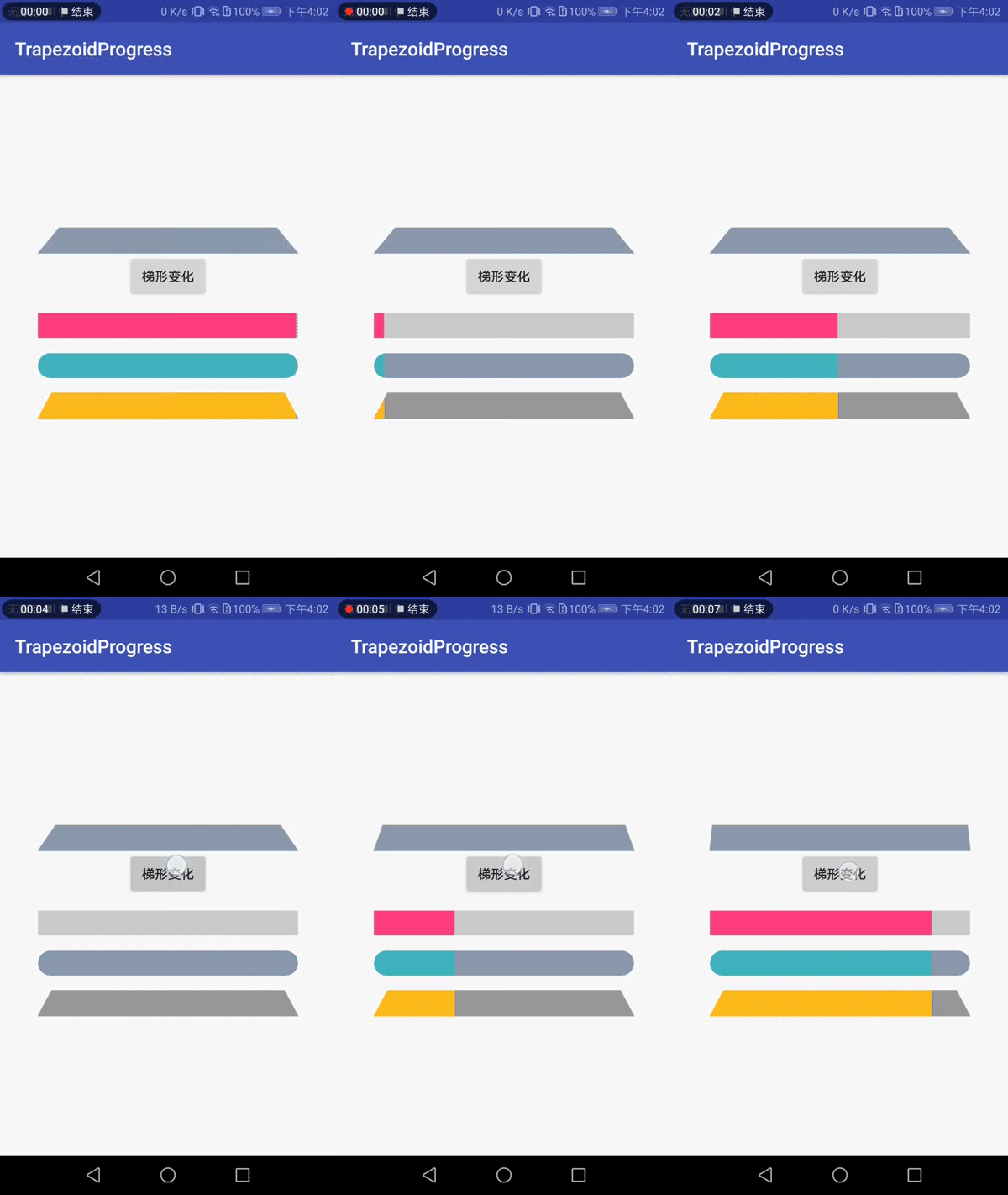
额,Gif有点卡;
梯形、矩形、圆角、背景色、前景色、进度条中的文字都可以改;
<?xml version="1.0" encoding="utf-8"?>

<LinearLayout xmlns:android="http://schemas.android.com/apk/res/android"

    xmlns:app="http://schemas.android.com/apk/res-auto"

    xmlns:tools="http://schemas.android.com/tools"

    android:layout_width="match_parent"

    android:layout_height="match_parent"

    android:gravity="center"

    android:orientation="vertical"

    tools:context=".MainActivity">

    <choi.ccb.com.trapezoidprogress.progressbar.ProgressButton

        android:id="@+id/pb1"

        android:layout_width="match_parent"

        android:layout_height="28dp"

        android:layout_marginLeft="40dp"

        android:layout_marginRight="40dp"

        android:layout_marginTop="15dp"

        app:progressbtn_radius="1"

        app:progressbtn_trapezoid_differ="15dp"

        app:progressbtn_enable_trapezoid="true"

        app:progressbtn_text_size="14dp"

        app:progressbtn_background_color="#43B2BF"

        app:progressbtn_background_second_color="#8D99AF" />

    <Button

        android:id="@+id/bt1"

        android:text="梯形变化"

        android:layout_width="wrap_content"

        android:layout_height="wrap_content" />

    <choi.ccb.com.trapezoidprogress.progressbar.ProgressButton

        android:id="@+id/pb2"

        android:layout_width="match_parent"

        android:layout_height="28dp"

        android:layout_marginLeft="40dp"

        android:layout_marginRight="40dp"

        android:layout_marginTop="15dp"

        app:progressbtn_radius="1"

        app:progressbtn_trapezoid_differ="15dp"

        app:progressbtn_enable_trapezoid="false"

        app:progressbtn_text_size="14dp"

        app:progressbtn_background_color="@color/colorAccent"

        app:progressbtn_background_second_color="#ccc" />

    <choi.ccb.com.trapezoidprogress.progressbar.ProgressButton

        android:id="@+id/pb3"

        android:layout_width="match_parent"

        android:layout_height="28dp"

        android:layout_marginLeft="40dp"

        android:layout_marginRight="40dp"

        android:layout_marginTop="15dp"

        app:progressbtn_radius="0"

        app:progressbtn_trapezoid_differ="15dp"

        app:progressbtn_enable_trapezoid="false"

        app:progressbtn_text_size="14dp"

        app:progressbtn_background_color="#43B2BF"

        app:progressbtn_background_second_color="#8D99AF" />

    <choi.ccb.com.trapezoidprogress.progressbar.ProgressButton

        android:id="@+id/pb4"

        android:layout_width="match_parent"

        android:layout_height="28dp"

        android:layout_marginLeft="40dp"

        android:layout_marginRight="40dp"

        android:layout_marginTop="15dp"

        app:progressbtn_radius="1"

        app:progressbtn_trapezoid_differ="15dp"

        app:progressbtn_enable_trapezoid="true"

        app:progressbtn_text_size="14dp"

        app:progressbtn_background_color="#fb2"

        app:progressbtn_background_second_color="#999" />

</LinearLayout>
public class MainActivity extends AppCompatActivity {
private ProgressButton pb1,pb2,pb3,pb4;
private Button btn;
@Override
protected void onCreate(Bundle savedInstanceState) {
super.onCreate(savedInstanceState);
setContentView(R.layout.activity_main);
pb1 = findViewById(R.id.pb1);
pb2 = findViewById(R.id.pb2);
pb3 = findViewById(R.id.pb3);
pb4 = findViewById(R.id.pb4);
btn = findViewById(R.id.bt1);
btn.setOnClickListener(new View.OnClickListener() {
@Override
public void onClick(View view) {
int num = (int) ((Math.random() * 9 + 1) * 8);
pb1.setTrapezoidDiffer(num);
}
});
}
@Override
protected void onResume() {
super.onResume();
simulateProgress();
}
private void simulateProgress() {
ValueAnimator animator = ValueAnimator.ofInt(0, 100);
animator.addUpdateListener(new ValueAnimator.AnimatorUpdateListener() {
@Override
public void onAnimationUpdate(ValueAnimator animation) {
int progress = (int) animation.getAnimatedValue();
pb2.setProgress(progress);
pb3.setProgress(progress);
pb4.setProgress(progress);
}
});
animator.setRepeatCount(ValueAnimator.INFINITE);
animator.setDuration(4000);
animator.start();
}
}GitHub源码 : https://github.com/CuiChenbo/TrapezoidProgress
Android 梯形进度条、下载进度条;的更多相关文章
- Android开发之多线程下载、断点续传、进度条和文本显示
代码实现了在Android环境下的多线程下载.断点续传.进度条显示和文本显示百分数: import java.io.BufferedReader; import java.io.File; impor ...
- Android 高手进阶之自定义View,自定义属性(带进度的圆形进度条)
Android 高手进阶(21) 版权声明:本文为博主原创文章,未经博主允许不得转载. 转载请注明地址:http://blog.csdn.net/xiaanming/article/detail ...
- android 开发-自定义多节点进度条显示
看效果图: 里面的线段颜色和节点图标都是可以自定义的. main.xml <RelativeLayout xmlns:android="http://schemas.android.c ...
- Android中的webview的进度条
<application android:icon="@drawable/hunqin" android:label="@string/app_name" ...
- Android开发 ---基本UI组件4:拖动事件、评分进度条、圆圈式进度条、进度条控制
Android开发 ---基本UI组件4 1.activity_main.xml 描述: 定义了一个按钮 <?xml version="1.0" encoding=" ...
- Android View 之进度条+拖动条+星级评论条....
PS:将来的你会感谢现在奋斗的自己.... 学习内容: 1.进度条 2.拖动条 3.星级评论条 1.进度条... 进图条这东西想必大家是很熟悉的...为了使用户不会觉得应用程序死掉了,因此 ...
- android学习笔记20——ProgressDialog进度条对话框
ProgressDialog==>进度条对话框 ProgressDialog本身就代表一个进度条对话框,程序只需要创建ProgressDialog实例,并将其显示出来就是一个进度条对话框:开发者 ...
- PHP持续保有长连接,利用flush持续更新浏览器UI,下载进度条实现
如何用PHP+JS实现上传进度条,大部分的人可能都实现过,但是下载呢?如何呢?原理也是差不多的,就是分次读写,每次读多少字节,但是这样的不好就是长连接,一般实现下载进度条常用的两种解决方案是:一种是需 ...
- android 14 进度条和拖动条
进度条: <LinearLayout xmlns:android="http://schemas.android.com/apk/res/android" android:l ...
- 用 CALayer 定制下载进度条控件
// // RPProgressView.h // CALayer定制下载进度条控件 // // Created by RinpeChen on 16/1/2. // Copyright © 2016 ...
随机推荐
- 跟随我在oracle学习php(1)
所有的web页面都由HTML(超文本标记语言)构成,每种浏览器都将代码转换成我们所看到的页面. 这是基本上是每个程序员写的第一个代码“hello world” 这是浏览器翻译后的结果 首先<&g ...
- Samba服务与Nginx服务
Samba服务: 1 准备环境 =====>part1: iptables -F 清楚防火墙配置 #systemctl disable firewalld #开机默认关闭 #systemctl ...
- ubuntu 16.04 安装brackets
1 github 上下载deb包 2 双击deb包但是安装不了(无任何提示,是因为缺少lib文件) 网上给出的解决方案 使用debtool 接压 deb包 把缺少的lib复制进去 配置文件中去掉该 l ...
- 读取txt数据存入数据库中
http://blog.csdn.net/daditao/article/details/18899469
- mysql8.0.13 的docker镜像安装
1.从docker中获取mysql8.0.13镜像 docker pull mysql:8.0.13通过 docker images 命令查看镜像是否获取到了 2.运行 mysql8.0.13 镜像 ...
- spring(三、spring中的eheche缓存、redis使用)
spring(三.spring中的eheche缓存.redis使用) 本文主要介绍为什么要构建ehcache+redis两级缓存?以及在实战中如何实现?思考如何配置缓存策略更合适?这样的方案可能遗留什 ...
- Visual Studio AI环境记录(Windows10)
一.环境 Windows [版本 10.0.15063]64位 Git-2.14.1 64位[官网下载] TortoiseGit-2.5.0.0 64位[官网下载],这是一个Git 客户端,外号&qu ...
- hibernate---级联保存、级联删除
直接上菜: dept.hbm.xml:关键点标蓝色这部分,inverse表示放弃维护外键关系,cascade就不用说了 <hibernate-mapping package="com. ...
- kali 2018.2版本运行破解版burpsuite时候的问题。
最近重装了kali虚拟机,装完之后把burp拷到里面发现运行不了了,折腾了下才解决,问题主要是由于java环境造成的. 系统默认是以java10运行burp的,但是java10好像是不支持 -X ...
- PythonStudy——阶段总结
每个数据类型的最大特点是什么? (1)int整型:用于存放整形对象,是不可变类型.若将一个整数赋值给一个变量名,python可自动将其设置为int型. 例如:age = 30 这里的age对象的typ ...