
Android设置RadioButton在文字的右边
效果图如下:
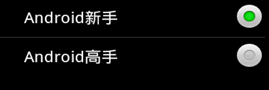
- <?xml version="1.0" encoding="utf-8"?>
- <LinearLayout xmlns:android="http://schemas.android.com/apk/res/android"
- android:layout_width="fill_parent"
- android:layout_height="fill_parent"
- android:orientation="vertical" >
- <TextView
- android:id="@+id/radiobutton_textview"
- android:layout_width="fill_parent"
- android:layout_height="50dip"
- android:background="@android:drawable/title_bar"
- android:gravity="center_vertical"
- android:textAppearance="?android:attr/textAppearanceLarge"
- android:textSize="18dip"
- android:textStyle="bold" />
- <RadioGroup
- android:id="@+id/group"
- android:layout_width="fill_parent"
- android:layout_height="wrap_content"
- android:orientation="vertical" >
- <RadioButton
- android:id="@+id/button1"
- android:layout_width="fill_parent"
- android:layout_height="50dip"
- android:button="@null"
- android:drawableRight="@android:drawable/btn_radio"
- android:paddingLeft="30dip"
- android:text="Android新手"
- android:textSize="20dip" />
- <View
- android:layout_width="fill_parent"
- android:layout_height="1px"
- android:background="?android:attr/listDivider" />
- <RadioButton
- android:id="@+id/button2"
- android:layout_width="fill_parent"
- android:layout_height="50dip"
- android:button="@null"
- android:drawableRight="@android:drawable/btn_radio"
- android:paddingLeft="30dip"
- android:text="Android高手"
- android:textSize="20dip" />
- </RadioGroup>
- </LinearLayout>
- package sdfasdf.sadf;
- import android.app.Activity;
- import android.os.Bundle;
- import android.widget.RadioGroup;
- import android.widget.RadioGroup.OnCheckedChangeListener;
- import android.widget.TextView;
- public class SdfsadfasdfasdffActivity extends Activity {
- private TextView textView;
- private RadioGroup group;
- @Override
- public void onCreate(Bundle savedInstanceState) {
- super.onCreate(savedInstanceState);
- setContentView(R.layout.main);
- textView = (TextView) findViewById(R.id.radiobutton_textview);
- group = (RadioGroup) findViewById(R.id.group);
- // 单选按钮组监听事件
- group.setOnCheckedChangeListener(new OnCheckedChangeListener() {
- @Override
- public void onCheckedChanged(RadioGroup group, int checkedId) {
- // 根据ID判断选择的按钮
- if (checkedId == R.id.button1) {
- textView.setText("Android新手");
- } else {
- textView.setText("Android高手");
- }
- }
- });
- }
- }
http://blog.csdn.net/furongkang/article/details/7272512
Android设置RadioButton在文字的右边的更多相关文章
- Android中如何设置RadioButton在文字的右边,图标在左边
from:http://blog.csdn.net/sunnyfans/article/details/7901592?utm_source=tuicool&utm_medium=referr ...
- android自定义radiobutton样式文字颜色随选中状态而改变
主要是写一个 color selector 在res/建一个文件夹取名color res/color/color_radiobutton.xml <selector xmlns:android= ...
- Android 自定义RadioButton实现
由于使用小米系统MIUI运行是RadioButton样式跟google Android API自定义的不一样,则我们可以定义任何想要的东东.没有做不到,只有想不到 Android 自定义RadioBu ...
- Android中代码设置RadioButton的高端技巧
不知道怎么起标题,就这样了. 目前主要讲两个方面内容: 代码方式 设置RadioButton的 android:button . android:background 等属性为 @null : 代码方 ...
- 【Android初级】使用TypeFace设置TextView的文字字体(附源码)
在Android里面设置一个TextView的文字颜色和文字大小,都很简单,也是一个常用的基本功能.但很少有设置文字字体的,今天要分享的是通过TypeFace去设置TextView的文字字体,布局里面 ...
- 转:android 自定义RadioButton样式
http://gundumw100.iteye.com/blog/1146527 上面这种3选1的效果如何做呢?用代码写? 其实有更简单的办法,忘了RadioButton有什么特性了吗? 我就用Ra ...
- 改变RadioButton的文字位置以及距离
在默认情况下,RadioButton的 文字位置和文字的距离是不变的,为了可以改变它,我们可以用以下的方法. 1.改变文字的位置 android:button="@null" // ...
- Android 自定义RadioButton样式
上面这种3选1的效果如何做呢?用代码写? 其实有更简单的办法,忘了RadioButton有什么特性了吗? 我就用RadioButton实现了如上效果,其实很简单的. 首先定义一张background ...
- Android实现自定义带文字和图片的Button
Android实现自定义带文字和图片的Button 在Android开发中经常会需要用到带文字和图片的button,下面来讲解一下常用的实现办法. 一.用系统自带的Button实现 最简单的一种办法就 ...
随机推荐
- 使用while和read命令读取文件内容
转:使用while和read命令读取文件内容 1.准备数据文件 $cat a.txt 200:2 300:3 400:4 500:5 2.用while循环从文件中读取数据 #!/bin/ksh whi ...
- Linux中执行脚本参数获取
Linux中变量$[#,@,0,1,2,*,$,?]含义 $# 是传给脚本的参数个数 $0 是脚本本身的名字 $1 是传递给该shell脚本的第一个参数 $2 是传递给该shell脚本的第二个参数 $ ...
- 常见 Bash 内置变量介绍
目录 $0$1, $2 等等$#$* 与 "$*"$@ 与 "$@"$!$_$$$PPID$?$BASH$BASH_VERSION$EUID 与 $UID$GR ...
- 初级Java工程师面试所遇面试题
1.servlet的生命周期 : 一.百度百科 : 1.客户端请求servlet: 2.加载servlet类到内存: 3.实例化并调用init()方法初始化servlet: 4.调用service() ...
- sqli-labs less 5-6
sqli-labs less 5-6 从源代码中可以看到,运行返回结果正确的时候只返回you are in....,不会返回数据库当中的信息了,以前的union联合查询就不能用了,开始尝试盲注. 简单 ...
- 作业20171026 alpha-2及alpha发布成绩
申诉 对成绩有疑问或不同意见的同学,请在群里[@杨贵福]. 申诉时间截止2017年11月21日 17:00. 成绩 scrum01 scrum02 scrum03 scrum04 scrum05 sc ...
- Python学习笔记 --第二章
Python语法基础 "#"号为注释符,建议缩进四个空格,Python大小写敏感. 数据类型 整数 0,2等等,以0x开头的为十六进制数 浮点数 1.58e9 字符串 用'或"括起来的任意文 ...
- Max length of title attribute in html
测了一下chrome是1024个utf-8字符. 具体可见: http://stackoverflow.com/questions/8516235/max-length-of-title-attrib ...
- Docker 安装私有镜像库的简单使用
公司的网络实在是太差了, 想着自己搭建一个私有的镜像库进行使用测试使用.... docker pull registry.docker-cn.com/library/registry docker t ...
- [学习笔记]Ubuntu下安装配置SQLSERVER2017
摘要自微软官网: https://docs.microsoft.com/zh-cn/sql/linux/quickstart-install-connect-ubuntu 安装步骤: 1. 导入公共秘 ...