
python基础(8)-装饰器函数&进阶
从小例子进入装饰器
统计一个函数执行耗时
原始版本
 import time

 # time模块有提供时间相关函数
 def do_something():
     print("do_something")
     time.sleep(0.5)  # 让程序停止0.5秒模拟其它操作耗时

 start = time.time()
 do_something()
 print(time.time() - start)
 #result:
 # do_something
 # 0.5000283718109131
问题:上述代码可以完成这个功能,但之后会发现,如果我们要统计其它函数,就必须在每个函数前后加入相应代码
装饰器版本1(无参数)
 import time

 def execute_time(func):
     def inner():
         start = time.time()
         func()
         print(time.time() - start)

     return inner

 # time模块有提供时间相关函数
 def do_something():
     print("do_something")
     time.sleep(0.5)  # 让程序停止0.5秒模拟其它操作耗时

 do_something = execute_time(do_something)
 do_something()
 #result:
 # do_something
 # 0.5000283718109131
从上述代码可以看到,使用了另一个函数execute_time()给我们要统计耗时的函数进行了包装,这时,这个execute_time()函数就叫做装饰器函数,而我们要统计的那个函数也就是do_something()函数就是被装饰的函数.问题:函数执行的时候实际上是调用的execute_time()函数中的inner()函数,这种方法虽然解决了原始版本的问题,但是当我们要统计的函数拥有返回值的时候,这时候我们获取不到返回值.
装饰器版本2(有固定参数)
import time

def execute_time(func):
    def inner(do):
        start = time.time()
        result = func(do)
        print(time.time() - start)
        return result
    return inner

# time模块有提供时间相关函数
def do_something(do):
    print("do_something", do)
    time.sleep(0.5)  # 让程序停止0.5秒模拟其它操作耗时
    return 'do_something over'

do_something = execute_time(do_something)
print(do_something('say hello'))
# result:
# do_something say hello
# 0.5000283718109131
# do_something over
为了解决装饰器版本1的问题,我在inner()函数里面加了个返回值.问题:当被装饰函数的参数个数与inner()参数个数不同时,这个装饰器就不适用了
装饰器版本3(动态参数)
 import time

 def execute_time(func):
     def inner(*args, **kwargs):
         start = time.time()
         result = func(*args, **kwargs)
         print(time.time() - start)
         return result

     return inner

 # time模块有提供时间相关函数
 def do_something(do1,do2):
     print("do_something", do1,do2)
     time.sleep(0.5)  # 让程序停止0.5秒模拟其它操作耗时
     return 'do_something over'

 do_something = execute_time(do_something)
 print(do_something('say hello1','say hello2'))
 # result:
 # do_something say hello1 say hello2
 # 0.5000283718109131
 # do_something over
在第七天内容中有个知识点是动态参数,刚好可以解决这个问题
终极版本(语法糖@)
 import time

 def execute_time(func):
     def inner(*args, **kwargs):
         start = time.time()
         result = func(*args, **kwargs)
         print(time.time() - start)
         return result

     return inner

 @execute_time
 def do_something(do1,do2):
     print("do_something", do1,do2)
     time.sleep(0.5)  # 让程序停止0.5秒模拟其它操作耗时
     return 'do_something over'

 # do_something = execute_time(do_something)
 print(do_something('say hello1','say hello2'))
 # result:
 # do_something say hello1 say hello2
 # 0.5000283718109131
 # do_something over
对于装饰器,python内部给我们提供了语法糖支持.在需要被装饰的函数名上部使用[@装饰器函数名称]即可,简化上述代码18行
装饰器进阶
获取被包装函数原生属性
例1:常规函数取函数名
 def func():
     print('执行中')
     print(func.__name__)

 func()
 # result:
 #   执行中
 #   func
常规函数可以通过函数的__name__属性可拿到当前函数名称
例2:被装饰函数取函数名
 def wrapper(func):
     def inner():
         print('执行前')
         result = func()
         print('执行后')
         return result
     return inner;
 @wrapper
 def func():
     print('执行中')
     print(func.__name__)

 func()
 # result:
 #   执行前
 #   执行中
 #   inner
 #   执行后
问题:通过执行结果会发现,结果中想获取的函数名是func,而实际结果是inner.原因是@wrapper进行包装相当于执行一个操作:func=wrapper(func)=inner
解决
使用functools模块
 from functools import wraps

 def wrapper(func):
     @wraps(func)
     def inner():
         print('执行前')
         result = func()
         print('执行后')
         return result

     return inner;

 @wrapper
 def func():
     print('执行中')
     print(func.__name__)

 func()
 # result:
 #   执行前
 #   执行中
 #   func
 #   执行后
导入functools模块后通过第4行操作,会发现执行的函数即使被包装但还是能获取到它本身的属性
带参数的装饰器
例1
 def wrapper(func):
     def inner():
         print('执行前')
         result = func()
         print('执行后')
         return result

     return inner;

 @wrapper
 def func_1():
     print('执行中')

 @wrapper
 def func_2():
     print('执行中')

 @wrapper
 def func_3():
     print('执行中')
 ...
 @wrapper
 def func_n():
     print('执行中')
问题:通过上述代码会发现,有很多函数都用了同一个装饰器,如果有一天要取消这些函数上的装饰,就必须对每一个函数进行修改
解决
定义一个全局变量flag,并给原本装饰器外部再加一层函数用来接收参数,inner()函数内部通过外部参数flag判断被装饰函数的执行与否,修改flag即可控制装饰器的执行结果,如下:
 from functools import wraps
 flag = True

 def wrapper_out(flag):
     def wrapper(func):
         @wraps(func)
         def inner():
             if (flag):
                 print('{}执行前'.format(func.__name__))
                 result = func()
                 print('{}执行后'.format(func.__name__))
             else:
                 result = func()
             return result

         return inner

     return wrapper

 @wrapper_out(flag)
 def func_1():
     print('{}执行中'.format(func_1.__name__))

 @wrapper_out(flag)
 def func_2():
     print('{}执行中'.format(func_2.__name__))

 @wrapper_out(flag)
 def func_3():
     print('{}执行中'.format(func_3.__name__))

 ...

 @wrapper_out(flag)
 def func_n():
     print('{}执行中'.format(func_n.__name__))

 func_1()
 func_2()
 func_3()
 func_n()

 #result:
     # func_1执行前
     # func_1执行中
     # func_1执行后
     # func_2执行前
     # func_2执行中
     # func_2执行后
     # func_3执行前
     # func_3执行中
     # func_3执行后
     # func_n执行前
     # func_n执行中
     # func_n执行后
from functools import wraps flag = False def wrapper_out(flag): def wrapper(func): @wraps(func) def inner(): if (flag): print('{}执行前'.format(func.__name__)) result = func() print('{}执行后'.format(func.__name__)) else: result = func() return result return inner return wrapper @wrapper_out(flag) def func_1(): print('{}执行中'.format(func_1.__name__)) @wrapper_out(flag) def func_2(): print('{}执行中'.format(func_2.__name__)) @wrapper_out(flag) def func_3(): print('{}执行中'.format(func_3.__name__)) ... @wrapper_out(flag) def func_n(): print('{}执行中'.format(func_n.__name__)) func_1() func_2() func_3() func_n() #result: # func_1执行中 # func_2执行中 # func_3执行中 # func_n执行中
多个装饰器装饰同一个函数
代码
 def wrapper1(func):
     def inner():
         print('wrapper1 ,before func')
         func()
         print('wrapper1 ,after func')

     return inner

 def wrapper2(func):
     def inner():
         print('wrapper2 ,before func')
         func()
         print('wrapper2 ,after func')

     return inner

 @wrapper1
 @wrapper2
 def f():
     print('in f')

 f()
 # result:
 # wrapper1 ,before func
 # wrapper2 ,before func
 # in f
 # wrapper2 ,after func
 # wrapper1 ,after func
图解
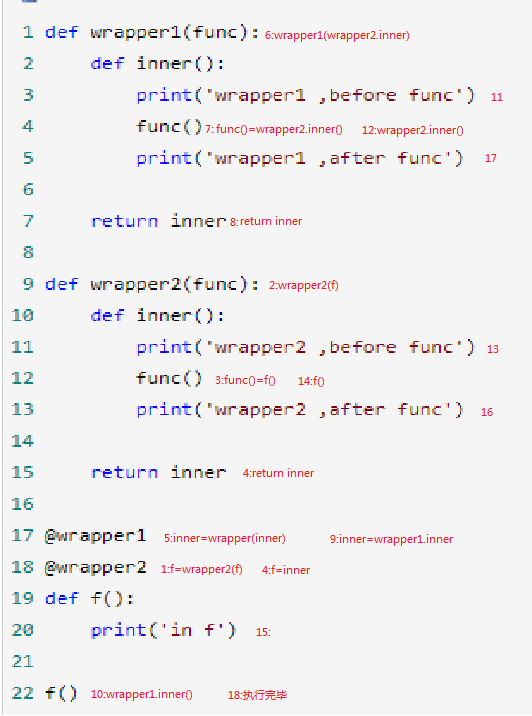
从上图可以看到,从1-9步是装饰器的装载过程,10-18步是执行过程.结论:多个装饰器装饰同一个函数时,装载顺序是从下到上,但执行顺序却是从上到下,可以理解为创建了一个装饰器栈(先进后出)
python基础(8)-装饰器函数&进阶的更多相关文章
- 十. Python基础(10)--装饰器
十. Python基础(10)--装饰器 1 ● 装饰器 A decorator is a function that take a function as an argument and retur ...
- python基础之 装饰器,内置函数
1.闭包回顾 在学习装饰器之前,可以先复习一下什么是闭包? 在嵌套函数内部的函数可以使用外部变量(非全局变量)叫做闭包! def wrapper(): money =10 def inner(num) ...
- Day11 Python基础之装饰器(高级函数)(九)
在python中,装饰器.生成器和迭代器是特别重要的高级函数 https://www.cnblogs.com/yuanchenqi/articles/5830025.html 装饰器 1.如果说装 ...
- python基础--定义装饰器(内置装饰器)
装饰器的定义: 装饰器本质上就是一个python函数,它可以让其它函数在不需要做任何代码改动的前提下增加额外的功能,装饰器的返回值也是一个函数对象.它经常用于有切面需求的场景中,比如-- >插入 ...
- [python基础]关于装饰器
在面试的时候,被问到装饰器,在用的最多的时候就@classmethod ,@staticmethod,开口胡乱回答想这和C#的static public 关键字是不是一样的,等面试回来一看,哇,原来是 ...
- 1.16 Python基础知识 - 装饰器初识
Python中的装饰器就是函数,作用就是包装其他函数,为他们起到修饰作用.在不修改源代码的情况下,为这些函数额外添加一些功能,像日志记录,性能测试等.一个函数可以使用多个装饰器,产生的结果与装饰器的位 ...
- python基础之装饰器(实例)
1.必备 #### 第一波 #### def foo(): print 'foo' foo #表示是函数 foo() #表示执行foo函数 #### 第二波 #### def foo(): print ...
- 【Python基础】装饰器的解释和用法
装饰器的用法比较简单,但是理解装饰器的原理还是比较复杂的,考虑到接下来的爬虫框架中很多用到装饰器的地方,我们先来讲解一下. 函数 我们定义了一个函数,没有什么具体操作,只是返回一个固定值 请注意一下缩 ...
- python之路——装饰器函数
阅读目录 楔子 装饰器的形成过程 开放封闭原则 谈装饰器主要功能和装饰器固定结构 带参数的装饰器 多个装饰器装饰一个函数 返回顶部 楔子 作为一个会写函数的python开发,我们从今天开始要去公司上班 ...
随机推荐
- svn安装教程
svn服务器端下载(VisualSVN) 安装包,选择windows版的VisualSVN-Server https://www.visualsvn.com/downloads/ svn客户端下载(T ...
- 如何使用maven优雅地管理项目版本号
原文: https://blog.csdn.net/TeleDCOS/article/details/79853782
- mybatis中_parameter使用和常用sql
mybatis中_parameter使用和常用sql mybatis中_parameter使用和常用sql 在用自动生成工具生成的mybatis代码中,总是能看到这样的情况,如下: <sel ...
- [原创]Fashion汽车定位器拆解
随着共享单车的爆发增长,定位方案被彻底激活.当下主流的共享单车都采用了MTK2503的方案(后续再详细分解),本文针对某商城热卖的汽车定位器进行拆解分析. 第一部分,定位器外观. 第二部分,拆解开壳, ...
- 简单Java动态代理实现
package test; import java.lang.reflect.InvocationHandler; import java.lang.reflect.Method; import ja ...
- iOS 库操作
目录 库操作 主工程和子工程的引用关系 库之间的引用关系 ar命令 nm命令 库操作 主工程和子工程的引用关系 子工程引用主工程中的文件需要在子工程的search path中加入头文件的目录 子工程引 ...
- node.js用logio实时监控log
http://logio.org/ 1.先装好node.js $ yum install nodejs 2.安装log.io $sudo npm install -g log.io --user &q ...
- 自定义Flume Sink:ElasticSearch Sink
Flume Sink的目的是从Flume Channel中获取数据然后输出到存储或者其他Flume Source中.Flume Agent启动的时候,它会为每一个Sink都启动一个SinkRunner ...
- 原码、补码,反码以及JAVA中数值采用哪种码表示
原码.补码,反码以及JAVA中数值采用哪种码表示 1.原码定义(摘自百度百科):一种计算机中对数字的二进制定点表示方法,原码表示法在数值前面增加了一位符号位(即最高位为符号位):正数该位为0,负数该位 ...
- thymeleaf(一)
(一)Thymeleaf 是个什么? 简单说, Thymeleaf 是一个跟 Velocity.FreeMarker 类似的模板引擎,它可以完全替代 JSP .相较与其他的模板引擎,它有如下 ...